




 here!
I’m your shopping assistant for PC builds, upgrades, and everything tech.
Got questions? Ask away!
Start a conversation
here!
I’m your shopping assistant for PC builds, upgrades, and everything tech.
Got questions? Ask away!
Start a conversation







Any questions? Ask CelesteSM will help you find out quickly.
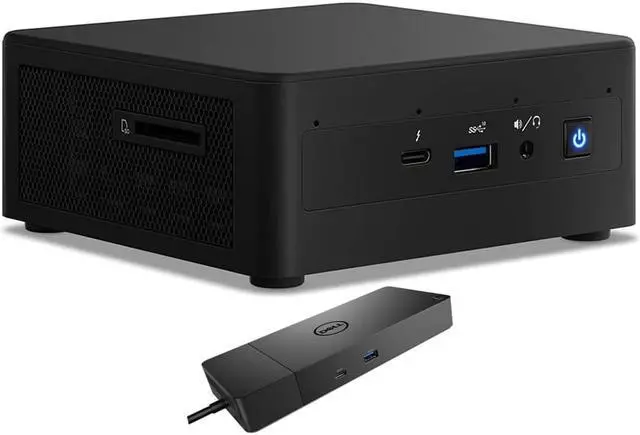
The Intel NUC11PAHi5 is a compact Windows 11 Home mini desktop with an 11th Gen Core i5 processor, 16GB RAM, 256GB NVMe SSD, and Dell WD19S dock, suited to home-office and business productivity setups that need wired and wireless connectivity.
| Attribute | Value |
|---|---|
| Best For | Compact home or business desktop use, with integrated graphics, 16GB memory, and 256GB SSD storage |
| Processor And Cache | 11th Gen Intel Core i5 quad-core processor with 8MB L3 cache |
| Graphics | Integrated graphics with integrated video output |
| Memory | 16GB DDR4 memory |
| Storage And Expansion | 256GB SSD; no HDD or optical drive; card reader included |
| Networking | Wi-Fi 6 AX201, Bluetooth 4.2, and RJ-45 connectivity |
| Operating System | Windows 11 Home |
| Included Equipment | Monitor and keyboard not included |
| Power And Appearance | 120W power supply; black finish |
| Model Identifiers | Intel NUC11PAHi5 |
Q: Intel NUC11PAHi5 vs NUC11PAHi3: which should I choose?
A: Choose the NUC11PAHi5 for more multitasking capacity: its Core i5-1135G7 has 4 cores and 8 threads, compared with 2 cores and 4 threads in the NUC11PAHi3’s Core i3-1115G4. This listing also includes 16GB RAM and a 256GB SSD, making it a ready-configured option.
Q: Should I get the NUC11PAHi5 or the NUC11PAHi7?
A: Choose the NUC11PAHi5 for a four-core, eight-thread mini PC with 16GB RAM and a 256GB SSD in this configuration. Choose the NUC11PAHi7 if you want the higher-tier Core i7-1165G7, with a maximum turbo frequency of 4.7 GHz and 96 Iris Xe graphics execution units, compared with 4.2 GHz and 80 units in the i5 processor.
Q: How does the NUC11PAHi5 compare with the older NUC10i5FNK?
A: Choose the NUC11PAHi5 if you want the newer 11th-generation platform and Intel Iris Xe integrated graphics. Both models use four-core, eight-thread Core i5 processors; the NUC10i5FNK uses a 10th-generation i5-10210U with Intel UHD Graphics. The NUC11PAHi5 listing also comes with 16GB RAM and a 256GB SSD.
Q: Does this mini desktop come with a monitor, keyboard, or mouse?
A: No monitor or keyboard is included. The product information does not list a mouse as included, so confirm the seller’s bundle contents if you need one.
Q: Can it connect to two monitors?
A: It has HDMI, mini DisplayPort, and two Thunderbolt 3 ports for display connections. The product information does not state the maximum number of simultaneous displays or supported resolutions, so verify those details for your monitor setup.
Q: Does it have Wi-Fi and Bluetooth?
A: Yes. It includes Wi-Fi 6 and Bluetooth 4.2, and it also has an Ethernet port for a wired network connection.
Q: Is it suitable for everyday home or office work?
A: It is configured for general desktop tasks such as office applications, web browsing, and multitasking, with a quad-core Intel Core i5 processor, 16GB of RAM, and a 256GB SSD. Its integrated graphics are a trade-off for demanding gaming or graphics-heavy work; it also has no built-in webcam or display.
Q: Is the NUC11PAHi5 suitable for a home media server?
A: It can be suitable for a compact media-server setup: the listed configuration has a quad-core i5, 16GB RAM, Ethernet, and a 256GB SSD. A Reddit user reported using this model for media serving and transcoding, but actual results depend on the media, settings, and number of streams. Plan for additional storage if your media library exceeds the SSD capacity.
Q: Is this NUC good for retro gaming?
A: It may suit retro gaming, but it has integrated graphics rather than a discrete GPU, so it is not the best choice for demanding modern games. A Reddit discussion about this model also notes that raising power limits can increase heat and lead to thermal throttling; aggressive BIOS tuning is not a guaranteed performance fix.
Q: Is the NUC11PAHi5 quiet enough for a desk?
A: It has active cooling, and noise may matter if you need a very quiet workspace. One Reddit user using this model reported that its fan hummed constantly. That is an individual experience, not a guarantee that every unit will behave the same way.
Q: Is the NUC11PAHi5 worth buying?
A: Whether it is worth buying depends on the bundle price. The provided configuration includes 16GB RAM, a 256GB SSD, Windows 11 Home, and a Dell WD19S dock, but the product data does not give a price. An older Reddit buyer’s guide described the model as overpriced at its listed price at that time, so compare the current bundle price and included dock against alternatives rather than relying on that historical assessment.


