• $1,909.00
  • Free 30-day Returns
  • Sold by Velztorm
    Hot Seller
    4.4 (2,201 seller ratings)

    Shipped by Velztorm

    Price alert
    Shop it at NeweggBusiness.

    Meet Your Seller

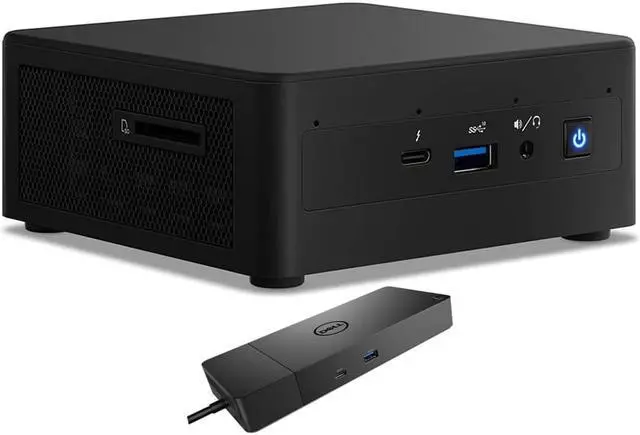
    Intel NUC11PAHi5 Home & Business Mini Desktop (Intel i5-1135G7 4-Core, Integrated Graphics, 16GB RAM, 2TB PCIe SSD + 1TB HDD (2.5), Wifi, USB 3.2, HDMI, Bluetooth, Win 11 Pro) with WD19S 180W Dock

    • Windows 11 Pro
    • Windows 11 Home
    • Windows 10 Pro
    • Windows 10 Home
    • 64GB DDR4
    • 32GB DDR4
    • 16GB DDR4
    • 8GB DDR4
    • 4GB DDR4
    • 1TB
    • 1TB|1TB
    • 1TB|2TB
    • 1TB|None
    • 256GB|1TB
    • 256GB|2TB
    • 256GB|500GB
    • 256GB|None
    • 2TB
    • 2TB|1TB
    • 2TB|2TB
    • 2TB|None
    • 4TB|None
    • 500GB
    • 512GB|1TB
    • 512GB|2TB
    • 512GB|None
    • None
    • 11th Gen Intel Core i5-1135G7 2.40GHz Processor (upto 4.2 GHz, 8MB Cache, 4-Cores) ; Integrated Graphics Integrated Graphics, .
    • 16GB DDR4 SODIMM ; Wi-Fi 6 AX201 Wifi, Bluetooth 4.2, Ethernet LAN (RJ-45), No Webcam, .
    • No Display ; 120W Power Supply; Black Color, .
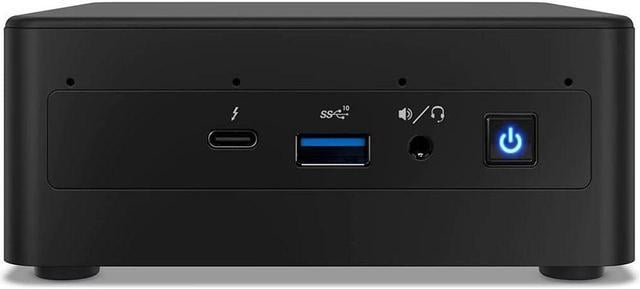
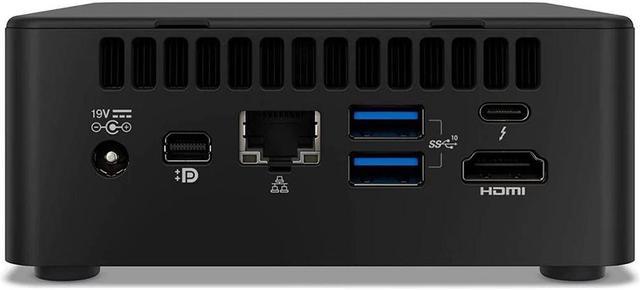
    • 2TB PCIe NVMe SSD + 1TB HDD; 1 HDMI, 1 mini Display Port, 2 Thunderbolt 3 (Type-C), SD Reader, No Optical Drive, Headphone/Microphone Combo Jack., Windows 11 Pro., 1 Year Manufacturer warranty from Velztorm (Professionally upgraded by Velztorm)
    • Includes Dell WD19S 180W Docking Station(90W power delivery to any System (130W to Dell);USB-C Input. 180W Power adapter;USB-C 3.1 Gen 2, PowerShare, DisplayPort 1.4, HDMI 2.0b, Dual USB-A 3.1, GE RJ45;Windows, RedHat, Ubuntu Compatible)
    +
    +
    Overview
    Specs
    Reviews
    See all Q & A

    Any questions? Ask CelesteSM will help you find out quickly.

    We sell computers with custom/upgraded configurations to enhance system performance. If the computer has modifications as listed above, the manufacturers box was opened by our highly skilled technicians for testing, inspection, and installation of the upgrades according to the specifications advertised. All computers and components are brand new.

  • Model: Intel NUC 11 Performance kit NUC11PAHi5
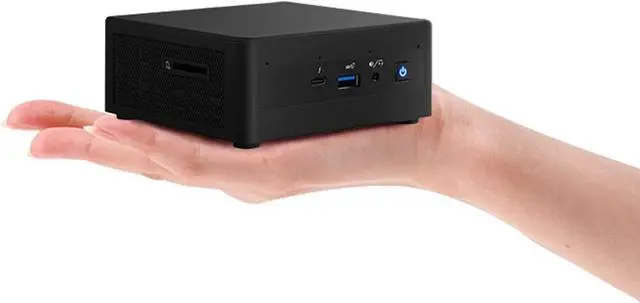
  • Form/Style: Mini PC
  • Model No: NUC11PAHi5
  • Processor: 11th Gen Intel Core i5-1135G7 2.40GHz Processor (upto 4.2 GHz, 8MB Cache, 4-Cores)
  • Memory: 16GB DDR4 SO-DIMM
  • Graphics: Integrated Graphics Integrated Graphics,
  • Storage: 2TB PCIe SSD (Solid State Drive) + 1TB HDD (Hard Disk Drive)
  • Operating System: Windows 11 Pro
  • Display: No Display
  • Connectivity: Wi-Fi 6 AX201 Wifi, Bluetooth 4.2, Ethernet LAN (RJ-45)
  • Ports/Slots:, 1 HDMI, 1 mini Display Port, 2 Thunderbolt 3 (Type-C), SD Card Reader, No Optical Drive, Headphone/Microphone Combo Jack
  • Input/Output: No Webcam,
  • Battery: 120W Power Supply,
  • Other Features,
  • Color: Black
  • Weight: 1.32lb
  • Product Dimensions (WxLxH): 4.41 IN x 4.6 IN x 2.01 IN
  • 1 Year Manufacturer warranty from Velztorm (Professionally upgraded by Velztorm)


  • Dell WD19S 180W Docking Station
  • Model: WD19S
  • Model Number: WD19S-180W
  • 90W Output | 180W Adapter
  • USB-C | DisplayPort | HDMI | RJ45
  • 8.1x3.5x1.1 in | Black
  • Warranty & Returns

    Warranty, Returns, And Additional Information

    Warranty

    • Please contact the Seller directly for warranty information. Warranty information may also be found on the Manufacturer's website.
    • Read full details
    • CONTACT

    Return Policies

    • Return for refund within: 30 days
    • Return for replacement within: 30 days
    • This item is covered by Velztorm Return Policy

    Manufacturer Contact Info

    LOADING...

    The Intel NUC11PAHi5 is a compact Windows 11 Pro mini desktop with an 11th Gen Core i5 processor, 16GB RAM, 2TB SSD, 1TB HDD, and a Dell WD19S dock, suited to office and home productivity setups that need substantial local storage and desk connectivity.

    Recommended For

    • Home-office users handling documents, browsing, video calls, and several everyday apps who want a compact desktop that can sit beside or behind a monitor.
    • Desk-based users who want a small PC for a multi-display workspace; the NUC supports multiple displays, and the included dock adds display and USB connections.
    • Living-room or study users who want a compact Windows PC for streaming and everyday 4K display use rather than a dedicated gaming or editing machine.
    • Users who need a compact desktop with room for a fast SSD and a second 2.5-inch drive for local files, media, or work archives.

    Real-World Use Scenarios

    • For a home-office or small-business desk, use it for documents, email, web browsing, and several everyday apps at once; the included dock can help keep a monitor and desk peripherals connected. Add an external webcam for video calls.
    • As a compact family-room PC, connect it to a TV or monitor for web browsing and video streaming; its integrated graphics are suited to everyday playback, rather than graphics-intensive workloads.
    • For a basic Plex or home-media server, run a media library and serve videos to other devices; community reports describe using the NUC 11 i5 for Plex and Intel Quick Sync transcoding, though results depend on the media and server setup.
    • For casual gaming, try older games or less demanding titles at modest settings; a hands-on test of this model shows games running on its integrated Iris Xe graphics, but it is not a substitute for a dedicated gaming GPU.
    • For light photo or video work, use it for basic edits and occasional exports; expect heavier creative projects and sustained rendering to take longer than on a desktop with a dedicated graphics card.

    Spec Summary

    AttributeValue
    Best ForA compact business desktop setup for users who need a quad-core Intel Core i5 system with 16GB of memory
    Processor And Cache11th Gen Intel Core i5 with four cores and 8MB L3 cache
    GraphicsIntegrated graphics
    Memory16GB DDR4
    Storage2TB SSD and 1TB HDD
    Display And Optical DriveNo screen or monitor included; no optical drive
    Networking And Card ReaderWi-Fi 6 AX201, Bluetooth 4.2, RJ45, and a card reader
    Operating SystemWindows 11 Pro
    Form Factor And PowerMini PC form factor with a 120W power supply; black
    Model IdentifiersIntel NUC11PAHi5

    Reference Q&A

    Q: Should I choose the Intel NUC11PAHi5 or the NUC11PAHi3?

    A: Choose the NUC11PAHi5 for more CPU and integrated-graphics capability: its Core i5-1135G7 has 4 cores and 8 threads with Iris Xe graphics, while the NUC11PAHi3’s Core i3-1115G4 has 2 cores and 4 threads. This listing also includes 16GB RAM and 3TB total storage across its SSD and HDD.

    Q: How does the NUC11PAHi5 compare with the NUC11PAHi7?

    A: Choose this NUC11PAHi5 listing when its 16GB RAM, 2TB SSD, 1TB HDD, and included Dell WD19S dock fit your setup. The NUC11PAHi7 is the higher-processor-tier option, with a Core i7-1165G7; both models use four-core, eight-thread processors.

    Q: Is the NUC11PAHi5 a meaningful upgrade from the Intel NUC 10 i5?

    A: Choose the NUC11PAHi5 for the newer 11th-generation Core i5-1135G7 platform and Intel Iris Xe graphics. The NUC 10 Performance i5 uses a 10th-generation Core i5-10210U with Intel UHD Graphics, making the NUC11PAHi5 the generation step-up for buyers prioritizing integrated graphics.

    Q: Is this mini desktop suitable for office work and video meetings?

    A: It is suited to typical office work such as email, web browsing, documents, and spreadsheets, with 16GB of RAM and an 11th Gen Intel Core i5 processor. It can connect to a webcam and headset, but no webcam is included. Performance in meetings depends on the conferencing app and connected equipment.

    Q: Can it connect to more than one monitor?

    A: The listed computer has HDMI, mini DisplayPort, and two Thunderbolt 3 ports, and the included dock adds DisplayPort and HDMI outputs. The listing does not specify how many displays can run at once or their supported resolutions, so confirm the intended monitor setup and connection method before buying.

    Q: Does it include a monitor, keyboard, or mouse?

    A: No. The listing says no monitor, keyboard, or mouse is included. You will need a display and input devices to use it; the computer provides Wi-Fi, Bluetooth, USB, and Ethernet connections for compatible accessories.

    Q: Is it a good choice for gaming or demanding graphics work?

    A: It has integrated graphics rather than a dedicated graphics card, so it is better suited to everyday productivity and basic visual tasks than graphics-intensive gaming or demanding creative workloads. The listing does not specify performance for particular games or applications.

    Q: Is this NUC suitable for software development and running several virtual machines?

    A: It may suit lighter development work, but the listed configuration has a 4-core processor and 16GB of RAM. A Reddit user running 5–7 small virtual machines described using a 64GB version, so this 16GB configuration may be limiting for that workload. One user also reported persistent fan humming during development use.

    Q: Is the NUC11PAHi5 quiet enough to keep on a desk?

    A: Noise may be a trade-off. Reddit users have reported fan noise, including one development user who found the fan’s constant hum bothersome. Those are individual reports, so they do not establish how loud every unit will be.

    Q: Does the NUC11PAHi5 work with Ubuntu or other Linux distributions?

    A: Linux use has been reported, but the Reddit discussion found audio problems on Ubuntu 20.04: the 3.5 mm jack did not work for that user, and HDMI audio was unreliable. If Linux audio is important, treat compatibility as something to verify for your distribution and setup before buying.