




 here!
I’m your shopping assistant for PC builds, upgrades, and everything tech.
Got questions? Ask away!
Start a conversation
here!
I’m your shopping assistant for PC builds, upgrades, and everything tech.
Got questions? Ask away!
Start a conversation







Any questions? Ask CelesteSM will help you find out quickly.
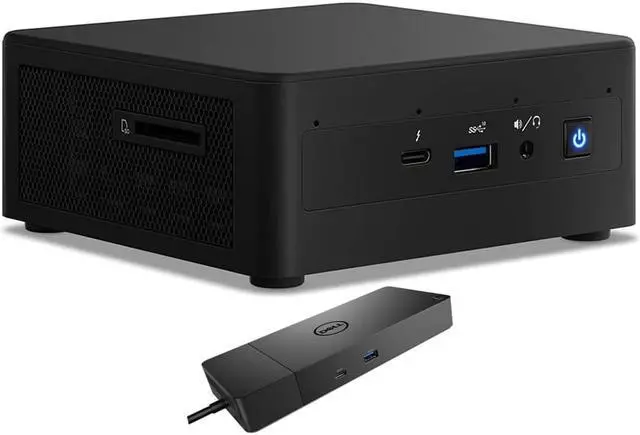
The Intel NUC11PAHi5 is a compact Windows 11 Pro mini desktop with an 11th Gen Core i5, 64GB of RAM, 2TB NVMe SSD, 1TB HDD, and Dell WD19S dock, suited to business users who need a small PC for multitasking and a range of wired connections.
| Attribute | Value |
|---|---|
| Best For | Home and business desktop computing with substantial memory and separate SSD and HDD storage |
| Processor And Cache | 11th Gen Intel Core i5 quad-core processor with 8MB L3 cache |
| Graphics | Integrated graphics |
| Memory Configuration | 64GB DDR4 memory |
| Storage And Expansion | 2TB SSD and 1TB HDD, with a card reader and no optical drive |
| Wired And Wireless Connectivity | Wi-Fi 6 AX201, Bluetooth 4.2, and RJ-45 networking |
| Display And Peripherals | Monitor and screen not included; no keyboard included |
| Operating System | Windows 11 Pro |
| Power And Color | 120W power supply in black |
| Model Identifiers | Intel NUC11PAHi5 mini PC |
Q: Intel NUC11PAHi5 vs NUC11PAHi7: which should I choose?
A: Choose this NUC11PAHi5 configuration if its 64GB of RAM and 2TB SSD plus 1TB HDD fit your workload and storage needs. Choose the NUC11PAHi7 if you want more processor and integrated-graphics headroom: its Core i7-1165G7 has a higher maximum turbo frequency and more graphics execution units than the i5-1135G7. Both are four-core, eight-thread processors.
Q: NUC11PAHi5 vs NUC11PAHi3: which is better for multitasking?
A: Choose the NUC11PAHi5 for heavier multitasking and integrated-graphics workloads. Its Core i5-1135G7 has four cores and eight threads with Iris Xe graphics; the NUC11PAHi3’s Core i3-1115G4 has two cores and four threads with Intel UHD Graphics. The i3 is the lower-tier option for simpler everyday computing.
Q: NUC11PAHi5 vs NUC10i5FNK: which is a better generational upgrade?
A: Choose the NUC11PAHi5 if integrated graphics are a priority in moving from the NUC10i5FNK. The NUC11 model uses an 11th Gen Core i5-1135G7 with Iris Xe graphics, while the NUC10 model uses a 10th Gen Core i5-10210U with Intel UHD Graphics. Both processors have four cores and eight threads.
Q: Is this mini PC suitable for office work and video meetings?
A: Yes. Its quad-core Intel Core i5 processor, 64GB of RAM, 2TB SSD, and Windows 11 Pro suit common office tasks and multitasking. It has no built-in webcam or screen, so video meetings require a separate webcam and monitor.
Q: Can I use it with two monitors?
A: The listed PC has HDMI, mini DisplayPort, and two Thunderbolt 3 ports, and the included dock adds HDMI and DisplayPort outputs. The listing does not specify the maximum number of simultaneous displays or supported resolutions, so confirm compatibility with your monitors and cables before buying.
Q: Is it practical to take on work trips?
A: It can be moved between workspaces, but it is not a self-contained travel computer. It has no screen or webcam, and you will need access to a monitor, power, and any keyboard, mouse, or meeting accessories you use.
Q: Is it a good choice for gaming?
A: It is better suited to office work, browsing, and everyday computing than graphics-intensive gaming. The listed configuration uses integrated graphics and does not include a dedicated graphics card, so demanding modern games may not run well.
Q: Is the NUC11PAHi5 suitable as a main PC for office work?
A: It is a reasonable fit for office work and everyday desktop use: the listed configuration has a quad-core i5-1135G7, 64GB RAM, and a 2TB NVMe SSD. Reddit users discuss using this model as a work PC and describe ordinary office and video use as suitable. It has integrated graphics, so it is not a substitute for a workstation needing a powerful dedicated GPU.
Q: Could it work as a Plex or home server?
A: It may suit a home server or modest Plex setup: users discuss this model for Plex, Docker, and other services, and the listed 64GB RAM and 2TB SSD provide capacity for such workloads. For continuous or sustained heavy use, consider the small chassis and cooling; Reddit users raise heat and workload concerns. The listing does not establish performance for a particular number of streams or transcoding workload.
Q: Is it a good choice for gaming?
A: It is better suited to retro or less demanding games than to gaming that depends on a dedicated graphics card. This configuration uses integrated graphics, and Reddit discussion of gaming on the NUC11PAHi5 notes thermal limits under heavier loads. Choose a system with dedicated graphics if modern, graphics-intensive games are a priority.
Q: What should I consider before using it for sustained heavy workloads?
A: Account for cooling and fan noise. The NUC11PAHi5 is a compact system with integrated graphics, and Reddit users discussing this model report that thermals can constrain performance under sustained load. It may be a better match for typical office tasks or moderate server workloads than for long, intensive CPU or GPU workloads.


