




 here!
I’m your shopping assistant for PC builds, upgrades, and everything tech.
Got questions? Ask away!
Start a conversation
here!
I’m your shopping assistant for PC builds, upgrades, and everything tech.
Got questions? Ask away!
Start a conversation




Any questions? Ask CelesteSM will help you find out quickly.
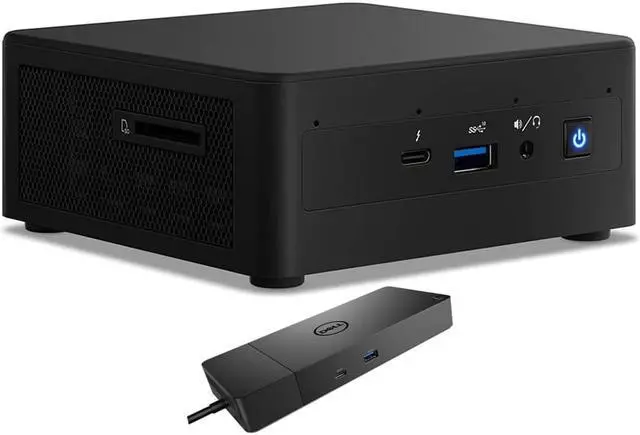
The Intel NUC11PAHi5 is a compact Windows 10 Pro desktop with an 11th Gen Core i5 processor, 16GB RAM, a 1TB SSD, a 1TB HDD, and a Dell WD19S dock, suited to home or office productivity and multitasking where a small footprint and flexible connectivity matter.
| Attribute | Value |
|---|---|
| Best For | A compact business desktop for users who need integrated graphics, 16GB memory, and separate SSD and HDD storage |
| Processor And Cache | Intel Core i5 11th Gen quad-core processor with 8MB L3 cache |
| Graphics | Integrated graphics with integrated video output |
| Memory | 16GB DDR4 memory |
| Storage | 1TB SSD and 1TB HDD |
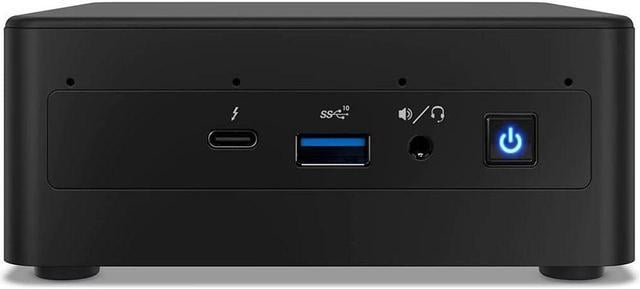
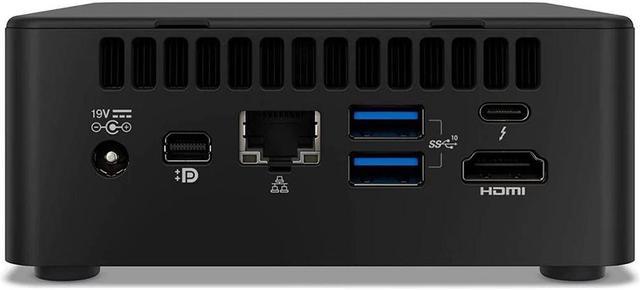
| Connectivity And Card Reader | Wi-Fi 6 AX201, Bluetooth 4.2, RJ-45 Ethernet, and a card reader |
| Display And Included Equipment | Monitor and screen not included; no optical drive or keyboard |
| Power And Form Factor | Black mini PC with a 120W power supply |
| Operating System | Windows 10 Pro |
| Model Identifiers | Intel NUC11PAHi5 |
Q: Intel NUC11PAHi5 or NUC11PAHi3: which should I choose?
A: Choose the NUC11PAHi5 when you want more capacity for multitasking and graphics-focused tasks. Its Core i5-1135G7 has 4 cores and 8 threads with Iris Xe graphics; the NUC11PAHi3 uses a 2-core, 4-thread Core i3-1115G4 with Intel UHD Graphics.
Q: NUC11PAHi5 or NUC11PAHi7: which model should I get?
A: Choose this NUC11PAHi5 configuration for its Core i5-1135G7 and 16GB RAM. Choose the NUC11PAHi7 if you prefer the higher-tier Core i7-1165G7, with up to 4.7 GHz turbo frequency and 12MB cache; both processors have 4 cores, 8 threads, and Intel Iris Xe graphics.
Q: How does the NUC11PAHi5 compare with the older NUC10i5FNK?
A: Choose the NUC11PAHi5 if you want the newer 11th-generation Core i5 platform with Intel Iris Xe graphics. The NUC10i5FNK uses a 10th-generation Core i5-10210U with Intel UHD Graphics. Both are four-core, eight-thread mini PCs.
Q: Is this mini desktop suitable for everyday office work and multitasking?
A: Yes. Its 11th Gen Core i5 processor, 16GB of RAM, and SSD are suitable for typical office tasks such as documents, email, web browsing, and multitasking. It has no built-in display, keyboard, or webcam, so those must be supplied separately.
Q: Can I use it for video meetings?
A: It can run video-meeting software, but it has no built-in webcam. You will need to connect a separate webcam and use a monitor, keyboard, and mouse.
Q: Is it practical to take this computer between work locations?
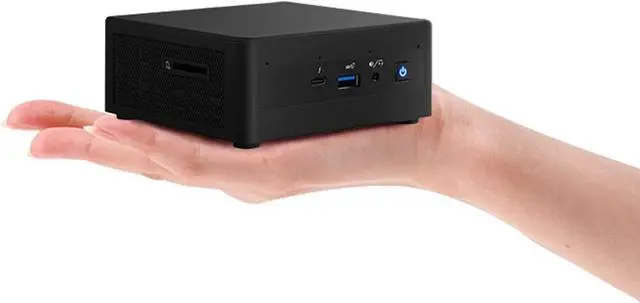
A: The mini PC itself is compact and listed at 1.32 lb, so it is easier to move than a tower desktop. It is not a self-contained travel computer: you still need a display, keyboard, mouse, and power at each location, and the included dock adds another item to carry.
Q: Can it connect to more than one monitor?
A: The listing specifies HDMI, mini DisplayPort, and two Thunderbolt 3 ports, and the included dock adds HDMI and DisplayPort outputs. These provide display-connection options, but confirm the supported number and resolution of simultaneous displays for your exact monitor and dock setup before buying.
Q: Is the NUC11PAHi5 suitable as a primary work computer?
A: It has an 11th-gen Core i5, 16GB RAM, and Windows 10 Pro, which fit ordinary office and multitasking use on paper. However, one owner reported severe sluggishness after the system sat locked with monitors off, so check the return and warranty terms if dependable long work sessions are essential.
Q: Can the NUC11PAHi5 run Linux reliably?
A: Linux use is possible, but community reports describe setup-dependent issues, including audio, display, suspend, and stability problems. Those reports cover specific configurations and do not establish that every unit will have problems; buyers relying on Linux should verify their distribution, kernel, and peripherals before committing.
Q: Is the NUC11PAHi5 a good choice for a gaming PC?
A: It has integrated graphics rather than a dedicated GPU, so it is better suited to light or older games than demanding modern gaming. A discussion about using this model for retro gaming also identifies the compact system’s thermal capacity as a performance constraint.
Q: Should I use the NUC11PAHi5 as an always-on home server?
A: It has Wi-Fi and Ethernet and can be considered for server tasks, but Reddit users have reported intermittent crashes or shutdowns on particular Linux and Proxmox setups. These are individual reports, not proof of a general defect; for an always-on server, test the exact configuration and confirm warranty support.


