




 here!
I’m your shopping assistant for PC builds, upgrades, and everything tech.
Got questions? Ask away!
Start a conversation
here!
I’m your shopping assistant for PC builds, upgrades, and everything tech.
Got questions? Ask away!
Start a conversation







Any questions? Ask CelesteSM will help you find out quickly.
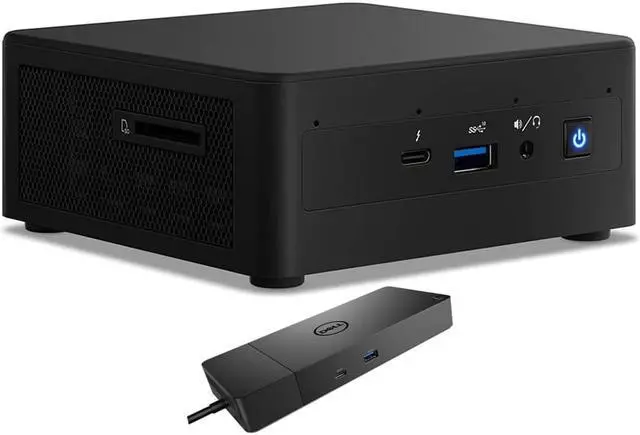
The Intel NUC11PAHi5 is a compact mini desktop with an 11th Gen Core i5 processor, 8GB RAM, a 128GB SSD, and a 2TB hard drive, suited to home and office users who want a small Windows PC with room for files and everyday work.
| Attribute | Value |
|---|---|
| Best For | Home and business desktop tasks in a compact setup, with a quad-core Intel Core i5 processor and 8GB of memory |
| Processor And Cache | 11th Gen Intel Core i5 with four cores and 8MB L3 cache |
| Memory | 8GB DDR4 memory |
| Storage And Optical Drive | 2TB HDD storage; no optical drive |
| Graphics | Integrated graphics with integrated video output |
| Networking And Card Reader | Wi-Fi 6 AX201, Bluetooth 4.2, RJ45 Ethernet, and a card reader |
| Display And Peripherals | No screen or monitor included; no keyboard |
| Form Factor, Color And Power | Mini PC form factor, black finish, and 120W power supply |
| Operating System | Windows 10 Home |
| Model Identifiers | Intel NUC11PAHi5; business desktop and workstation type |
Q: Should I get the Intel NUC11PAHi5 or the NUC11PAHi3?
A: Choose the NUC11PAHi5 when you want more processor capacity for multitasking: its Core i5-1135G7 has four cores and eight threads, compared with two cores and four threads in the NUC11PAHi3’s Core i3-1115G4. The i5 processor also uses Iris Xe graphics, while the i3 uses Intel UHD graphics. This Newegg bundle includes 8GB RAM, a 128GB SATA SSD, a 2TB HDD, and a Dell WD19S dock.
Q: Is the NUC11PAHi5 or NUC11PAHi7 the better fit for everyday productivity?
A: The NUC11PAHi5 is a four-core, eight-thread option for everyday productivity and multitasking. The NUC11PAHi7 keeps the same core and thread count but uses the Core i7-1165G7, which has a higher maximum turbo frequency—up to 4.7 GHz versus 4.2 GHz for the i5. Choose the i5 configuration for the Core i5 tier; consider the i7 when its higher processor frequency is a priority.
Q: Should I choose this NUC 11 or the previous-generation Intel NUC10i5FNH?
A: Choose the NUC11PAHi5 if you want the newer 11th-generation Core i5-1135G7 platform and its Iris Xe graphics capability. The NUC10i5FNH uses a 10th-generation Core i5-10210U. In Notebookcheck’s review of a related NUC 11 i7 model, its graphics performance tested above that of the reviewed NUC 10 i7 model; those results are generation-level context, not a direct benchmark of these two i5 configurations.
Q: Is this mini desktop suitable for everyday office work and video meetings?
A: Yes. Its 11th Gen Core i5 processor and 8GB of RAM suit common tasks such as email, web browsing, documents, and spreadsheets. It has no built-in webcam or display, so video meetings require a separate webcam, monitor, and microphone or headset.
Q: Does it include a monitor or webcam?
A: No. This is a mini desktop, not an all-in-one computer; the monitor and webcam are not included. Connect a separate monitor using a compatible video connection, and add a webcam if needed for calls.
Q: Can I upgrade the memory or storage later?
A: The listed configuration has 8GB of RAM, a 128GB M.2 SATA SSD, and a 2TB 2.5-inch HDD. The listing does not clearly confirm upgrade options for this seller-configured unit, so check with the seller about available slots, compatibility, and warranty implications before buying or upgrading.
Q: Is it a good choice for gaming?
A: It is better suited to everyday computing and lighter games than demanding modern games. Its integrated graphics are not a dedicated gaming GPU, and the listing does not provide game-specific performance results.
Q: Can the NUC11PAHi5 run Linux?
A: Reddit users report successful Linux use, but also describe setup-specific display and audio problems. Choose it for Linux if you are comfortable updating drivers or troubleshooting; the listed configuration comes with Windows 10 Home.
Q: Can I use an external graphics card with the NUC11PAHi5?
A: One Reddit user reported using a Razer Core X eGPU with this model and resolving an issue by disabling the integrated GPU. That is a single setup report, not a guarantee of compatibility with every enclosure or graphics card.
Q: Is the NUC11PAHi5 suitable for 4K 60 fps video playback?
A: A Reddit discussion raises this use case but does not establish a reliable performance result. The supplied product information lists integrated graphics and HDMI and mini DisplayPort outputs, but does not specify 4K 60 fps playback performance; verify that requirement before buying.


