




 here!
I’m your shopping assistant for PC builds, upgrades, and everything tech.
Got questions? Ask away!
Start a conversation
here!
I’m your shopping assistant for PC builds, upgrades, and everything tech.
Got questions? Ask away!
Start a conversation







Any questions? Ask CelesteSM will help you find out quickly.
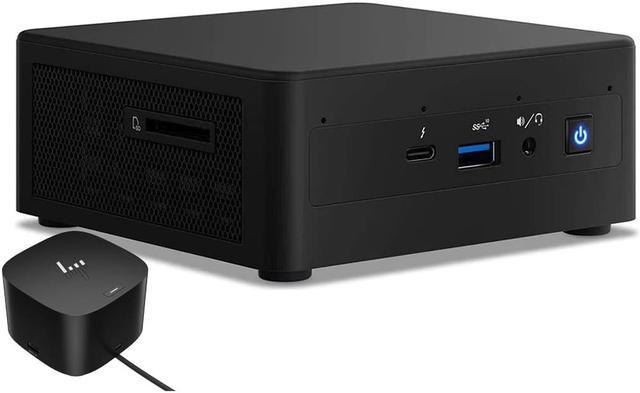
The Intel NUC11PAHi5 is a compact mini desktop with an 11th Gen Intel Core i5-1135G7, 8GB RAM, a 128GB SSD, and a 500GB HDD, bundled with an HP Thunderbolt Dock G4. It suits home and business users seeking a small Windows 10 PC for everyday productivity and a connected desk setup.
| Attribute | Value |
|---|---|
| Best For | Compact business desktop setups with integrated graphics and 8GB of memory |
| Processor And Cache | 11th Gen Intel Core i5 with four cores and 8MB L3 cache |
| Graphics | Integrated graphics and video |
| Memory | 8GB DDR4 memory |
| Storage | 500GB HDD |
| Networking And Connectivity | Wi-Fi 6 AX201, Bluetooth 4.2, RJ45 Ethernet, and a card reader |
| Operating System | Windows 10 Home |
| Power And Appearance | 120W power supply; black finish |
| Included And Omitted Components | No monitor, screen, keyboard, or optical drive |
| Model Identifiers | Intel NUC11PAHi5 |
Q: Intel NUC11PAHi5 vs NUC11PAHi3: which should I choose?
A: Choose the NUC11PAHi5 when you want more processor and integrated-graphics capability within the NUC 11 Performance family. Its Core i5-1135G7 has four cores and eight threads with Iris Xe graphics; the NUC11PAHi3 uses a two-core, four-thread Core i3-1115G4 with Intel UHD Graphics. This listing also includes 8GB RAM, a 128GB SSD, a 500GB HDD, and a Thunderbolt dock.
Q: Intel NUC11PAHi5 vs NUC11PAHi7: is the i7 worth choosing?
A: Choose the NUC11PAHi5 for the four-core, eight-thread Core i5 configuration and the storage and dock included in this listing. Choose the NUC11PAHi7 if you want the higher-tier Core i7-1165G7, which has a higher maximum turbo frequency, more cache, and more Iris Xe graphics execution units. Both models belong to the NUC 11 Performance family.
Q: Intel NUC11PAHi5 vs NUC10i5FNH: what changes with the newer generation?
A: Choose the NUC11PAHi5 for its 11th Gen Core i5-1135G7 and Iris Xe integrated graphics; the NUC10i5FNH has a 10th Gen Core i5-10210U and Intel UHD Graphics. Both use four-core, eight-thread Core i5 processors. A Notebookcheck comparison of tested NUC 11 and NUC 10 systems found a notable graphics-generation uplift, while exact results vary with the specific configurations.
Q: Intel NUC11PAHi5 vs NUC11PAKi5: which chassis fits a 2.5-inch drive?
A: Choose the NUC11PAHi5 when you want the taller NUC 11 chassis and a 2.5-inch drive in the system; this listing includes a 500GB HDD alongside its 128GB SSD. The NUC11PAKi5 is the slim-chassis option in the same family. Both use the Core i5-1135G7 platform.
Q: Is this mini desktop suitable for office work and video meetings?
A: Yes. Its quad-core Intel Core i5 and 8GB of RAM are suited to everyday tasks such as email, web browsing, and documents. It has no built-in webcam, so video meetings require a separate webcam; the monitor is also not included.
Q: Is 8GB of RAM and the 128GB SSD enough?
A: The 8GB RAM and 128GB SSD can suit basic office and web use, but may feel limiting with many apps or browser tabs open, or if you store many files. The included 500GB hard drive adds storage capacity; heavier multitasking or larger storage needs may call for an upgrade.
Q: Can it run multiple monitors?
A: The NUC has HDMI, mini DisplayPort, and Thunderbolt 3 ports, and the included dock is listed as supporting up to three monitors. The listing also specifies dual 4K UHD support; confirm the exact number of displays and resolutions for your planned cable and dock setup.
Q: Does it include a monitor, keyboard, and webcam?
A: No monitor or keyboard is listed as included, and the product data specifies no webcam. Plan to provide a monitor and keyboard, and add a webcam if you need video calls. The listing does not specify whether a mouse is included.
Q: Is the NUC11PAHi5 suitable for a Plex server?
A: A Reddit user reported using this model with Linux and a Plex container, with 1080p transcoding at about 15% CPU usage. That supports it as an option for a small Plex setup, but the report does not establish performance for 4K transcoding or multiple simultaneous streams.
Q: Does the NUC11PAHi5 work with Linux?
A: Reddit users reported successful Ubuntu and Manjaro installations, and one Fedora user said graphics worked after system updates. Reports suggest Linux can work, but results may depend on the distribution and kernel version.
Q: Can I upgrade the NUC11PAHi5’s RAM and storage?
A: Reddit users describe configuring this model with 32GB of RAM and larger SSDs. This product listing includes 8GB RAM, a 128GB M.2 SATA SSD, and a 500GB hard drive; confirm the exact drive interface and upgrade compatibility before purchasing parts.


