




 here!
I’m your shopping assistant for PC builds, upgrades, and everything tech.
Got questions? Ask away!
Start a conversation
here!
I’m your shopping assistant for PC builds, upgrades, and everything tech.
Got questions? Ask away!
Start a conversation







Any questions? Ask CelesteSM will help you find out quickly.
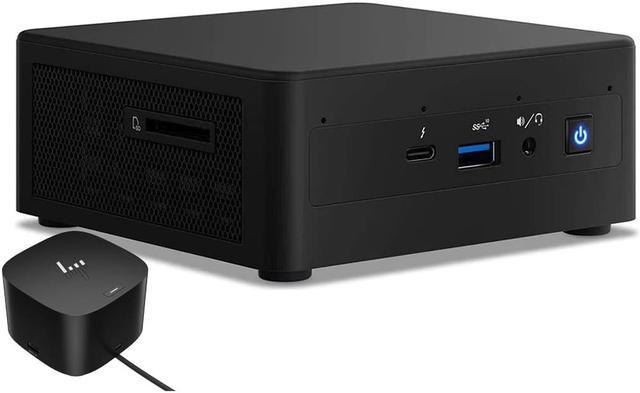
The Intel NUC11PAHi5 is a compact Windows 10 Home mini desktop with an 11th Gen Core i5 processor, 16GB RAM, a 128GB SSD, a 1TB hard drive, and an included Thunderbolt G4 dock, suited to home-office and business productivity setups that need extra connectivity.
| Attribute | Value |
|---|---|
| Best For | Home or business desktop use in a mini PC form factor, with integrated graphics and 16GB of memory |
| Processor And Core Count | 11th Gen Intel Core i5 quad-core processor with 8MB L3 cache |
| Memory Configuration | 16GB DDR4 memory |
| Storage | 1TB HDD |
| Graphics | Integrated graphics |
| Networking And Card Reader | Wi-Fi 6 AX201, Bluetooth 4.2, RJ45 Ethernet, and a card reader |
| Display And Included Equipment | No monitor or screen, keyboard, or optical drive included |
| Operating System | Windows 10 Home |
| Power And Color | 120W power supply; black |
| Model Identifiers | Intel NUC11PAHi5 |
Q: Intel NUC11PAHi5 vs NUC11PAHi7: which should I choose?
A: Choose the NUC11PAHi5 for a balanced mini-PC setup with a 4-core, 8-thread processor; this Newegg bundle also includes 16GB RAM, a 128GB SSD, a 1TB HDD, and a Thunderbolt dock. Choose the NUC11PAHi7 if you want the same-generation i7-1165G7, which has a higher maximum turbo frequency and more Iris Xe graphics execution units than the i5-1135G7.
Q: Intel NUC11PAHi5 vs NUC 12 Pro with Core i5: which is better for multitasking?
A: For CPU-heavy multitasking, the NUC 12 Pro’s Core i5-1240P is the higher-core option, with 12 cores and 16 threads; the NUC11PAHi5’s Core i5-1135G7 has 4 cores and 8 threads. Choose this NUC11 bundle when its included 16GB RAM, combined SSD-and-HDD storage, and Thunderbolt dock match the setup you want; choose a NUC 12 Pro configuration when you prioritize the newer 12th-generation processor.
Q: Intel NUC11PAHi5 vs NUC10i5FNH: is the 11th-generation model a good upgrade?
A: The NUC11PAHi5 is the newer-generation choice, pairing its Core i5-1135G7 with Iris Xe graphics. The NUC10i5FNH pairs a Core i5-10210U with Intel UHD Graphics. Both processors have 4 cores and 8 threads, so choose the NUC11PAHi5 when you want the newer platform and Iris Xe graphics; choose the NUC10i5FNH when you are comparing specifically against Intel’s earlier NUC 10 Performance model.
Q: Is this mini desktop suitable for office work and video meetings?
A: It is suitable for typical office tasks, with a quad-core Intel Core i5 processor and 16GB of RAM. It has no built-in screen or webcam, so video meetings require an external monitor and webcam; a keyboard and mouse are not listed as included.
Q: Can I use it with multiple monitors?
A: The PC has HDMI, Mini DisplayPort, and Thunderbolt 3 connections, and the included dock is specified to support up to three monitors. The monitor setup and supported resolutions depend on the connections used, so check compatibility with your displays before buying.
Q: Is this a good computer to take while traveling?
A: It is compact, but it is a desktop rather than a standalone travel computer: it has no built-in display, keyboard, or webcam. It is better suited to a fixed desk or a destination where you can connect a monitor and peripherals.
Q: Does it come with everything I need to start using it?
A: No. The listing includes the mini desktop and a 120W G4 dock, but no monitor or keyboard. It also specifies no webcam, so plan to provide those separately if needed.
Q: Is the NUC11PAHi5 suitable for Linux?
A: It can run Linux, but user reports describe possible audio and display quirks depending on the distribution, kernel, and drivers. If you need reliable HDMI or headphone audio without troubleshooting, check compatibility with your intended Linux setup before buying.
Q: Is the NUC11PAHi5 a good choice for gaming?
A: It has integrated graphics, not a dedicated GPU, so it is better suited to light or older games than graphics-intensive gaming. A Reddit discussion also points to the small chassis’s thermal limits when trying to raise performance; the Thunderbolt ports may allow an external GPU setup, but that adds cost and equipment.
Q: Can I expect the NUC11PAHi5 to work smoothly with Windows 10 out of the box?
A: Not necessarily. The listed configuration includes Windows 10 Home, but users have reported setup, driver, or stability problems on some systems. One video also notes that installing Intel-provided network drivers may be needed if Wi-Fi or Ethernet has issues. These are individual reports, not evidence that every unit has problems.


