




 here!
I’m your shopping assistant for PC builds, upgrades, and everything tech.
Got questions? Ask away!
Start a conversation
here!
I’m your shopping assistant for PC builds, upgrades, and everything tech.
Got questions? Ask away!
Start a conversation







Any questions? Ask CelesteSM will help you find out quickly.
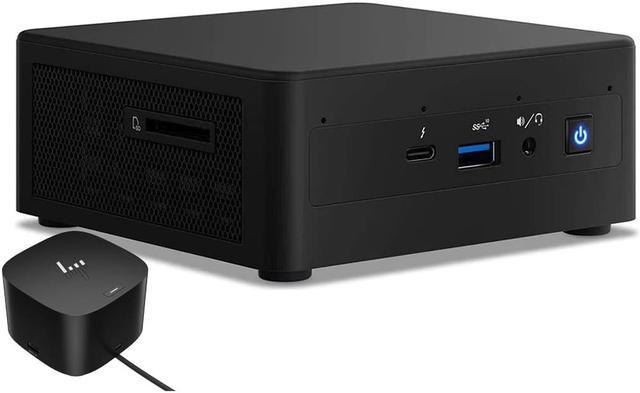
The Intel NUC11PAHi5 is a compact Windows 11 Home mini desktop with an 11th Gen Core i5 processor, 16GB RAM, 1TB hard drive, and included Thunderbolt dock—well suited to everyday home or office productivity where desk space and expanded connectivity matter.
| Attribute | Value |
|---|---|
| Best For | Compact home and business computing with a quad-core Intel Core i5 processor, 16GB memory, 1TB hard drive, and integrated graphics |
| Processor And Cache | 11th Gen Intel Core i5 with four cores and 8MB L3 cache |
| Graphics | Integrated graphics |
| Memory And Storage | 16GB DDR4 memory and a 1TB HDD; no SSD |
| Networking And Connectivity | Wi-Fi 6 AX201, Bluetooth 4.2, RJ45 Ethernet, and a card reader |
| Operating System | Windows 11 Home |
| Design And Power | Black Mini PC with a 120W power supply |
| Included Equipment | Monitor, screen, keyboard, and optical drive are not included |
| Model Identifiers | Intel NUC11PAHi5 |
Q: Intel NUC11PAHi5 or NUC 12 Pro Core i5: which should I choose?
A: Choose the NUC11PAHi5 listing if you want its preconfigured 16GB RAM, 1TB hard drive, and included dock for everyday desktop tasks. Choose a NUC 12 Pro with the Core i5-1240P if your priority is newer-generation processing and more CPU capacity for heavily threaded work: it has 12 cores and 16 threads, compared with the NUC11PAHi5’s 4 cores and 8 threads.
Q: Is the NUC11PAHi5 or NUC11PAHi7 a better fit for multitasking?
A: The NUC11PAHi5 pairs a 4-core, 8-thread Core i5-1135G7 with Intel Iris Xe graphics, making it a practical fit for everyday productivity and multitasking. The NUC11PAHi7 keeps the same 4-core, 8-thread layout but uses a higher-tier Core i7-1165G7, making it the step-up choice for more processor-intensive work.
Q: What do I gain with the NUC11PAHi5 over the NUC11PAHi3?
A: The NUC11PAHi5 upgrades the NUC11PAHi3’s 2-core, 4-thread Core i3 configuration to a 4-core, 8-thread Core i5-1135G7. Choose the Hi5 when you want more CPU headroom for running multiple applications and handling heavier everyday workloads; both are compact Intel NUC 11 Performance kits.
Q: Is this mini PC suitable for everyday office work and multitasking?
A: Yes. Its 4-core Intel Core i5 processor and 16GB of RAM are suited to routine office tasks such as documents, web browsing, and typical multitasking. It is a desktop setup, so you will need a separate monitor, keyboard, and mouse.
Q: What do I need to use it for video meetings?
A: You will need an external monitor, webcam, keyboard, and mouse. The product has no built-in screen or webcam; its listed Wi-Fi and Ethernet connections can provide network access for meeting software.
Q: Can it support a multi-monitor desk setup?
A: It has HDMI, Mini DisplayPort, and Thunderbolt 3 ports, and the bundled dock is listed with HDMI and DisplayPort outputs and support for up to three monitors. Check the dock and monitor connection requirements for your intended resolution and setup; no monitor is included.
Q: Is it practical to take on business trips?
A: It is compact, but it is not a standalone travel computer: it has no built-in screen, keyboard, battery, or webcam. It is more suitable for a desk or a destination where you can connect those peripherals.
Q: Is the NUC11PAHi5 suitable for everyday work and streaming?
A: It is a reasonable fit for general desktop work and streaming: the listed configuration has a quad-core Core i5 processor and 16GB of RAM, and a Reddit owner described using this model for work and streaming. The included 1TB HDD is not an SSD, so storage responsiveness may be a trade-off.
Q: Can this NUC be used for retro or casual gaming?
A: It may suit retro or lighter gaming, but it is not a dedicated gaming PC: this configuration uses integrated graphics. A Reddit discussion about using the NUC11PAHi5 for retro gaming also notes that the small chassis can limit cooling when power is increased.
Q: Can I add an SSD to the included 1TB HDD?
A: The listed configuration includes a 1TB 2.5-inch HDD and no SSD. A YouTube build of the NUC11PAHi5 shows installation of both an M.2 drive and a SATA drive, so adding SSD storage is a demonstrated option; check the installed configuration and available slots before buying.


