




 here!
I’m your shopping assistant for PC builds, upgrades, and everything tech.
Got questions? Ask away!
Start a conversation
here!
I’m your shopping assistant for PC builds, upgrades, and everything tech.
Got questions? Ask away!
Start a conversation







Any questions? Ask CelesteSM will help you find out quickly.
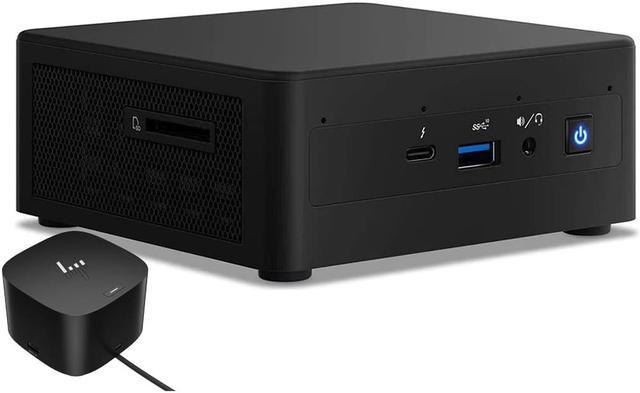
The Intel NUC11PAHi5 is a compact mini desktop with an 11th Gen Core i5-1135G7, 16GB of RAM, a 128GB SSD, and a 1TB HDD, suited to home or office users who need a small PC for everyday work and multitasking.
| Attribute | Value |
|---|---|
| Best For | Compact business desktop use with a quad-core Intel Core i5, 16GB DDR4 memory, integrated graphics, and 1TB HDD storage |
| Processor And Core Count | 11th Gen Intel Core i5 quad-core processor with 8MB L3 cache |
| Graphics | Integrated graphics |
| Memory Configuration | 16GB DDR4 |
| Storage And Media | 1TB HDD; no optical drive |
| Networking And Connectivity | Wi-Fi 6 AX201, Bluetooth 4.2, RJ45 Ethernet, and a card reader |
| Operating System | Windows 10 Pro |
| Physical And Power | Mini PC form factor, black, with a 120W power supply |
| Display And Peripherals | No screen or monitor included; no keyboard |
| Model Identifiers | Intel NUC11PAHi5 |
Q: Intel NUC11PAHi5 or NUC11PAHi3: which is better for multitasking?
A: Choose the NUC11PAHi5 for multitasking: its Core i5-1135G7 has 4 cores and 8 threads, compared with the NUC11PAHi3’s 2 cores and 4 threads. The listed system also comes with 16GB RAM, plus a 128GB SSD and 1TB hard drive.
Q: Should I choose the NUC11PAHi5 or the higher-tier NUC11PAHi7?
A: Choose the NUC11PAHi5 for its 4-core, 8-thread processor and the listed 16GB RAM and 128GB SSD plus 1TB hard drive. Choose the NUC11PAHi7 if you want the higher-tier i7-1165G7 processor, which has a higher maximum turbo frequency and more cache: up to 4.7GHz and 12MB, versus the i5-1135G7’s up to 4.2GHz and 8MB.
Q: Is the NUC11PAHi5 a worthwhile upgrade from the Intel NUC 10 i5?
A: The NUC11PAHi5 is the newer-generation option, with an 11th Gen Core i5-1135G7 and Intel Iris Xe graphics. The NUC 10 i5 uses a 10th Gen Core i5-10210U and Intel UHD graphics. Choose the NUC11PAHi5 when you want the newer processor generation and Iris Xe graphics in this compact desktop format.
Q: Is this mini PC suitable for everyday office work and video meetings?
A: Yes. Its 11th Gen Core i5 processor and 16GB of RAM are suited to everyday tasks such as documents, email, browsing, and multitasking. It has no built-in webcam, and a monitor is not included, so plan to provide those separately for video meetings.
Q: Can I connect multiple monitors?
A: The NUC has HDMI, mini DisplayPort, and two Thunderbolt 3 ports. The included dock is listed as supporting up to three monitors and dual 4K UHD; check your monitor ports, cables, and intended setup before buying.
Q: Does it come with a monitor, keyboard, and mouse?
A: A monitor is not included, and the listing does not list a keyboard or mouse as included. You will need to provide your own display and input devices.
Q: Is the storage enough for everyday use?
A: It includes a 128GB PCIe SSD and a 1TB hard drive. The hard drive provides space for files, while the SSD is a smaller volume for the operating system and frequently used applications; users who need substantial fast storage may want more SSD capacity.
Q: Is the NUC11PAHi5 a good choice for Linux?
A: It can run Linux, but user reports suggest compatibility may depend on the distribution and setup. Reddit users reported Ubuntu and Manjaro working, while others described audio or display issues on some Ubuntu configurations. If Linux is your main use, check compatibility with your required audio and display connections before buying.
Q: Can I connect an external GPU to the NUC11PAHi5?
A: The product has two Thunderbolt 3 ports. A Reddit user reported using a Razer Core X eGPU with this NUC model, but needed to disable the integrated GPU to resolve an issue. Treat that as one working setup, not a guarantee that every enclosure and graphics card will work without troubleshooting.
Q: How does the NUC11PAHi5 compare with the NUC11TNHi5?
A: A Reddit comparison highlights differences in port layout and case options between the PAHi5 and TNHi5. This listing includes HDMI, mini DisplayPort, two Thunderbolt 3 ports, and a dock with additional display and USB connections. Choose based on the ports and accessories you actually need, and verify the included dock’s compatibility with your setup.


