




 here!
I’m your shopping assistant for PC builds, upgrades, and everything tech.
Got questions? Ask away!
Start a conversation
here!
I’m your shopping assistant for PC builds, upgrades, and everything tech.
Got questions? Ask away!
Start a conversation







Any questions? Ask CelesteSM will help you find out quickly.
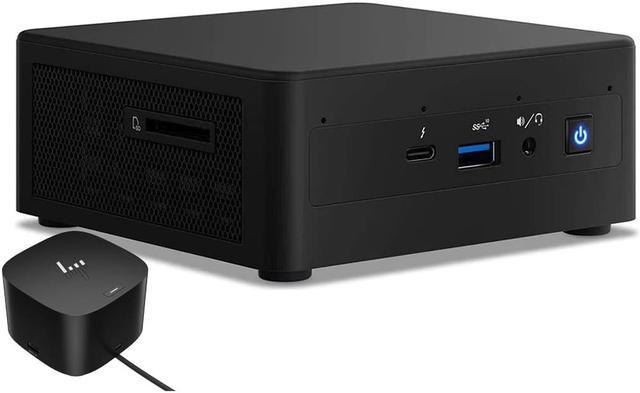
The Intel NUC11PAHi5 is a compact mini PC with an 11th Gen Core i5 processor, 32GB RAM, a 2TB SSD, and a 2TB hard drive, bundled with a Thunderbolt dock. It suits home and small-office users who need ample memory and storage for everyday multitasking and a multi-display desk setup.
| Attribute | Value |
|---|---|
| Best For | Compact home and business desktop setups needing an Intel Core i5 quad-core processor, 32GB of memory, and 4TB of combined SSD and HDD storage |
| Processor And Graphics | 11th Gen Intel Core i5 quad-core processor with 8MB L3 cache and integrated graphics |
| Memory | 32GB DDR4 memory |
| Storage | 2TB SSD plus 2TB HDD |
| Connectivity And Media Access | Wi-Fi 6 AX201, Bluetooth 4.2, RJ45, and a card reader |
| Operating System And Power | Windows 10 Home with a 120W power supply |
| Form Factor And Color | Mini PC in black |
| Included Equipment | Monitor and screen not included; no keyboard or optical drive |
| Model Identifiers | Intel NUC11PAHi5 |
Q: Should I choose the Intel NUC11PAHi5 or the NUC11PAHi7?
A: Choose this NUC11PAHi5 bundle when its listed 32GB of RAM, 4TB of combined storage, and included dock fit your setup. Choose the NUC11PAHi7 when you prioritize the higher-tier 11th Gen processor: its Core i7-1165G7 has a maximum turbo frequency of 4.7GHz and 96 graphics execution units, compared with 4.2GHz and 80 execution units for the NUC11PAHi5’s Core i5-1135G7.
Q: Is the NUC11PAHi5 worth choosing over the NUC11PAHi3?
A: Choose the NUC11PAHi5 when you want a four-core processor and Intel Iris Xe graphics in the NUC 11 Performance family, along with this listing’s 32GB RAM and 4TB combined storage. The NUC11PAHi3 uses a two-core Core i3-1115G4 with Intel UHD Graphics, making it the lower-tier configuration in the same family.
Q: How does this NUC11PAHi5 compare with an Intel NUC 12 Pro with Core i5-1240P?
A: Choose the NUC 12 Pro when you prioritize a newer 12th Gen processor with 12 cores and 16 threads. Choose this NUC11PAHi5 listing when its specified 32GB RAM, 2TB NVMe SSD, 2TB HDD, and included Thunderbolt dock are central to your setup. The NUC 12 Pro Core i5-1240P has a different, higher-core-count design; Notebookcheck has also tested a NUC 12 Pro configuration using that processor.
Q: Is this mini PC suitable for everyday office work and multitasking?
A: Yes. Its 11th Gen Core i5 processor, 32GB of RAM, and 2TB PCIe SSD suit common office tasks and multitasking; the additional 2TB HDD provides more storage. It has integrated graphics, so it is not intended for demanding graphics workloads.
Q: Can I use it for video meetings?
A: Yes, with additional equipment. The mini PC has no built-in webcam or screen, and a monitor is not included. Connect a monitor and use an external webcam; a headset or microphone may also be needed.
Q: Is it practical as a travel work computer?
A: It is small enough to transport, but it is a desktop rather than a self-contained travel computer: it has no screen, battery, or built-in webcam. You will need external power and access to a monitor and peripherals, so it is most practical for a fixed desk or a destination with a ready-made setup.
Q: Can it run multiple monitors?
A: The mini PC lists HDMI, mini DisplayPort, and two Thunderbolt 3 ports, and the included dock adds HDMI and DisplayPort connections. The dock is listed as supporting up to three monitors and dual 4K UHD; confirm that its connection requirements match your monitors and planned setup.
Q: Does the NUC11PAHi5 work with Linux?
A: Reddit users reported that Ubuntu and Manjaro worked, but experiences varied: one Ubuntu user described HDMI and audio problems, while another reported that a newer kernel resolved some issues. The bundle lists Windows 10 Home, so Linux should be treated as an alternative installation that may require troubleshooting, not as a confirmed out-of-box setup.
Q: Can I use an external GPU with the NUC11PAHi5?
A: A Reddit user reported using a Razer Core X with an RTX 3070 Ti over Thunderbolt on this model, after disabling the integrated GPU in Windows. That is an individual setup report, not a guarantee that every enclosure, graphics card, or configuration will work.
Q: How does the NUC11PAHi5 compare with the NUC11TNHi5?
A: In a Reddit comparison, users described the two models as broadly similar in specifications but noted differences in port layout. The PAHi5 was favored by one user for its Mini DisplayPort; the best choice depends on which ports you need. This bundle also includes a Thunderbolt dock, which adds ports and display connections according to the product information.


