




 here!
I’m your shopping assistant for PC builds, upgrades, and everything tech.
Got questions? Ask away!
Start a conversation
here!
I’m your shopping assistant for PC builds, upgrades, and everything tech.
Got questions? Ask away!
Start a conversation







Any questions? Ask CelesteSM will help you find out quickly.
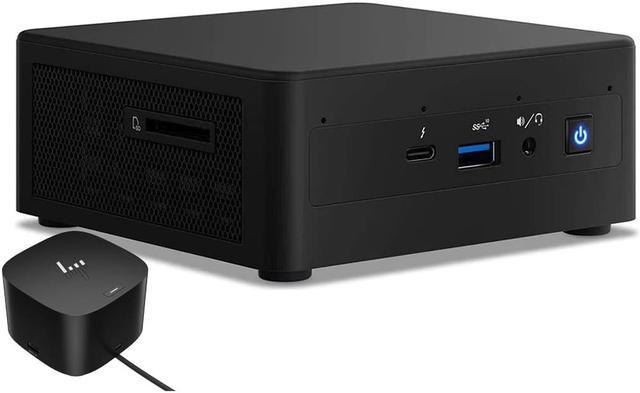
The Intel NUC11PAHi5 is a compact Windows 11 Home mini desktop with an 11th Gen Core i5-1135G7, 32GB RAM, a 256GB NVMe SSD, and a Thunderbolt dock. It suits office work, home productivity, and users who want a small PC with expanded connectivity for a multi-display desk setup.
| Attribute | Value |
|---|---|
| Best For | Home and business desktop use in a compact mini PC form factor, with integrated graphics, 32GB memory, and a 256GB SSD |
| Processor And Cache | 11th Gen Intel Core i5 with four cores and 8MB L3 cache |
| Graphics | Integrated graphics with integrated video output |
| Memory | 32GB DDR4 memory |
| Storage And Expansion | 256GB SSD, no HDD, no optical drive, and a card reader |
| Networking And Connectivity | Wi-Fi 6 AX201, Bluetooth 4.2, and RJ-45 Ethernet |
| Display And Peripherals | No screen or monitor included; no keyboard included |
| Power And Color | 120W power supply; black |
| Operating System | Windows 11 Home |
| Model Identifiers | Intel NUC11PAHi5 |
Q: How does the NUC11PAHi5 compare with the NUC11PAHi3?
A: Choose this NUC11PAHi5 configuration for its Core i5-1135G7 quad-core processor, 32GB of RAM, and bundled Thunderbolt dock. The NUC11PAHi3 uses a two-core Core i3-1115G4, making the i5 model the more suitable fit for multitasking and workloads that benefit from additional CPU cores.
Q: Should I choose this NUC11PAHi5 or the NUC11PAHi7?
A: Choose this i5 configuration if its 32GB of RAM and included Thunderbolt dock fit your setup. The NUC11PAHi7 is the higher-clocked option, with a Core i7-1165G7 processor that reaches up to 4.7 GHz; the i5-1135G7 in this system reaches up to 4.2 GHz. Both are four-core processors with integrated Iris Xe graphics.
Q: Is the NUC11PAHi5 with the 120W G4 dock a better fit than the same NUC without a dock?
A: Choose this bundle if you want the NUC and a dock together for a desk setup with expanded connectivity. The HP Thunderbolt G4 dock adds USB-A, USB-C, Ethernet, HDMI, and DisplayPort connections; HP lists support for multiple displays, with the supported resolution and display count depending on the host system and setup.
Q: Is this mini PC suitable for office work and multitasking?
A: Yes. Its 11th Gen quad-core Intel Core i5 processor and 32GB of RAM are suited to typical office work, such as documents, email, web apps, and routine multitasking. It is a desktop setup, so you will need a separate monitor, keyboard, and mouse.
Q: Can it run multiple monitors?
A: The included dock is listed as supporting up to three monitors and dual 4K UHD. The mini PC also lists HDMI, mini DisplayPort, and Thunderbolt 3 connections. Check the dock’s port and cable requirements against your monitor setup before buying.
Q: Is it a good choice for video meetings?
A: It can run video-meeting software, but the product has no built-in webcam or screen. You will need a separate monitor and webcam; a keyboard and mouse are not listed as included.
Q: Is it practical to use as a travel work computer?
A: It is compact, but it is not a standalone travel computer: it has no built-in screen, keyboard, or webcam and requires external power and peripherals. It is better suited to a desk or a temporary setup where those items are available.
Q: Is the NUC11PAHi5 suitable for everyday office work?
A: Its Core i5 processor and 32GB of RAM make it a plausible fit for typical office workloads. One NUC11PAHi5 owner reported sluggish graphics after the PC had been locked while using two 4K monitors; that single report does not establish a common issue, but multi-monitor wake behavior may be worth checking.
Q: Can it handle 4K video playback or serve as a media PC?
A: A Reddit discussion about this model considered 4K 60 fps playback and suggested ordinary 4K playback should be manageable, while HDR playback may be more demanding. It has integrated graphics, so buyers needing reliable HDR playback should verify their display and playback setup.
Q: Is it suitable for gaming?
A: It can be considered for lighter or retro gaming, but it has integrated graphics rather than a discrete GPU. A NUC11PAHi5 owner discussing retro gaming identified the compact chassis’s thermal limits as a constraint, so it is not the best fit for sustained high-performance gaming.
Q: Can I install Linux on the NUC11PAHi5?
A: Reddit users reported successful use with Ubuntu, Manjaro, and Fedora after system updates. Compatibility may depend on the distribution and kernel version; this configuration is sold with Windows 11 Home, not Linux.


