

Get a $25 Newegg Promo Gift Card when you spend $250+ between 1/17/26 and 1/19/26. Learn More>
  • $59.99
  • Free 30-day Returns
  • Price alert
    Sold by Fegfrght

    Shipped by Fegfrght

    Shop it at NeweggBusiness.

    Meet Your Seller

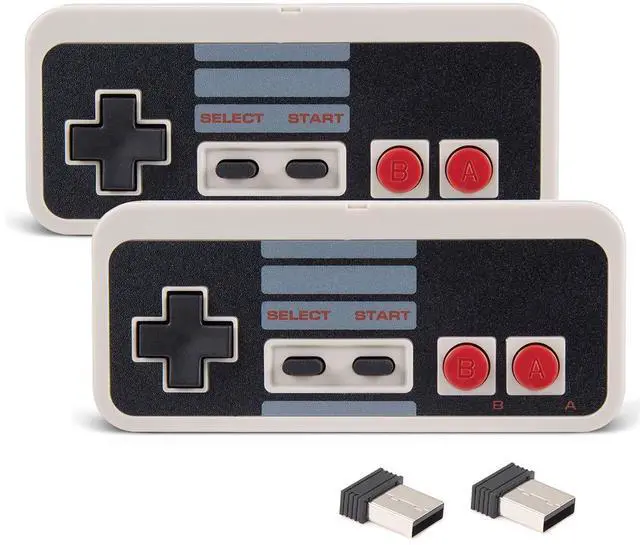
    2X Wireless Nes USB Controller for PC Gamings, 2.4ghz Wireless USB Remote N-E-S Emulated Game Pad Controller for Windows XP 7 8 11 & MAC & Retropie

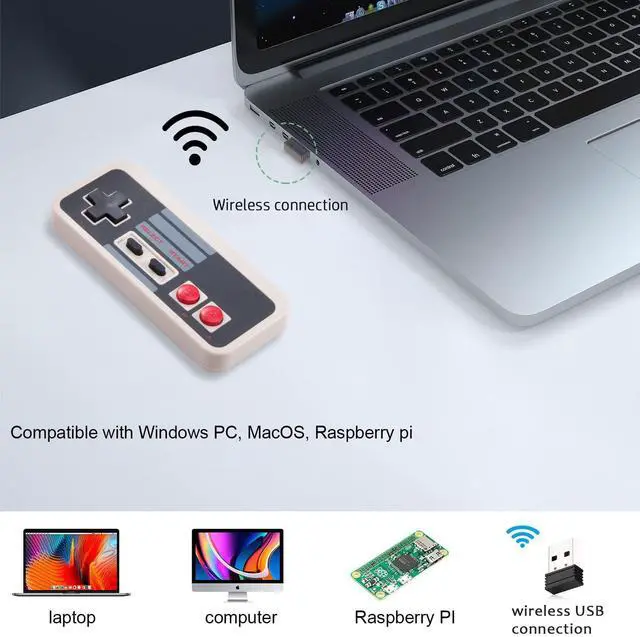
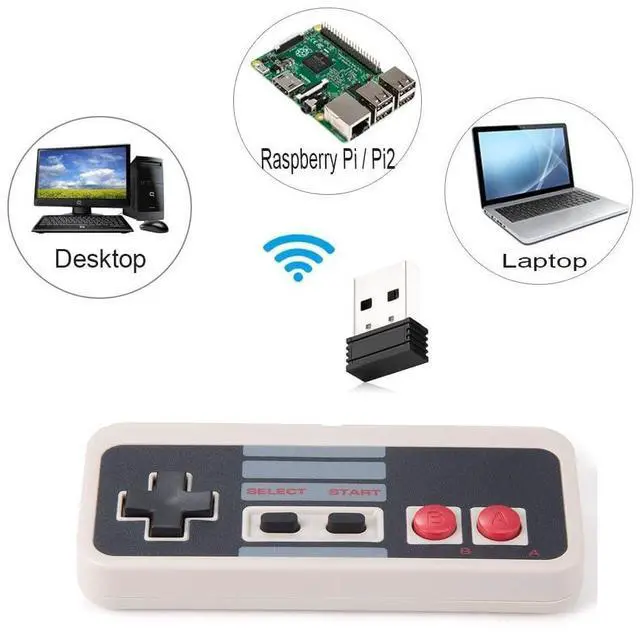
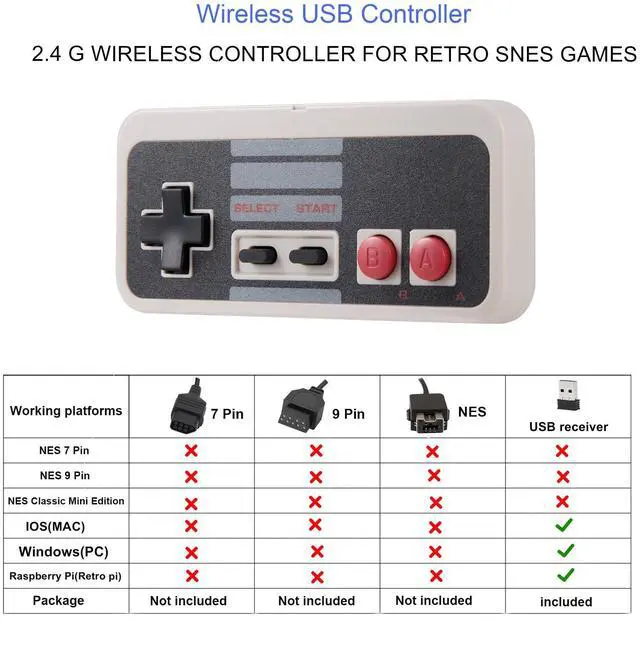
    • [Compatibility] Wireless USB controller is mainly designed for playing classic old school PC emulated games on computer or laptop(Not for Any N-E-S console), compatible with Windows PC(windows XP/7/8/11), MacOS,Linux, Raspberry pi(running RetroPie).
    • [Ergonomic Design]Super precise cross key and function buttons, the cross direction key adopts frosted concave design,anti-sweat and anti-slip. Support Raspberry Pie 4, Raspberry Pi 1B+/3B+, PC running operating system:Windows 98/2000/ ME/XP/Vista/Win7/8/8.1/11 or later,or Mac running OS X 10.0/Mac OS X or above.
    • [Wireless USB Connection]Standard USB 2.0 port, Wireless Controller with USB dongle, only works with PC emulated games and retropi games, you have to configure in emulator in the controller and map the keys properly first, then start the retro games.
    • [2.4G Wireless ]Not original controller, 2.4GHz wirelessly connect via usb dongle,not bluetooth version, you didn't have to sit so close to the computer or TV when it works for retropie system, and enjoy gaming within 30Ft (10m) wireless connection range
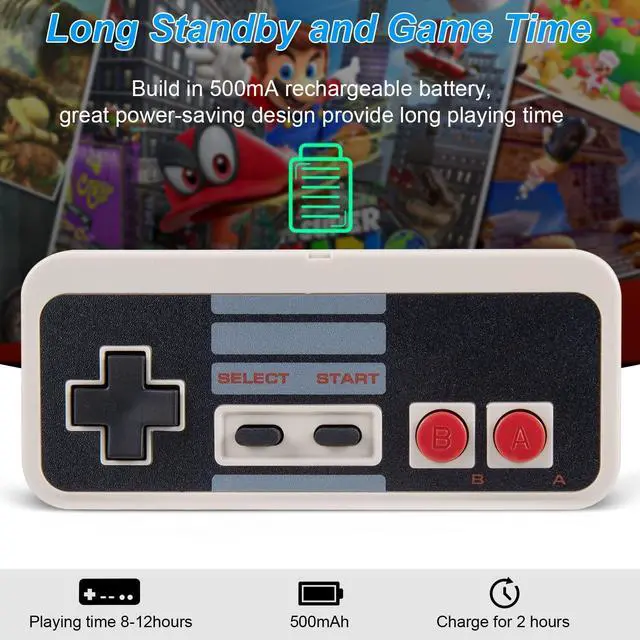
    • Build in rechargeable 3.7V/500mA lithium Ion battery which can work continuously for over 12 hours. the ultra-low Power batteries last a long time for your retro gamings, no longer have to worry about charging frequently.
    +
    +
    Overview
    Specs
    Reviews
    avatar

    Any questions? Our AI beta will help you find out quickly.

    NES Controller

    Wireless USB Retro Controller for Classic PC emulator Games

    Paring instruction:

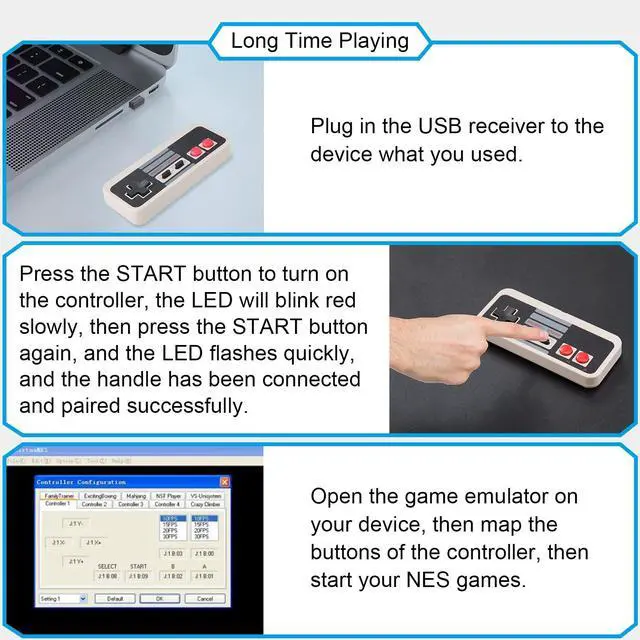
    • Step 1: Press the START button to turn on the controller. The LED will blink red slowly
    • Step 2: Press the START button again, the controller is ready to connect when the RED LED indicator flash rapidly.
    • Step 3: Plug in the USB receiver to the device,the controller will auto reconnect to your Windows device.

    Specifications:

    1. Build-in 500mAh rechargeable lithium battery
    2. Time charge: about 2-3 hours
    3. Play time:about 10-12 hours

    nes controller

    Applicable Platform/Device:

    • Compatible with Windows PC(windows XP/7/8/11), MacOS,Linux, Raspberry pi(running RetroPie)
    • Support operating system: Windows running 98/2000/ ME/XP/Vista/Win7/8/8.1/11 or later,or Mac running OS X 10.0/Mac OS X or above.

    Note:

    1. Third-party Controller, mainly works PC games via USB dongle

    2. Not support any original console and super console X pro

    3. Only includes the USB receivers for PC games

    Ergonomic Design

    Ergonomic Design

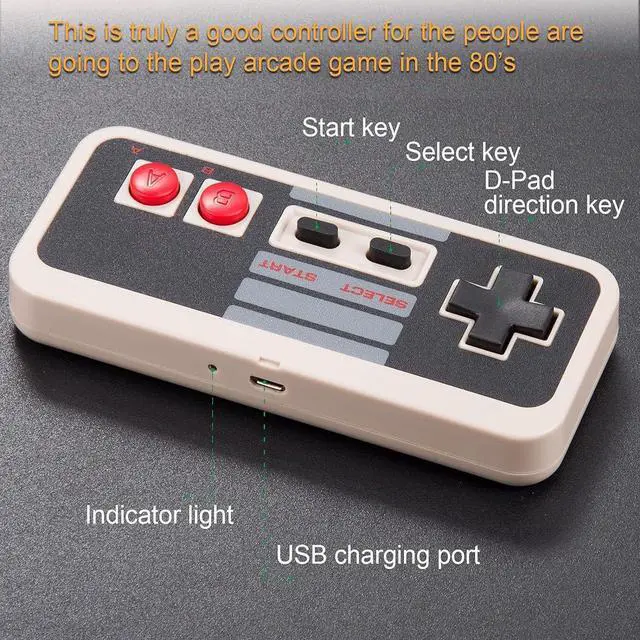
    Ergonomic shape is designed to fit the contour of your hands,easy and comfortable to hold

    NES USB

    Supports Most PC Games

    Such as Super Mario , street fighter, The Legend of Zelda and more. (Not support online games)

    Ergonomic Design

    Precise Button

    Super precise cross key and function buttons, 2.4 GHz wireless connection with up to a 25-foot that is better than having to sit on floor a foot away from the TV

    Ergonomic Design

    Packing List

    • 2*wireless USB controllers
    • 2*USB dongles
    • 2* charge cables
    • 2*User Manual

    Platform: Windows PC(windows XP/7/8/11)/ Mac/ Linux ,Raspberry pi ect.
    Emulator: OpenEmu(MAC),Nestopia,Jnes,Mesen, Snes9x, Higan, Handheld GBA emulator, Sega Genesis emulator etc.
    Rest Mode Press the button" DOWN+SELECT+START" at the same time, and the red LED light of the controller flashes to reset
    Notice tips: Before you playing games, you have to download the game emulator on your device
    NES controller

    Wireless Remote USB PC Gamepad

    Works with emulated games and few arcade games,you have to configure in emulator to the controller and map the keys properly first

    NES Controller

    Wireless USB Retro Controller for Classic PC emulator Games

    Paring instruction:

    • Step 1: Press the START button to turn on the controller. The LED will blink red slowly
    • Step 2: Press the START button again, the controller is ready to connect when the RED LED indicator flash rapidly.
    • Step 3: Plug in the USB receiver to the device,the controller will auto reconnect to your Windows device.

    Specifications:

    1. Build-in 500mAh rechargeable lithium battery
    2. Time charge: about 2-3 hours
    3. Play time:about 10-12 hours

    nes controller

    Applicable Platform/Device:

    • Compatible with Windows PC(windows XP/7/8/11), MacOS,Linux, Raspberry pi(running RetroPie)
    • Support operating system: Windows running 98/2000/ ME/XP/Vista/Win7/8/8.1/11 or later,or Mac running OS X 10.0/Mac OS X or above.

    Note:

    1. Third-party Controller, mainly works PC games via USB dongle

    2. Not support any original console and super console X pro

    3. Only includes the USB receivers for PC games

    Ergonomic Design

    Ergonomic Design

    Ergonomic shape is designed to fit the contour of your hands,easy and comfortable to hold

    NES USB

    Supports Most PC Games

    Such as Super Mario , street fighter, The Legend of Zelda and more. (Not support online games)

    Ergonomic Design

    Precise Button

    Super precise cross key and function buttons, 2.4 GHz wireless connection with up to a 25-foot that is better than having to sit on floor a foot away from the TV

    Ergonomic Design

    Packing List

    • 2*wireless USB controllers
    • 2*USB dongles
    • 2* charge cables
    • 2*User Manual

    Platform: Windows PC(windows XP/7/8/11)/ Mac/ Linux ,Raspberry pi ect.
    Emulator: OpenEmu(MAC),Nestopia,Jnes,Mesen, Snes9x, Higan, Handheld GBA emulator, Sega Genesis emulator etc.
    Rest Mode Press the button" DOWN+SELECT+START" at the same time, and the red LED light of the controller flashes to reset
    Notice tips: Before you playing games, you have to download the game emulator on your device
    NES controller

    Wireless Remote USB PC Gamepad

    Works with emulated games and few arcade games,you have to configure in emulator to the controller and map the keys properly first

    Strong compatibility: support Android games, computer games, and Raspberry Pi etc. Paring instruction:
    Step 1: Press the START button to turn on the controller. The LED will blink red slowly>
    Step 2: Press the START button again, the controller is ready to connect when the RED LED indicator flash rapidly.
    Step 3: Plug in the USB receiver to the device,the controller will auto reconnect to your Windows device.

    Notice tips:
    1. Before you playing PC games, you have to download the game emulator on your device:
    2.Press the button" DOWN+SELECT+START" at the same time, and the red LED light of the controller flashes to reset.

    Retro SNES game/platform suppot
    Platform
    Pc(Mac Linux Windows) ,Andorid phone(with OTG cable),Raspberry pi ect.
    Emulator:
    OpenEmu(MAC),SNES, Snes9x, ZSNES, Higan, Handheld GBA emulator, Sega Genesis emulator etc.

    Why did you choose us?
    *)Made from high-quality ABS material, it features sturdy and durable shell.
    *)2.4GHz high-performance wireless connection, working range up to 30 feet.
    *)With built-in Rechargeable battery, low heat and high-efficiency use for long lifespan.

    Packing list:
    2 x Wireless USB Controller
    2 x 2.4Ghz USB Receiver


    Product information

    Package Dimensions 5.24 x 3.58 x 2.4 inches; 0.71 ounces
    Type of item CD-ROM
    Item model number Y-D002-239-K
    Item Weight 0.704 ounces
    Manufacturer KIWITATA
    Batteries 1 Lithium Ion batteries required. (included)
    Date First Available May 7, 2019

    Additional Features

    • Notice: the package only includes the USB dongles for PC or MAC or Raspberry Pi. Not work for Mini N-E-S or super N-E-S console, not compatibility for switch game console. If the controller can't successfully recognized on your device, please turn off the firewall on the computer.

    Warranty & Returns

    Warranty, Returns, And Additional Information

    Warranty

    • Please contact the Seller directly for warranty information. Warranty information may also be found on the Manufacturer's website.
    • CONTACT

    Return Policies

    • Return for refund within: 30 days
    • Return for replacement within: 30 days
    • This item is covered by Fegfrght Return Policy

    Manufacturer Contact Info

    LOADING...