• $19.95
  • $24.95
  • Save: $5.00 (20%)
  • This item is not returnable
  • Login to Make an Offer
    Sold by Newegg

    Shipped by Newegg

    Price alert
    Shop it at NeweggBusiness.

    Laplink SafeErase 8 - 64 bit

    • 32 Bit
    • 64 Bit
    • Erase Internet Browser Data, Files, Partitions, hard drives for Complete Protection
    • 64 bit versions of Microsoft Windows 10, 8, 7, Vista or XP
    • Employs 6 methods for secure elimination of confidential data
    • Fastest deletion method overwrites with 0 for fastest deletion
    Please note that this product is non-returnable and non-refundable.
    +
    +
    Overview
    Specs
    Reviews (1)
    See all Q & A

    Any questions? Ask CelesteSM will help you find out quickly.

    Laplink SafeErase 8
    SafeErase 8
    Permanently Erase Your Data for Complete Protection

    Your personal confidential data will never fall into the wrong hands. Laplink SafeErase 8 utilizes a series of government recommended deletion methods to completely wipe your personal data from your hard drive so that it is unrecoverable. It is the fastest and most secure way to permanently delete sensitive information.

    Use daily on ordinary data deletions or wipe your entire PC before recycling or selling an old PC for complete privacy protection. With SafeErase 8, you can be sure financial information, email archives, photos and Internet history are deleted forever.

    • Windows 10 Compatible
    • Easy-to-Use Wizard
    • Complete Privacy Protection
    • Customized Deletion
    • Fast Data Wipe
    • Advanced Technology
    Complete Privacy Protection
    Complete Privacy Protection

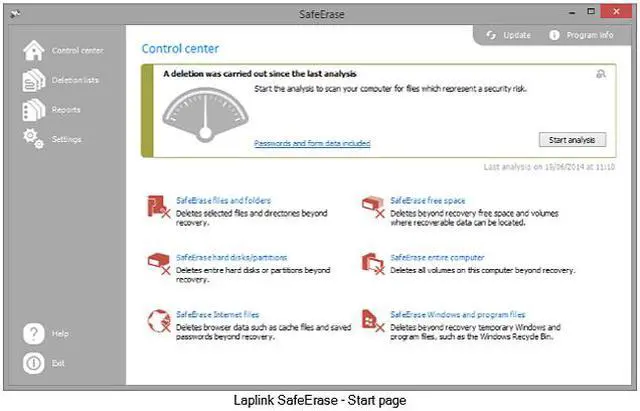
    Securely deletes Internet browser data, files, partitions, and entire hard drives.

    Advanced Technology
    Advanced Technology

    Employs six methods for secure elimination of your confidential data.

    Fast Data Wipe
    Fast Data Wipe

    Fastest deletion method overwrites with zeroes for the fastest deletion times.

    Customized Deletion
    Customized Deletion

    Choose from pre-defined and individual deletion profiles and receive detailed reports on the deletion process.

    Note:

    SafeErase should only be used as intended and as described in the User Guide. If you attempt to use this product for unintended purposes, your computer may become unstable or unusable.

    Warranty & Returns

    Warranty, Returns, And Additional Information

    Return Policies

    • Return for refund within: non-refundable
    • Return for replacement within: non-replaceable
    • This item is covered by Newegg.com's Digital Products Return Policy.
    • Read full return policy for details.
    LOADING...

    Laplink SafeErase 8 is Windows data-erasure software for people who want to securely delete browser data, files, partitions, or entire hard drives, including before selling or recycling a PC. It offers six erasure methods and customizable deletion profiles.

    Recommended For

    • Windows PC owners who need to securely delete selected files or browser data rather than rely on ordinary deletion, which may leave data recoverable.
    • People preparing a Windows PC with a hard disk drive for resale, recycling, or hand-me-down use who want to erase the drive before passing it on.
    • Windows users who want to choose among deletion methods and review reports, rather than use only the default delete function.
    • Owners of older 64-bit Windows PCs within this edition’s listed compatibility range who need a dedicated data-erasure utility.

    Real-World Use Scenarios

    • Before selling, donating, or recycling an old Windows PC, a user can erase the whole computer rather than rely on deleting files or formatting the drive; the wipe removes the existing data, so the PC will need an operating system installed again before it can be used.
    • When a user needs to discard a sensitive file or folder but keep the rest of the PC intact, SafeErase can securely erase the selected items from Windows Explorer instead of removing them with an ordinary delete.
    • Before handing a PC to someone else, a user can erase browser data such as internet history and cache to reduce the personal traces left on the computer, without wiping the entire drive.
    • When retiring a separate hard drive or partition while keeping the rest of the computer, a user can target that storage area for erasure; this is useful for removing its contents before the drive is passed on or repurposed.
    • For occasional privacy maintenance, a user can select files or use a deletion profile to remove chosen data and review a report of the erasure; this is more targeted than wiping the whole computer.

    Spec Summary

    AttributeValue
    Best ForErasing browser data, files, partitions, or entire hard drives on a Windows PC
    Data Erasure Methods And ControlsUses six secure deletion methods, including a zero-overwrite option for fast deletion; choose predefined or individual deletion profiles and receive detailed deletion reports
    Operating System CompatibilityWindows 10, 8.1, 8, 7, Vista, and XP
    Delivery FormatDownload
    Model IdentifiersLaplink SafeErase 8, 64-bit; model PAFGSFER0800P0RT-64b