




Wireless Backlit KeyboardMouse
More Comfortable, High Performance, High Efficiency

Hi, here is Acebaff
We have focus on Keyboard and Mouse for over 30 years . We keep design and manufacture new and excellent experience products for users.
We are one of the top suppliers for a lot of named brands. For more and more users, we provide much more suitable product choices.
For Acebaff, We will continue to work hard to create " high-performance, high-level, the most cost-effective keyboard "
What makes our products unique?
We listen to every customer's feedback, thank you for your praise, and appreciate your criticism. Every voice of yours is the driving force for our improvement.
What will you get?
Is it just a wireless keyboard and mouse combo? No, you will get lifetime after-sales service and a one-year unconditional return and exchange. Welcome to join the ACEBAFF family.
Why do we love what we do?
Because you chose ACEBAFF. We are extremely proud every time we hear customers say that our products can help them at work.

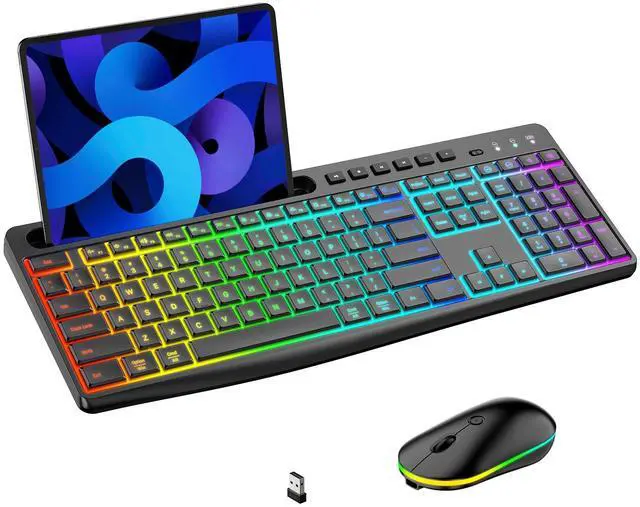
Acebaff Wireless 7-Color Rainbow LED Backlit Keyboard and 22 RGB Mouse Combo with Phone and Tablet Holder,Provides Excellent Comfort and Efficiency !

Wireless 7-Color Rainbow LED Backlit Keyboard and RGB Backlit Mouse Strives In Every Detail with Powerful Functions , To Meet Your All Working Needs!
1-Super Precise and Comfortable Light Up Wireless Keyboard and Mouse Combo with Phone Tablet Holder
- Our wireless keyboard and mouse combo are built with 7-Color LED Rainbow & RGB Backlit/Convenient Phone holder /Ergonomic Comfortable/Power Saving/Quiet/Smooth typing/Stable 2,4G Wireless Connection/Quality Details
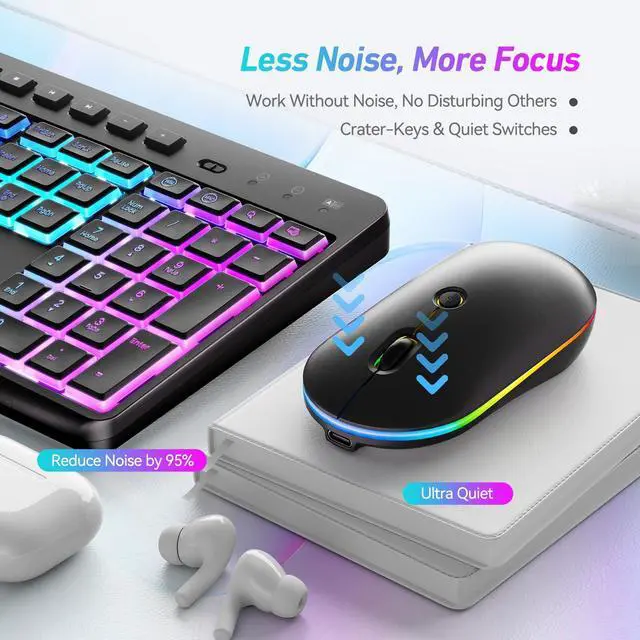
2-Ergonomic & Comfortable Typing Experience---Smooth and Almost Silent Computer Keyboard with 7-Color Rainbow Backlit
- This 2.4GHz wireless keyboard and mouse combo with 8.46-inch multifunctional phone tablet holder.
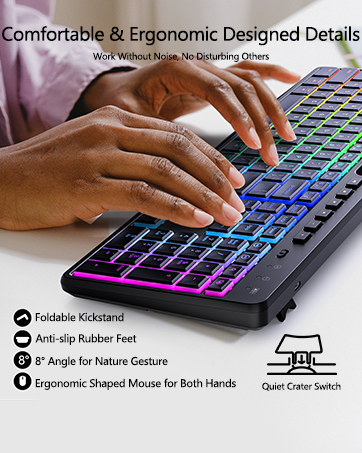
- The bottom of the keyboard is equipped with foldable feet, allowing you to adjust the most comfortable typing angle.
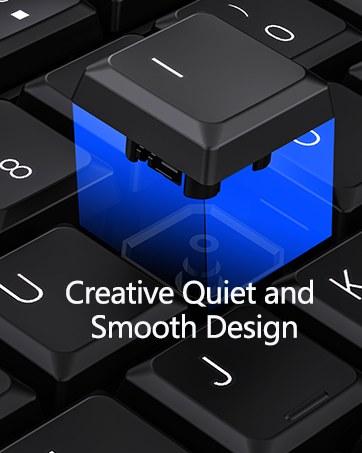
- With the soft key stroke, the keyboard offers smoother touch. Light up keycaps and letters help you to make easier to type at night
3-Slim & Portable Design-- AdvancedMultifunctional Efficient Mouse with 22 switchable RGB lighting effect
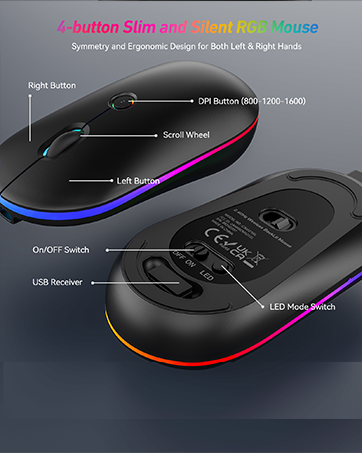
- Wireless high precision mouse adopts slim and symmetrical design, suitable for right or left hand. Moreover, the thinness makes the mouse easier for picking and moving, especially for kids. Low profile design is also perfectly contoured for the shape of your hand.
- If you often need to travel or work away from home, we portable mouse is a good choice for you. Easily fits into a backpack and take around.
4-Anti-Splash & Sweat Design
- The ergonomic keyboard and mouse wireless combo was made with a skin-friendly, anti-sweat and anti-splash material.
- The texture on both sides of the mouse and anti-splash/sweat material were designed to help you hold the mouse comfortably and keep you typing easily,Never to be worried about spilling coffee on your keyboard, which mostly enhance your working efficient.
5-Instructions to Get Start With The Wonderful Keyboard and Mouse Set
- Take out the keyboard and mouse from the box, and take out the receiver from the mouse battery compartment;
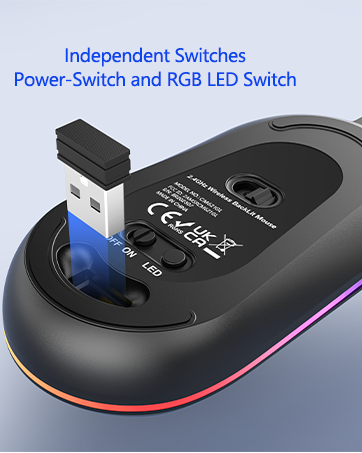
- Turn on the Power Switches to make sure the batteries are well recharged. Insert the receiver into the USB port of the computer; Wait for the computer to automatically install the driver and start using it.
2025 New Wireless Mouse Keyboard Combo with Phone&Tablet Holder, Makes Working More Entertainment, Comfortable and Convenient!

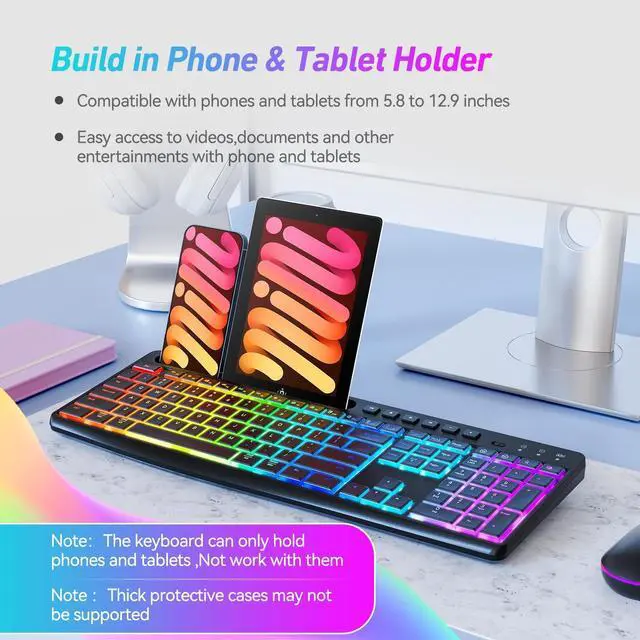
Almost Silent and Smooth Keyboard with Built In Phone & Tablet Holder,Provides A New Way to Deal with Desktop Muti-Devices
- The 8.46-inch holder can help hold your phone, tablets or other devices when you are working with the cordless keyboard and mouse
- You can watch videos ,read documents ,and other entertainment horizontally or vertically according to the size of your devices.
Adjustable 7-Color Rainbow Keyboard and 22 Modes RGB Mouse Backlighting, Helps Enjoy Hours‘ of Cooling Experiences,Especially In Dark Environment.

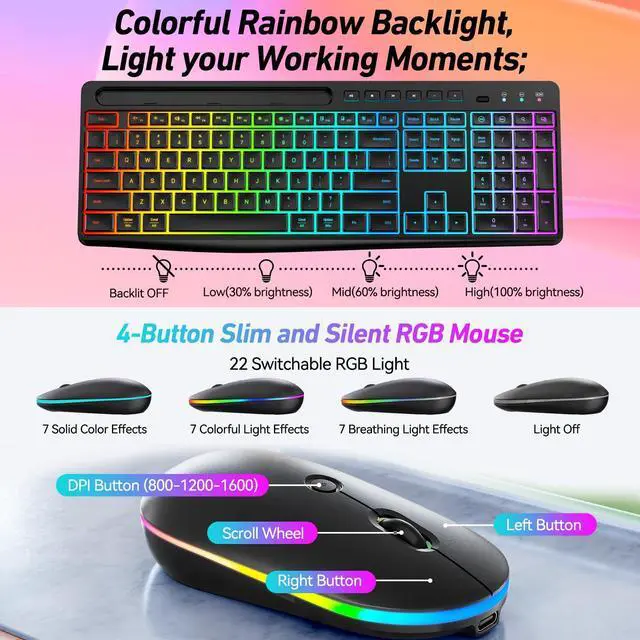
The 7-Color Rainbow Backlit Keyboard Provides 4 Brightness(100%/60% /30% and LED OFF Mode ), and Mouse Provides 22 RGB Lights to DIY !
>> Adjust the Rainbow Backlit Keyboard's Brightness by Fn+End
- It is perfect in the dark, with each key glowing intensely so you can see them clearly. You can also notice the backlighting during the day: the keyboard will shine on your desktop. Both sober and elegant, the wireless keyboard backlighting can be switched off if you prefer.
- You will also be able to adjust its brightness. The keyboard will autoly turn off the backlighting after 90 seconds of idle time in order to extend its battery life.
>> Adjust the RGB Backlit Mouse's Effects by LED Switch
- The mouse has 22 switchable lighting effects(7 Solid Color Effects/7 Colorful Light Effects/7 Breathing Light Effects/Light Off ). It can be controled by the independent led switch on the bottom of the mouse.
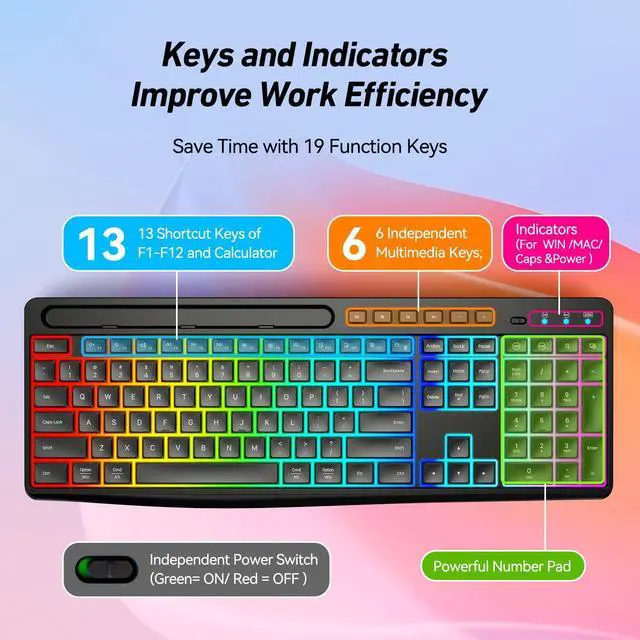
>> Independent Hotkeys and 12 Combined Multimedia Fn-Keys & Numeric Pad On the Compact Keyboard
- With the 11 Independent hotkeys and 12 combined multimedia Fn-keys, you can always enjoy music, watch movies, browse websites, scan emails, etc. in a convenient way.
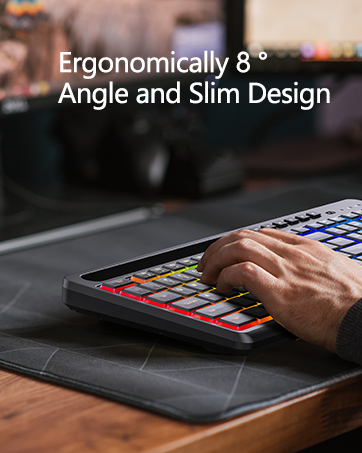
- This full size wireless keyboard is designed with a 8° tilted angle foldable stands, help you reduce the wrist fatigue and pressure, keep your hand to be comfortable, enhance productivity.
- With the independent numeric pad, you can quickly enter your passwords or deal with numerical calculation working.
>> Warm Tips:
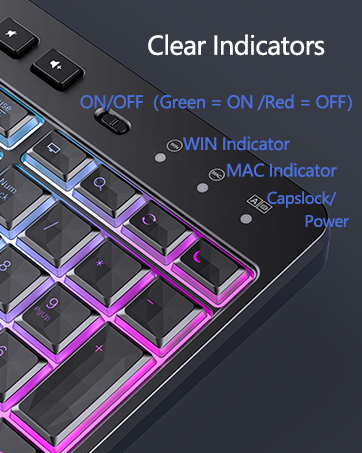
- When the Keyboard Power Switch Is At Green : Indicates Power ON
- When the Keyboard Power Switch Is At Red : Indicates Power OFF
- The Mouse Power Switch Indicates ON/OFF Directly
2025 Advanced Wireless Keyboard and Mouse Combo with Backlit,Come with Smart Power-Saving Management & Fast Recharging USB C Cable

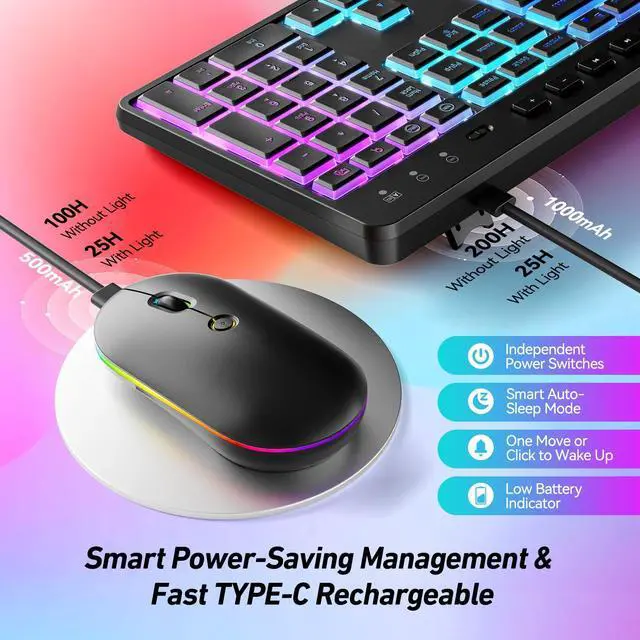
Independent Power Switches/Auto-Backilit-Off/Auto-Sleep After 10Mins, Extends The Battery Life As Long As Possible,Which Reduce Charing Times
>> For The Rainbow Backlit Wireless Slim & Compact Keyboard
- The keyboard will autoly turn off the backlighting after 90 seconds of idle time, Auto-sleep After 10mins Leaving, in order to extend its battery life.
- The wireless rechargeable keyboard could consistenly work for at least 25Hours With Fully 100% LEDs Brightness ON ,and work for 200Hours Without Light.
- It may takes about 4hours to recharge the high- quality 1000mah battery of the quiet and smooth keyboard.
>> For The RGB Backlit Wireless Quiet & Ergonomic Mouse
- The mouse will Auto-sleep After 10mins Leaving, in order to extend its battery life.
- The wireless rechargeable mouse could consistenly work for at least 25Hours With RGB LEDs ON ,and work for 100Hours Without Light.
- It may takes about 2hours to recharge the high- quality 500mah battery of the mouse,which is for both left and right hands.
>> Smart Power Saving Wireless Keyboard and Mouse, Auto-enter Power Saving Mode When You Stop Using It
- The wireless keyboard mouse both come with independent power switches, so you can turn them off when you will leave working for a long time to save batteries.
- This set is also designed with smart power saving function, they will auto-enter power saving mode when you stop using it for more than 10 Minutes. So, you could never worry about wasting battery when you forget to turn off the switch.
- Press any key or button can make the wireless keyboard mouse re-activity from power-saving mode.

2025 Wireless Keyboard Come with Win/MAC Dual Layout, Which Can be Switched by Single Click On the Independent WIN/MAC Buttons !

The Ergonomic Details, Soft &Smooth Typing Feel, and Splash-proof Design Makes the Keyboard More Comfortable and Sturdy !
>> Powerful Compatibility
- This 2.4 GHz wireless mouse and keyboard Combo has built-in adaptive frequency technology, Supporting plug and play, this cordless keyboard and mouse combo is widely compatible with Windows XP/VISTA/7/8/10/11, Mac ( Please note that the independent hot-keys may not be available in Mac system ).
>> Windows/Mac OS Dual System & 2.4G Stable Wireless Connection
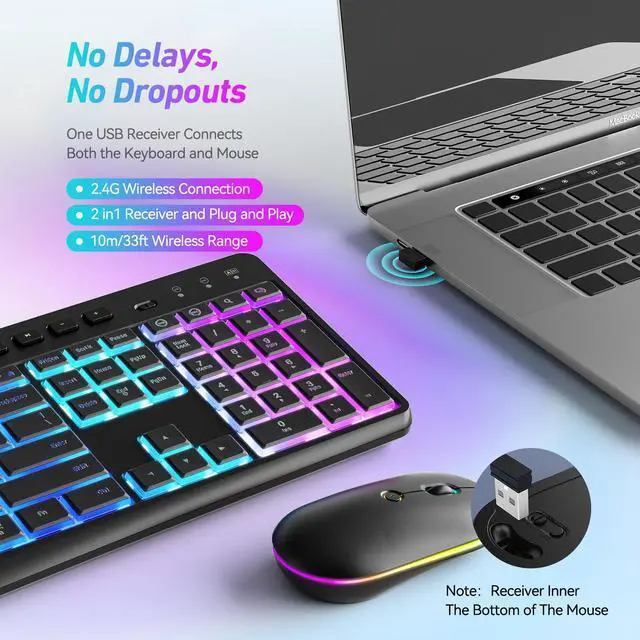
- This wireless keyboard and mouse is equipped with Windows/Mac OS dual systems, promoting a wider range of applications. the same USB receiver, no need to take up additional USB ports (Also the wireless keyboard and mouse can also be used separately). Plug & play, no need to download any software, 2.4 GHz wireless provides a powerful and reliable connection up to 33 feet(10m) without any delays.
>> How does the Power Indicator Work ?
After the new battery is put into the keyboard and mouse:
- a. If the connection goes normally with the computer, the power red indicator will flash 5-8 seconds and then off, the computer will working normally.
- b. If the computer is not normally connected with the keyboard, the power red indicator lights on for a long while to indicate you and then off.
- c. When on Low battery mode ,the Power Red Indicator will flash when you press any key .
(So when you first start using, the power red indicator keeps flashing for 5-8 seconds is normal.)
2025 Newest Version - Advanced Structures and 2.4Ghz Wireless Tech Provides Stable,Sturdy and Reliable Experiences for Office,Home and Library

Important Instructions For Trouble Shooting You may Need to Know
>> The Keyboard/Mouse Response Is Delayed and Works Abnormally, How to Solve It?
1. The battery may be low, please recharge the battery for the keyboard/mouse.
2. It may be caused by the computer being stuck, please restart the computer and try again.
3. The maximum use distance of this product is 33ft, please keep it within 33ft.
4. And be sure there are no metal obstacles between the keyboard/mouse and the receiver.
>> Tips: Solution to Connection Exception
Keyboard
1. Make sure the battery is fully charged and replug the receiver into the computer.
2. Turn off and on the keyboard switch, which should be within 20cm away from the receiver.
3. Press and hold the keyboard “ESC” + “K” keys together to pair again.
Mouse
1. Make sure the battery is fully charged and replug the receiver into the computer.
2. Turn off and on the mouse switch, which should be within 20cm away from the receiver.
3. Press and hold the Right button and Scroll button together to pair again.
Acebaff Wireless 7-Color Rainbow LED Backlit Keyboard and 22 RGB Mouse Combo with Phone and Tablet Holder,Provides Excellent Comfort and Efficiency !
Wireless 7-Color Rainbow LED Backlit Keyboard and RGB Backlit Mouse Strives In Every Detail with Powerful Functions , To Meet Your All Working Needs!
1-Super Precise and Comfortable Light Up Wireless Keyboard and Mouse Combo with Phone Tablet Holder
- Our wireless keyboard and mouse combo are built with 7-Color LED Rainbow & RGB Backlit/Convenient Phone holder /Ergonomic Comfortable/Power Saving/Quiet/Smooth typing/Stable 2,4G Wireless Connection/Quality Details
2-Ergonomic & Comfortable Typing Experience---Smooth and Almost Silent Computer Keyboard with 7-Color Rainbow Backlit
- This 2.4GHz wireless keyboard and mouse combo with 8.46-inch multifunctional phone tablet holder.
- The bottom of the keyboard is equipped with foldable feet, allowing you to adjust the most comfortable typing angle.
- With the soft key stroke, the keyboard offers smoother touch. Light up keycaps and letters help you to make easier to type at night
3-Slim & Portable Design-- AdvancedMultifunctional Efficient Mouse with 22 switchable RGB lighting effect
- Wireless high precision mouse adopts slim and symmetrical design, suitable for right or left hand. Moreover, the thinness makes the mouse easier for picking and moving, especially for kids. Low profile design is also perfectly contoured for the shape of your hand.
- If you often need to travel or work away from home, we portable mouse is a good choice for you. Easily fits into a backpack and take around.
4-Anti-Splash & Sweat Design
- The ergonomic keyboard and mouse wireless combo was made with a skin-friendly, anti-sweat and anti-splash material.
- The texture on both sides of the mouse and anti-splash/sweat material were designed to help you hold the mouse comfortably and keep you typing easily,Never to be worried about spilling coffee on your keyboard, which mostly enhance your working efficient.
5-Instructions to Get Start With The Wonderful Keyboard and Mouse Set
- Take out the keyboard and mouse from the box, and take out the receiver from the mouse battery compartment;
- Turn on the Power Switches to make sure the batteries are well recharged. Insert the receiver into the USB port of the computer; Wait for the computer to automatically install the driver and start using it.
2025 New Wireless Mouse Keyboard Combo with Phone&Tablet Holder, Makes Working More Entertainment, Comfortable and Convenient!
Almost Silent and Smooth Keyboard with Built In Phone & Tablet Holder,Provides A New Way to Deal with Desktop Muti-Devices
- The 8.46-inch holder can help hold your phone, tablets or other devices when you are working with the cordless keyboard and mouse
- You can watch videos ,read documents ,and other entertainment horizontally or vertically according to the size of your devices.
Adjustable 7-Color Rainbow Keyboard and 22 Modes RGB Mouse Backlighting, Helps Enjoy Hours‘ of Cooling Experiences,Especially In Dark Environment.
The 7-Color Rainbow Backlit Keyboard Provides 4 Brightness(100%/60% /30% and LED OFF Mode ), and Mouse Provides 22 RGB Lights to DIY !
>> Adjust the Rainbow Backlit Keyboard's Brightness by Fn+End
- It is perfect in the dark, with each key glowing intensely so you can see them clearly. You can also notice the backlighting during the day: the keyboard will shine on your desktop. Both sober and elegant, the wireless keyboard backlighting can be switched off if you prefer.
- You will also be able to adjust its brightness. The keyboard will autoly turn off the backlighting after 90 seconds of idle time in order to extend its battery life.
>> Adjust the RGB Backlit Mouse's Effects by LED Switch
- The mouse has 22 switchable lighting effects(7 Solid Color Effects/7 Colorful Light Effects/7 Breathing Light Effects/Light Off ). It can be controled by the independent led switch on the bottom of the mouse.
>> Independent Hotkeys and 12 Combined Multimedia Fn-Keys & Numeric Pad On the Compact Keyboard
- With the 11 Independent hotkeys and 12 combined multimedia Fn-keys, you can always enjoy music, watch movies, browse websites, scan emails, etc. in a convenient way.
- This full size wireless keyboard is designed with a 8° tilted angle foldable stands, help you reduce the wrist fatigue and pressure, keep your hand to be comfortable, enhance productivity.
- With the independent numeric pad, you can quickly enter your passwords or deal with numerical calculation working.
>> Warm Tips:
- When the Keyboard Power Switch Is At Green : Indicates Power ON
- When the Keyboard Power Switch Is At Red : Indicates Power OFF
- The Mouse Power Switch Indicates ON/OFF Directly
2025 Advanced Wireless Keyboard and Mouse Combo with Backlit,Come with Smart Power-Saving Management & Fast Recharging USB C Cable
Independent Power Switches/Auto-Backilit-Off/Auto-Sleep After 10Mins, Extends The Battery Life As Long As Possible,Which Reduce Charing Times
>> For The Rainbow Backlit Wireless Slim & Compact Keyboard
- The keyboard will autoly turn off the backlighting after 90 seconds of idle time, Auto-sleep After 10mins Leaving, in order to extend its battery life.
- The wireless rechargeable keyboard could consistenly work for at least 25Hours With Fully 100% LEDs Brightness ON ,and work for 200Hours Without Light.
- It may takes about 4hours to recharge the high- quality 1000mah battery of the quiet and smooth keyboard.
>> For The RGB Backlit Wireless Quiet & Ergonomic Mouse
- The mouse will Auto-sleep After 10mins Leaving, in order to extend its battery life.
- The wireless rechargeable mouse could consistenly work for at least 25Hours With RGB LEDs ON ,and work for 100Hours Without Light.
- It may takes about 2hours to recharge the high- quality 500mah battery of the mouse,which is for both left and right hands.
>> Smart Power Saving Wireless Keyboard and Mouse, Auto-enter Power Saving Mode When You Stop Using It
- The wireless keyboard mouse both come with independent power switches, so you can turn them off when you will leave working for a long time to save batteries.
- This set is also designed with smart power saving function, they will auto-enter power saving mode when you stop using it for more than 10 Minutes. So, you could never worry about wasting battery when you forget to turn off the switch.
- Press any key or button can make the wireless keyboard mouse re-activity from power-saving mode.
2025 Wireless Keyboard Come with Win/MAC Dual Layout, Which Can be Switched by Single Click On the Independent WIN/MAC Buttons !
The Ergonomic Details, Soft &Smooth Typing Feel, and Splash-proof Design Makes the Keyboard More Comfortable and Sturdy !
>> Powerful Compatibility
- This 2.4 GHz wireless mouse and keyboard Combo has built-in adaptive frequency technology, Supporting plug and play, this cordless keyboard and mouse combo is widely compatible with Windows XP/VISTA/7/8/10/11, Mac ( Please note that the independent hot-keys may not be available in Mac system ).
>> Windows/Mac OS Dual System & 2.4G Stable Wireless Connection
- This wireless keyboard and mouse is equipped with Windows/Mac OS dual systems, promoting a wider range of applications. the same USB receiver, no need to take up additional USB ports (Also the wireless keyboard and mouse can also be used separately). Plug & play, no need to download any software, 2.4 GHz wireless provides a powerful and reliable connection up to 33 feet(10m) without any delays.
>> How does the Power Indicator Work ?
After the new battery is put into the keyboard and mouse:
- a. If the connection goes normally with the computer, the power red indicator will flash 5-8 seconds and then off, the computer will working normally.
- b. If the computer is not normally connected with the keyboard, the power red indicator lights on for a long while to indicate you and then off.
- c. When on Low battery mode ,the Power Red Indicator will flash when you press any key .
(So when you first start using, the power red indicator keeps flashing for 5-8 seconds is normal.)
2025 Newest Version - Advanced Structures and 2.4Ghz Wireless Tech Provides Stable,Sturdy and Reliable Experiences for Office,Home and Library
Important Instructions For Trouble Shooting You may Need to Know
>> The Keyboard/Mouse Response Is Delayed and Works Abnormally, How to Solve It?
1. The battery may be low, please recharge the battery for the keyboard/mouse.
2. It may be caused by the computer being stuck, please restart the computer and try again.
3. The maximum use distance of this product is 33ft, please keep it within 33ft.
4. And be sure there are no metal obstacles between the keyboard/mouse and the receiver.
>> Tips: Solution to Connection Exception
Keyboard
1. Make sure the battery is fully charged and replug the receiver into the computer.
2. Turn off and on the keyboard switch, which should be within 20cm away from the receiver.
3. Press and hold the keyboard “ESC” + “K” keys together to pair again.
Mouse
1. Make sure the battery is fully charged and replug the receiver into the computer.
2. Turn off and on the mouse switch, which should be within 20cm away from the receiver.
3. Press and hold the Right button and Scroll button together to pair again.
Wireless Backlit KeyboardMouse
More Comfortable, High Performance, High Efficiency
Hi, here is Acebaff
We have focus on Keyboard and Mouse for over 30 years . We keep design and manufacture new and excellent experience products for users.
We are one of the top suppliers for a lot of named brands. For more and more users, we provide much more suitable product choices.
For Acebaff, We will continue to work hard to create " high-performance, high-level, the most cost-effective keyboard "
What makes our products unique?
We listen to every customer's feedback, thank you for your praise, and appreciate your criticism. Every voice of yours is the driving force for our improvement.
What will you get?
Is it just a wireless keyboard and mouse combo? No, you will get lifetime after-sales service and a one-year unconditional return and exchange. Welcome to join the ACEBAFF family.
Why do we love what we do?
Because you chose ACEBAFF. We are extremely proud every time we hear customers say that our products can help them at work.