



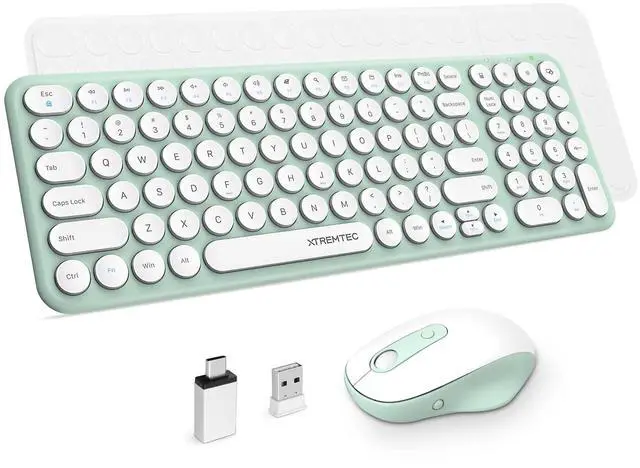






XTREMTEC Keyboard Mouse Combo
- 2.4Ghz Wireless
- Auto-Sleep Function
- Slim Quiet Keyboard








Notice:If your 2.4G wireless keyboard and mouse kit malfunctions, try these steps:
1.Replace with new, correctly installed batteries of the same model. If the issue remains, proceed to the next step.
2. Run the system self-check to inspect the computer's USB interface.
3.Update the official input method to fix software conflicts.
4. Update your computer system to resolve compatibility problems.
If none of the above works,tell via the Messaging System.


How many batteries does they need:
- 1 * AA(wireless mouse)
- 2 * AAA(wireless keyboard)
Tips: Use rechargeable batteries.

How long will they enter sleep mode:
- Wireless keyboard: 5 seconds
- Wireless mouse: 10 seconds
Tips: The Middle Indicator off

Advantage of XTREMTEC keyboard
- Impact resistance, scratch resistance
- Coating has prevented letters disappear - Glittering on the letters

Lightweight Keyboard
- Portable to carry
- Lightweight but firm

Desktop PC Accessories
- Wireless connectivity
- A clean, uncluttered desktop

Laptop Accessories
- External keyboards and mouse for latop
- Type fast with numeric keypad
 XTREMTEC 2.4G Full Size Wireless Keyboard Mouse Combo, Ultra Slim Silent Cute... |  Wireless Keyboard and Mouse Combo, XTREMTEC Cute Compact -Size Pink Retro Rou... |  Wireless Keyboard and Mouse Combo, XTREMTEC Cute Kawaii Green Aesthetic Quiet... |  Wireless Keyboard and Mouse, XTREMTEC Compact Full Size Cute Keyboard Retro R... | |
|---|---|---|---|---|
| Customer Reviews | — | — | — | — |
| Price | — no data | — | — | — |
| DPI Adjustable | ? | ? | ? | ? |
| Model Name | K102 | K101 | K101 | K101A |
| Back to previous page | ? | ? | ? | ? |
Notice:If your 2.4G wireless keyboard and mouse kit malfunctions, try these steps:
1.Replace with new, correctly installed batteries of the same model. If the issue remains, proceed to the next step.
2. Run the system self-check to inspect the computer's USB interface.
3.Update the official input method to fix software conflicts.
4. Update your computer system to resolve compatibility problems.
If none of the above works,tell via the Messaging System.
How many batteries does they need:
- 1 * AA(wireless mouse)
- 2 * AAA(wireless keyboard)
Tips: Use rechargeable batteries.
How long will they enter sleep mode:
- Wireless keyboard: 5 seconds
- Wireless mouse: 10 seconds
Tips: The Middle Indicator off
Advantage of XTREMTEC keyboard
- Impact resistance, scratch resistance
- Coating has prevented letters disappear - Glittering on the letters
Lightweight Keyboard
- Portable to carry
- Lightweight but firm
Desktop PC Accessories
- Wireless connectivity
- A clean, uncluttered desktop
Laptop Accessories
- External keyboards and mouse for latop
- Type fast with numeric keypad
XTREMTEC 2.4G Full Size Wireless Keyboard Mouse Combo, Ultra Slim Silent Cute... | Wireless Keyboard and Mouse Combo, XTREMTEC Cute Compact -Size Pink Retro Rou... | Wireless Keyboard and Mouse Combo, XTREMTEC Cute Kawaii Green Aesthetic Quiet... | Wireless Keyboard and Mouse, XTREMTEC Compact Full Size Cute Keyboard Retro R... | |
|---|---|---|---|---|
| Customer Reviews | — | — | — | — |
| Price | — no data | — | — | — |
| DPI Adjustable | ? | ? | ? | ? |
| Model Name | K102 | K101 | K101 | K101A |
| Back to previous page | ? | ? | ? | ? |
XTREMTEC Keyboard Mouse Combo
- 2.4Ghz Wireless
- Auto-Sleep Function
- Slim Quiet Keyboard
Aesthetic and Sleek
- Macaron-green body and white keys
- The concave and convex of retro round keys
- Excellent fingertip response
2.4G Wireless Keyboard/Mouse
- Delivers a reliable cordless connection
- Super easy to setup
- No other driver or option needed.

Meet your needs


PC Gaming Keyboard
Full Size Keyboard