




 here!
here!
I’m your shopping assistant for PC builds, upgrades, and everything tech.
Got questions? Ask away!
Start a conversation
here!
I’m your shopping assistant for PC builds, upgrades, and everything tech.
Got questions? Ask away!
Start a conversation




Any questions? Ask CelesteSM will help you find out quickly.


At Leviton, we build what’s next to light, power, and connect everyday spaces, encompassing electrical, lighting, data networks, and energy management. With a rich history spanning over 120 years, Leviton develops thoughtful solutions that streamline processes, elevate safety standards, increase efficiency, and enhance productivity.




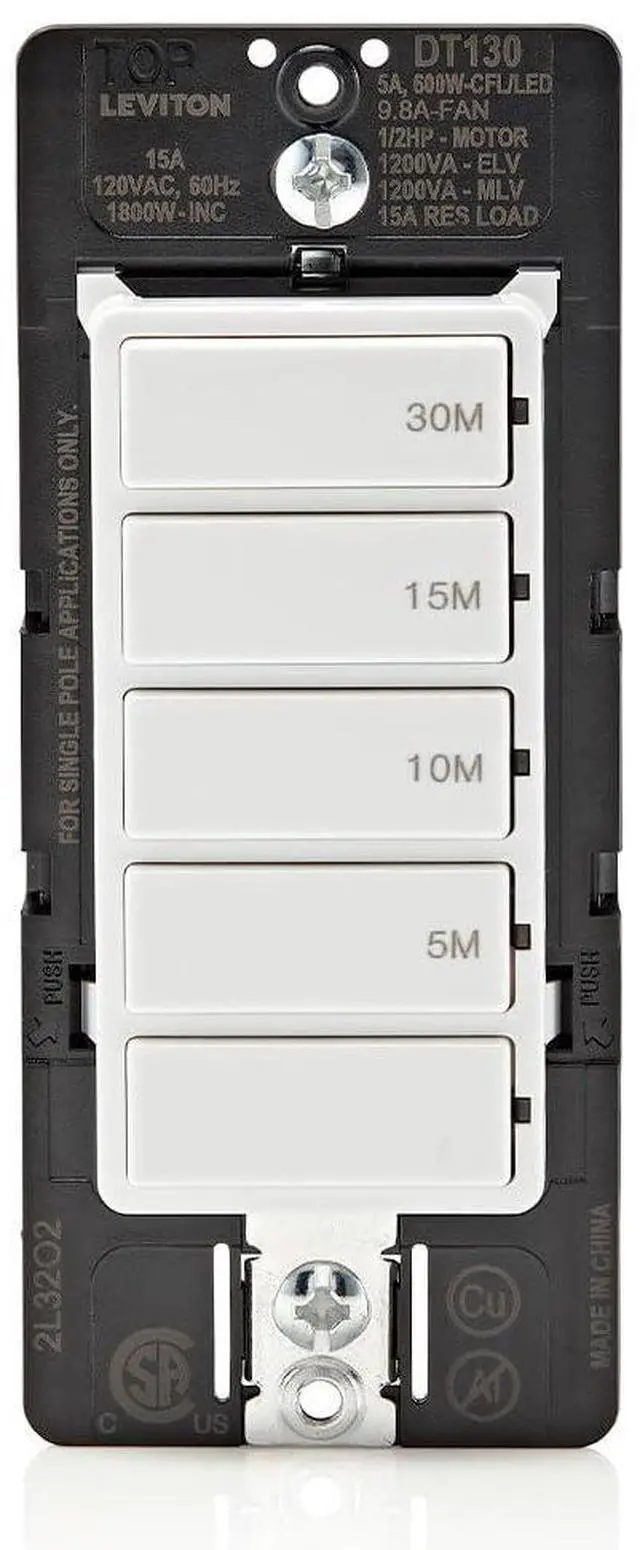
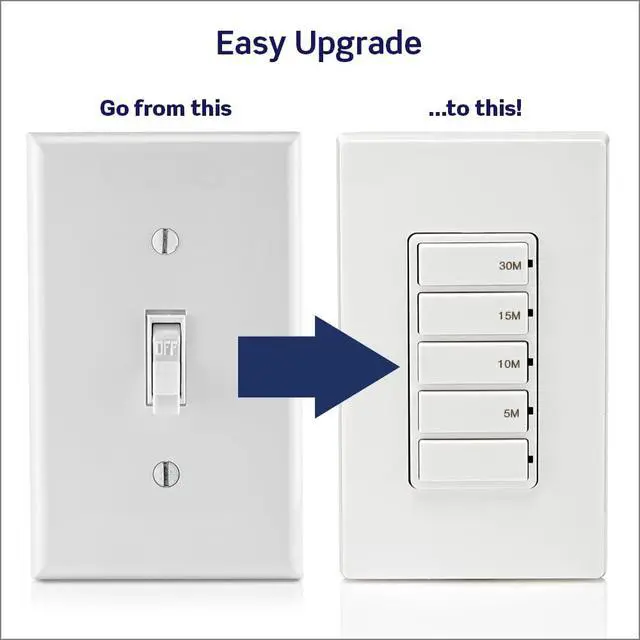
Replace your current wall switch with a countdown timer to automate fans, motor loads and lights. Four preset time buttons, press to turn on and automatically turns off when time expires.

Make sure the bathroom exhaust fan or lights are not accidentally left on.

Slim profile, flexible wiring options and interchangeable line and load wires reduce the likelihood of miswiring, saving time and making installation a DIY-friendly project.

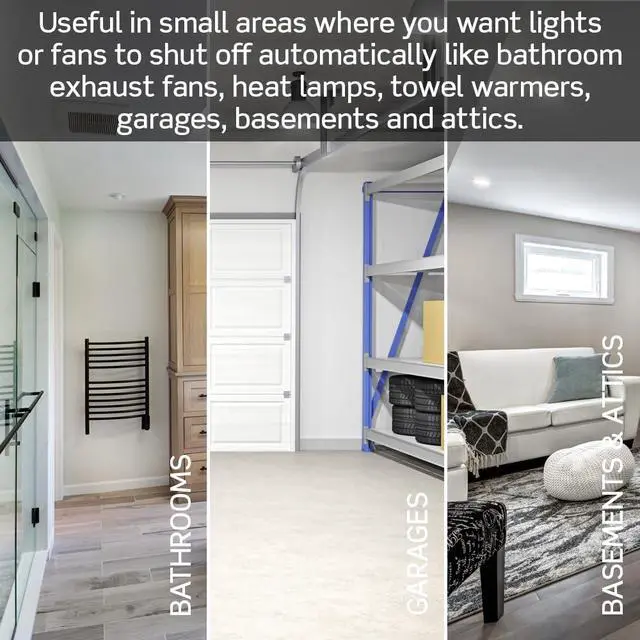
The 60-Minute countdown timer is a practical solution to use in areas such as bathrooms, garages, attics, and basements.


Each button has a preset time with the top button being the longest time ON. Press to choose time ON and will turn OFF automatically when the time expires or press OFF button to turn OFF at any time.

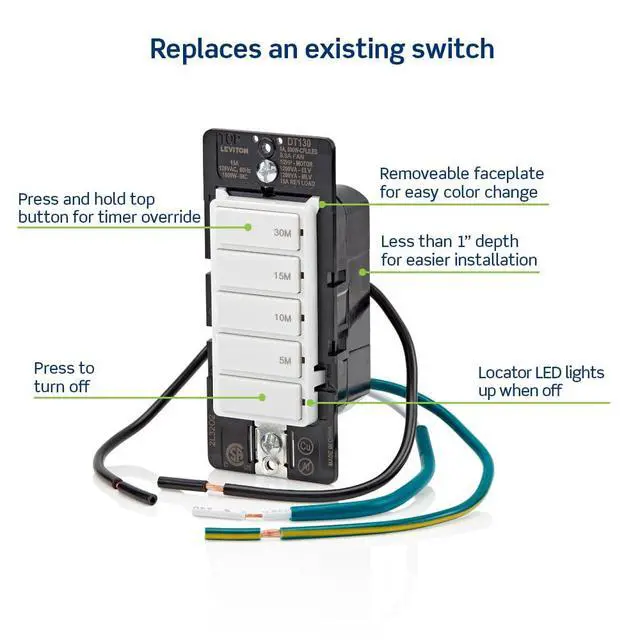
Each timer button has an adjacent LED that will illuminate green to indicate the current countdown time. The locator LED on the bottom button will be ON when the timer is OFF.

Override preset times to keep load ON by pressing and holding the top button for 5 seconds. Exit at any time by pressing any button. The timer will automatically turn OFF after 24 hours.

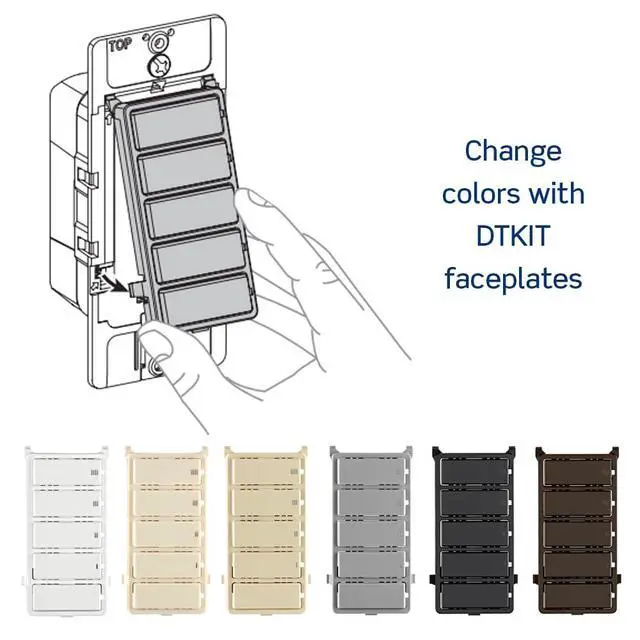
Easily change the color of the countdown timer switch by removing the faceplate and snapping on a new color.
 30-Minute Countdown Timer |  15-Minute Countdown Timer |  60-Minute Countdown Timer |  30-Minute Countdown Timer |  60-Minute Countdown Timer |  24-Hr Programmable Timer |  Smart Wi-Fi Timer Switch | |
|---|---|---|---|---|---|---|---|
Customer Reviews | — | — | — | — | — | — | — |
Price | — | — | — | — | — | — | — |
Model Number | DT130 | DT115 | DT160 | DT230 | DT260 | VPT24 | D215S |
Timer Button Options | 5-10-15-30 Minutes | 2-5-10-15 Minutes | 10-20-30-60 Minutes | 5-10-15-30 Minutes | 10-20-30-60 Minutes | 24-Hour Programmable | App Programmable |
Amperage | 15A | 15A | 15A | 20A | 20A | 15A | — |
Motor Load | ½ HP | ½ HP | ½ HP | 1 HP | 1 HP | 1 HP | 15A |
Single Pole or Multi-Way | Single pole | Single pole | Single pole | SP/multi-way/multi-timer | SP/multi-way/multi-timer | Single pole/multi-way | ¾ HP |
Color Change Faceplates | DTKIT | DTKIT | DTKIT | DTKIT | DTKIT | VPTKT | Single pole/multi-way |
Neutral Wire Required | Optional | Optional | Optional | Yes | Yes | Yes | Yes |
Ground Wire Required | Yes | Yes | Yes | Yes | Yes | Yes | Yes |
Can a countdown timer replace a standard wall switch?
Yes, it is designed to replace a standard wall switch and can be installed with or without a neutral wire. Perfect for retrofit applications where a neutral wire may not be present in the wallbox.
Can a countdown timer switch be used for a ceiling fan?
Yes, press to turn the fan on for the specified time and it will turn off automatically. Note that using a countdown timer will only turn fan on and off, not variate the speed.
Can I use a countdown timer switch for my bathroom light?
A countdown timer can be used to control bathroom lights as well as lighting in other areas. However, do not use to control lighting if it is the only light source in the area.
Does the DT130 countdown timer require a neutral wire for installation?
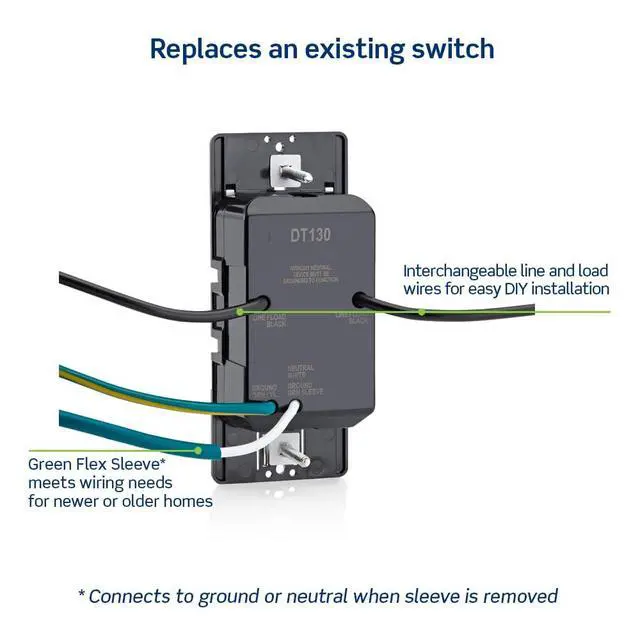
No, a neutral wire is not required. The DT130 has an innovative Green Flex Sleeve that wires to ground when no neutral wire is available. If there is a neutral wire available, remove the green sleeve and connect neutral.
Is there a way I can keep the fan or light on longer than the set times?
Yes, press and hold the top button for 5 seconds to override and keep the timer in an EXTENDED ON state. The timer will automatically turn OFF after 24 hours. To exit the EXTENDED ON state at any time, press any timer button or OFF button.


Replace your current wall switch with a countdown timer to automate fans, motor loads and lights. Four preset time buttons, press to turn on and automatically turns off when time expires.
Make sure the bathroom exhaust fan or lights are not accidentally left on.
Slim profile, flexible wiring options and interchangeable line and load wires reduce the likelihood of miswiring, saving time and making installation a DIY-friendly project.
The 60-Minute countdown timer is a practical solution to use in areas such as bathrooms, garages, attics, and basements.

Press any of the top four timer buttons to turn on for designated time. The adjacent green LED will be lit to indicate the current countdown time.

Press to manually turn the timer off. LED locator light will illuminate when timer is off, making it easier to locate in the dark.

0.96” depth makes it easier to install in smaller wallboxes.

Connects to ground or to neutral when green sleeve is removed, meeting the wiring needs for newer or older homes.

Interchangeable Line and Load Wires mean no need to test for line (hot) wire and helps prevent miswiring.

Interchangeable Line and Load Wires mean no need to test for line (hot) wire and helps prevent miswiring.


Each button has a preset time with the top button being the longest time ON. Press to choose time ON and will turn OFF automatically when the time expires or press OFF button to turn OFF at any time.
Each timer button has an adjacent LED that will illuminate green to indicate the current countdown time. The locator LED on the bottom button will be ON when the timer is OFF.
Override preset times to keep load ON by pressing and holding the top button for 5 seconds. Exit at any time by pressing any button. The timer will automatically turn OFF after 24 hours.
Easily change the color of the countdown timer switch by removing the faceplate and snapping on a new color.
30-Minute Countdown Timer | 15-Minute Countdown Timer | 60-Minute Countdown Timer | 30-Minute Countdown Timer | 60-Minute Countdown Timer | 24-Hr Programmable Timer | Smart Wi-Fi Timer Switch |
|---|---|---|---|---|---|---|
| Customer Reviews | ||||||
| — | — | — | — | — | — | — |
| Price | ||||||
| — | — | — | — | — | — | — |
| Model Number | ||||||
| DT130 | DT115 | DT160 | DT230 | DT260 | VPT24 | D215S |
| Timer Button Options | ||||||
| 5-10-15-30 Minutes | 2-5-10-15 Minutes | 10-20-30-60 Minutes | 5-10-15-30 Minutes | 10-20-30-60 Minutes | 24-Hour Programmable | App Programmable |
| Amperage | ||||||
| 15A | 15A | 15A | 20A | 20A | 15A | — |
| Motor Load | ||||||
| ½ HP | ½ HP | ½ HP | 1 HP | 1 HP | 1 HP | 15A |
| Single Pole or Multi-Way | ||||||
| Single pole | Single pole | Single pole | SP/multi-way/multi-timer | SP/multi-way/multi-timer | Single pole/multi-way | ¾ HP |
| Color Change Faceplates | ||||||
| DTKIT | DTKIT | DTKIT | DTKIT | DTKIT | VPTKT | Single pole/multi-way |
| Neutral Wire Required | ||||||
| Optional | Optional | Optional | Yes | Yes | Yes | Yes |
| Ground Wire Required | ||||||
| Yes | Yes | Yes | Yes | Yes | Yes | Yes |
Can a countdown timer replace a standard wall switch?
Yes, it is designed to replace a standard wall switch and can be installed with or without a neutral wire. Perfect for retrofit applications where a neutral wire may not be present in the wallbox.
Can a countdown timer switch be used for a ceiling fan?
Yes, press to turn the fan on for the specified time and it will turn off automatically. Note that using a countdown timer will only turn fan on and off, not variate the speed.
Can I use a countdown timer switch for my bathroom light?
A countdown timer can be used to control bathroom lights as well as lighting in other areas. However, do not use to control lighting if it is the only light source in the area.
Does the DT130 countdown timer require a neutral wire for installation?
No, a neutral wire is not required. The DT130 has an innovative Green Flex Sleeve that wires to ground when no neutral wire is available. If there is a neutral wire available, remove the green sleeve and connect neutral.
Is there a way I can keep the fan or light on longer than the set times?
Yes, press and hold the top button for 5 seconds to override and keep the timer in an EXTENDED ON state. The timer will automatically turn OFF after 24 hours. To exit the EXTENDED ON state at any time, press any timer button or OFF button.
At Leviton, we build what’s next to light, power, and connect everyday spaces, encompassing electrical, lighting, data networks, and energy management. With a rich history spanning over 120 years, Leviton develops thoughtful solutions that streamline processes, elevate safety standards, increase efficiency, and enhance productivity.


