Are you an E-Blast Insider?

Shop without retyping payment details. Secure shopping made faster.
Check out with PayPal.


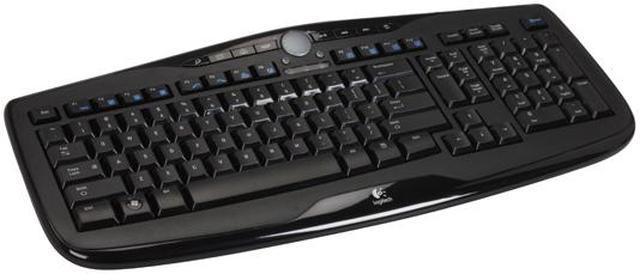
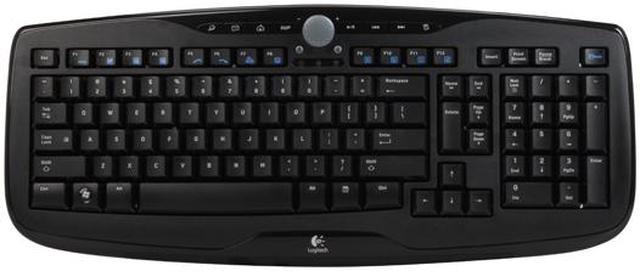
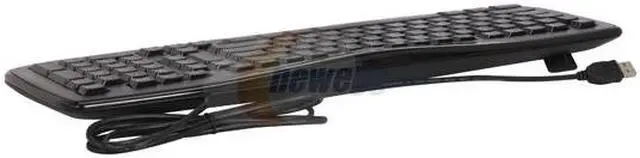
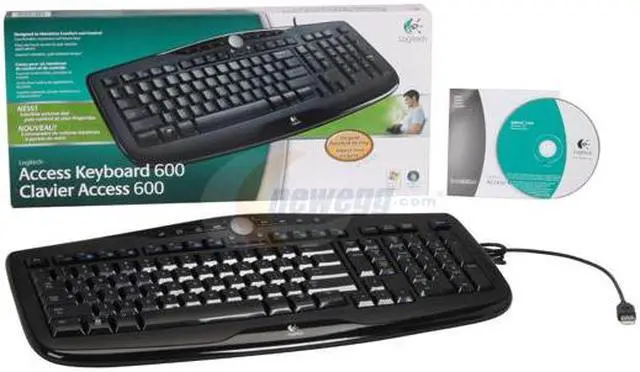
Logitech 920-000021 Black 103 Normal Keys 11 Function Keys USB Standard Access Keyboard 600
- 103 Normal Keys
- 11 Function Keys
- USB
- Logitech
- Black
One-touch controls and programmable keys make this low-profile keyboard your all-access pass to comfort and convenience.
Learn more about the Logitech 920-000021
| Brand | Logitech |
|---|---|
| Model | 920-000021 |
| Keyboard Interface | USB |
|---|---|
| Design Style | Standard |
| Palm Rest | N/A |
| Normal Keys | 103 |
| Function Keys | 11 |
| Keyboard Color | Black |
| Mouse Included | No |
|---|
| Operating System Supported | Windows XP/ Vista |
|---|---|
| System Requirement | 1 USB Port; CD-ROM Drive |
| Windows Vista | Certified for Windows Vista |
|---|---|
| Features | Access Keyboard 600 User Manual Driver Disk |
| Date First Available | April 24, 2007 |
|---|
Pros: Works great for gaming, allows a lot of keys to be pressed at once, unlike a lot of keyboards i have seen. keys aren't too soft or mushy, but there not so firm that its hard to type with. multimedia keys work with no software, completely plug and play, and of course, i love the high gloss edge of the keyboard and keys. not to mention the fact that the keys have printed on letters, numbers, and symbols, unlike some keyboards where they are just annoying stickers that peel.
Cons: key layout is a bit different from most keyboards, which may be bad for some people, so i thought i would state this. you also need to install software to use the "function" keys, just like on a laptop.
Overall Review: thank you logitech for yet another wonderful product, i have heard a lot about your quality products, and, i am not disappointed for buying this keyboard. keep up the good work, now-a-days everything seems so cheaply built, yet this keyboard is of superior quality, and i am sure i could get at least five years of heavy use out of it. which, for the price, is beyond amazing. i have not tried the twelve function keys, theres one on each F key, i havnt used them due to the fact that i am too lazy to install the logitec software. i love this keyboard, it will take some getting use to, but thats normal for any device you are not familiar with. on a side note, i bought every part of my computer from newegg, except for the case i am currently using, its a "make do" case 'till i can afford a new one. i love neweggs service, and i will continue to buy from them, and logitech in the future
Pros: Fully compatible with Vista & 64bit OS's. I had the Elite keyboard but when i moved to Vista 64bit, I was told that Logitech would NOT be creating compatible drivers. (so the functions keys could not be customizable) Plus its a logitech, logitech = quality.
Cons: um, nothing. when you press the key, the letter/number/symbol shows up on the screen...
Overall Review: if your used to older style keyboards (ex: Logitech Elite) it takes a little getting used to the new palcement of the Delete key. (google yourself some pictures) But after several attempts it will be like you never knew anything else
Pros: It looks good, works just as it's suppose to, and it's affordable. You cannot go wrong with this keyboard. I've purchased four of these already and I love them. Shortcuts on the top of the keyboard are convenient and nice to have. There is no software to install because it's plug & play compatible. The volume tuner is also a nice addition, though I don't use it much out of ignorance.
Cons: The shiny exterior of keyboard sometimes sticks to your hand when typing after a while... can be annoying at times. If your hands are sweaty or greasy from prolonged typing, you'll leave fingerprints all over. It can easily be cleaned, but the fact that you'll actually NEED to clean it is a con for me. Other than that, I am very pleased with this product.
Pros: Awesome glossy finish, key's aren't raised so high (low susceptiblity to having them broken off), sturdy build and a good solid USB connector. Great tactile feel, and nice hotkeys. All around great product.
Cons: Volume control takes more than one spin to get the volume all the way up or down. This is very minor, but a con nonetheless.
Overall Review: Didn't bother installing setpoint (the included software) becauseI don't really need the Fn keys. If you want the use the Function keys though, you're gonna need it.
Pros: Great key placement, quick response, good for gaming if you dont want to spend at least an extra $30 to get the Saitek or $50 - $60 extra for the Razer or Logitech gaming keyboard.
Cons: no backlight
Overall Review: I plan on keeping this board until I find a G15 for around $50-60. When I bought this keyboard I told myself that I don't really game that much in low light situations so I don't need a lit keyboard...I now realize that it would be a huge convenience because I play A LOT in low light situations. If you are a gamer, chances are you will play in low lighting. Get a lit keyboard and save yourself time and money buying serveral different models like me.
Pros: Works as should, somewhat comfortable, looks alright.
Cons: My space key makes an annoying clicking sound when pressed. Im used to it now but it was annoying at first and not that big of a deal anyway.
Overall Review: Buy it if you need a cheap keyboard that works to par.
Pros: Well made, no errors or dropped keystrokes or anything so far. Very low profile, keys aren't super clicky and feel pretty good. Haven't messed around with the key mappings too much yet but the functionality is there. Been playing TF2 with it for a week or so and it's served me pretty well.
Cons: No scroll lock key. Not there. I had to bind two of the [F] keys using setpoint and a scroll lock executable program I downloaded in order to restore this functionality. If you have a serious need for a scroll lock key I would suggest looking elsewhere.
Overall Review: Surely they could have found a place for a scroll lock key. Otherwise it's a solid keyboard.
Warranty & Returns
Warranty, Returns, And Additional Information
Warranty
- Limited Warranty period (parts): 2 years
- Limited Warranty period (labor): 2 years
- Read full details
Return Policies
- Return for refund within: 30 days
- Return for replacement within: 30 days
- This item is covered by Newegg.com's Standard Return Policy
Manufacturer Contact Info
- Manufacturer Product Page
- Manufacturer Website
- Support Phone: 1-646-454-3200
- Support Website
- View other products from Logitech


Pros: High quality manufacture from Logitech; slick design and color; tight feel on keypress.
Cons: This keyboard is still technically QWERTY, but little things have been moved around. The Delete Key is now as large as the enter key, the home/end keys have been shifted, and the scroll lock is completely gone. Not a big deal, but downsides nonetheless.
Overall Review: After working with this keyboard for about 4 months, I'm still getting use to the new layout. It also turns out I had an application that could use the scroll lock key. I never noticed until that key was gone. I didn't install the special keyboard application, so most of the special function toggles don't work.