

Your Browsing History



| Brand | Lulu Software |
|---|---|
| Model | SDPDFPROLICA |
| Name | Soda PDF Professional |
|---|---|
| Version | Professional |
| Operating Systems Supported | Windows |
| Packaging | Retail |
| System Requirements | OS: Windows XP, Windows Vista 32 & 64, Windows 7 32 & 64 Processor: Pentium III or equivalent RAM: 512 MB (1 GB for Vista & 7) Disk Space: 100 MB or more |
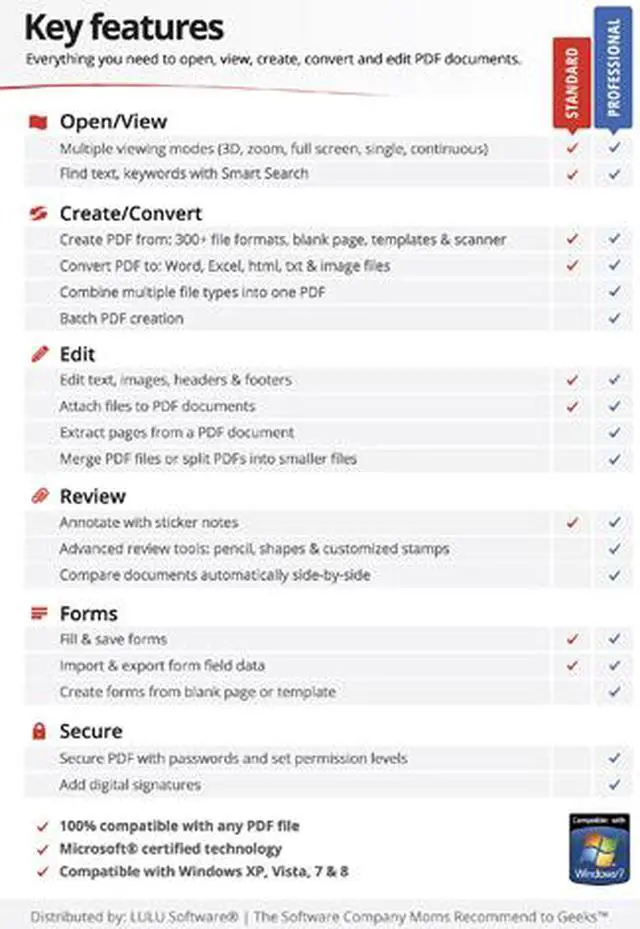
| Feature | Soda PDF Professional is a powerful PDF solution.Open, create, edit, convert and secure PDF documents quickly and easily with this full-featured PDF software. Increase your efficiency with improved editing functions and a vast array of collaboration and annotation tools designed to make working with others a breeze. - Create professional looking PDFs & forms - Document comparison & annotation - Password security & digital signatures - Use professional templates & create forms - Automatic Document Comparison - Encrypt PDF files & manage digital signatures - Collaborate easily with annotation tools - Compatible with OCR plugin - Extract pages of a PDF for use elsewhere (New for 2012) - Split PDF documents into multiple smaller PDF files (New for 2012) Create Custom Dynamic Stamps and Insert Them Anywhere in a PDF Use dynamic stamps to add quick comments anywhere in a PDF document. Create your own custom dynamic stamps and save them for future use. Review and Collaborate Easily with Soda PDF's Annotation Tools Use Sticker notes to add comments anywhere in a PDF document or use the drawing tools to mark an element that requires attention. Ensure the Safety of your PDF Documents with 256-bit Encryption By adding passwords and controlling permission levels for printing & editing, you can be sure that only the intended people will have access to them. Mark Elements in a PDF Document that Require Attention or Revision Use comment features like the Pencil tool to mark an element in a PDF document that requires revision. |
|---|
| First Listed on Newegg | April 24, 2012 |
|---|
