




 here!
I’m your shopping assistant for PC builds, upgrades, and everything tech.
Got questions? Ask away!
Start a conversation
here!
I’m your shopping assistant for PC builds, upgrades, and everything tech.
Got questions? Ask away!
Start a conversation



Any questions? Ask CelesteSM will help you find out quickly.


We want to ensure your holiday shopping this year is hassle-free. That’s why we’re automatically extending our return policies on almost every product! For purchases placed between November 1st, 2026 and December 31, 2026 you will have until January 31, 2027 to return your product.
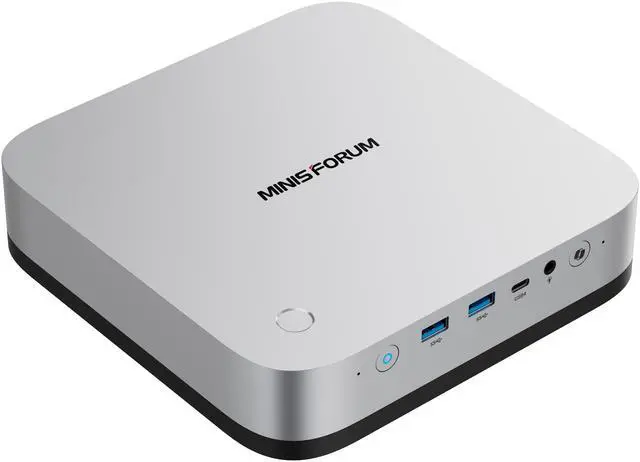
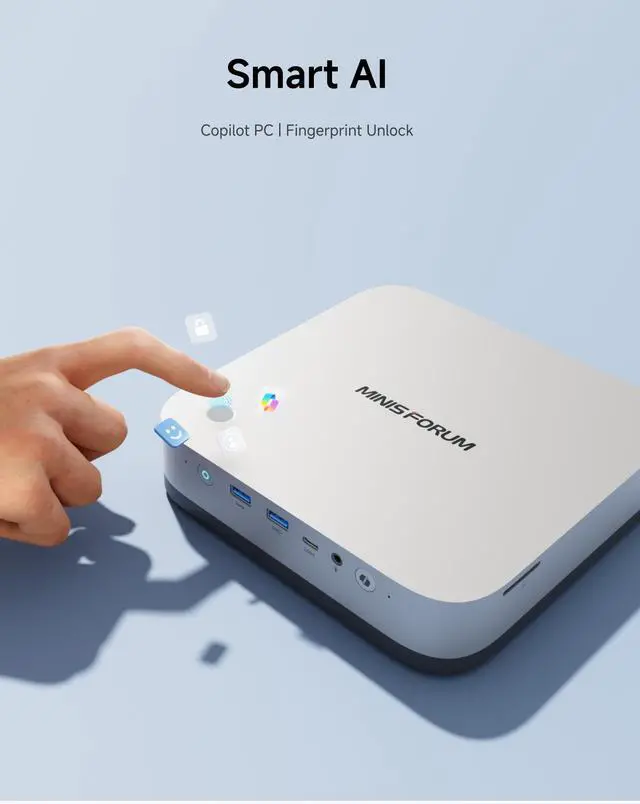
The MINISFORUM X1 Pro-470 is a high-performance AI mini PC for developers, creators, and power users who want Ryzen AI 9 HX 470 compute, Radeon 890M graphics, quad-display support, Wi-Fi 7, dual 2.5GbE, and room to expand memory and storage in a compact desktop.
| Attribute | Value |
|---|---|
| Best For | AI-ready compact mini PC with a Ryzen AI 9 HX 470 CPU and Radeon 890M iGPU, suited for AI-accelerated workloads, heavy multitasking, and multi-display productivity; supports external displays via HDMI 2.1 FRL and DisplayPort 2.0 |
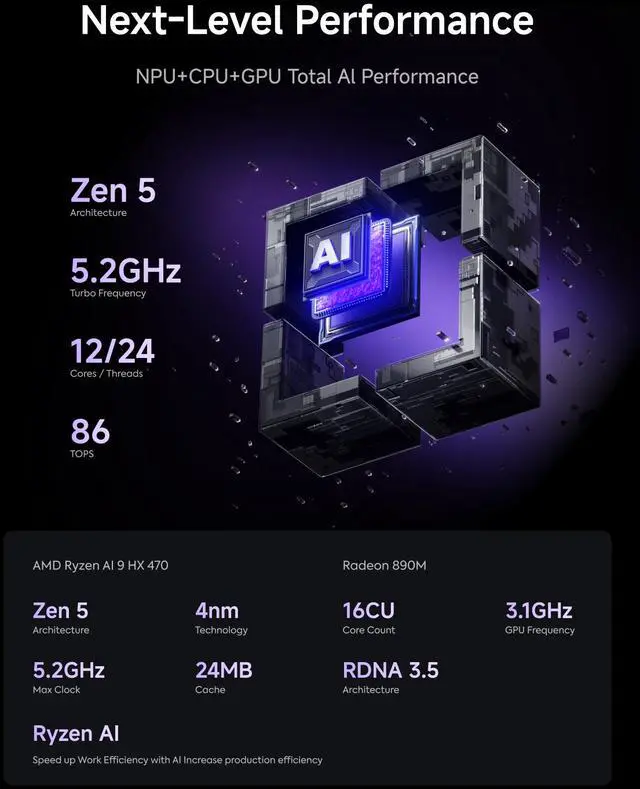
| Processor And Core Count | AMD Ryzen AI 9 HX 470 — 12 cores / 24 threads, up to 5.2 GHz |
| AI And NPU Performance | AI Ready with overall NPU performance up to 86 TOPS |
| Graphics And Display Output | Integrated AMD Radeon 890M graphics with 1x HDMI 2.1 FRL and 1x DisplayPort 2.0 for high-resolution external monitors |
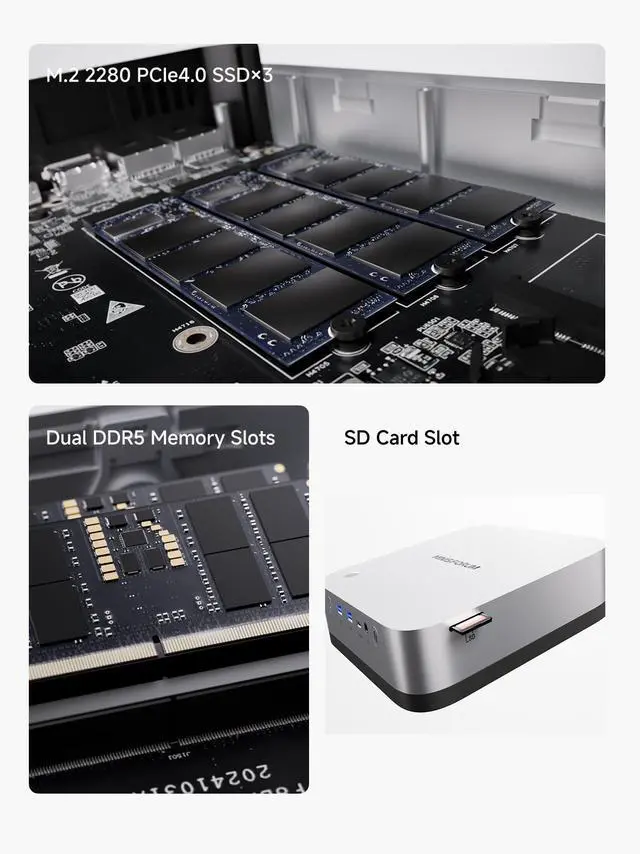
| Memory Configuration | 32 GB installed across 2 SO-DIMM slots (2 x 262Pin SO-DIMM), DDR5-5600 support, expandable up to 128 GB |
| Storage And Expansion | Includes 2 TB SSD; three M.2 2280 NVMe slots (2 × PCIe4.0 x4, 1 × PCIe4.0 x1), each slot supported up to 4 TB for additional NVMe storage |
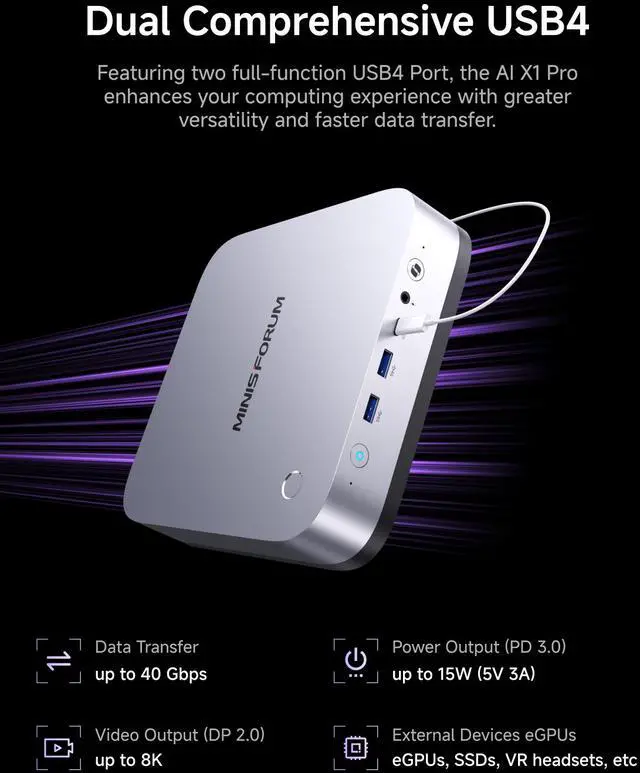
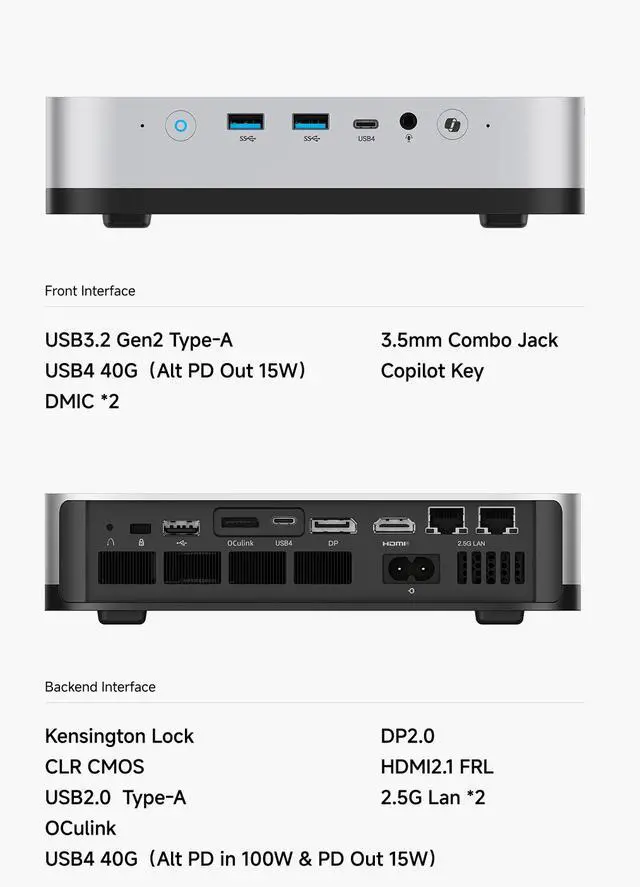
| Ports And High-Speed I/O | Front: 2 × USB 3.2 Gen2 Type-A, 1 × USB4 (Alt PD Out 15W, 40 Gbps), 3.5 mm combo jack, SD card slot; Rear: 1 × USB 2.0 Type-A, 1 × USB4 (Alt PD in 65–100W & PD Out 15W, 40 Gbps), OCuLink |
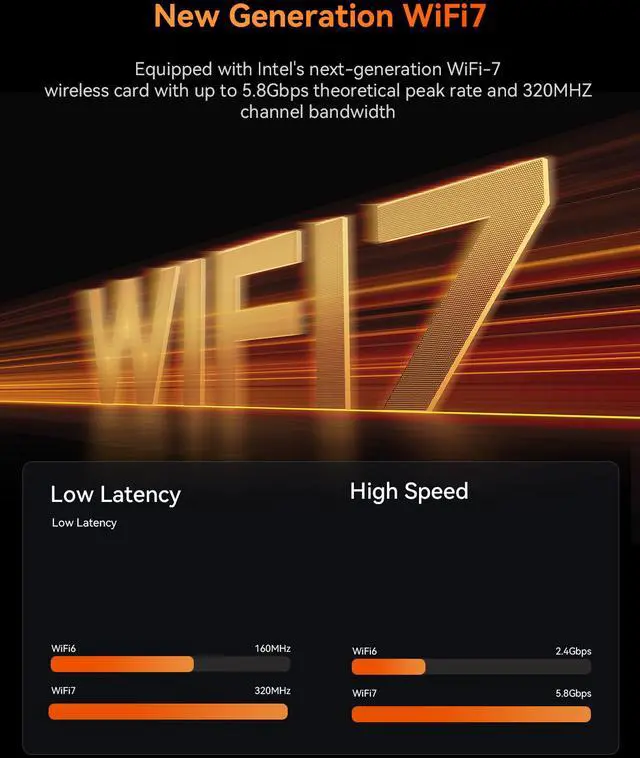
| Wired And Wireless Networking | Dual gigabit-class wired LAN with 2 × RJ45 at up to 2.5 Gbps, Wi‑Fi 7 (802.11be) wireless, and Bluetooth 5.4 |
| Power And Physical | AC input 100–240V 50/60 Hz with internal DC adapter 19V/7.1A (134.9 W); compact footprint 195 × 195 × 42.5 mm; weight 1.36 kg |
| Model Identifiers | MINISFORUM X1 Pro-470 in Silver |
| Box Contents | Includes X1 Pro-470 mini PC, US power adapter, HDMI cable, and manual |
Q: Should I buy the MINISFORUM AI X1 Pro-470 or a Ryzen AI 9 HX 370 mini PC?
A: Choose the AI X1 Pro-470 if you want the newer Gorgon Point refresh, the same Radeon 890M class of graphics with a modest CPU/iGPU clock uplift, and the X1 Pro chassis features such as dual 2.5GbE, dual USB4, OCuLink, and three M.2 slots. Choose an HX 370 mini PC instead if price is the main priority, because real-world positioning across reviews suggests the step from HX 370 to HX 470 is an incremental upgrade rather than a category change. This comparison is strongest when the X1 Pro-470 is close in price to HX 370 systems with similar memory and storage.
Q: Is the AI X1 Pro-470 worth it over an older Radeon 780M mini PC?
A: Yes, if you want a clearer step up in integrated graphics, CPU headroom, and AI capability without moving to a larger desktop. Review data consistently places Radeon 890M systems ahead of typical Radeon 780M mini PCs in gaming and compute-oriented iGPU workloads, while the AI X1 Pro-470 also adds newer platform features such as Wi‑Fi 7, dual USB4, OCuLink, and up to three NVMe drives. A 780M mini PC still makes sense for lighter office use or lower-cost emulation and media tasks, but the AI X1 Pro-470 is the more appropriate upgrade for users who want newer games, local AI experiments, or broader expansion.
Q: Should I choose the 32GB AI X1 Pro-470 or upgrade to a higher-memory dual-channel setup?
A: Choose the higher-memory dual-channel setup if you plan to game on the Radeon 890M, run local AI workloads, or keep many creator apps open at once. The AI X1 Pro-470's integrated GPU and shared-memory AI workloads benefit heavily from memory bandwidth, and multiple reviews and user testing point to the default single-module style configuration being a meaningful limiter. The 32GB version is still suitable for general productivity and basic development, but dual-channel memory is the better fit for buyers who want the platform's graphics and AI features to scale closer to its hardware potential.
Q: Is the AI X1 Pro-470 better for performance-first buyers or portability-first buyers?
A: The AI X1 Pro-470 is the better choice for performance-first buyers who still want a compact desktop. Its larger mini-PC footprint makes room for dual 2.5GbE, OCuLink, two USB4 ports, three M.2 slots, and an internal power supply, which is a more workstation-style design than ultra-small travel-oriented mini PCs. Portability-first buyers may prefer a smaller system with fewer expansion options, but the X1 Pro-470 is the more practical option when sustained performance, storage expansion, multi-display use, or eGPU flexibility matter more than minimizing size.
Q: Should I get the AI X1 Pro-470 or a mini PC with OCuLink removed and simpler I/O?
A: Choose the AI X1 Pro-470 if you want the option to extend the system later with an external GPU, faster external expansion, or a more flexible desk setup. Official positioning and reviews both emphasize that OCuLink, dual USB4, and triple-storage support are part of what separates the X1 Pro line from simpler mini PCs built mainly for office duty. A less expansion-focused mini PC can still be the better value for web, streaming, and office work, but the AI X1 Pro-470 is the more future-flexible choice for buyers deciding between integrated graphics now and stronger graphics later.
Q: Is the MINISFORUM X1 Pro-470 a good choice if I want a small desktop for office work, meetings, and multitasking?
A: Yes. It is well suited for office work, video meetings, web apps, and heavier multitasking because it combines a 12-core Ryzen AI 9 HX 470 processor, 32GB DDR5 memory, fast SSD storage, and support for up to four displays. The main trade-off is that this Newegg configuration ships without an operating system, so it is better for buyers who are comfortable installing Windows or Linux themselves.
Q: Can this mini PC replace a larger desktop for multiple monitors and a clean desk setup?
A: For many users, yes. The X1 Pro-470 has HDMI 2.1, DisplayPort 2.0, and two USB4 ports, so it is designed for multi-monitor setups and high-speed docking-style connections in a much smaller footprint than a tower PC. The limitation is graphics headroom: the integrated Radeon 890M is strong for an iGPU, but buyers doing sustained high-end 3D or workstation GPU work may still prefer a full desktop or an eGPU setup.
Q: Who is the X1 Pro-470 best for, and who should skip it?
A: It is best for power users who want a compact desktop for productivity, development, home lab use, light-to-moderate content creation, fast networking, and flexible expansion. Its dual 2.5GbE, Wi-Fi 7, OCuLink, two DDR5 slots, and three M.2 slots make it more appealing to enthusiasts than to casual buyers. Buyers who want a simple plug-and-play family PC should consider skipping this specific version, because it is sold without an OS and is more specialized than a typical prebuilt mini PC.
Q: Is it a good buy for gaming by itself, or does it make more sense with an external GPU?
A: By itself, it should be good for lighter and mid-range gaming thanks to the Radeon 890M integrated graphics, but it is still an iGPU-based mini PC rather than a dedicated gaming desktop. Its OCuLink port makes it a more interesting option for buyers who may want to add an external GPU later, because that gives a clearer upgrade path than many mini PCs without OCuLink. If gaming is the main priority from day one, a system with a discrete GPU will usually be the better value.
Q: What is the main trade-off versus a similar mini PC that includes Windows out of the box?
A: The main trade-off is convenience versus flexibility. The X1 Pro-470 offers stronger enthusiast features than many mainstream mini PCs, including dual 2.5GbE, OCuLink, Wi-Fi 7, dual USB4, and broad storage expansion, but this listing does not include an operating system. A comparable Windows-included mini PC is easier to deploy immediately, while the X1 Pro-470 makes more sense for buyers who value hardware expandability and do not mind setting up the software themselves.
Q: Is the MINISFORUM X1 Pro-470 a good fit for a compact work and home setup?
A: Yes, if you want a small desktop with strong general performance, modern connectivity, and upgrade room. The Ryzen AI 9 HX 470, 32GB DDR5, dual 2.5GbE, Wi-Fi 7, four-display output, OCuLink, and three M.2 slots make it well suited for office work, development, multitasking, media work, and homelab use. It is less suitable if you want the lowest-cost mini PC or if you do not need its expansion and networking features.
Q: Should I buy the X1 Pro-470 over the older HX 370 version?
A: Usually only if the price gap is small. Community discussion repeatedly notes that the HX 470 is a minor refresh over the HX 370, with very similar overall behavior and only modest gains. If both models are close in price, the 470 is the safer pick. If the 370 is meaningfully cheaper, it is often the better value.
Q: Is the X1 Pro-470 good for gaming or should I plan on an eGPU?
A: It is good for light to moderate gaming on the Radeon 890M, but it is not a substitute for a dedicated gaming desktop. Its OCuLink port is a meaningful advantage if you may add an external GPU later. Buy it for compact gaming plus flexibility, not for top-tier native GPU performance.
Q: Are there any important trade-offs before buying the X1 Pro-470?
A: Yes. The main trade-offs are price, the small real-world step up over HX 370 models, and mixed community confidence around brand support and after-sales service. It makes more sense for buyers who specifically value dual 2.5GbE, OCuLink, multiple SSD slots, and high-end I/O than for buyers shopping mainly on price.
Q: Is the X1 Pro-470 a good choice for local AI or LLM use?
A: It is reasonable for small local AI workloads, experimentation, and AI-assisted desktop use, but it is not ideal for larger local LLMs. The built-in NPU and fast APU help with AI-ready workflows, yet community discussion suggests larger models quickly run into performance limits. It is best viewed as a compact all-purpose PC with some local AI capability, not a dedicated LLM box.


