

Your Browsing History
- Free 30-day Returns
$269.99
Best Sellers
 Top Rated
- $346.78
- + FREE SHIPPING
 Hot Seller
- $352.81
- + $28.89 Shipping

Meet Your Seller


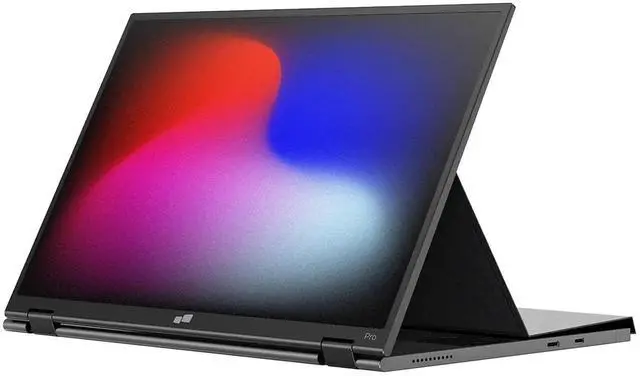
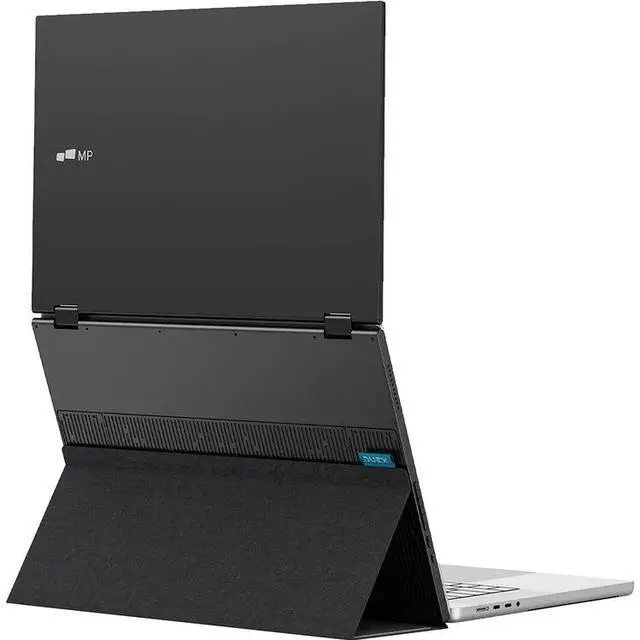
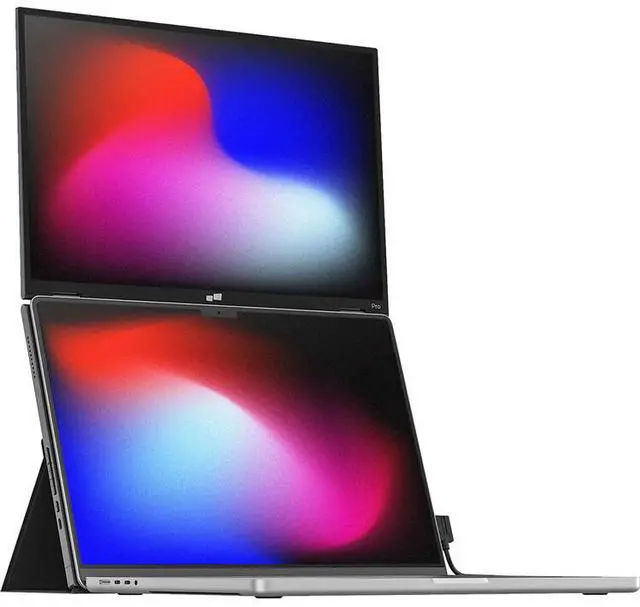


Mobile Pixels Duex Float 2.0 Pro 15.6" Portable Monitor 101-1011P03
- 16" 2.5K DUEX FLOAT 2.0 PRO Portable Monitor: Work or play with pixel-perfect clarity - 2560x1600 resolution, 100% sRGB accuracy, and 120Hz refresh rate; Ideal for photo editing, 4K video scrubbing, or buttery-smooth gaming – no calibration needed
- 65W Pass-Through Charging: Never choose between screens and life. Charge your laptop and Duex Float 2.0 laptop second screen simultaneously via USB-C; Perfect for flights, cafes, or marathon creative sessions
- 3-in-1 Magnetic Ergonomics: Snap. Tilt. Dominate; Newly designed integrated kickstand enable stacked, presentation, or freestanding modes – ergonomic alignment anywhere; Thinner than a magazine!
- Anti-Glare + Dual Speakers: Fight eye strain & tinny audio. Anti-glare matte screen cuts reflections during long workdays, while built-in stereo speakers deliver crisp calls/music without headphones
- Universal Plug & Play: Works with EVERYTHING: MacBooks, Windows, iPhone 15+, Samsung DeX, Switch (via Mini HDMI 2.0). Zero drivers – just plug in and productivity explodes.
+
+
Overview
Specs
Reviews
See all Q & A 
Any questions? Our AI mode will help you find out quickly.
Try me now
Sleek Portability Meets Premium
Mobile Pixels has taken everything you loved about the Duex Float 2 Pro and made it even better. The Duex Float 2 Pro isn't just a second screen, but a productivity powerhouse that fits into your workflow. This 16 2650 x 1600 display is 0.7 thin and lightweight at 2.9 lb allowing it to be easily packed and transported wherever you go. Using a USB-C cable, it can quickly and easily be set up for both video and power. Stacked Mode
Use it as your secondary monitor as an extended display or mirrored display. Achieve a healthy ergonomic alignment while working on the go. Presentation Mode
You can also flip the screen and easily share content with someone in front of you, such as a presentation to your team at work. Free-Standing Mode
Use the built-in kickstand and turn the Duex Float 2 Pro into an independent display, making it perfect for gaming or viewing documents. Integrated Kickstand
Mobile Pixels redesigned the integrated kickstand of the Duex Float 2 Pro, allowing it to both support this display and serve as a protective screen. The integrated kickstand also allows you to use this display without magnetically attaching it to your laptop using four included magnets. Set It Up Quickly
- Open the cover and rotate the screen out.
- Fold the cover back, stick it to the base part of the monitor.
- Attach the monitor to your laptop via optional magnets.
- Connect the cable to your laptop. Pairs with Your Devices
Set up the Duex Float 2 Pro with Windows and macOS laptops using a single USB-C cable that transmits both video and power for efficient plug-and-play and quick transitions. If your laptop doesn't have a USB-C port or has one without DP Alt mode, you can also use the HDMI cable for video. No software is required. iOS and DeX
Extend your smartphone's screen with USB-C connectivity. This works with the iPhone 15 and newer or devices that support Samsung DeX. Crisp and Immersive Sound
Engineered with dual integrated speakers, the Duex Float 2 Pro blends outstanding screen performance with stereo sound for an immersive multimedia experience. Easy On the Eyes
The anti-glare screen minimizes reflections, which can cause eye strain and fatigue when viewing screens for long periods. Also, the reduced glare and improved visibility contribute to a more comfortable and enjoyable viewing experience, whether you're watching movies, playing games, or working on tasks.
Mobile Pixels has taken everything you loved about the Duex Float 2 Pro and made it even better. The Duex Float 2 Pro isn't just a second screen, but a productivity powerhouse that fits into your workflow. This 16 2650 x 1600 display is 0.7 thin and lightweight at 2.9 lb allowing it to be easily packed and transported wherever you go. Using a USB-C cable, it can quickly and easily be set up for both video and power. Stacked Mode
Use it as your secondary monitor as an extended display or mirrored display. Achieve a healthy ergonomic alignment while working on the go. Presentation Mode
You can also flip the screen and easily share content with someone in front of you, such as a presentation to your team at work. Free-Standing Mode
Use the built-in kickstand and turn the Duex Float 2 Pro into an independent display, making it perfect for gaming or viewing documents. Integrated Kickstand
Mobile Pixels redesigned the integrated kickstand of the Duex Float 2 Pro, allowing it to both support this display and serve as a protective screen. The integrated kickstand also allows you to use this display without magnetically attaching it to your laptop using four included magnets. Set It Up Quickly
- Open the cover and rotate the screen out.
- Fold the cover back, stick it to the base part of the monitor.
- Attach the monitor to your laptop via optional magnets.
- Connect the cable to your laptop. Pairs with Your Devices
Set up the Duex Float 2 Pro with Windows and macOS laptops using a single USB-C cable that transmits both video and power for efficient plug-and-play and quick transitions. If your laptop doesn't have a USB-C port or has one without DP Alt mode, you can also use the HDMI cable for video. No software is required. iOS and DeX
Extend your smartphone's screen with USB-C connectivity. This works with the iPhone 15 and newer or devices that support Samsung DeX. Crisp and Immersive Sound
Engineered with dual integrated speakers, the Duex Float 2 Pro blends outstanding screen performance with stereo sound for an immersive multimedia experience. Easy On the Eyes
The anti-glare screen minimizes reflections, which can cause eye strain and fatigue when viewing screens for long periods. Also, the reduced glare and improved visibility contribute to a more comfortable and enjoyable viewing experience, whether you're watching movies, playing games, or working on tasks.
Warranty & Returns
Warranty, Returns, And Additional Information
Warranty
- Please contact the Seller directly for warranty information. Warranty information may also be found on the Manufacturer's website.
- Read full details
- CONTACT
Return Policies
- Return for refund within: 30 days
- Return for replacement within: non-replaceable
- This item is covered by Electronic Express Return Policy
Manufacturer Contact Info
- For a directory of all our manufacturers, please click below.
- Manufacturers Directory
LOADING...
LOADING...