




 here!
I’m your shopping assistant for PC builds, upgrades, and everything tech.
Got questions? Ask away!
Start a conversation
here!
I’m your shopping assistant for PC builds, upgrades, and everything tech.
Got questions? Ask away!
Start a conversation





Any questions? Ask CelesteSM will help you find out quickly.
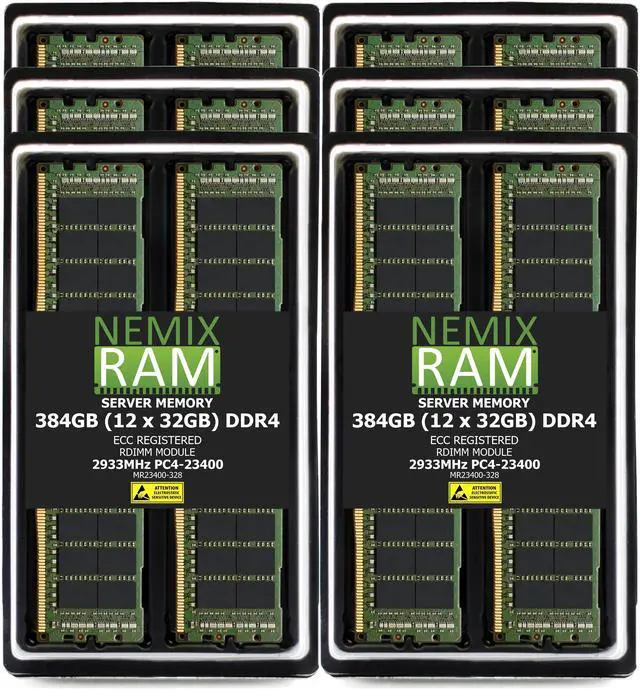
The NEMIX RAM 384GB kit is a 12-module DDR4-2933 ECC Registered DIMM upgrade for servers that support 32GB 2Rx8 RDIMMs at this speed, voltage, and configuration.
| Attribute | Value |
|---|---|
| Best For | Server memory upgrades for systems requiring DDR4-2933 ECC registered DIMMs |
| Capacity | 384GB total across 12 × 32GB modules |
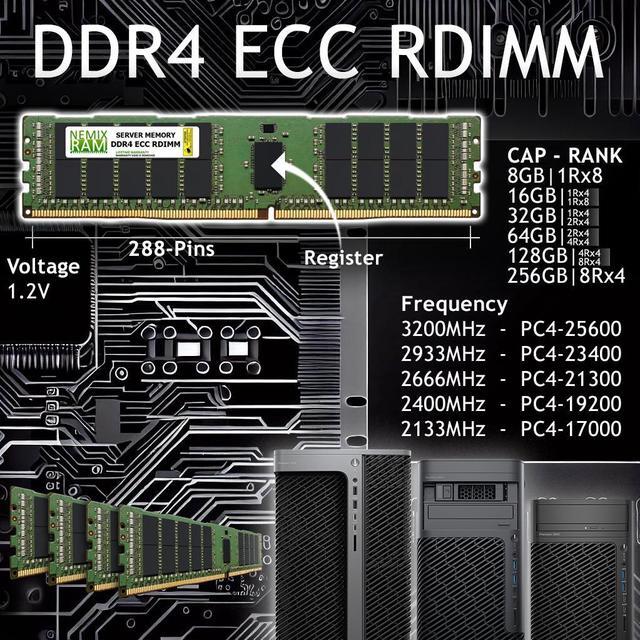
| Memory Type And Configuration | DDR4 ECC registered DIMMs, 2Rx8 rank configuration |
| Speed And Timing | 2933MHz (PC4-23400), CAS latency 21 |
| Voltage | 1.2V |
| Memory Chip Manufacturers | Samsung, Micron, or Hynix |
| Model Identifiers | NEMIX RAM; Part#: MR23400-328K12-SM-SYS-6029U-TR4 |
Q: Should I choose this 384GB kit or a 192GB (6 x 32GB) configuration?
A: Choose the 384GB kit when your server workload benefits from twice the installed memory capacity. Both configurations use 32GB modules, while the 384GB kit contains 12 modules. Confirm the module population against your server and processor configuration.
Q: Is this 384GB kit or a 768GB (24 x 32GB) configuration a better fit?
A: Choose 384GB when that capacity meets your workload and you want to leave room for future memory expansion. Choose 768GB when your workload calls for twice the capacity; the platform has 24 DIMM slots, so a 24-module configuration uses all of them.
Q: For 384GB, should I use this 12 x 32GB kit or 24 x 16GB modules?
A: Both configurations total 384GB. The 12 x 32GB kit uses 12 DIMM slots, leaving more slots available for a later expansion; a 24 x 16GB configuration uses all 24 slots. Check the server’s supported module types and slot-population rules before choosing.
Q: Should I choose this DDR4-2933 kit or a DDR4-2666 configuration?
A: Choose this DDR4-2933 kit when your server’s processor and memory configuration support that speed. A DDR4-2666 configuration is an option when that is the speed specified for your system; supported memory speeds depend on the platform configuration.
Q: Will this memory work in a standard desktop PC?
A: No. This is ECC registered server memory (RDIMM), and the product listing says it is not for PC computers. Use it only in a system that supports DDR4 ECC RDIMMs.
Q: How can I tell whether this kit is compatible with my server?
A: Check the server and processor documentation for support for DDR4-2933 ECC Registered DIMMs, 32GB modules, and 2Rx8 rank organization. Also confirm that the system supports 12 DIMMs and the intended 384GB total; matching the DDR generation alone does not establish compatibility.
Q: What does the kit include, and how much memory does it provide?
A: The kit contains 12 modules of 32GB each, for 384GB total. Each module is DDR4-2933, ECC registered, 2Rx8, and rated at 1.2V.
Q: Does the kit include a warranty?
A: The product information states that NEMIX RAM offers a lifetime replacement warranty. Check the seller’s warranty terms for coverage and claim requirements.
Q: Will this memory work in a regular desktop PC?
A: No. This kit is registered ECC RDIMM server memory, and the product listing says it is not for PC computers. Reddit discussions likewise warn that RDIMMs do not work in typical consumer systems; check that the motherboard and CPU specifically support registered DIMMs before buying.
Q: How can I check whether this kit is compatible with my server?
A: Check the server and CPU documentation for support for DDR4 ECC registered RDIMMs, 32GB modules, 2Rx8 rank, and the kit’s 2933MHz speed and total 384GB capacity. Also verify the system’s DIMM population rules; a matching form factor alone does not guarantee compatibility.
Q: What should I check if the server does not recognize all the installed modules?
A: Confirm that the DIMMs are seated in the slots required by the server’s population guide, and that the CPU, motherboard, and BIOS support the installed module configuration. A Reddit NEMIX RDIMM discussion describes a system recognizing only some installed sticks, so verify the configuration before assuming the full kit will be detected.


