

Your Browsing History

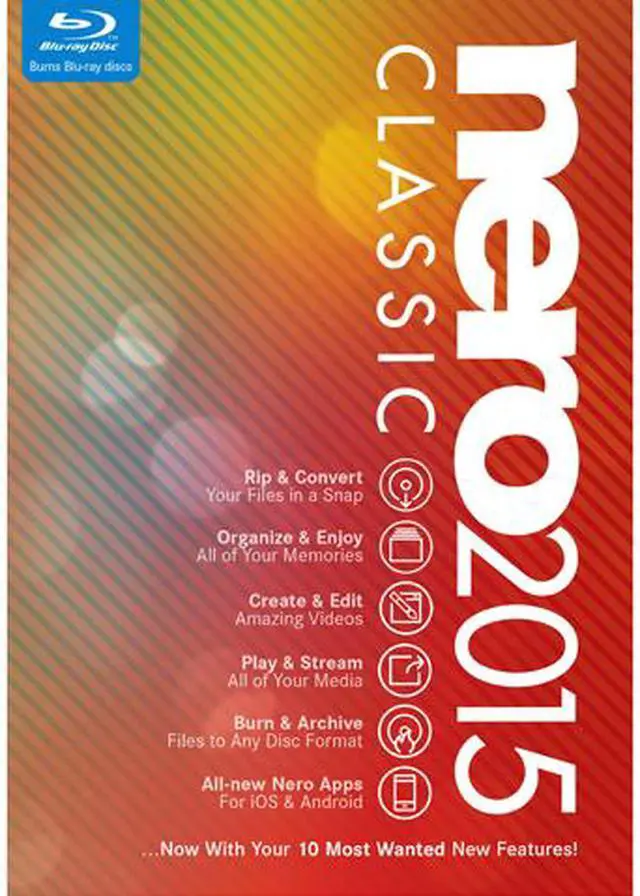

Nero 2015 Classic - Download
- Even faster video converting and burning
- Hollywood-grade font styles and motion text effects for video
- Browse & tag photos and videos with places ("Geotags")
Overview
Specs
Reviews (2)
See all Q & A 
Any questions? Our AI mode will help you find out quickly.
Try me now

nero2015 CLASSIC
- NEW! Nero AirBurn: Burn files straight from your smartphone
- NEW! Nero Launcher with
instant access to the entire suite - Burn & Copy discs like a pro
- Hollywood-grade video editing
for everyone
What's new in Nero 2015 Classic?
It's the Nero you always loved, with 10 amazing features you always wanted.
- Stream videos to any iOS & Android device
- Nero AirBurn: Burn files straight from your Android & iOS device
- Browse & tag photos and videos with places ("Geotags")
- New Nero Launcher with instant access to the entire suite
- Change the video-disc format on-the-fly when authoring
- Hollywood-grade font styles and motion text effects for videos
- Instant access to your Nero cloud
- Five new mobile apps to help you learn and master Nero 2015
- Stream to any TV or media player with auto-transcoding
- Even faster video converting and burning
NEW! Stream to your iOS & Android Device
- Use "Play to" to stream files directly from your PC to your smartphone or tablet with Nero MediaHome Receiver App
- Watch video, slideshows, and listen to music on-the-go without worrying about file formats
- Works on your iOS and Android

NEW! AirBurn
- NEW! Select precious photos, videos and even documents on your phone or tablet
- NEW! Send these files directly to your PC for instant burning
- NEW! Works on your iOS and Android

NEW! Organize Photos & Videos with Geotags
- All-new support for geotags right within Nero MediaHome
- Supports your camera's geotags - or just add your own!
- Use Nero MediaBrowser with places view in non-Nero applications, too
- Create and enjoy slideshows and videos based on places you visited
- A new way to enjoy your memories

NEW! All-in-one launcher
- New, sleek launcher for all your beloved Nero applications, such as Nero Video, Nero Burning ROM and Nero MediaHome
- Quick access to all video tutorials included many new ones
- Fast access to your new Nero mobile apps

NEW! Switch Video-Disc Format on-the-fly
- No need to create a new project if you want to switch the output format
- Switch to different disc target formats on-the-fly
- Finally available in the authoring and burning tool

NEW! Font Styles & Motion Text Effects
- High-class fonts and styles for your Nero Video project
- 20 pre-set design styles for drag and drop
- Save any personal style for later use
- All-new motion text effects
- Transforms your home videos into Hollywood-grade blockbusters

NEW! Instant Access to Your Nero Cloud
- Enjoy and view photos, music and videos you stored on your Nero BackItUp cloud
- Nero MediaHome is your One-Stop-Shop for all your precious memories on your PC, all your connected devices and now even your personal online drive

NEW! Five New mobile Nero Manual Apps
- Get 5 companion apps
- Our apps contain detailed step-by-step guides and instuctions to master your Nero 2015 projects
- Works on iOS and Android

NEW! Stream to any TV & Media Player
- Stream any video file from Nero MediaHome to your TV or Media Player
- Play back files that your devices don't even support
- Powered by our new auto-transcoding feature

NEW! Even Faster Video Converting and Burning
- Enhanced SmartEncoding delivers superfast rendering
- Results in quicker burning times
- Improved hardware acceleration for AVC export to convert your videos even faster

 Organize and EnjoyNero MediaHome brings together all your photos, music, and videos from across all your devices – PC, laptop, smartphone, tablet, and even personal online drive. Thanks to the all-new geotagging support, you can organize and enjoy your photos and videos based on the places you visited. The new Nero MediaBrowser Places view also makes it easy to add your footage to any project, or even to non-Nero applications. Most importantly, the refreshed and clean Nero Launcher enables quick access to all your Nero Suite applications.
 Create and EditWhether you are a starter or a pro, you can use Nero Video to create fabulous-looking home movies. It offers a Nero Video Express Editing mode for video creation in no time, and an Advanced Editing mode for professional-level video creation. Spice up your project with hundreds of special effects, like Picture-in-Picture-Generator, Tilt-Shift Effects, Retro Film Effects, Video Stabilizer, and many more. Future-proof your videos with Nero Ultra HD (4K) support. Burn your video projects or your video archive in high quality on Blu-ray discs or DVD-video discs, complete with Hollywood-style menus, on-screen navigation, graphics, and text. You can even switch to different disc target formats on the fly when authoring and burning!
 Rip and ConvertNero Recode provides a drop zone. Just drag the file (can be taken from Blu-ray Discs, AVCHDs, DVD-Videos, or any other video and audio files) you want to convert into the drop zone, and make the file ready for your smartphone or tablet. You can even convert the file straight to Dropbox, OneDrive, or Google Drive, and convert Ultra HD (4K) to any HD and SD format to work on any device. Thanks to improved hardware acceleration for AVC exports, you can now convert videos even faster than before.
 Play and StreamDon’t just let your media library sit on your PC. With Nero Platinum 2015, you can finally stream any video, photo, or music file to virtually all devices in your home. Thanks to the new auto-transcoding feature and the new Nero Media Home Receiver App for iOS and Android, you’ll stream content right from your PC to any smartphone or tablet – even a TV – where it wouldn’t play before.
 Burn and ArchiveUse Nero Burning ROM to burn and archive your most important data. Its advanced disc-burning engine lets you burn high-quality CDs, DVDs, and Blu-ray Discs. Nero SecurDisc technology ensures the discs will last forever. With Nero DiscSpan in Nero Burning ROM, you can split oversized files and burn them to multiple discs. Nero DiscSpan SmartFit additionally lets you span large files efficiently across multiple discs. Even combine disc types such as CD, DVD, and Blu-ray disc, to use as few of discs as possible. Nero Burning ROM also helps you create a carbon copy of your data and even copies audio-CDs, including CD text.
 More Mobile AppsEnjoy your media and boost your creative skills anywhere, at home or when you’re on the road, with Nero’s Mobile Apps. Stream files directly to your iOS or Android device with the new Nero Media Home Receiver Mobile App. Use Nero AirBurn to send files from your iOS or Android devices straight to Nero Burning ROM – all over your Wi-Fi connection! Use five Nero Manual Apps to learn and master your Nero suite in a snap.
 Organize and EnjoyNero MediaHome brings together all your photos, music, and videos from across all your devices – PC, laptop, smartphone, tablet, and even personal online drive. Thanks to the all-new geotagging support, you can organize and enjoy your photos and videos based on the places you visited. The new Nero MediaBrowser Places view also makes it easy to add your footage to any project, or even to non-Nero applications. Most importantly, the refreshed and clean Nero Launcher enables quick access to all your Nero Suite applications.
 Create and EditWhether you are a starter or a pro, you can use Nero Video to create fabulous-looking home movies. It offers a Nero Video Express Editing mode for video creation in no time, and an Advanced Editing mode for professional-level video creation. Spice up your project with hundreds of special effects, like Picture-in-Picture-Generator, Tilt-Shift Effects, Retro Film Effects, Video Stabilizer, and many more. Future-proof your videos with Nero Ultra HD (4K) support. Burn your video projects or your video archive in high quality on Blu-ray discs or DVD-video discs, complete with Hollywood-style menus, on-screen navigation, graphics, and text. You can even switch to different disc target formats on the fly when authoring and burning!
 Rip and ConvertNero Recode provides a drop zone. Just drag the file (can be taken from Blu-ray Discs, AVCHDs, DVD-Videos, or any other video and audio files) you want to convert into the drop zone, and make the file ready for your smartphone or tablet. You can even convert the file straight to Dropbox, OneDrive, or Google Drive, and convert Ultra HD (4K) to any HD and SD format to work on any device. Thanks to improved hardware acceleration for AVC exports, you can now convert videos even faster than before.
 Play and StreamDon’t just let your media library sit on your PC. With Nero Platinum 2015, you can finally stream any video, photo, or music file to virtually all devices in your home. Thanks to the new auto-transcoding feature and the new Nero Media Home Receiver App for iOS and Android, you’ll stream content right from your PC to any smartphone or tablet – even a TV – where it wouldn’t play before.
 Burn and ArchiveUse Nero Burning ROM to burn and archive your most important data. Its advanced disc-burning engine lets you burn high-quality CDs, DVDs, and Blu-ray Discs. Nero SecurDisc technology ensures the discs will last forever. With Nero DiscSpan in Nero Burning ROM, you can split oversized files and burn them to multiple discs. Nero DiscSpan SmartFit additionally lets you span large files efficiently across multiple discs. Even combine disc types such as CD, DVD, and Blu-ray disc, to use as few of discs as possible. Nero Burning ROM also helps you create a carbon copy of your data and even copies audio-CDs, including CD text.
 More Mobile AppsEnjoy your media and boost your creative skills anywhere, at home or when you’re on the road, with Nero’s Mobile Apps. Stream files directly to your iOS or Android device with the new Nero Media Home Receiver Mobile App. Use Nero AirBurn to send files from your iOS or Android devices straight to Nero Burning ROM – all over your Wi-Fi connection! Use five Nero Manual Apps to learn and master your Nero suite in a snap.
Warranty & Returns
Warranty, Returns, And Additional Information
Return Policies
- Return for refund within: non-refundable
- Return for replacement within: non-replaceable
- Read full return policy for details.
Manufacturer Contact Info
- Manufacturer Product Page
- Manufacturer Website
- Support Phone: 1-818-956-7094
- Support Website
- View other products from Nero
Digital Download Disclaimer
- View full Digital Download Disclaimer
LOADING...