




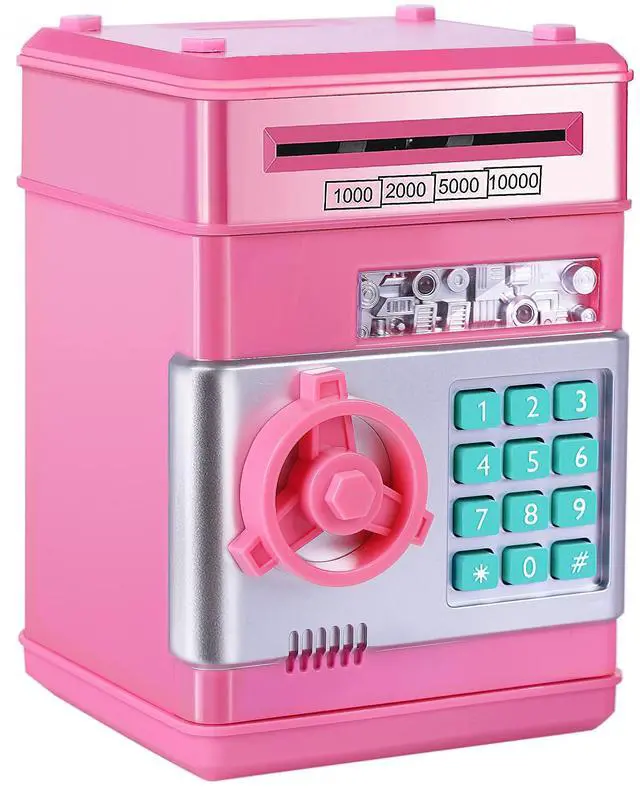
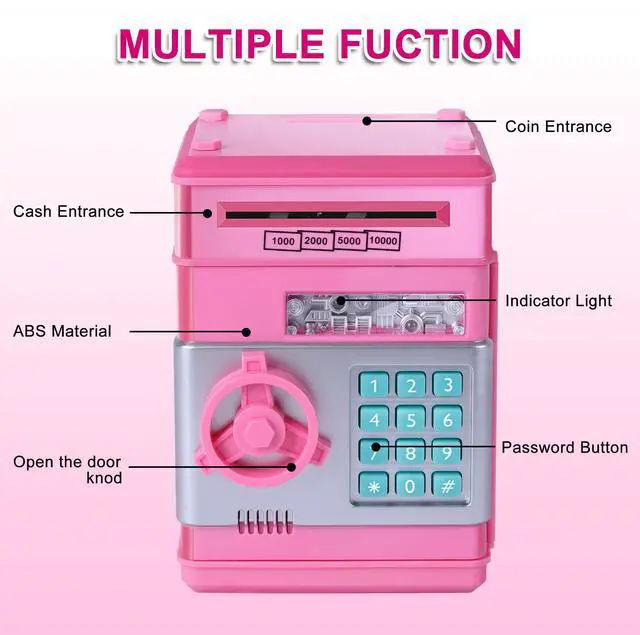


GuDoQi Best Brithday Gift for Kids

- How To Open the Door:
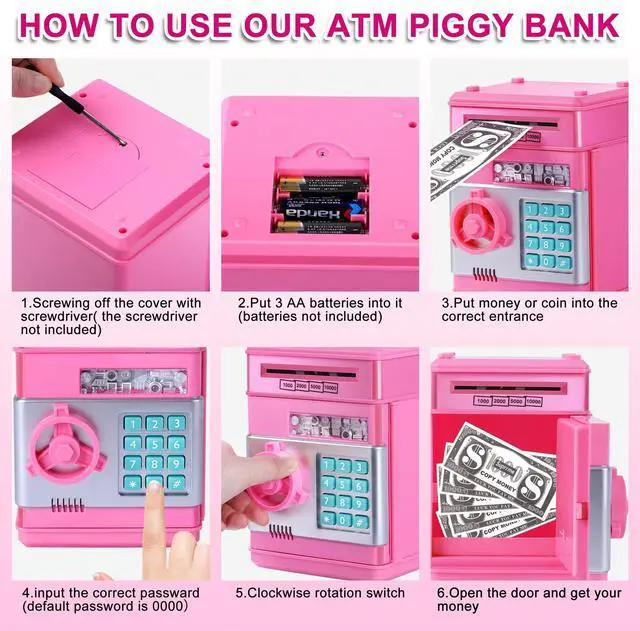
1. Counterclockwise Screwing off the cover with screwdriver (screwdriver not incoulded) ,then put 3AA battery in to it ( batteries not incoulded)
2. After put your money or coin in the correct entrance; Input the correct password, the green light will on
3. Clockwise rotating the door knob to open the door
4. After you open the door, you will hear beep sound every 20 seconds until closing the door
- Two Mode:
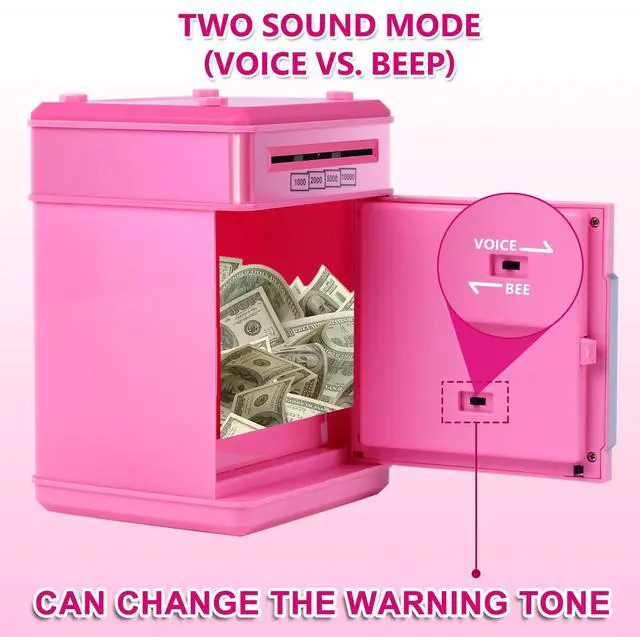
1. There is a button inside the door for two modes choosing
2. In ''beeps sound'' mode, when you press the digital button you will hear the sound like ''du''. If the password is wrong, you will hear the sound like ''oh''
3. In ''voice'' mode, when you press the digital button you will hear the sound like ''password please''. If the password is wrong, you will hear the sound like ''oh sorry, please try again''
4. If you don't like the music or the sound is too loud for you, we suggest you choose the beeps sound mode
- Warm tips:
1. Please make sure your prepared 3 AA new batteries have enough power
2. Please make sure every time press the digital button, you will hear the sound like ''du'' sound or ''password please''. or not you can not open the door and need to press the button again .
3.If you have any questions about this product,pls contact with us
How to change password

step1
Enter four-digit password(default 0000), the green lights. Rotate the knob clockwise to open the door

step 2
Hold down the "*" button, the red light flashes.(hold the * button not to loosen)

step 3
Enter the new 4-digit password within 15 seconds, then press # button and the light stops flashing

step 4
Release the "*" button, change password successfully, close the door

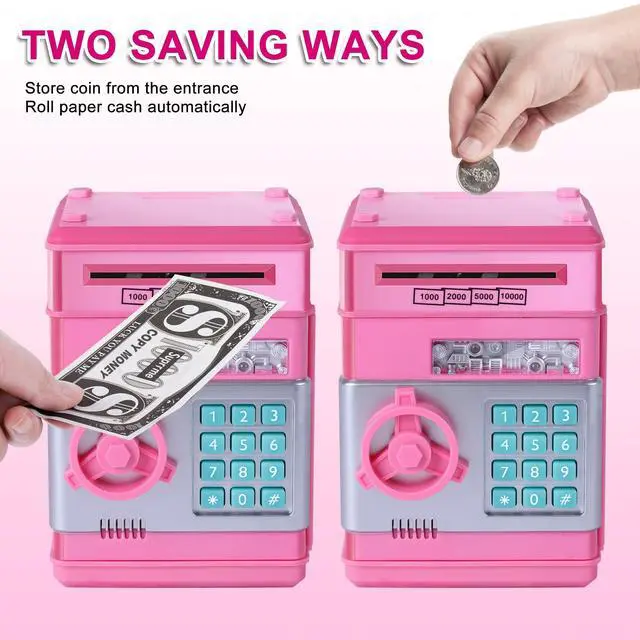
Two money Saving Way
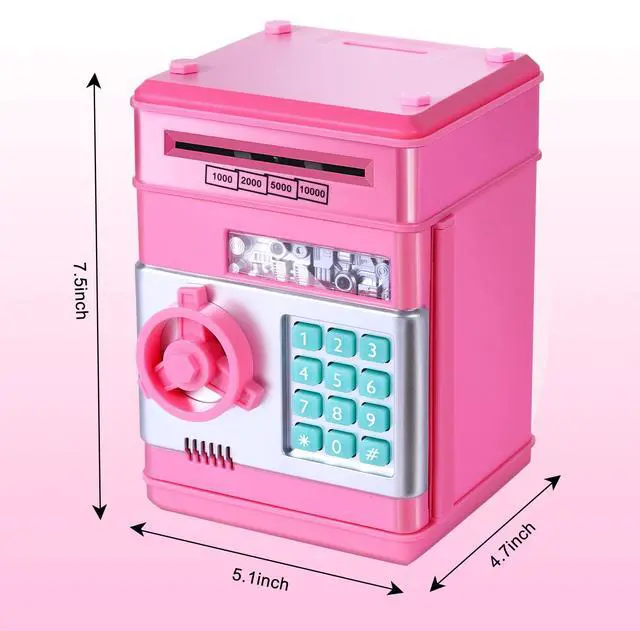
- Put cash on the scroll, it can be rolled into the machine automatically
- It can also store coin from the top coin entry

Q&A
- Q: What to do if the product does not power on after inserting batteries
- A: This product has high power consumption. Please use new or fully charged 3AAA batteries to power it.
- Q: How to do if forgot password
- A: If you forget the password, simply remove the batteries for 15mins, and the device will reset to the default password 0000. Then, follow the password setting steps in the setup instructions again
- Q: How to properly use the deposit mechanism
- A: Please use new banknotes as much as possible, as old ones may cause paper jams
- Q: Why is also showing voice
- A: Behind the door, there is a black button. Slide it left or right to switch between buzzer sound and voice mode. Please switch according to your needs.
 Sliver |  Gold |  Blue |  Unicorn |  Black |  GuDoQi Password Piggy Bank, Digital Electronic Money Bank, Mini ATM Cash Coin... | |
|---|---|---|---|---|---|---|
| Customer Reviews | — | — | — | — | — | — |
| Price | — | — | — | — | — | — |
| Coin Entry | ? | ? | ? | ? | ? | ? |
| Paper Money | ? | ? | ? | ? | ? | ? |
| Playing music | No | No | No | YES | No | NO |
| Best Gift | Birthday /Christmas/ Thanksgiving Day/ New Year/ Holiday Present | Birthday /Christmas/ Thanksgiving Day/ New Year/ Holiday Present | Birthday /Christmas/ Thanksgiving Day/ New Year/ Holiday Present | Birthday /Christmas/ Thanksgiving Day/ New Year/ Holiday Present | Birthday /Christmas/ Thanksgiving Day/ New Year/ Holiday Present | Birthday /Christmas/ Thanksgiving Day/ New Year/ Holiday Present |
| for Kids | Boy | grandson | Children | Granddaughter | Boy | Girl |
GuDoQi Best Brithday Gift for Kids
- How To Open the Door:
1. Counterclockwise Screwing off the cover with screwdriver (screwdriver not incoulded) ,then put 3AA battery in to it ( batteries not incoulded)
2. After put your money or coin in the correct entrance; Input the correct password, the green light will on
3. Clockwise rotating the door knob to open the door
4. After you open the door, you will hear beep sound every 20 seconds until closing the door
- Two Mode:
1. There is a button inside the door for two modes choosing
2. In ''beeps sound'' mode, when you press the digital button you will hear the sound like ''du''. If the password is wrong, you will hear the sound like ''oh''
3. In ''voice'' mode, when you press the digital button you will hear the sound like ''password please''. If the password is wrong, you will hear the sound like ''oh sorry, please try again''
4. If you don't like the music or the sound is too loud for you, we suggest you choose the beeps sound mode
- Warm tips:
1. Please make sure your prepared 3 AA new batteries have enough power
2. Please make sure every time press the digital button, you will hear the sound like ''du'' sound or ''password please''. or not you can not open the door and need to press the button again .
3.If you have any questions about this product,pls contact with us
How to change password
step1
Enter four-digit password(default 0000), the green lights. Rotate the knob clockwise to open the door
step 2
Hold down the "*" button, the red light flashes.(hold the * button not to loosen)
step 3
Enter the new 4-digit password within 15 seconds, then press # button and the light stops flashing
step 4
Release the "*" button, change password successfully, close the door
Two money Saving Way
- Put cash on the scroll, it can be rolled into the machine automatically
- It can also store coin from the top coin entry
Q&A
- Q: What to do if the product does not power on after inserting batteries
- A: This product has high power consumption. Please use new or fully charged 3AAA batteries to power it.
- Q: How to do if forgot password
- A: If you forget the password, simply remove the batteries for 15mins, and the device will reset to the default password 0000. Then, follow the password setting steps in the setup instructions again
- Q: How to properly use the deposit mechanism
- A: Please use new banknotes as much as possible, as old ones may cause paper jams
- Q: Why is also showing voice
- A: Behind the door, there is a black button. Slide it left or right to switch between buzzer sound and voice mode. Please switch according to your needs.
Sliver | Gold | Blue | Unicorn | Black | GuDoQi Password Piggy Bank, Digital Electronic Money Bank, Mini ATM Cash Coin... | |
|---|---|---|---|---|---|---|
| Customer Reviews | — | — | — | — | — | — |
| Price | — | — | — | — | — | — |
| Coin Entry | ? | ? | ? | ? | ? | ? |
| Paper Money | ? | ? | ? | ? | ? | ? |
| Playing music | No | No | No | YES | No | NO |
| Best Gift | Birthday /Christmas/ Thanksgiving Day/ New Year/ Holiday Present | Birthday /Christmas/ Thanksgiving Day/ New Year/ Holiday Present | Birthday /Christmas/ Thanksgiving Day/ New Year/ Holiday Present | Birthday /Christmas/ Thanksgiving Day/ New Year/ Holiday Present | Birthday /Christmas/ Thanksgiving Day/ New Year/ Holiday Present | Birthday /Christmas/ Thanksgiving Day/ New Year/ Holiday Present |
| for Kids | Boy | grandson | Children | Granddaughter | Boy | Girl |