






6-in-1 Voice Recording Button for Interactive Fun

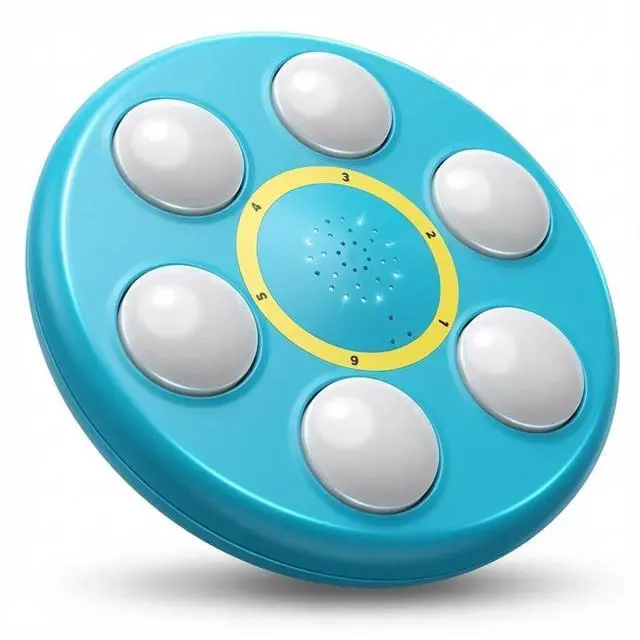
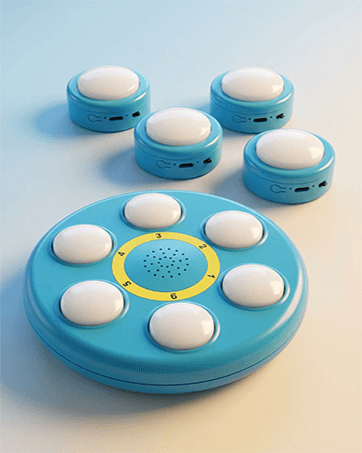
Six independent buttons let you record different sounds, words or cues in one device.
Create interactive games, quick Q&A, learning prompts or party fun.
Button combinations allow easy volume control and instant re-recording for flexible use.
Diverse application scenarios

Designed for everyday versatility.
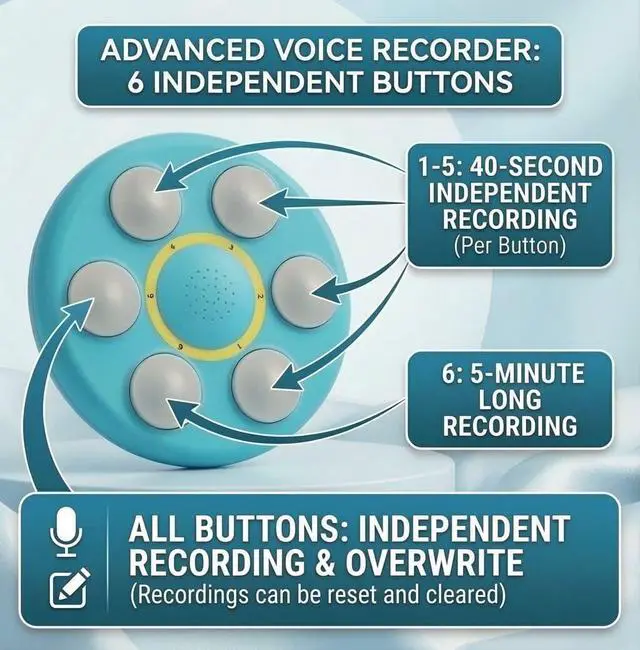
Each button records and plays voice independently.
Ideal for games, classrooms, outdoor fun, pet training, or surprise messages.
Simple button combinations enable easy volume control and quick re-recording for all ages.
How to Use Six in One Voice Recording Button

Simple controls, easy to learn:
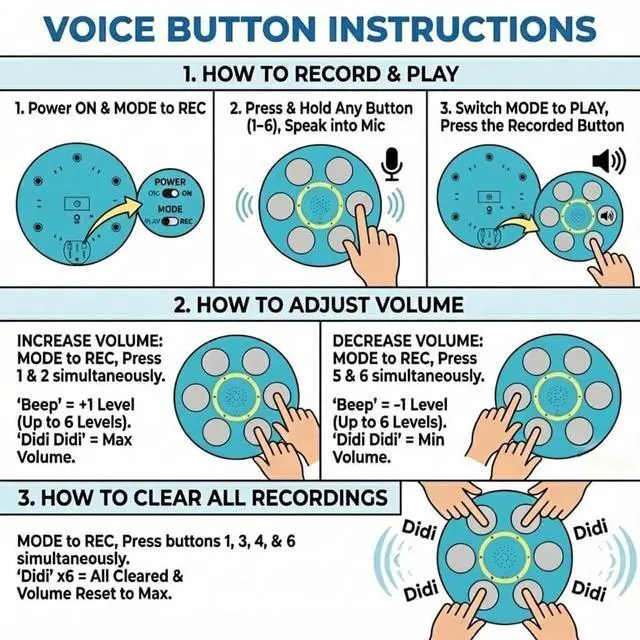
Switch to REC mode, press and hold a button to record, then switch to PLAY to hear it back. Use button combinations to adjust volume or clear recordings quickly. Clear visual steps help users get started in seconds.
Designed to Do More

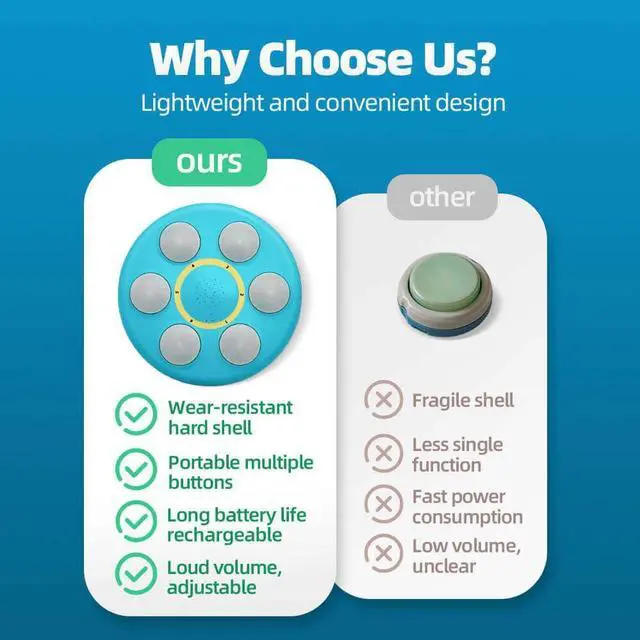
Multiple recordings, flexible control, and rechargeable convenience—designed to deliver more functionality in one simple, intuitive device.
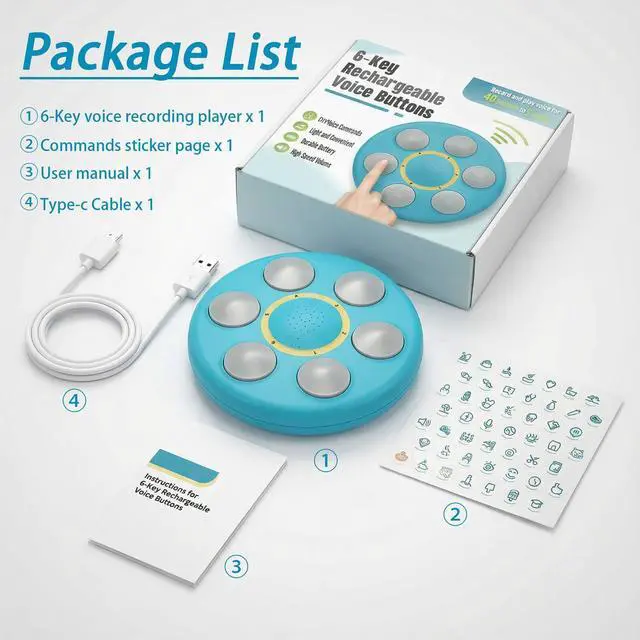
Complete Gift Set, Ready to Share

Designed to share voices, ideas, and moments:
A versatile recording set suitable for all ages and a wide range of everyday and special occasions.
Product Spec
Why is the recorded voice incomplete?
After pressing the record key, you must hear the sound of "beep" before you start recording. If you start talking too soon, you will lose the previous voice.
Why is the sound played so low?
When recording, talk as close as possible to the microphone, which can increase the volume; In addition, try to increase the volume by pressing button 1 and button 2 at the same time in "REC" mode (multiple operations are possible).
How many seconds can the voice of the intercom button be recorded?
Button 6 records up to 5 minutes for long voice or music; Buttons 1–5 record up to 40 seconds for short clips. Recording ends automatically when time expires.
Why is the voice volume getting lower and lower after pressing the play button, or can't be played completely?
This may be caused by the low battery power of the intercom button. Please charge the button in time.
Why is the red indicator not lit when charging?
First, check whether the Power switch has been turned ON; Secondly, after the button is fully charged, the red indicator light will go out; Finally, the charger may be faulty, so you can try to replace the charger or cable.

Sound, Made Simple
DasTooKii creates intuitive voice tools designed for everyday interaction, helping sound feel natural, simple, and easy to share.

DasTooKii | Voice Made Simple
DasTooKii designs simple voice tools for everyday use. We focus on clear sound, intuitive interaction, and thoughtful design. Small buttons, meaningful moments.
Simple Voices-Real Connections
We believe communication should feel natural, simple, and joyful — whether at home, with pets, or with loved ones.
How did we get our start?
DasTooKii began with one idea: keep everyday communication simple. We created easy voice buttons that record and replay short messages for daily use.
Why do we love what we do?
We love building tools that make sharing words quick and fun. Small taps can create clearer routines, better learning, and warmer moments.
What problem are we solving?
Many people want voice replay without complicated steps. DasTooKii delivers clear audio, simple controls, and a design made for everyday life.
6-in-1 Voice Recording Button for Interactive Fun

Six independent buttons let you record different sounds, words or cues in one device.
Create interactive games, quick Q&A, learning prompts or party fun.
Button combinations allow easy volume control and instant re-recording for flexible use.
Diverse application scenarios

Designed for everyday versatility.
Each button records and plays voice independently.
Ideal for games, classrooms, outdoor fun, pet training, or surprise messages.
Simple button combinations enable easy volume control and quick re-recording for all ages.
How to Use Six in One Voice Recording Button

Simple controls, easy to learn:
Switch to REC mode, press and hold a button to record, then switch to PLAY to hear it back. Use button combinations to adjust volume or clear recordings quickly. Clear visual steps help users get started in seconds.
Designed to Do More

Multiple recordings, flexible control, and rechargeable convenience—designed to deliver more functionality in one simple, intuitive device.
Complete Gift Set, Ready to Share

Designed to share voices, ideas, and moments:
A versatile recording set suitable for all ages and a wide range of everyday and special occasions.
Product Spec
| D=ø200mmH=300mm | Measure |
|---|---|
| 203g | Weight |
| 8O500mW | Horn power |
| 3.7V120mAh | Battery capacity |
| 1~5(40s)6(5min) | Recording time |
| 100000 times | Mechanical button life |
| DC 5V | Charge voltage |
| 100mA | Charging current |
| At least 120days | Standby time |
| USB Type-C | Charging interface |
| -40?~+85? | Working temperature |
| 10%`90% | Working humidity |
Why is the recorded voice incomplete?
After pressing the record key, you must hear the sound of "beep" before you start recording. If you start talking too soon, you will lose the previous voice.
Why is the sound played so low?
When recording, talk as close as possible to the microphone, which can increase the volume; In addition, try to increase the volume by pressing button 1 and button 2 at the same time in "REC" mode (multiple operations are possible).
How many seconds can the voice of the intercom button be recorded?
Button 6 records up to 5 minutes for long voice or music; Buttons 1–5 record up to 40 seconds for short clips. Recording ends automatically when time expires.
Why is the voice volume getting lower and lower after pressing the play button, or can't be played completely?
This may be caused by the low battery power of the intercom button. Please charge the button in time.
Why is the red indicator not lit when charging?
First, check whether the Power switch has been turned ON; Secondly, after the button is fully charged, the red indicator light will go out; Finally, the charger may be faulty, so you can try to replace the charger or cable.
Sound, Made Simple
DasTooKii creates intuitive voice tools designed for everyday interaction, helping sound feel natural, simple, and easy to share.
DasTooKii | Voice Made Simple
DasTooKii designs simple voice tools for everyday use. We focus on clear sound, intuitive interaction, and thoughtful design. Small buttons, meaningful moments.
Simple Voices-Real Connections
We believe communication should feel natural, simple, and joyful — whether at home, with pets, or with loved ones.
How did we get our start?
DasTooKii began with one idea: keep everyday communication simple. We created easy voice buttons that record and replay short messages for daily use.
Why do we love what we do?
We love building tools that make sharing words quick and fun. Small taps can create clearer routines, better learning, and warmer moments.
What problem are we solving?
Many people want voice replay without complicated steps. DasTooKii delivers clear audio, simple controls, and a design made for everyday life.