





Tester Latest Button Functions
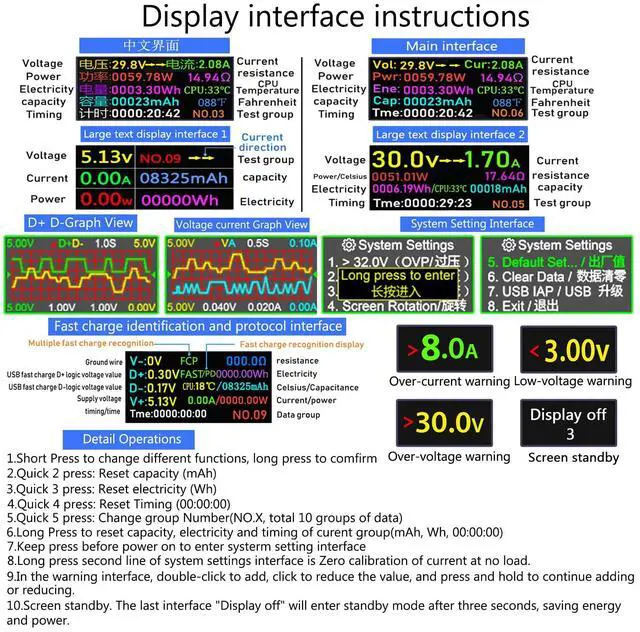
- Press Once-Click: Switch the Display Interface
- Fast Double-Click: Capacity mAH Clear
- Fast Press Three-Click: Current WH Clear
- Fast Press Four-Click: Time Clea
- Fast Press Five-Click: Switch Data Storage Group (NO.X)
- Long Press Button, Capacity, Power, Time, Clear the current group (mAh, Wh, 00:00:00)
- Switch to the Screen rotation interface Long Press the Screen to Flip, Other interfaces can only long press to clear data.
- Voltage and current warning interface:2 click to add, 3 click to reduce,When add and reduce, long press is continuous addition and subtraction;
Tips:
- If there is current in the tester at no load,?Press and hold the tester button,insert the device,and calibrate to zero. During calibration,the output must not have any current consumption.
Tester highlights:
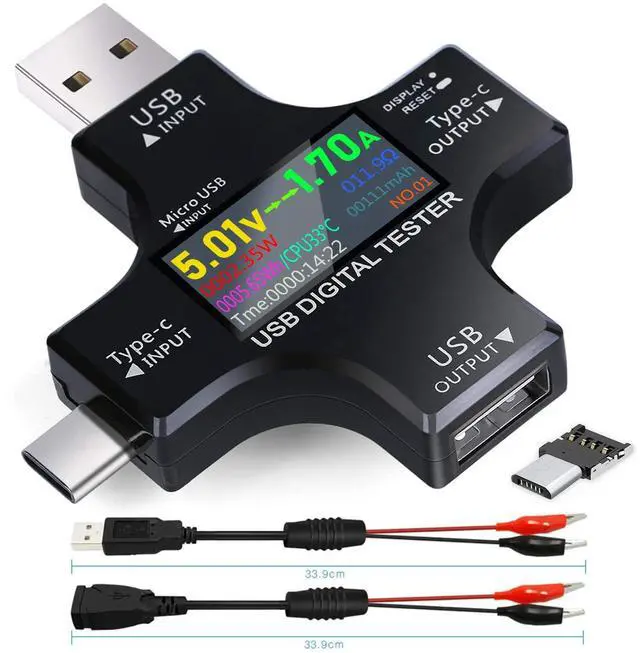
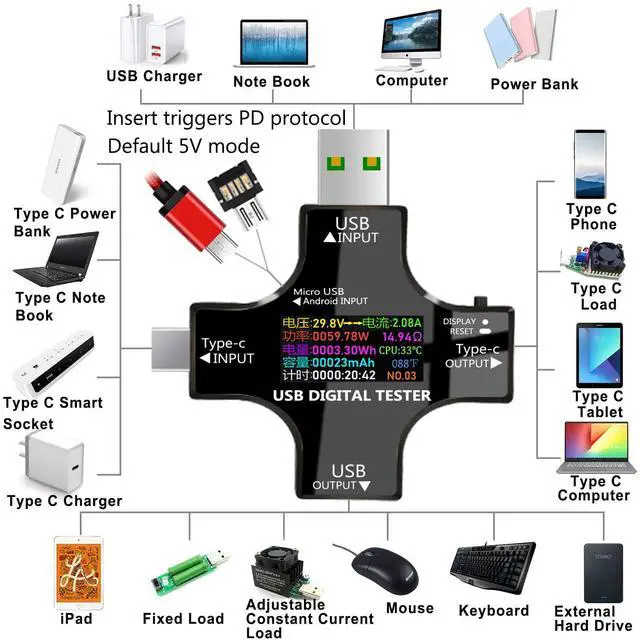
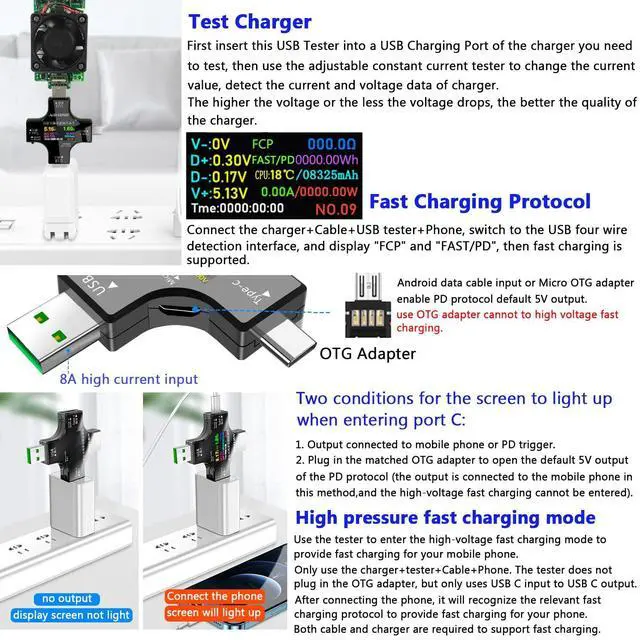
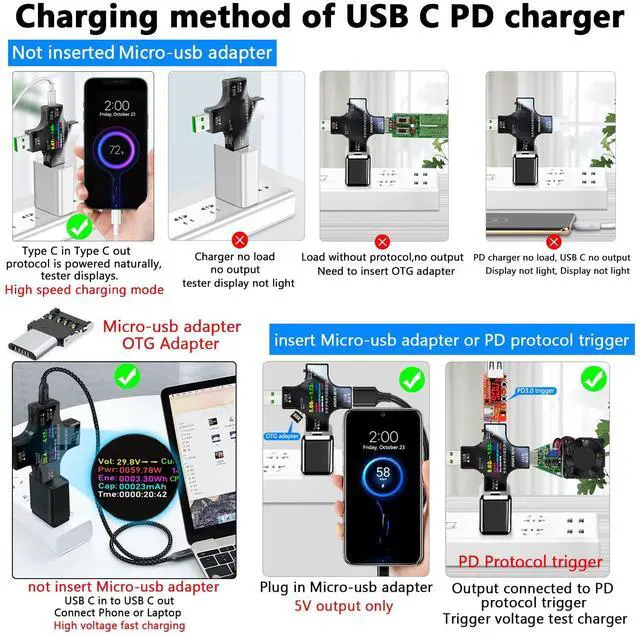
- When inserting the tester into the USB-C device and USB C Cable/usb a to usb c Cable, you must use the OTG adapter (Micro-usb adapter) or Micro-usb Cable to insert the Micro-USB INPUT Port of the USB Tester to trigger the PD charging function. The tester can be used normally.
Scope of application:
- Micro-usb cable, usb a to usb c Cable, usb c to usb c Cable. USB A Charger, USB C Charger, Power Bank and other USB devices.
- USB C bidirectional current: USB C input and USB C output ports can be used with each other, not limited to the input port or the output port. Inserting USB C Cable into USB C output requires USB C input into the device (mobile phone, Laptop) to form a current loop, so that the tester can display normally and the data is the same.
Important:Please download more information from Product guides and documents
The product is constantly updated and new content is added, so sometimes the version you receive may be different from the description, but it does not affect the use of the product.

Multi-screen interface
- Chinese and English interface display: voltage, current, power, resistance, electricity, CPU temperature, capacity, temperature, timing, test group.
- Large font capacity interface: voltage, current, power, capacity, power, test group, charging direction.
- Personalized interface: personalized interface such as voltage and current.
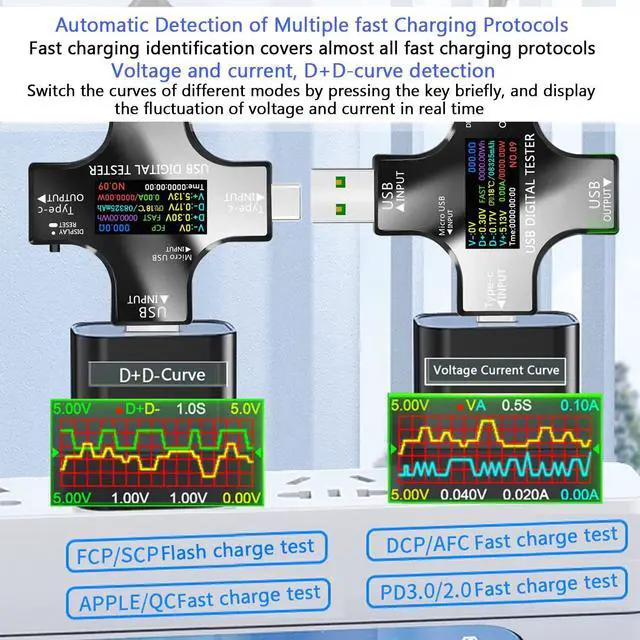
- USB 4-wire detection interface: multiple fast charging identification, fast charging identification display, V-: ground wire, D+/D-: USB fast charging D+/D- logic voltage value, V+: power supply voltage, timing, resistance, power, capacity, current/power.
- Screen flip interface: switch to this interface, long press the button to flip the screen 180°, other interfaces cannot be flipped by long pressing.
- Voltage and current warning interface: adjust the Max/Min voltage and Max current of the tester,When the voltage and current exceeds or falls below this range, the tester will shut down to protect your equipment.

Test Micro-usb/usb a to usb c/usb c to usb c Cable
Tips: You need to test the charger before testing the cable
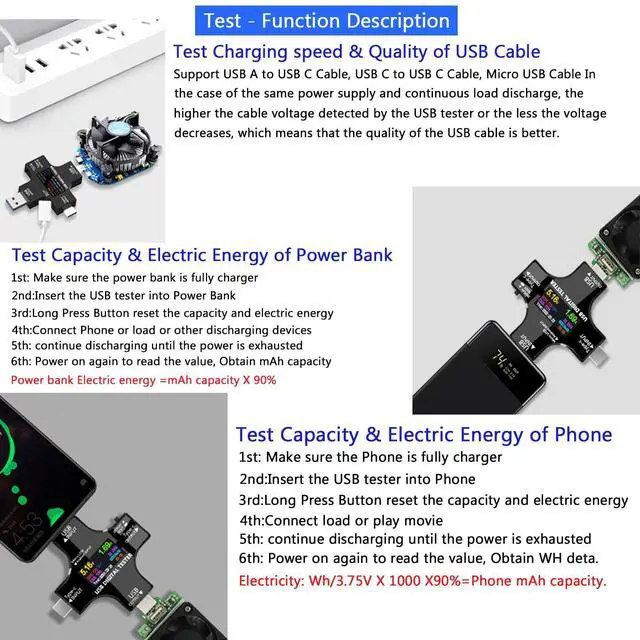
- 1. Check the supported voltage and current of the charger, insert the tester, connect the adjustable Load, adjust the current to the supported current of the charger, the voltage does not change The charger is of excellent quality. The quality of the charger is poor if the voltage drop exceeds 1V, and the voltage drop within 0.5V is within the normal range.
- 2. Use the tested charger to insert the corresponding cable, adjust the current to the supported current of the charger, if the voltage drop exceeds 1V, the cable quality is poor, and the voltage drop within 0.5V belongs to the normal range.
Test Charger,Support USB A Charger/USB C Charger. Test Cables, Support Micro-usb Cable/usb a to usb c Cable/usb c to usb c Cable.

Test Power Bank/Phone Capacity
- Tester Power Bank
Fully charge the power bank, insert it into the tester, clear the mAh of the tester, connect to Load to quickly discharge to obtain mAh capacity,multiply by 90%.
- Tester Phone Capacity
The phone is fully charged, plugged into the tester, cleared Wh data, connected to Load, quickly discharged, and acquired data.
Electricity: Wh/3.75V(Phone battery voltage)=Capacity value X 1000 X90%=Phone mAh capacity.(which is close to the phone battery capacity)

Tester Charger/Cable Whether to support Fast charging
Tester USB A/USB C Charger,USB A to USB C Cable, USB C to USB C Cable, Micro-usb Cable.
- Test Charger
Insert the tester into the charger, connect Load, adjust the current to 3A, if it supports fast charging, the fifth interface will display "FCP" "FAST". If it does not support fast charging, "FCP" "FAST" will not be displayed.
- Test charging cable
Use a charger that has been tested by the tester to support fast charging, plug the corresponding cable into the charger, and adjust to 3A after connecting the cable. If the fifth interface displays "FCP" and "FAST", it supports fast charging. If it does not support fast charging, "FCP" "FAST" is not displayed.

Test various cables / monitor charging status
Charge your phone safely and check data in real time
Support QC3.0 (3.8 ~ 12V) QC2.0 (5V / 9V / 12V / 20V)
Android BC1.2 (5V)
Apple 5V / 2.4A and MTK-PE (5V / 7V / 9V / 12V)
And other Qualcomm fast charge

Test various USB / Type-C chargers
Plug the tester into the charger and connect an adjustable current loader,
Perform current adjustment and test the current and voltage data of the charger.
Let the charger be connected to the current loader for a long time to check the stability of the charger

Charge test / 1 X 2
Can meet the output of two devices at the same time, support Type-C devices, intelligent charging scheme, and ensure the safety of the device

Laptop Charge Monitoring
When you power the notebook, connect a KJ-KayJI test meter to monitor the voltage, current, capacity, power,temperature and other technical parameter information in real time.
Tester Latest Button Functions
- Press Once-Click: Switch the Display Interface
- Fast Double-Click: Capacity mAH Clear
- Fast Press Three-Click: Current WH Clear
- Fast Press Four-Click: Time Clea
- Fast Press Five-Click: Switch Data Storage Group (NO.X)
- Long Press Button, Capacity, Power, Time, Clear the current group (mAh, Wh, 00:00:00)
- Switch to the Screen rotation interface Long Press the Screen to Flip, Other interfaces can only long press to clear data.
- Voltage and current warning interface:2 click to add, 3 click to reduce,When add and reduce, long press is continuous addition and subtraction;
Tips:
- If there is current in the tester at no load,?Press and hold the tester button,insert the device,and calibrate to zero. During calibration,the output must not have any current consumption.
Tester highlights:
- When inserting the tester into the USB-C device and USB C Cable/usb a to usb c Cable, you must use the OTG adapter (Micro-usb adapter) or Micro-usb Cable to insert the Micro-USB INPUT Port of the USB Tester to trigger the PD charging function. The tester can be used normally.
Scope of application:
- Micro-usb cable, usb a to usb c Cable, usb c to usb c Cable. USB A Charger, USB C Charger, Power Bank and other USB devices.
- USB C bidirectional current: USB C input and USB C output ports can be used with each other, not limited to the input port or the output port. Inserting USB C Cable into USB C output requires USB C input into the device (mobile phone, Laptop) to form a current loop, so that the tester can display normally and the data is the same.
Important:Please download more information from Product guides and documents
The product is constantly updated and new content is added, so sometimes the version you receive may be different from the description, but it does not affect the use of the product.
Multi-screen interface
- Chinese and English interface display: voltage, current, power, resistance, electricity, CPU temperature, capacity, temperature, timing, test group.
- Large font capacity interface: voltage, current, power, capacity, power, test group, charging direction.
- Personalized interface: personalized interface such as voltage and current.
- USB 4-wire detection interface: multiple fast charging identification, fast charging identification display, V-: ground wire, D+/D-: USB fast charging D+/D- logic voltage value, V+: power supply voltage, timing, resistance, power, capacity, current/power.
- Screen flip interface: switch to this interface, long press the button to flip the screen 180°, other interfaces cannot be flipped by long pressing.
- Voltage and current warning interface: adjust the Max/Min voltage and Max current of the tester,When the voltage and current exceeds or falls below this range, the tester will shut down to protect your equipment.
Test Micro-usb/usb a to usb c/usb c to usb c Cable
Tips: You need to test the charger before testing the cable
- 1. Check the supported voltage and current of the charger, insert the tester, connect the adjustable Load, adjust the current to the supported current of the charger, the voltage does not change The charger is of excellent quality. The quality of the charger is poor if the voltage drop exceeds 1V, and the voltage drop within 0.5V is within the normal range.
- 2. Use the tested charger to insert the corresponding cable, adjust the current to the supported current of the charger, if the voltage drop exceeds 1V, the cable quality is poor, and the voltage drop within 0.5V belongs to the normal range.
Test Charger,Support USB A Charger/USB C Charger. Test Cables, Support Micro-usb Cable/usb a to usb c Cable/usb c to usb c Cable.
Test Power Bank/Phone Capacity
- Tester Power Bank
Fully charge the power bank, insert it into the tester, clear the mAh of the tester, connect to Load to quickly discharge to obtain mAh capacity,multiply by 90%.
- Tester Phone Capacity
The phone is fully charged, plugged into the tester, cleared Wh data, connected to Load, quickly discharged, and acquired data.
Electricity: Wh/3.75V(Phone battery voltage)=Capacity value X 1000 X90%=Phone mAh capacity.(which is close to the phone battery capacity)
Tester Charger/Cable Whether to support Fast charging
Tester USB A/USB C Charger,USB A to USB C Cable, USB C to USB C Cable, Micro-usb Cable.
- Test Charger
Insert the tester into the charger, connect Load, adjust the current to 3A, if it supports fast charging, the fifth interface will display "FCP" "FAST". If it does not support fast charging, "FCP" "FAST" will not be displayed.
- Test charging cable
Use a charger that has been tested by the tester to support fast charging, plug the corresponding cable into the charger, and adjust to 3A after connecting the cable. If the fifth interface displays "FCP" and "FAST", it supports fast charging. If it does not support fast charging, "FCP" "FAST" is not displayed.
Test various cables / monitor charging status
Charge your phone safely and check data in real time
Support QC3.0 (3.8 ~ 12V) QC2.0 (5V / 9V / 12V / 20V)
Android BC1.2 (5V)
Apple 5V / 2.4A and MTK-PE (5V / 7V / 9V / 12V)
And other Qualcomm fast charge
Test various USB / Type-C chargers
Plug the tester into the charger and connect an adjustable current loader,
Perform current adjustment and test the current and voltage data of the charger.
Let the charger be connected to the current loader for a long time to check the stability of the charger
Charge test / 1 X 2
Can meet the output of two devices at the same time, support Type-C devices, intelligent charging scheme, and ensure the safety of the device
Laptop Charge Monitoring
When you power the notebook, connect a KJ-KayJI test meter to monitor the voltage, current, capacity, power,temperature and other technical parameter information in real time.