

Your Browsing History

Meet Your Seller


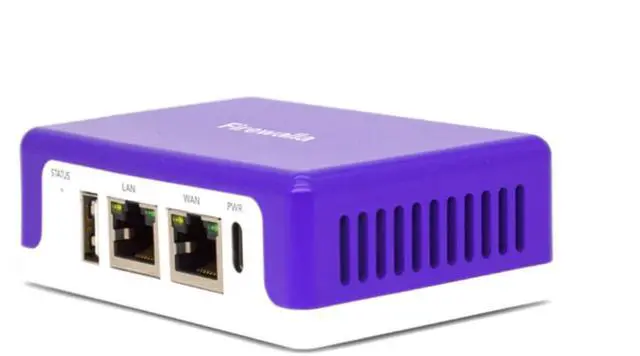

Cyber Security Firewall for Home & Business, Protect Network from Malware and Hacking | Smart Parental Control | Block Ads | VPN Server and Client | No Monthly Fee (Purple SE)
- COMPATIBILITY - This is the Purple SE. The IPS functionality is limited to 500 Mbits. This device can function as a router or bridge to your existing router. When in Simple Mode, this device may not be compatible with all routers. Please refer to the Compatibility Guide video or the specification sheet document in this listing to see which routers are compatible. Setup may require logging into your router for basic configuration. COMPLETE CYBERSECURITY PROTECTION - The unique intrusion prevention system (IDS and IPS) protects all your home wired and wireless Internet of Things devices from threats like viruses, malware, hacking, phishing, and unwanted data theft when using public WiFi. It is a simple and affordable solution for families, professionals, and businesses. The built-in OpenVPN server keeps your device usage as secure as it is in your home. PARENTAL CONTROL AND FAMILY PROTECT - With just a few taps on your smartphone, you can monitor activity, cut off all access, or block only gaming or social networks. Turn on Family Protect to filter and block adult and malicious content, keeping internet activities healthy and safe. ROUTER MODE - Use the Purple SE as your main router for advanced features including policy-based routing to forward traffic as desired, smart queue to decongest your network and prioritize important traffic, and network health monitoring. These features give you control over your network and ensure optimal performance and quality. DEEP INSIGHT - Deep
+
+
Overview
Specs
Reviews

Any questions? Our AI mode will help you find out quickly.
Try me now
COMPATIBILITY - This is the Purple SE. The IPS functionality is limited to 500 Mbits. This device can function as a router or bridge to your existing router. When in Simple Mode, this device may not be compatible with all routers. Please refer to the Compatibility Guide video or the specification sheet document in this listing to see which routers are compatible. Setup may require logging into your router for basic configuration. COMPLETE CYBERSECURITY PROTECTION - The unique intrusion prevention system (IDS and IPS) protects all your home wired and wireless Internet of Things devices from threats like viruses, malware, hacking, phishing, and unwanted data theft when using public WiFi. It is a simple and affordable solution for families, professionals, and businesses. The built-in OpenVPN server keeps your device usage as secure as it is in your home. PARENTAL CONTROL AND FAMILY PROTECT - With just a few taps on your smartphone, you can monitor activity, cut off all access, or block only gaming or social networks. Turn on Family Protect to filter and block adult and malicious content, keeping internet activities healthy and safe. ROUTER MODE - Use the Purple SE as your main router for advanced features including policy-based routing to forward traffic as desired, smart queue to decongest your network and prioritize important traffic, and network health monitoring. These features give you control over your network and ensure optimal performance and quality. DEEP INSIGHT - Deep insight and cloud-based behavior analytics engines actively detect and automatically block problems as they arise. Continuous monitoring provides full visibility of activities across all your IoT devices, the ability to identify full network flows, bandwidth analysis, and internet troubleshooting, keeping your internet secure. HOW TO USE - The box includes a USA power supply, a Cat 6 Ethernet cable, and installation instructions. Downloading the app is required to set up your Purple SE. The app will guide you through the setup steps. Using the Purple SE in Router Mode (recommended) requires a modem and additional WiFi access points. If you want to continue using your existing router as the main router, you can set up the Purple SE in Transparent Bridge Mode
Warranty & Returns
Warranty, Returns, And Additional Information
Warranty
- Please contact the Seller directly for warranty information. Warranty information may also be found on the Manufacturer's website.
- CONTACT
Return Policies
- Return for refund within: 30 days
- Return for replacement within: 30 days
- This item is covered by Eristy shop Return Policy
Manufacturer Contact Info
- For a directory of all our manufacturers, please click below.
- Manufacturers Directory
LOADING...