

Your Browsing History
- Free 30-day Returns
$198.99

Meet Your Seller

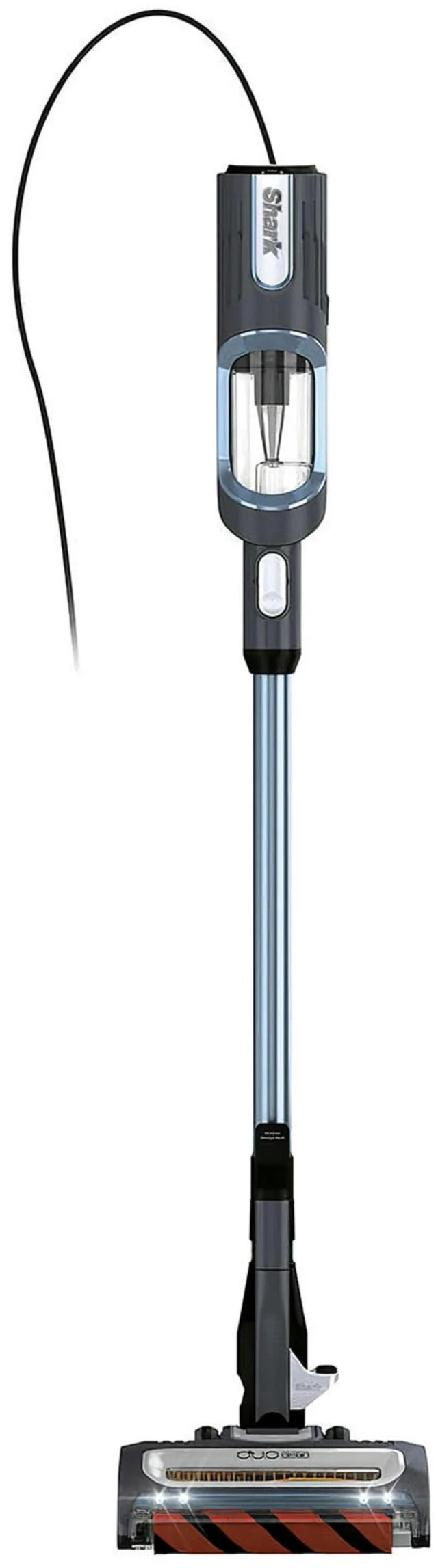

Fresh Fab Find Shark UV580 Corded Stick Vacuum with DuoClean and Self-cleaning brushroll Vacuum Cleaner with Duster Crevice & Upholstery Tools Removable Handheld Vac - Blue
- Fresh Fab Find Shark UV580 Corded Stick Vacuum with DuoClean and Self-cleaning brushroll Vacuum Cleaner with Duster Crevice & Upholstery Tools Removable Handheld Vac - Blue
+
+
Overview
Specs
Reviews

Any questions? Our AI mode will help you find out quickly.
Try me now
Adopting DuoClean Technology and HyperVelocity powerful suction technology, Shark stick vacuum features a handheld vacuum that weighs less than 3 pounds but packs 680W big suction power. Included with cleaning tool accesorries and featured with swivel steering design, the vacuum can easily maneuver in and out of tight spaces, making getting under furniture a breeze. Suitable for various floor types, an excellent house cleaning helper!
DuoClean Technology: Adopting the advanced dual brushroll system, our stick vacuum is able to clean from carpets to hard floors effectively. It has two self-cleaning brushroll for powerful pet hair pickup with no hair wrap, ensuring quick and easy cleanup for a spotless home. Powerful Cleaning for
All Floors: With HyperVelocity powerful suction technology, our Shark corded stick vacuum deep cleans carpets and picks up dirt, dust, and debris from various floor types, such as bare floor, small area rugs etc..
Portable Hand Vacuum: If you detach the wand and floor nozzle, you will get a portable handheld vacuum, which allows you to take powerful cleaning anywhere. Also can be used without accessories with its tapered design and rubberized tip.
Ultra-lightweight for Versatile Cleaning: Features a handheld vacuum that weighs less than 3 pounds but packs big suction power. Attach the wand and access hard-to-reach spots in your home. The swivel steering easily maneuver in and out of tight spaces, making getting under furniture a breeze.
LED Headlights & User Interface: The convenient LED lights illuminate hidden debris and dust around your home. The LED user interface clearly indicates Bare Floor/Small Area Rugs Mode and Carpet Mode, easy to use.
FAQ: Q1How do I assemble my vacuum?
A 1.1: Insert the wand into the floor nozzle until it clicks into place.
A 1.2: Insert the handheld vacuum into the top of the wand until it clicks into place. Q2How do I use the different cleaning modes?
A 2.1: To clean bare floors, area rugs, or
with accessories: - Press the power button to turn on the vacuum. When first powered on, the vacuum will be in Bare Floor/Small Area Rugs mode. - Tilt the handle back while gently stepping on the floor nozzle. The brushrolls will spin slowly in this mode.
A 2.2: To
clean carpets: - Press the Floor Type button to switch to Carpet setting. - Tilt the handle back while gently stepping on the floor nozzle. The brushrolls will spin quickly in this mode. Q3How do I clean above floors with or without accessories?
A3: Detach the handheld vacuum by pressing the Wand Release button at the top of the wand. Use the tapered tip on the handheld vacuum to clean tight spaces, or add an accessory to the end. For more cleaning reach, leave the handheld vacuum in place and detach the wand from the floor nozzle. First remove the power cord from the cord clip. Step on the Wand Release foot pedal by the floor nozzle and pull up the handheld vacuum to remove the wand. Attach an accessory to the wand. Q4When and how do I empty the dust cup?
A4: For optimal performance, empty the dust cup each time you vacuum, or when debris reaches the MAX FILL line. To access the dust cup, detach the handheld vacuum from the wand. Press the two release latches on the bottom of the dust cup at the same time, then slide off the dust cup. 1. Quickly store the handheld vacuum by hanging it from the storage hook on the wand. Align the catch on the side of the handheld vacuum over the hook. 2. Hold the dust cup over a trash receptacle. Press the Empty button (with the trash can icon) on the front of the dust cup and pull open the lid until it clicks and locks open. 3. Tap gently to empty contents and remove any debris from the cone-shaped screen inside the dust cup. 4. Close the dust cup lid, until it clicks into place. 5. To reinstall the dust cup, slide in the front end first, then the back, until both ends click into place. Q5When and how do I clean the filters?
A5: Filters may need to be cleaned if the vacuum stops picking up
DuoClean Technology: Adopting the advanced dual brushroll system, our stick vacuum is able to clean from carpets to hard floors effectively. It has two self-cleaning brushroll for powerful pet hair pickup with no hair wrap, ensuring quick and easy cleanup for a spotless home. Powerful Cleaning for
All Floors: With HyperVelocity powerful suction technology, our Shark corded stick vacuum deep cleans carpets and picks up dirt, dust, and debris from various floor types, such as bare floor, small area rugs etc..
Portable Hand Vacuum: If you detach the wand and floor nozzle, you will get a portable handheld vacuum, which allows you to take powerful cleaning anywhere. Also can be used without accessories with its tapered design and rubberized tip.
Ultra-lightweight for Versatile Cleaning: Features a handheld vacuum that weighs less than 3 pounds but packs big suction power. Attach the wand and access hard-to-reach spots in your home. The swivel steering easily maneuver in and out of tight spaces, making getting under furniture a breeze.
LED Headlights & User Interface: The convenient LED lights illuminate hidden debris and dust around your home. The LED user interface clearly indicates Bare Floor/Small Area Rugs Mode and Carpet Mode, easy to use.
FAQ: Q1How do I assemble my vacuum?
A 1.1: Insert the wand into the floor nozzle until it clicks into place.
A 1.2: Insert the handheld vacuum into the top of the wand until it clicks into place. Q2How do I use the different cleaning modes?
A 2.1: To clean bare floors, area rugs, or
with accessories: - Press the power button to turn on the vacuum. When first powered on, the vacuum will be in Bare Floor/Small Area Rugs mode. - Tilt the handle back while gently stepping on the floor nozzle. The brushrolls will spin slowly in this mode.
A 2.2: To
clean carpets: - Press the Floor Type button to switch to Carpet setting. - Tilt the handle back while gently stepping on the floor nozzle. The brushrolls will spin quickly in this mode. Q3How do I clean above floors with or without accessories?
A3: Detach the handheld vacuum by pressing the Wand Release button at the top of the wand. Use the tapered tip on the handheld vacuum to clean tight spaces, or add an accessory to the end. For more cleaning reach, leave the handheld vacuum in place and detach the wand from the floor nozzle. First remove the power cord from the cord clip. Step on the Wand Release foot pedal by the floor nozzle and pull up the handheld vacuum to remove the wand. Attach an accessory to the wand. Q4When and how do I empty the dust cup?
A4: For optimal performance, empty the dust cup each time you vacuum, or when debris reaches the MAX FILL line. To access the dust cup, detach the handheld vacuum from the wand. Press the two release latches on the bottom of the dust cup at the same time, then slide off the dust cup. 1. Quickly store the handheld vacuum by hanging it from the storage hook on the wand. Align the catch on the side of the handheld vacuum over the hook. 2. Hold the dust cup over a trash receptacle. Press the Empty button (with the trash can icon) on the front of the dust cup and pull open the lid until it clicks and locks open. 3. Tap gently to empty contents and remove any debris from the cone-shaped screen inside the dust cup. 4. Close the dust cup lid, until it clicks into place. 5. To reinstall the dust cup, slide in the front end first, then the back, until both ends click into place. Q5When and how do I clean the filters?
A5: Filters may need to be cleaned if the vacuum stops picking up
Warranty & Returns
Warranty, Returns, And Additional Information
Warranty
- Please contact the Seller directly for warranty information. Warranty information may also be found on the Manufacturer's website.
- CONTACT
Return Policies
- Return for refund within: 30 days
- Return for replacement within: non-replaceable
- This item is covered by Global Bazaar Return Policy
Manufacturer Contact Info
- For a directory of all our manufacturers, please click below.
- Manufacturers Directory
LOADING...