


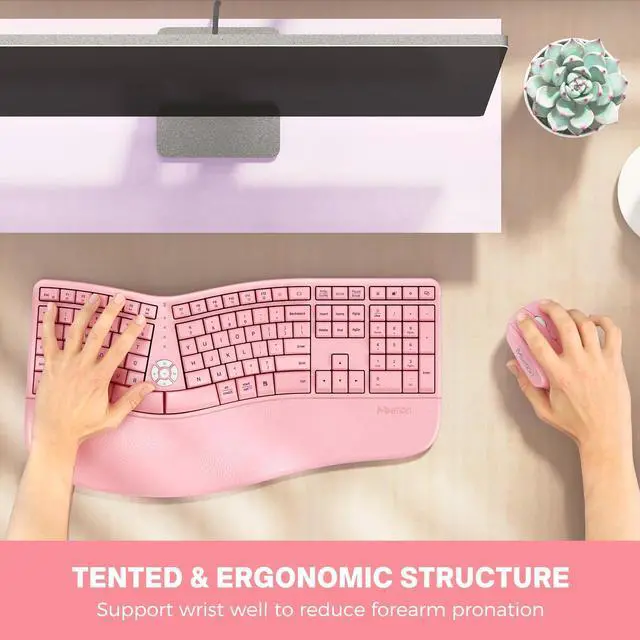
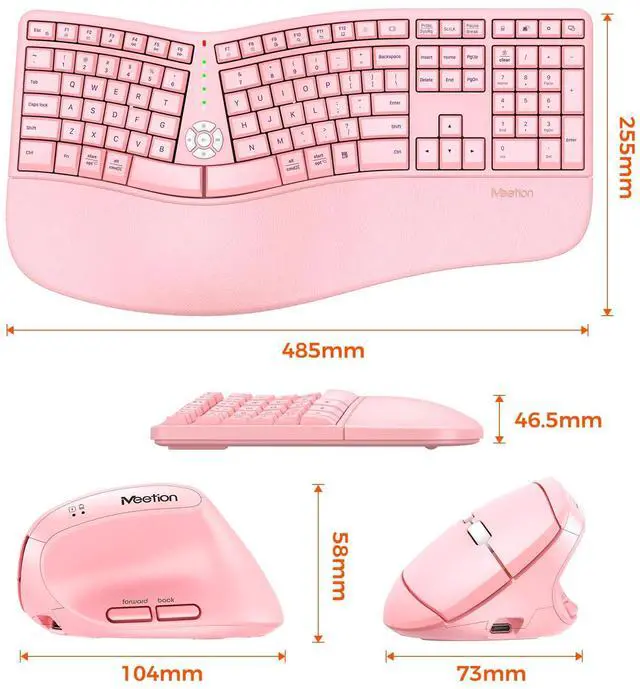
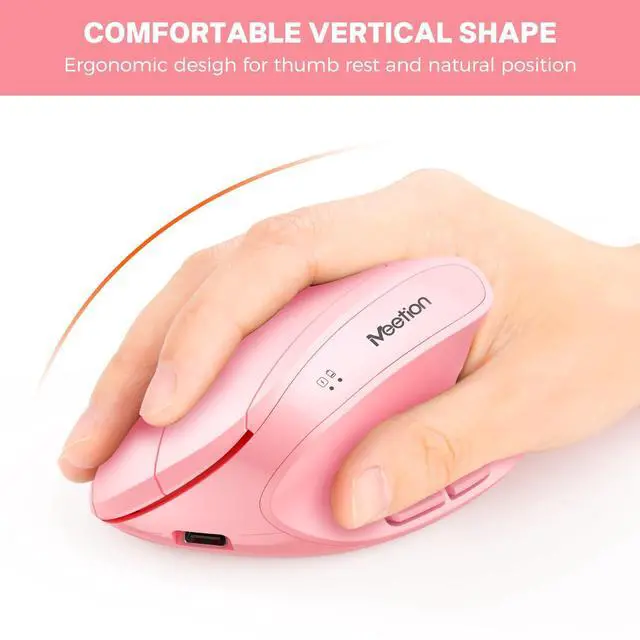


- Pillowed Palm Rest: Curved wrist rest with memory foam layer offers typing comfort.
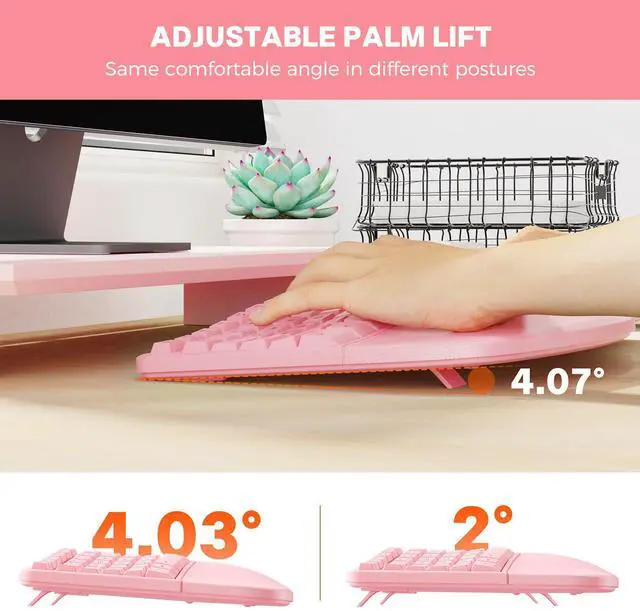
- Adjustable Tilt Legs: Adjust the keyboard tilt angle by setting up the front, back, or both-side legs.
- Standard 3 Zone Split Keyboard: Type more naturally to reduce muscle strain on your wrists and forearms.
- Wide Compatibility: Well compatible with Windows 7/8/10, Mac OS X 10.12, Chrome OS, Linux and DOS.
- Vertical Mouse: Prevent forearm twisting and reducing muscular strain by 10 percent.
- 800/1200/1600/2400 DPI Mouse: Provide more sensitivity than standard optical mice for smooth and precise tracking on a wide range of surfaces.
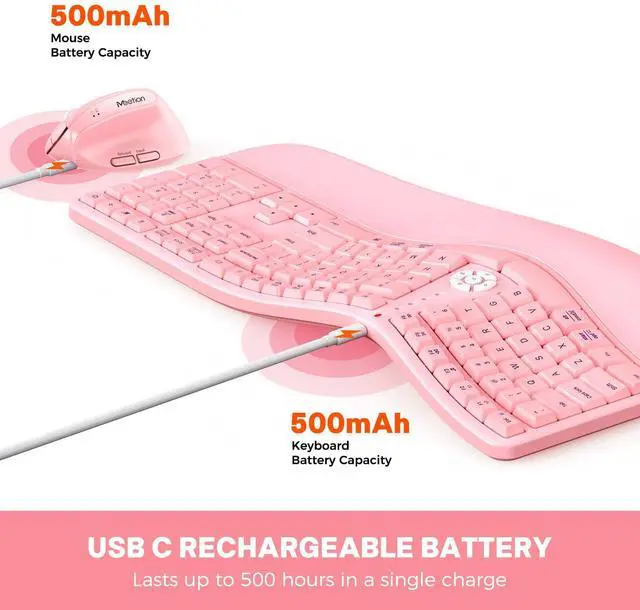
- Lasts Long Rechargeable Battery: Standby time is 500 hours of keyboard and the mouse can work for up to 400-500 hours.
Use Manual:
- 1. Take out the usb receiver on the bottom of the mouse.
- 2. Insert computer USB interface.
- 3. Toggle the switch at the bottom of the device to "ON".
- 4. The mouse and keyboard is connected and used normally.
Note: 1. Please fully charge before use. (When charging the product, please use a 5V charger for charging, otherwise it will damage the electronic circuit of the product. 2. It is recommended to use the computer USB port to charge the product.)
2. The bottom of the mouse has 3 areas with 3 foot pads, the foot pads above a transparent protective protector, please tear it off before use, the bottom of the mouse and the desktop more smoothly.

Director C Ergonomic Keyboard and Mouse
Higher productivity
Introducing the ultimate solution for all your typing and tracking needs - an ergonomic keyboard and vertical mouse. This innovative device is designed to provide you with a seamless typing and tracking experience, allowing you to work with greater precision and accuracy.
High efficiency
Will it take me some time to get used to the keyboard?
The split layout and key shapes of the keyboard are different from the normal keyboard and may take some time to get used to. Therefore, if you need any help, please tell me. We are always here.
Package Included:
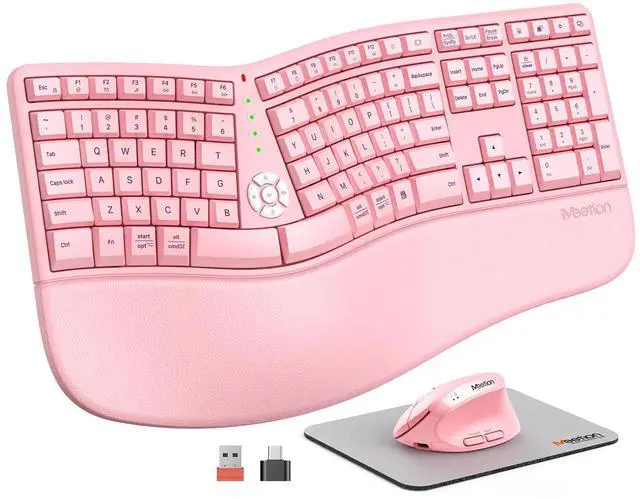
1 * Director C Standard Ergonomic Keyboard
1 * Vertical Mouse
1 * USB Receiver
1 * Type C Charging Cable
1 * USB Manual
Specifications:
- Split keyboard design
- Memory foam palm rest
- Adjustable 4 tilt legs
- Full size keyboard
- DPI Mouse
- For Windows, Mac, Chrome OS, Linux and DOS

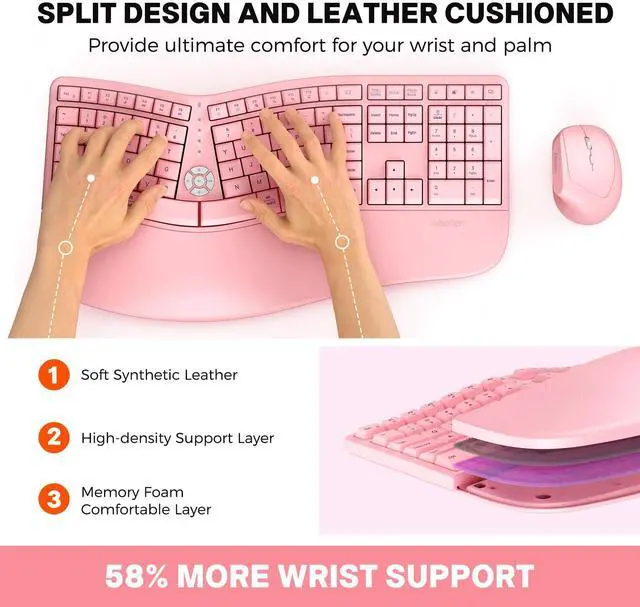
Pillow-Style Wrist Rest
Design pillowed wrist rest reduces muscle strain on your wrists and forearms, keeping your hands, neck and shoulders relaxed. Fabric with stain-resistant, easy-clean coating. Comfort memory foam for sustained comfort.

Split Curved Keyframe
With curved, segmented keyframes that conform to the natural structure of the human body, you can type more naturally. And scooped keys make it easy to orient your fingers and stay focused.

Shift Between Multi-media Shortcuts
You can enjoy a quick and easy way to reach “Volume+ and Volume-, ”Screen brightness“, ”Mute“ button handy shortcut keys.

Effortless Connectivity
The included USB-C adapter ensures compatibility with a wide range of devices, including Mac.

Side Button Control
Added back/forward button on the side of the mouse provides convenience when navigating the web; perfect for Internet surfers, gamers and those who work long hours in front of the computer.

Adjustable 4 Level DPI Switch
Easily adjust the mouse sensitivity between 3 DPI levels (800/1200/1600/2400). Optical laser allows for fast response, smooth movement and precise tracking. USB Receiver (at the bottom of the mouse)

Ergonomic wireless keyboard and mouse
Whether you're a busy professional, a business person, or a student, an ergonomic keyboard can be the perfect tool for all your computing needs. Its modern design, wireless connectivity, and ergonomic features make it the ultimate keyboard for maximizing productivity and achieving your goals. If you haven't used one before, it may take a little time to get used to, but we encourage you to try it out today and experience the difference for yourself!

MEETION Brand Story:
Our brand MEETION is a play on the concept of "meeting". All the products we develop revolve around this theme.
In terms of investment in the scientific research of new products, we never hold back. We have dedicated quality control for every single product, every detail in the production process is precise and controlled. Our product and intellectual property rights are top priorities. For four years, we have applied for MEETION brand in more than a hundred countries.
MEETION's products can be found in regions like Southeast Asia, the Middle East, Africa, and Latin America has earned quite a stellar reputation. MEETION even has a store on the Burj Khalifa in Dubai.
As more people participate in e-sport and business office working, the physical, mental health of gamers and business person should be considered. MEETION will roll out sports health series products in the future so that MEETION users can stay healthy while having fun.
All Day Comfort
- Pillowed Palm Rest: Curved wrist rest with memory foam layer offers typing comfort.
- Adjustable Tilt Legs: Adjust the keyboard tilt angle by setting up the front, back, or both-side legs.
- Standard 3 Zone Split Keyboard: Type more naturally to reduce muscle strain on your wrists and forearms.
- Wide Compatibility: Well compatible with Windows 7/8/10, Mac OS X 10.12, Chrome OS, Linux and DOS.
- Vertical Mouse: Prevent forearm twisting and reducing muscular strain by 10 percent.
- 800/1200/1600/2400 DPI Mouse: Provide more sensitivity than standard optical mice for smooth and precise tracking on a wide range of surfaces.
- Lasts Long Rechargeable Battery: Standby time is 500 hours of keyboard and the mouse can work for up to 400-500 hours.
Use Manual:
- 1. Take out the usb receiver on the bottom of the mouse.
- 2. Insert computer USB interface.
- 3. Toggle the switch at the bottom of the device to "ON".
- 4. The mouse and keyboard is connected and used normally.
Note: 1. Please fully charge before use. (When charging the product, please use a 5V charger for charging, otherwise it will damage the electronic circuit of the product. 2. It is recommended to use the computer USB port to charge the product.)
2. The bottom of the mouse has 3 areas with 3 foot pads, the foot pads above a transparent protective protector, please tear it off before use, the bottom of the mouse and the desktop more smoothly.
Director C Ergonomic Keyboard and Mouse
Higher productivity
Introducing the ultimate solution for all your typing and tracking needs - an ergonomic keyboard and vertical mouse. This innovative device is designed to provide you with a seamless typing and tracking experience, allowing you to work with greater precision and accuracy.
High efficiency
Will it take me some time to get used to the keyboard?
The split layout and key shapes of the keyboard are different from the normal keyboard and may take some time to get used to. Therefore, if you need any help, please tell me. We are always here.
Package Included:
1 * Director C Standard Ergonomic Keyboard
1 * Vertical Mouse
1 * USB Receiver
1 * Type C Charging Cable
1 * USB Manual
Specifications:
- Split keyboard design
- Memory foam palm rest
- Adjustable 4 tilt legs
- Full size keyboard
- DPI Mouse
- For Windows, Mac, Chrome OS, Linux and DOS
Pillow-Style Wrist Rest
Design pillowed wrist rest reduces muscle strain on your wrists and forearms, keeping your hands, neck and shoulders relaxed. Fabric with stain-resistant, easy-clean coating. Comfort memory foam for sustained comfort.
Split Curved Keyframe
With curved, segmented keyframes that conform to the natural structure of the human body, you can type more naturally. And scooped keys make it easy to orient your fingers and stay focused.
Shift Between Multi-media Shortcuts
You can enjoy a quick and easy way to reach “Volume+ and Volume-, ”Screen brightness“, ”Mute“ button handy shortcut keys.
Effortless Connectivity
The included USB-C adapter ensures compatibility with a wide range of devices, including Mac.
Side Button Control
Added back/forward button on the side of the mouse provides convenience when navigating the web; perfect for Internet surfers, gamers and those who work long hours in front of the computer.
Adjustable 4 Level DPI Switch
Easily adjust the mouse sensitivity between 3 DPI levels (800/1200/1600/2400). Optical laser allows for fast response, smooth movement and precise tracking. USB Receiver (at the bottom of the mouse)
Ergonomic wireless keyboard and mouse
Whether you're a busy professional, a business person, or a student, an ergonomic keyboard can be the perfect tool for all your computing needs. Its modern design, wireless connectivity, and ergonomic features make it the ultimate keyboard for maximizing productivity and achieving your goals. If you haven't used one before, it may take a little time to get used to, but we encourage you to try it out today and experience the difference for yourself!
MEETION Brand Story:
Our brand MEETION is a play on the concept of "meeting". All the products we develop revolve around this theme.
In terms of investment in the scientific research of new products, we never hold back. We have dedicated quality control for every single product, every detail in the production process is precise and controlled. Our product and intellectual property rights are top priorities. For four years, we have applied for MEETION brand in more than a hundred countries.
MEETION's products can be found in regions like Southeast Asia, the Middle East, Africa, and Latin America has earned quite a stellar reputation. MEETION even has a store on the Burj Khalifa in Dubai.
As more people participate in e-sport and business office working, the physical, mental health of gamers and business person should be considered. MEETION will roll out sports health series products in the future so that MEETION users can stay healthy while having fun.
All Day Comfort
| Model | DirectorC |
| Key Numbers | 117 |
| Mouse Button | 6 |
| Keyboard Type | Arch ergonomic design |
| Mouse Type | Vertical design |
| Mouse DPI | 800-1200-1600-2400 adjustable |
| Wrist Rest Material | Soft leather memory foam |
| Feature | Split, Ergonomic, Vertical, Palm Rest, |
| Style | Wireless, For Laptop, PC, Computer, Numeric Keypad |
| Operating System | Compatible with Windows, Mac, Chrome OS, Linux and DOS |
| USB Receiver | Inside the box underneath near the manual, next to the mouse (not inside the mouse and keyboard) |
| Note | Before use, please tear off the bottom of the mouse 3 transparent foot pad protector |
| Please note when charging: | 1. When charging the product, please use a 5V charger for charging, otherwise it will damage the electronic circuit of the product. 2. It is recommended to use the computer USB port to charge the product. |