

Your Browsing History
- Free 30-day Returns
$249.99

Meet Your Seller



Surface Pro Docking Station with Triple Displays 2 HDMI+VGA, 12 in 1 Surface Dock for Surface Pro 11/10/9/8/X/7/6/5/4/3, Surface Laptop 6/5/4/3/2/1, Surface Laptop Go 3/2/1, Surface Book
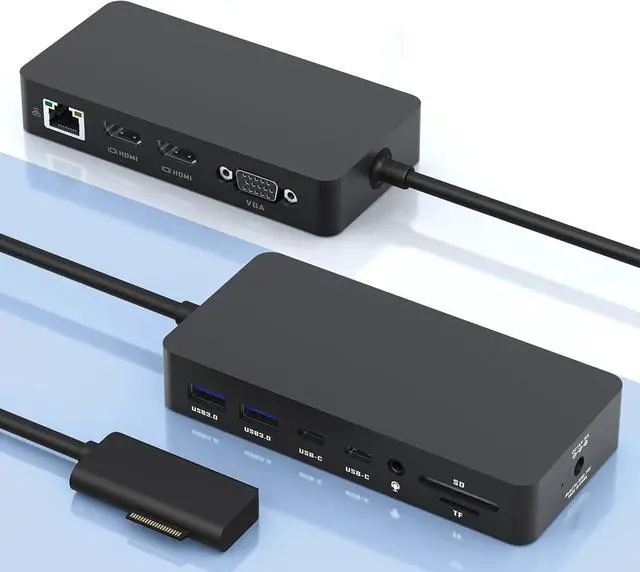
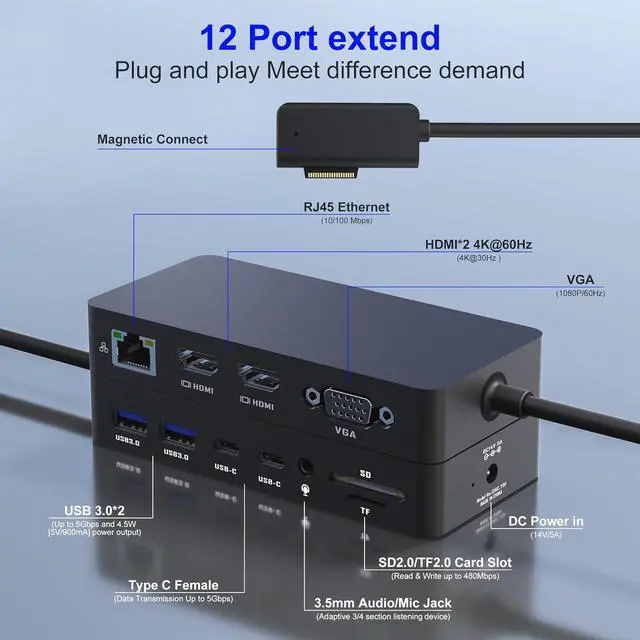
- Multi-Functional 12-in-1 Surface Dock: Featuring Surface Connection technology, this Surface Pro docking station provides a variety of connectivity options for your peripherals, including 2x 4K@30Hz HDMI ports, a 1080P@60Hz VGA port, a 100Mbps Gigabit RJ45 port, 2x USB-C data ports, 2x USB-A 3.0 ports, an SD/TF card slot, a 3.5mm Headphone Jack port, a DC Power port. Enjoy seamless plug-and-play connectivity with your Surface devices
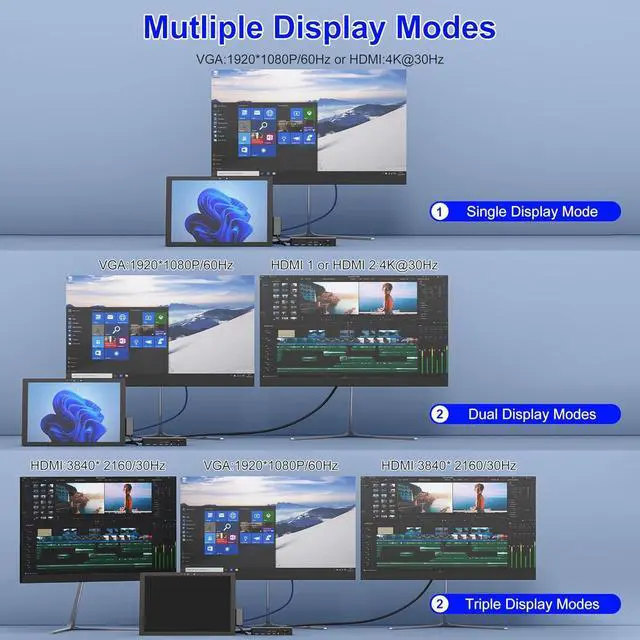
- Triple Display Surface Dock Hub with Ultra HD 4K Output: Featuring Surface Triple Displays (HDMI+HDMI+VGA) with extend or mirror mode, this Surface docking station boosts your efficiency by providing three times the display space. The Surface dock offers excellent 4K HDMI and VGA ports, with the 4K HDMI supporting resolutions up to 3840 x 2160@30Hz and the VGA port supporting display resolutions up to 1920 x 1080@60Hz. *Note: When connecting your Surface to up to 3 extra screens to achieve three displays (HDMI/HDMI/VGA + Surface), you will need to turn o
+
+
Overview
Reviews

Any questions? Our AI beta will help you find out quickly.
Try me now
12-in-1 Surface dock offering convenient connectivity for an expanded workspace. Connect your Surface laptop to up to three screens and enjoy multi-monitor support with HDMI+HDMI+VGA outputs. Immerse yourself in stunning visuals and crystal-clear display quality that will enhance both your work productivity and entertainment experience.
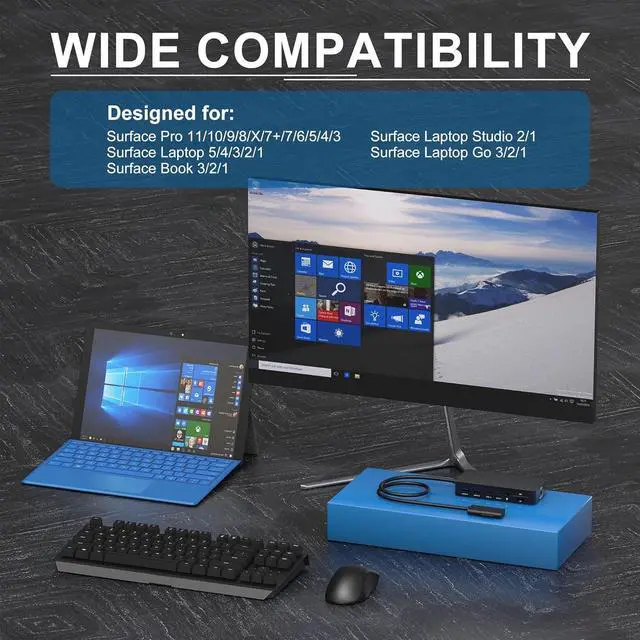
Surface Pro 11/10/9/8/X/7+/7/6/5/4/3
Surface Laptop 7/6/5/4/3/2/1
Surface Laptop Studio 2/1
Surface Laptop Go 3/2/1
Surface Book 3/2/1
Please note:
Our product products are not compatible with Surface Go series computers (including Surface Go 1/2/3/4).
Please note that Surface Go computers and Surface Laptop Go computers are different series, our products are compatible with Surface Laptop Go computers, but not Surface Go series computers.
Surface Triple display modes boost your efficiency 3 times.
When the three display interfaces are output at the same time, the 2 HDMI ports all support resolutions up to 3840 x 2160@30Hz.
*Note: Connect your Surface to up to 3 screens and enjoy the benefits of three displays (HDMI/HDMI/VGA + Surface)
When connecting the product externally to three displays (HDMI+HDMI+VGA), you need to turn off the screen of the Surface itself, and the three external displays can be displayed normally.
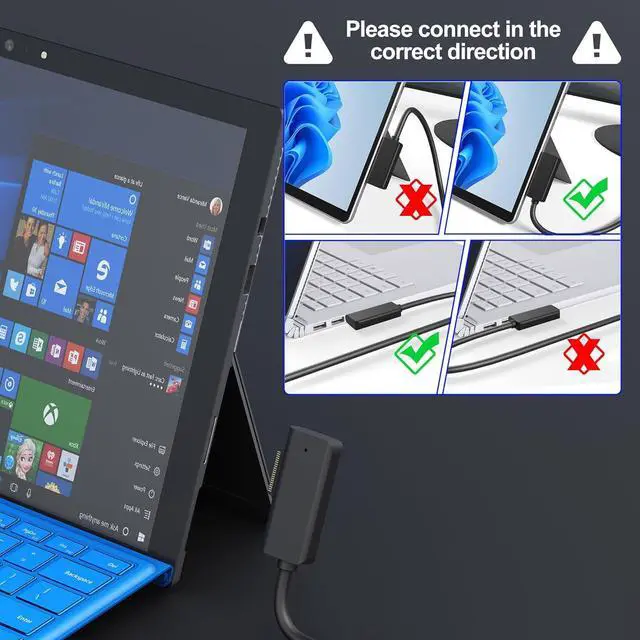
1.Please make sure to connect the magnetic connector interface to the Surface computer in the correct direction, the indicator light above the magnetic connector of the product will light up white after the correct connection, the incorrect connection of the product can only supply power to the Surface computer, the other ports can not be used, and the indicator light above the magnetic connector will not light up white.
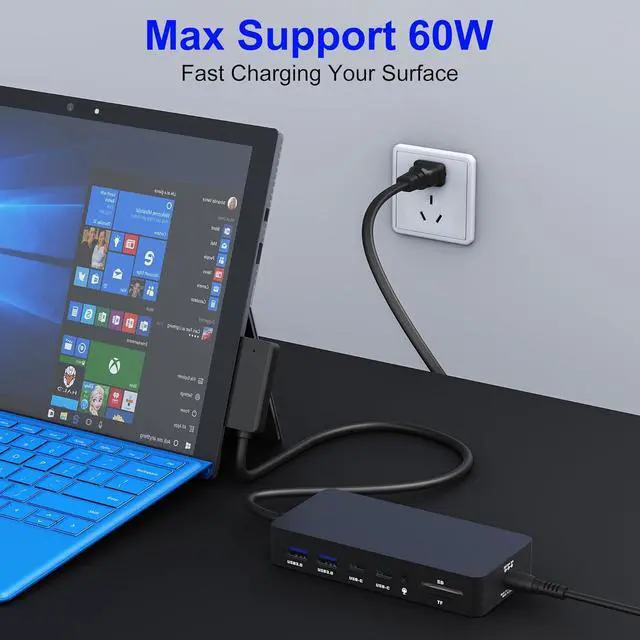
2. When using this product, the included charger must be connected to power the dock. Without the charger connected, HDMI display extension will not work, and this product will not charge the Surface device.
3. The indicator light next to the power Port: When connected to the power supply, the white light is on. When connected to the Surface, the green light is on normally; if there is a problem with the product, the white light is on.
4. Indicator light on the magnetic head: When connected to the Surface, the white light comes on normally. If the white light does not come on, there are two possibilities: either the magnetic head is not making good contact, or the magnetic head is plugged in backwards.
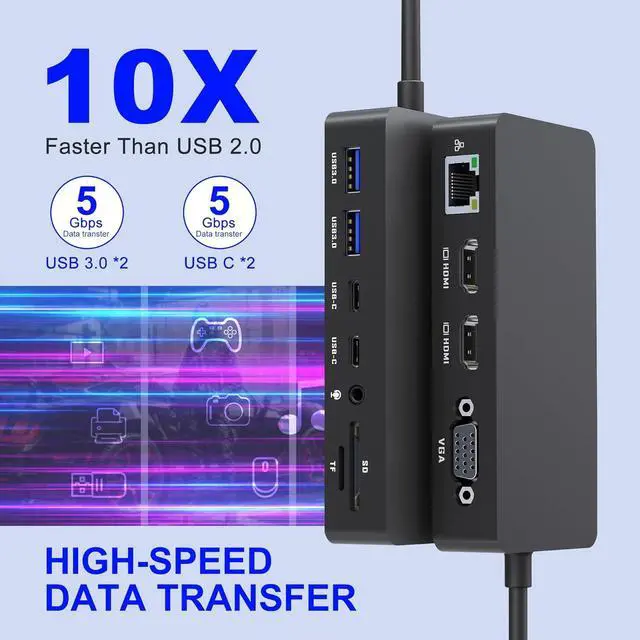
With support for super-fast data transfer up to 5Gbps, it's 10 times faster than USB 2.0, ensuring swift and efficient connectivity for all your devices.
Featuring 2 USB-A and 2 USB-C ports, this Surface dock enables seamless connections for a wide range of devices, including USB flash drives, hard drives, keyboards, mice, printers, thumb drives, USB sticks, MP3 players, and more. All ports can work simultaneously, offering unparalleled convenience and versatility for your workspace.
Our docking station Surface Pro feature Surface connection technology, which provides seamless high-speed video, audio, and data transfer while charging your device with surface magnetic ports. When properly connected, a white LED lights up above the connector.
12-in-1 Triple display Surface Pro Dock to meet your expansion needs Compatible with Surface Pro Triple Display Docking Station-Support Mirror Mode &Extend Mode Kindly Note: Super Speed Data Transfer Surface Magnetic Ports
Surface Pro 11/10/9/8/X/7+/7/6/5/4/3
Surface Laptop 7/6/5/4/3/2/1
Surface Laptop Studio 2/1
Surface Laptop Go 3/2/1
Surface Book 3/2/1
Please note:
Our product products are not compatible with Surface Go series computers (including Surface Go 1/2/3/4).
Please note that Surface Go computers and Surface Laptop Go computers are different series, our products are compatible with Surface Laptop Go computers, but not Surface Go series computers.
Surface Triple display modes boost your efficiency 3 times.
When the three display interfaces are output at the same time, the 2 HDMI ports all support resolutions up to 3840 x 2160@30Hz.
*Note: Connect your Surface to up to 3 screens and enjoy the benefits of three displays (HDMI/HDMI/VGA + Surface)
When connecting the product externally to three displays (HDMI+HDMI+VGA), you need to turn off the screen of the Surface itself, and the three external displays can be displayed normally.
1.Please make sure to connect the magnetic connector interface to the Surface computer in the correct direction, the indicator light above the magnetic connector of the product will light up white after the correct connection, the incorrect connection of the product can only supply power to the Surface computer, the other ports can not be used, and the indicator light above the magnetic connector will not light up white.
2. When using this product, the included charger must be connected to power the dock. Without the charger connected, HDMI display extension will not work, and this product will not charge the Surface device.
3. The indicator light next to the power Port: When connected to the power supply, the white light is on. When connected to the Surface, the green light is on normally; if there is a problem with the product, the white light is on.
4. Indicator light on the magnetic head: When connected to the Surface, the white light comes on normally. If the white light does not come on, there are two possibilities: either the magnetic head is not making good contact, or the magnetic head is plugged in backwards.
With support for super-fast data transfer up to 5Gbps, it's 10 times faster than USB 2.0, ensuring swift and efficient connectivity for all your devices.
Featuring 2 USB-A and 2 USB-C ports, this Surface dock enables seamless connections for a wide range of devices, including USB flash drives, hard drives, keyboards, mice, printers, thumb drives, USB sticks, MP3 players, and more. All ports can work simultaneously, offering unparalleled convenience and versatility for your workspace.
Our docking station Surface Pro feature Surface connection technology, which provides seamless high-speed video, audio, and data transfer while charging your device with surface magnetic ports. When properly connected, a white LED lights up above the connector.
12-in-1 Triple display Surface Pro Dock to meet your expansion needs Compatible with Surface Pro Triple Display Docking Station-Support Mirror Mode &Extend Mode Kindly Note: Super Speed Data Transfer Surface Magnetic Ports
Warranty & Returns
Warranty, Returns, And Additional Information
Warranty
- Please contact the Seller directly for warranty information. Warranty information may also be found on the Manufacturer's website.
- CONTACT
Return Policies
- Return for refund within: 30 days
- Return for replacement within: 30 days
- This item is covered by DHINGDOM TRADING CO., LIMITED Return Policy
Manufacturer Contact Info
- For a directory of all our manufacturers, please click below.
- Manufacturers Directory
LOADING...