

Your Browsing History
- Free 30-day Returns
$72.99

Meet Your Seller

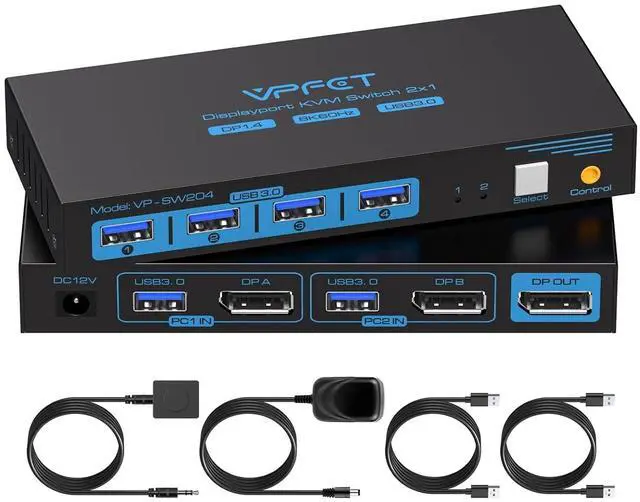
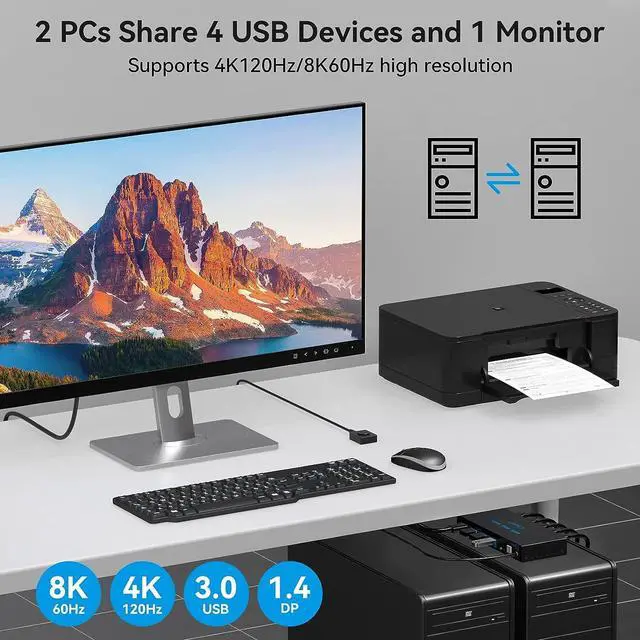


8K@60Hz KVM Switch 1 Monitors 2 Computers Displayport 4K@120Hz DP KVM Switches Single Monitor Dual Port for 2 PC/Laptops Share 4 USB 3.0 Ports Support Extended & Duplicate Display Mode
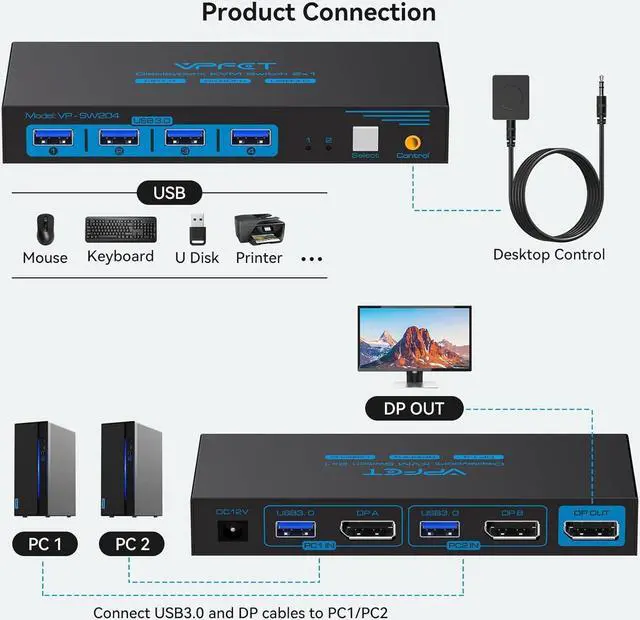
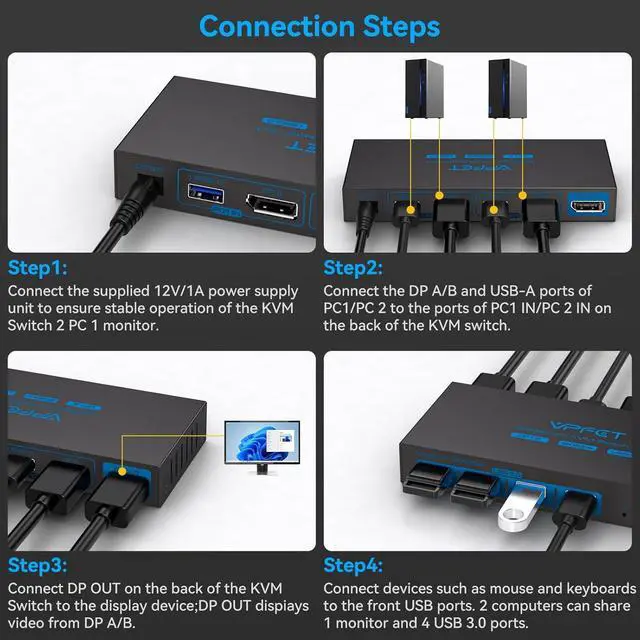
- KVM Switch Displayport 2 Port: This KVM Switch Displayport Allows 2 computers to share Mouse, Keyboards and an HD monitor for quick switching at the push of a button, improving office efficiency and gaming experience
- 8K High-Quality Video: DP switch Supports resolutions up to 8K@60Hz with clear picture quality and lag-free transmission of images, perfect for both office and entertainment use. Note: When transmitting 8K video, please use a standard Super Speed DP 1.4 cable(Not included in the package and needs to be purchased separately) to better experience 8K video and connect the KVM switch to the DC 12V power supply when in use
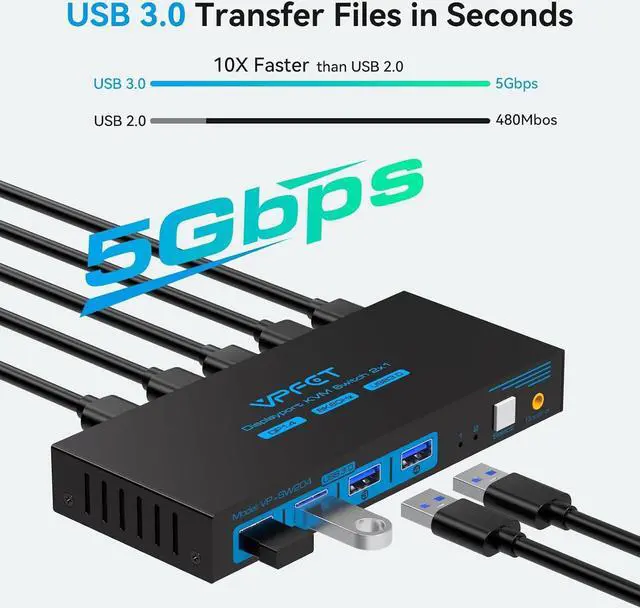
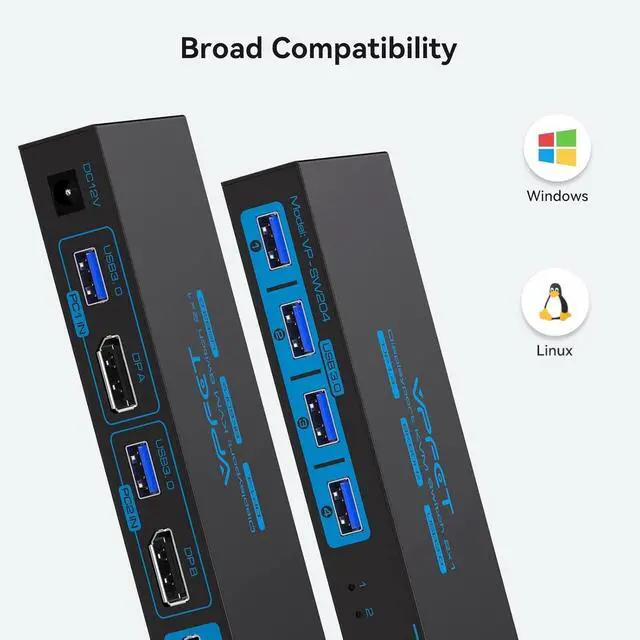
- 4 USB 3.0 Ports: The USB KVM switch is equipped with 4 USB 3.0 ports with a transfer rate up to 5Gbps for connecting peripherals such as mouse, keyboard, printer, webcam and U disk, and is backward compatible with USB 2.0, 1.1 and 1.0
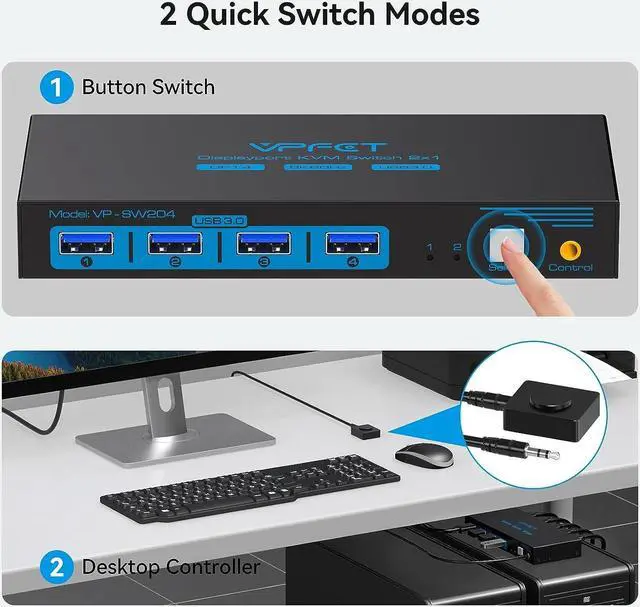
- Outstanding performance: Two button switching methods, easy to switch signal sources, the desktop wire controller can hide
+
+
Overview
Reviews

Any questions? Our AI beta will help you find out quickly.
Try me now
Please confirm that 1.the USB 3.0 cable is properly connected between the computer and the KVM;
2. the computer's USB port is functioning properly;
3. that the latest USB driver is installed on the computer.
1Usage Scenarios2USB 3.0 Higher Speed3Simpler desktop1Two switching methods2Supports multiple systems3High Performance Solution Can KVM switches support up to 4K@120Hz?
Our KVM can support up to 4K@120Hz, but the prerequisite is that the cable and Hub you use must support 4K@120Hz.
Can the two functions of USB Switch and HDMI Switch be used independently?
Yes, you can think of the KVM switch as a USB+HDMI Switch. These two functions not only support simultaneous use, but can also be used separately.
What is the maximum power of peripherals it can drive?
To drive peripherals with a maximum power of 10W, we use a 12V/1A power adapter, which can provide a more powerful and stable drive. Other KVM switches only support 5V/1A adapters. When using high-power
Is it really possible to replace a new product within two years?
Yes, if there are any problems with the product within two years, we will solve it for you, including replacing it with a new KVM.
Do I have to connect the 12V/1A power adapter to use it?
Make sure your computer supports multi-screen display, you can connect two screens directly to the computer and check if there are images display.
USB not working Displayport Kvm Switch 1 Monitors 2 Computers Can KVM switches support up to 4K@120Hz?
Can the two functions of USB Switch and HDMI Switch be used independently?
What is the maximum power of peripherals it can drive?
Is it really possible to replace a new product within two years?
Do I have to connect the 12V/1A power adapter to use it?
2. the computer's USB port is functioning properly;
3. that the latest USB driver is installed on the computer.
1Usage Scenarios2USB 3.0 Higher Speed3Simpler desktop1Two switching methods2Supports multiple systems3High Performance Solution Can KVM switches support up to 4K@120Hz?
Our KVM can support up to 4K@120Hz, but the prerequisite is that the cable and Hub you use must support 4K@120Hz.
Can the two functions of USB Switch and HDMI Switch be used independently?
Yes, you can think of the KVM switch as a USB+HDMI Switch. These two functions not only support simultaneous use, but can also be used separately.
What is the maximum power of peripherals it can drive?
To drive peripherals with a maximum power of 10W, we use a 12V/1A power adapter, which can provide a more powerful and stable drive. Other KVM switches only support 5V/1A adapters. When using high-power
Is it really possible to replace a new product within two years?
Yes, if there are any problems with the product within two years, we will solve it for you, including replacing it with a new KVM.
Do I have to connect the 12V/1A power adapter to use it?
Make sure your computer supports multi-screen display, you can connect two screens directly to the computer and check if there are images display.
USB not working Displayport Kvm Switch 1 Monitors 2 Computers Can KVM switches support up to 4K@120Hz?
Can the two functions of USB Switch and HDMI Switch be used independently?
What is the maximum power of peripherals it can drive?
Is it really possible to replace a new product within two years?
Do I have to connect the 12V/1A power adapter to use it?
Warranty & Returns
Warranty, Returns, And Additional Information
Warranty
- Please contact the Seller directly for warranty information. Warranty information may also be found on the Manufacturer's website.
- CONTACT
Return Policies
- Return for refund within: 30 days
- Return for replacement within: 30 days
- This item is covered by DHINGDOM TRADING CO., LIMITED Return Policy
Manufacturer Contact Info
- For a directory of all our manufacturers, please click below.
- Manufacturers Directory
LOADING...