

Your Browsing History
- Free 30-day Returns
$29.46

Meet Your Seller


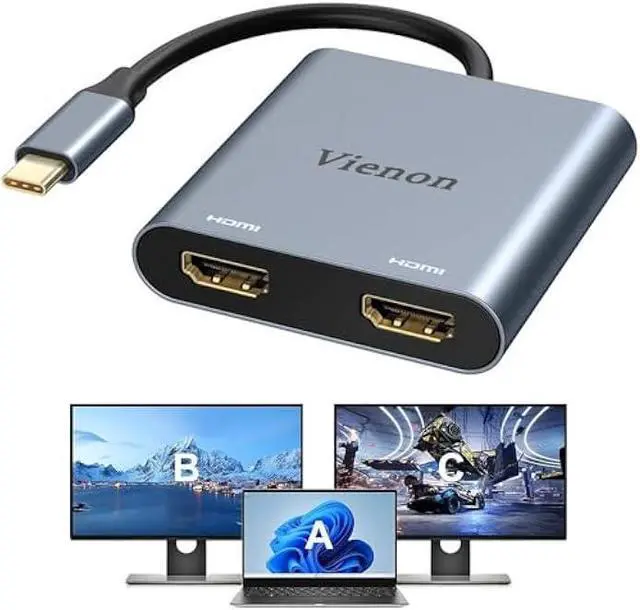


VIENON USB C to Dual HDMI Adapter 4K@60hz, Type C to HDMI Splitter for 2 Monitors, USB C Hub Extend Display for MacBook Air/Pro, XPS, More Laptops with Thunderbolt 3/4 Ports
- Type C to Dual HDMI Hub: This USB C to Dual HDMI Adapter allows you to stream movies,games from Macbook, iPad pro or other USB C host device to a HD big Screen for Enjoy clearer and more stunning image. With 2 HDMI ports, this type to hdmi adapter supports expand your workspace or media content on two screens simultaneously.(Note: Only compatible with Thunderbolt 3/4/5 ports, full-featured USB-C ports or USB4 ports, and requires a standard HDMI cable.)
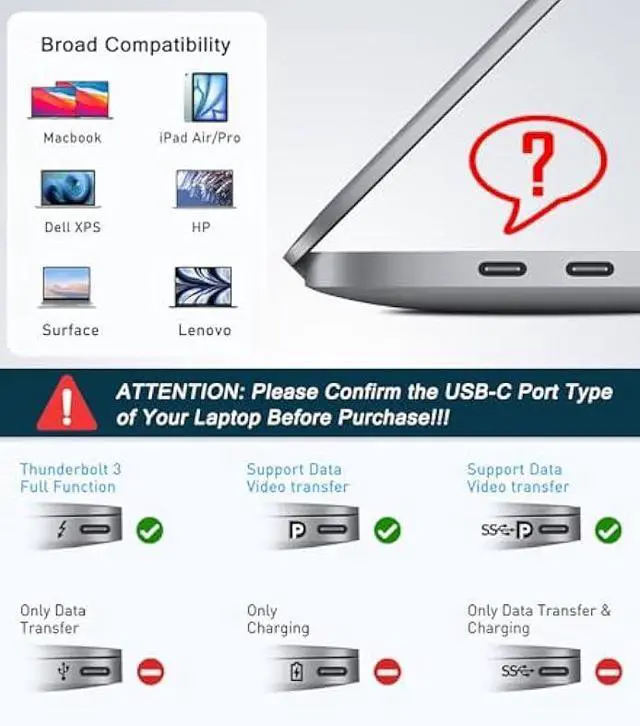
- Compatible Devices: (Note: NOT for all USB-C port laptop, such as this adapter CANNOT work with HP Pavilion/IdeaPad, You need to confirm that your host device's C port supports video output or DP Alt Mode, and you can normally see the DP-logo next to the port if this is the case, ).This HDMI Reader works well with Thunderbolt 3 compatible devices,such as MacBook/MacBook Pro2021 2020 2019 2018 2017,MacBook Air2020-2018,iPad Pro 2018 ,XPS13/15,Samsung Galaxy S9/S9+,etc.
- Easy to Use: This USB C to Dual HDMI Adapter is plug-and-
+
+
Overview
Specs
Reviews

Any questions? Our AI mode will help you find out quickly.
Try me now
Type C to
Dual HDMI Hub: This USB C to Dual HDMI Adapter allows you to stream movies, games from Macbook, iPad pro or other USB C host device to a HD big Screen for Enjoy clearer and more stunning image. With 2 HDMI ports, this type to hdmi adapter supports expand your workspace or media content on two screens simultaneously. (Note: Only compatible with Thunderbolt 3/4/5 ports, full-featured USB-C ports or USB4 ports, and requires a standard HDMI cable. )
Compatible Devices:
(Note: NOT for all USB-C port laptop, such as this adapter CANNOT work with HP Pavilion/IdeaPad, You need to confirm that your host device's C port supports video output or DP Alt Mode, and you can normally see the DP-logo next to the port if this is the case, ). This HDMI Reader works well with Thunderbolt 3 compatible devices, such as MacBook/MacBook Pro2021 2020 2019 2018 2017, MacBook Air2020-2018, iPad Pro 2018, XPS13/15, Samsung Galaxy S9/S9+, etc.
Easy to Use: This USB C to Dual HDMI Adapter is plug-and-play. Connect the Type C male port of this adapter to your USB C device, and your HDMI cables to the adapter and your monitors. No drivers or software installation is required, allowing you to start enjoying dual monitor functionality in no time. (Note: you may need to change the settings of the default audio output device on system preferences to deliver sound).
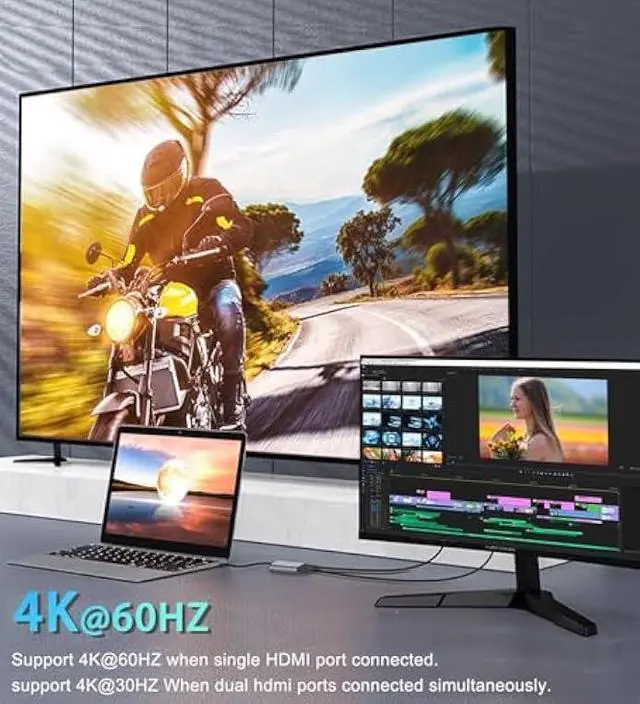
4K@ 60HZ UHD: While single use one HDMI port resolution up to 4K@60Hz, dual monitor with HDMI at 2x 4K@30Hz(3840x2160@30Hz). with this high-performance USB-C adapter, it will achieve real-time transmission of high-definition images without delay, very suitable for gaming enthusiasts, professional draftsmen and video editors.. (Important: ONLY when your devices support 4K resolution, the video output will be 4K, please make sure to use a HDMI 2.0 cable or better).
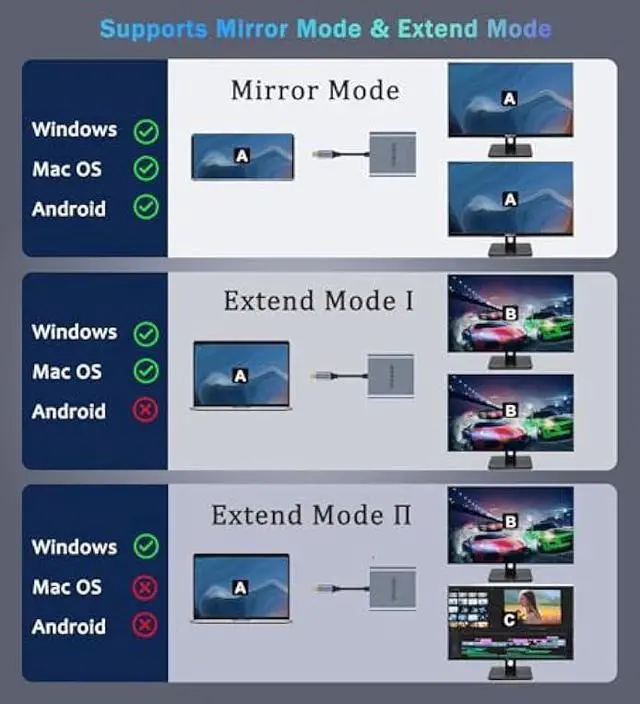
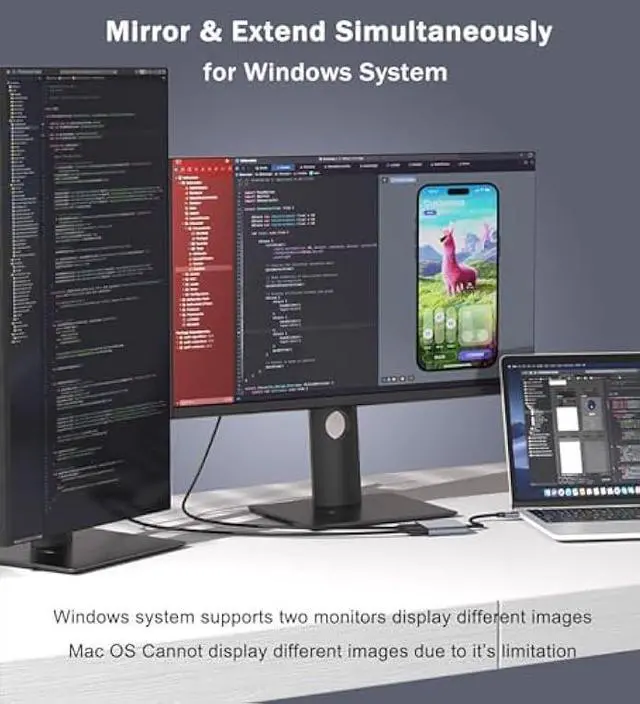
Mirror Mode & Extend Mode: Windows supports Mirror Mode and Extend Mode and MST mode; For Mac OS, it ONLY Mirror and Extend Mode, Not supports MST mode (Can't extend two different Screen), due to Mac OS limitation; Android only support Mirror Mode.
Dual HDMI Hub: This USB C to Dual HDMI Adapter allows you to stream movies, games from Macbook, iPad pro or other USB C host device to a HD big Screen for Enjoy clearer and more stunning image. With 2 HDMI ports, this type to hdmi adapter supports expand your workspace or media content on two screens simultaneously. (Note: Only compatible with Thunderbolt 3/4/5 ports, full-featured USB-C ports or USB4 ports, and requires a standard HDMI cable. )
Compatible Devices:
(Note: NOT for all USB-C port laptop, such as this adapter CANNOT work with HP Pavilion/IdeaPad, You need to confirm that your host device's C port supports video output or DP Alt Mode, and you can normally see the DP-logo next to the port if this is the case, ). This HDMI Reader works well with Thunderbolt 3 compatible devices, such as MacBook/MacBook Pro2021 2020 2019 2018 2017, MacBook Air2020-2018, iPad Pro 2018, XPS13/15, Samsung Galaxy S9/S9+, etc.
Easy to Use: This USB C to Dual HDMI Adapter is plug-and-play. Connect the Type C male port of this adapter to your USB C device, and your HDMI cables to the adapter and your monitors. No drivers or software installation is required, allowing you to start enjoying dual monitor functionality in no time. (Note: you may need to change the settings of the default audio output device on system preferences to deliver sound).
4K@ 60HZ UHD: While single use one HDMI port resolution up to 4K@60Hz, dual monitor with HDMI at 2x 4K@30Hz(3840x2160@30Hz). with this high-performance USB-C adapter, it will achieve real-time transmission of high-definition images without delay, very suitable for gaming enthusiasts, professional draftsmen and video editors.. (Important: ONLY when your devices support 4K resolution, the video output will be 4K, please make sure to use a HDMI 2.0 cable or better).
Mirror Mode & Extend Mode: Windows supports Mirror Mode and Extend Mode and MST mode; For Mac OS, it ONLY Mirror and Extend Mode, Not supports MST mode (Can't extend two different Screen), due to Mac OS limitation; Android only support Mirror Mode.
Warranty & Returns
Warranty, Returns, And Additional Information
Warranty
- Please contact the Seller directly for warranty information. Warranty information may also be found on the Manufacturer's website.
- CONTACT
Return Policies
- Return for refund within: 30 days
- Return for replacement within: 30 days
- This item is covered by TongHeQiaoShop Return Policy
Manufacturer Contact Info
- For a directory of all our manufacturers, please click below.
- Manufacturers Directory
LOADING...