




 here!
here!
I’m your shopping assistant for PC builds, upgrades, and everything tech.
Got questions? Ask away!
Start a conversation
here!
I’m your shopping assistant for PC builds, upgrades, and everything tech.
Got questions? Ask away!
Start a conversation



Any questions? Ask CelesteSM will help you find out quickly.

Tester Latest Button Functions
Tips:
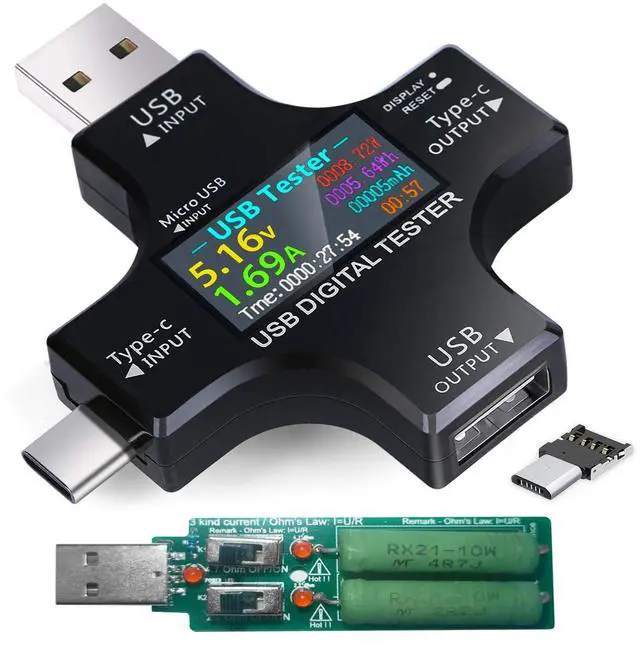
Tester highlights:
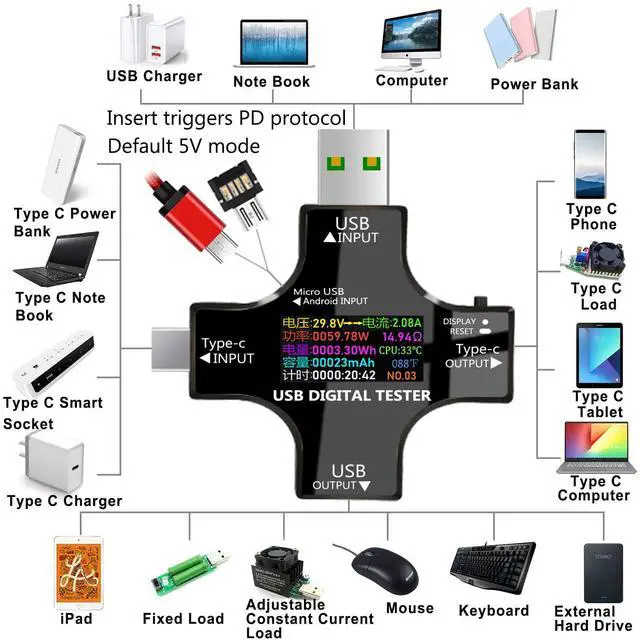
Scope of application:
You will get:
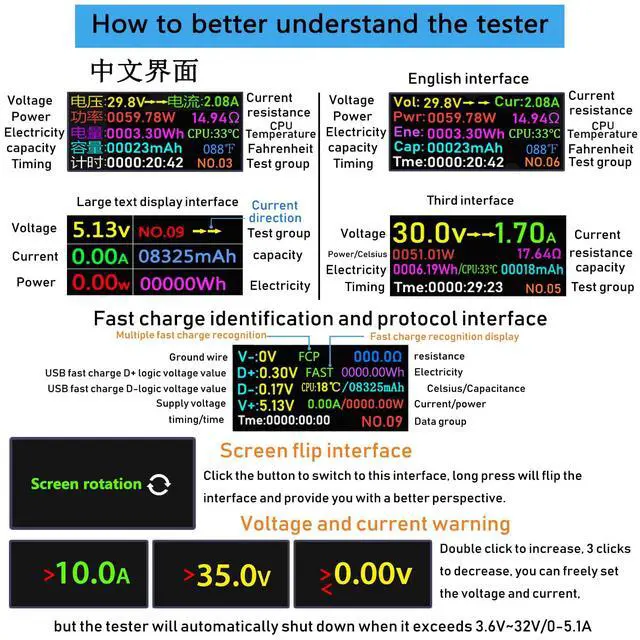
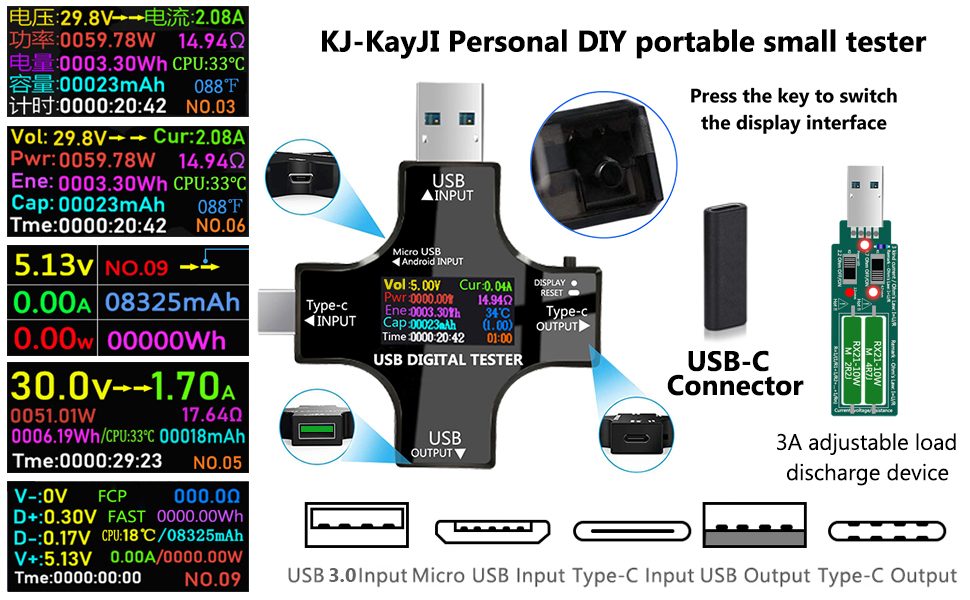
Multiple display screens
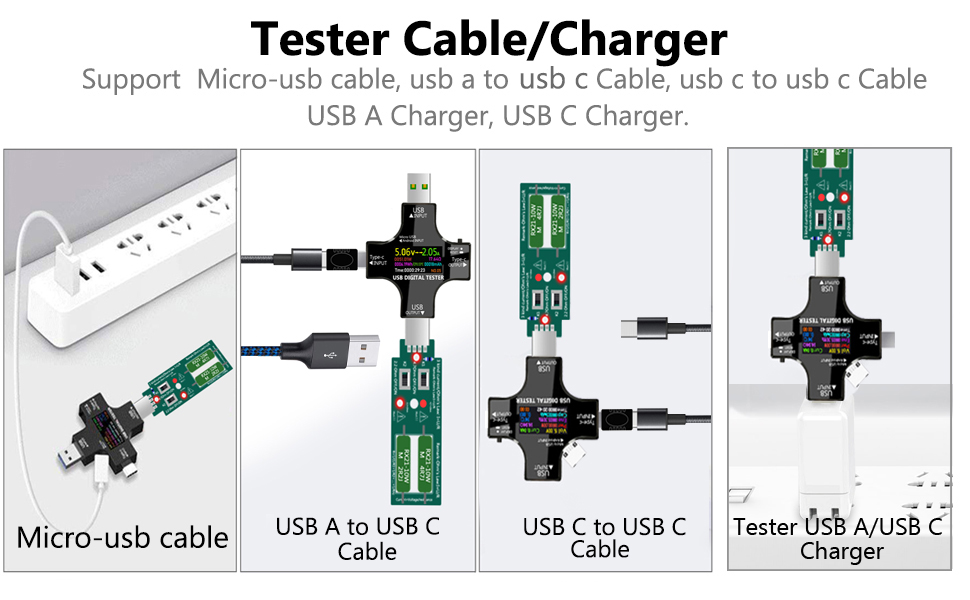
Tips: You need to test the charger before testing the cable
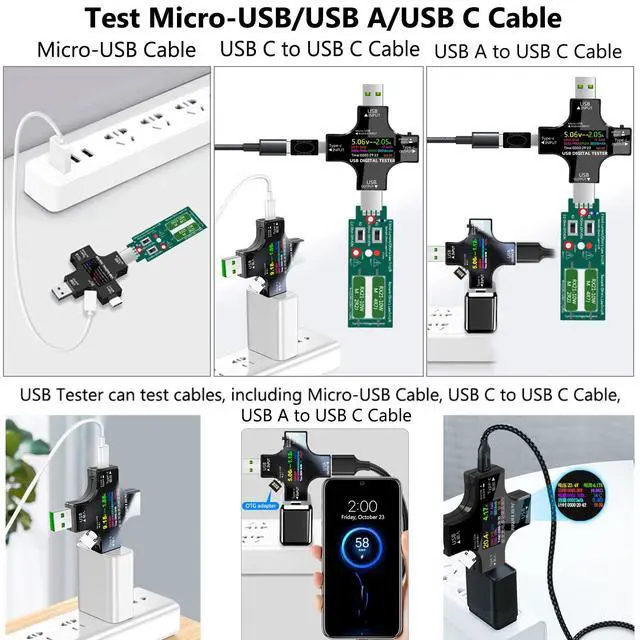
Test Charger,Support USB A Charger/USB C Charger. Test Cables, Support Micro-usb Cable/usb a to usb c Cable/usb c to usb c Cable.
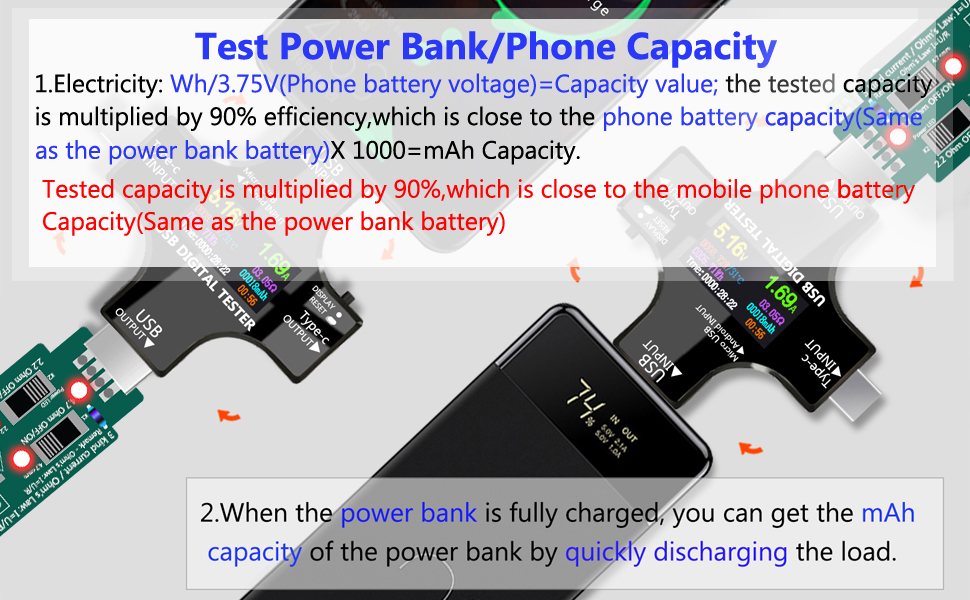
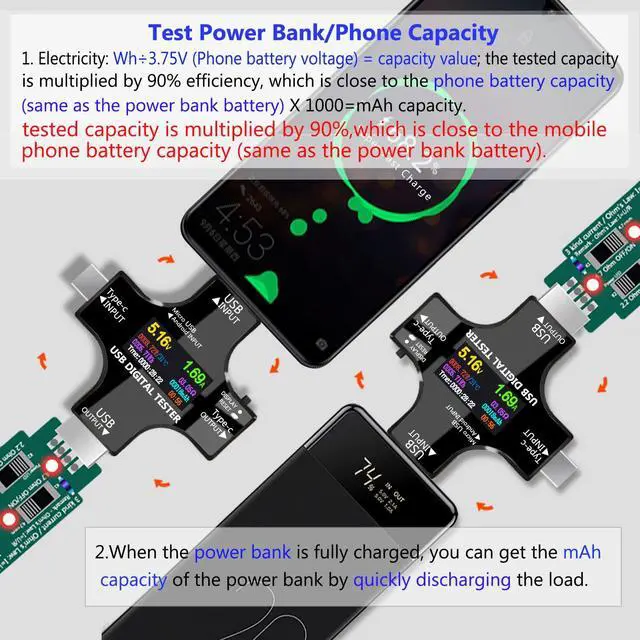
Fully charge the power bank, insert it into the tester, clear the mAh of the tester, connect to Load to quickly discharge to obtain mAh capacity,multiply by 90%.
The phone is fully charged, plugged into the tester, cleared Wh data, connected to Load, quickly discharged, and acquired data.
Electricity: Wh/3.75V(Phone battery voltage)=Capacity value X 1000 X90%=Phone mAh capacity.(which is close to the phone battery capacity)
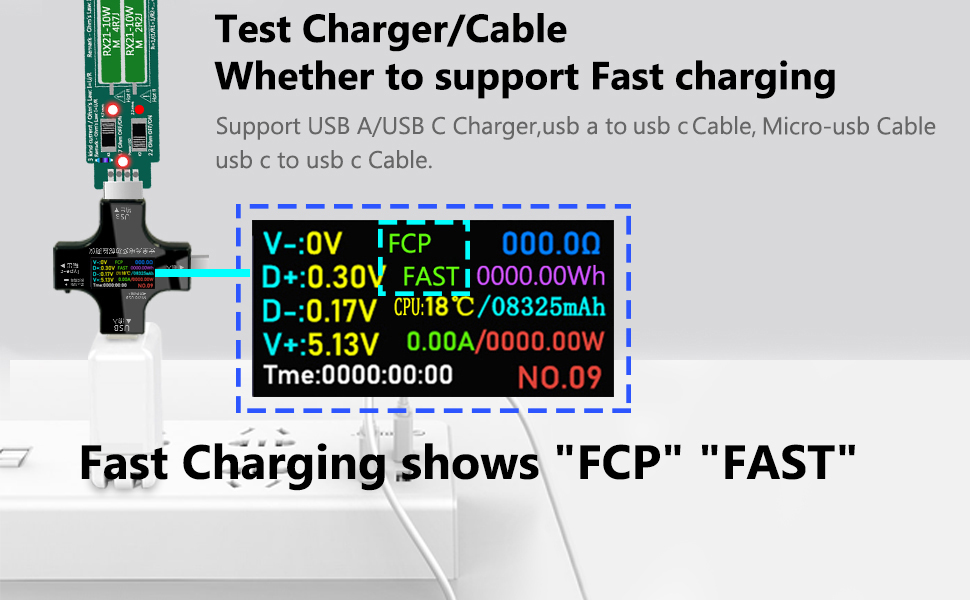
Tester USB A/USB C Charger,USB A to USB C Cable, USB C to USB C Cable.
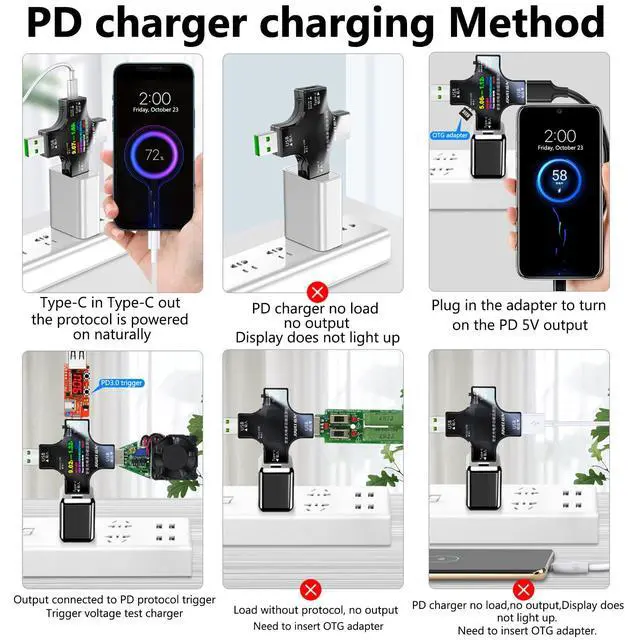
Insert the tester into the charger, connect Load, adjust the current to 3A, if it supports fast charging, the fifth interface will display "FCP" "FAST". If it does not support fast charging, "FCP" "FAST" will not be displayed.
Use a charger that has been tested by the tester to support fast charging, plug the corresponding cable into the charger, and adjust to 3A after connecting the cable. If the fifth interface displays "FCP" and "FAST", it supports fast charging. If it does not support fast charging, "FCP" "FAST" is not displayed.

Charge your phone safely and check data in real time
Support QC3.0 (3.8 ~ 12V) QC2.0 (5V / 9V / 12V / 20V)
Android BC1.2 (5V)
Apple 5V / 2.4A and MTK-PE (5V / 7V / 9V / 12V)
And other Qualcomm fast charge

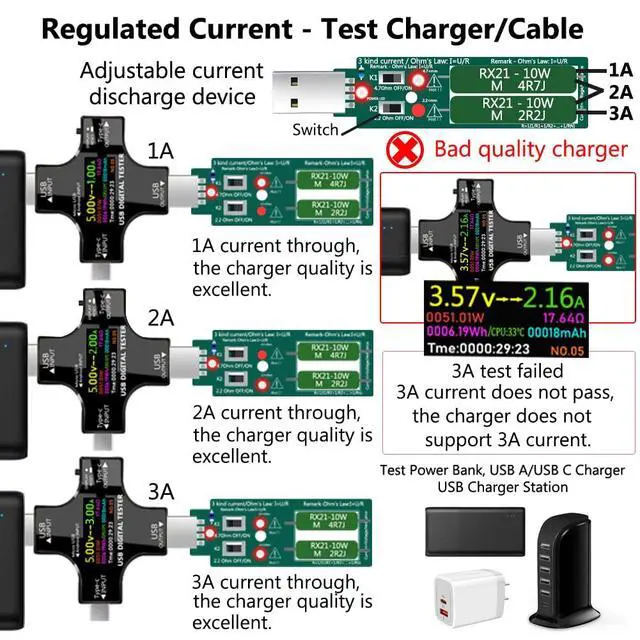
Plug the tester into the charger and connect an adjustable current loader,
Perform current adjustment and test the current and voltage data of the charger.
Let the charger be connected to the current loader for a long time to check the stability of the charger

Can meet the output of two devices at the same time, support Type-C devices, intelligent charging scheme, and ensure the safety of the device

When you power the notebook, connect a KJ-KayJI test meter to monitor the voltage, current, capacity, power,temperature and other technical parameter information in real time.
Tester Latest Button Functions
Tips:
Tester highlights:
Scope of application:
You will get:
Multiple display screens
Tips: You need to test the charger before testing the cable
Test Charger,Support USB A Charger/USB C Charger. Test Cables, Support Micro-usb Cable/usb a to usb c Cable/usb c to usb c Cable.
Fully charge the power bank, insert it into the tester, clear the mAh of the tester, connect to Load to quickly discharge to obtain mAh capacity,multiply by 90%.
The phone is fully charged, plugged into the tester, cleared Wh data, connected to Load, quickly discharged, and acquired data.
Electricity: Wh/3.75V(Phone battery voltage)=Capacity value X 1000 X90%=Phone mAh capacity.(which is close to the phone battery capacity)
Tester USB A/USB C Charger,USB A to USB C Cable, USB C to USB C Cable.
Insert the tester into the charger, connect Load, adjust the current to 3A, if it supports fast charging, the fifth interface will display "FCP" "FAST". If it does not support fast charging, "FCP" "FAST" will not be displayed.
Use a charger that has been tested by the tester to support fast charging, plug the corresponding cable into the charger, and adjust to 3A after connecting the cable. If the fifth interface displays "FCP" and "FAST", it supports fast charging. If it does not support fast charging, "FCP" "FAST" is not displayed.
Charge your phone safely and check data in real time
Support QC3.0 (3.8 ~ 12V) QC2.0 (5V / 9V / 12V / 20V)
Android BC1.2 (5V)
Apple 5V / 2.4A and MTK-PE (5V / 7V / 9V / 12V)
And other Qualcomm fast charge
Plug the tester into the charger and connect an adjustable current loader,
Perform current adjustment and test the current and voltage data of the charger.
Let the charger be connected to the current loader for a long time to check the stability of the charger
Can meet the output of two devices at the same time, support Type-C devices, intelligent charging scheme, and ensure the safety of the device
When you power the notebook, connect a KJ-KayJI test meter to monitor the voltage, current, capacity, power,temperature and other technical parameter information in real time.


