

Your Browsing History

Meet Your Seller


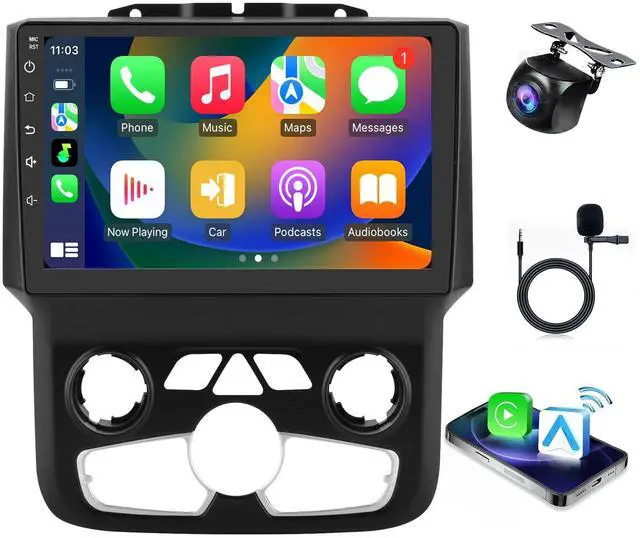

Car Radio for Dodge Ram 1500 2500 3500 2013-2018 Car Stereo Android 14 Touch Screen Wireless CarPlay& Android Auto with GPS Bluetooth WiFi Backup Camera Head Unit (Auto AC)
- Custom-Designed for Dodge Ram 1500, 2500, and 3500 models from 2013-2018, featuring Plug-and-Play Installation. Enhance your Dodge Ram infotainment system with this specifically engineered radio. Perfectly crafted for Dodge Ram models from 2013-2018, it provides plug-and-play installation without requiring any extra accessories. Powerful Features: This Dodge Ram radio features a 9-inch IPS touchscreen powered by the Android 14 system, supported by 2GB RAM and 32GB ROM for a smooth and responsive user experience. With its 100% standard size, no additional accessories are needed; simply adhere to the installation instructions. Wireless CarPlay & Android Auto: Connect using Bluetooth or a USB cable (for iPhone via Bluetooth, Android phone via USB cable). For wireless CarPlay: Activate Wi-Fi first, then activate Bluetooth. Once the phone is paired to the radio, launch the Tlink5 app to connect to CarPlay. Built-in Wi-Fi & Bluetooth for Connectivity: Remain connected while traveling with built-in Wi-Fi for internet access. Bluetooth functionality enables wireless pairing with mobile devices for music streaming and hands-free calling. GPS Navigation & RDS Radio: Integrated GPS capability offers turn-by-turn navigation
+
+
Overview
Specs
Reviews

Any questions? Our AI mode will help you find out quickly.
Try me now
Custom-Designed for Dodge Ram 1500, 2500, and 3500 models from 2013-2018, featuring Plug-and-Play Installation. Enhance your Dodge Ram infotainment system with this specifically engineered radio. Perfectly crafted for Dodge Ram models from 2013-2018, it provides plug-and-play installation without requiring any extra accessories. Powerful Features: This Dodge Ram radio features a 9-inch IPS touchscreen powered by the Android 14 system, supported by 2GB RAM and 32GB ROM for a smooth and responsive user experience. With its 100% standard size, no additional accessories are needed; simply adhere to the installation instructions. Wireless CarPlay & Android Auto: Connect using Bluetooth or a USB cable (for iPhone via Bluetooth, Android phone via USB cable). For wireless CarPlay: Activate Wi-Fi first, then activate Bluetooth. Once the phone is paired to the radio, launch the Tlink5 app to connect to CarPlay. Built-in Wi-Fi & Bluetooth for Connectivity: Remain connected while traveling with built-in Wi-Fi for internet access. Bluetooth functionality enables wireless pairing with mobile devices for music streaming and hands-free calling. GPS Navigation & RDS Radio: Integrated GPS capability offers turn-by-turn navigation
Warranty & Returns
Warranty, Returns, And Additional Information
Warranty
- Please contact the Seller directly for warranty information. Warranty information may also be found on the Manufacturer's website.
- CONTACT
Return Policies
- Return for refund within: 30 days
- Return for replacement within: 30 days
- This item is covered by PurePick Return Policy
Manufacturer Contact Info
- For a directory of all our manufacturers, please click below.
- Manufacturers Directory
LOADING...