Your Browsing History
- Free 30-day Returns
$44.52
Ships from China.
Meet Your Seller
Sponsored Products
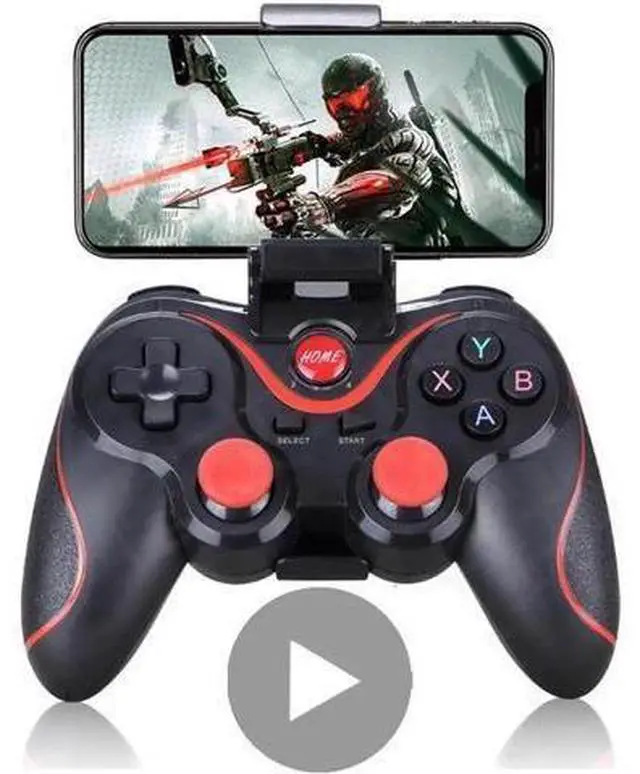
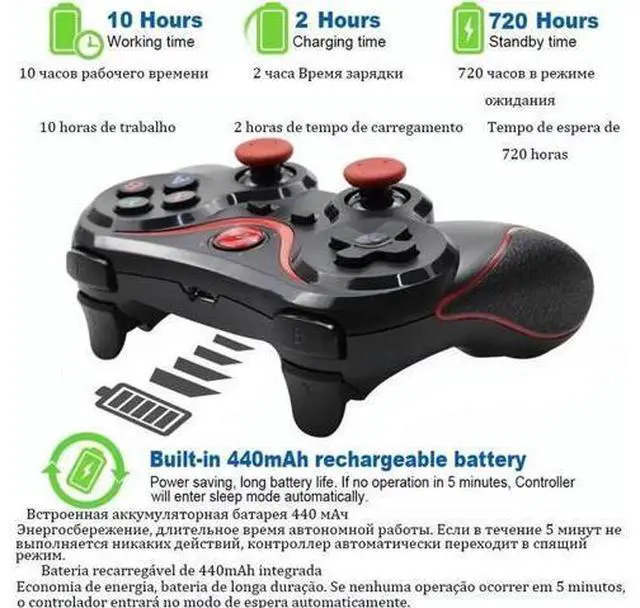
Control for Phone Gamepad Joystick PC Smart TV Box Android iPhone Trigger Mobile Game Pad Controller Gaming Smartphone
Limited time offer, ends 09/19 By Kepler Forge
- Enjoy Your Shopping
+
+
Overview
Specs
Reviews
Any questions? Our AI mode will help you find out quickly.
Try me now
We support drop shipping!
Model: X3/T3
Functions:
version: V 3.0
Compatible with: Smartphone, Tablet
Features: Charger
Capacity: 500mAh
Array charging time: 2
hours playing time: 5-8 hours
Package weight: 0.220 kg
Package List: 1 x Z6 Gamepad 1 x USB Cable 1 x User Manual 1 x Adapter (You can choose it or not) 1x Stand (You can choose it or not)
Descriptions:
Note1: Android system please choose the white color
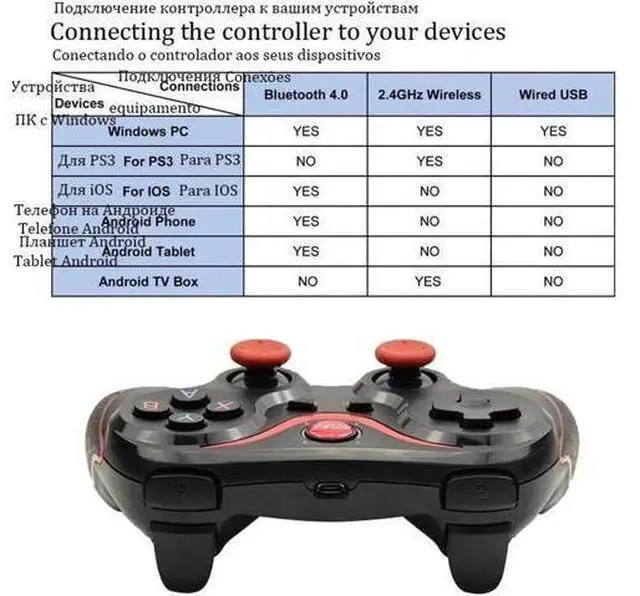
Note2: IOS system please choose the black color How to use the game controller to connect the TV box, PC and Smartphone, Inserting the receiver, then long press the SELECT + GEN GAME button Simultaneously of Game controller for about 2 second, it can connect the TV BOX or PC;
Android system: press X+ HOME button, IOS
system: Y+HOME button
Remarks: Android
users: Download Octopus at your APP store
IOS users: Download ShootingPlus V3 at your APP store Applicable system Windows system PS3 game console Operating mode 2.4 wireless mode 2.4 wireless mode Pattern matchig L1key + HOME key L1key + HOME key Long press for 2 seconds) Indicator light LED1+LED2 LED1+LED2 Remarks Requires wireless receiver, power on Wireless receiver required default is X-Input 360 mode, Long press SELECT key + START key for 2 seconds D-Input mode Android PC Support PlayStation3 ANALOG+DIGIIAL

Model: X3/T3
Functions:
version: V 3.0
Compatible with: Smartphone, Tablet
Features: Charger
Capacity: 500mAh
Array charging time: 2
hours playing time: 5-8 hours
Package weight: 0.220 kg
Package List: 1 x Z6 Gamepad 1 x USB Cable 1 x User Manual 1 x Adapter (You can choose it or not) 1x Stand (You can choose it or not)
Descriptions:
Note1: Android system please choose the white color
Note2: IOS system please choose the black color How to use the game controller to connect the TV box, PC and Smartphone, Inserting the receiver, then long press the SELECT + GEN GAME button Simultaneously of Game controller for about 2 second, it can connect the TV BOX or PC;
Android system: press X+ HOME button, IOS
system: Y+HOME button
Remarks: Android
users: Download Octopus at your APP store
IOS users: Download ShootingPlus V3 at your APP store Applicable system Windows system PS3 game console Operating mode 2.4 wireless mode 2.4 wireless mode Pattern matchig L1key + HOME key L1key + HOME key Long press for 2 seconds) Indicator light LED1+LED2 LED1+LED2 Remarks Requires wireless receiver, power on Wireless receiver required default is X-Input 360 mode, Long press SELECT key + START key for 2 seconds D-Input mode Android PC Support PlayStation3 ANALOG+DIGIIAL
Warranty & Returns
Warranty, Returns, And Additional Information
Warranty
- Please contact the Seller directly for warranty information. Warranty information may also be found on the Manufacturer's website.
- CONTACT
Return Policies
- Return for refund within: 30 days
- Return for replacement within: 30 days
- This item is covered by Kepler Forge Return Policy
Manufacturer Contact Info
- For a directory of all our manufacturers, please click below.
- Manufacturers Directory
LOADING...