



![Main image of Thermal Pad 13W/mK [0.5~3mm], 120x120x2mm Silicone Cooling Pad GPU Non Conductive Heat Resistance Soft Sticky Cover with Dual Self-Adhesive Films for PC Macbook Laptop SSD/RAM/PS5/Game Console](https://c1.neweggimages.com/productimage/nb640/C863D2608180EZV56C0.jpg)
![Alt view image 2 of 7 - Thermal Pad 13W/mK [0.5~3mm], 120x120x2mm Silicone Cooling Pad GPU Non Conductive Heat Resistance Soft Sticky Cover with Dual Self-Adhesive Films for PC Macbook Laptop SSD/RAM/PS5/Game Console](https://c1.neweggimages.com/productimage/nb640/C691D26041103H9XK97.jpg)
![Alt view image 3 of 7 - Thermal Pad 13W/mK [0.5~3mm], 120x120x2mm Silicone Cooling Pad GPU Non Conductive Heat Resistance Soft Sticky Cover with Dual Self-Adhesive Films for PC Macbook Laptop SSD/RAM/PS5/Game Console](https://c1.neweggimages.com/productimage/nb640/C691D26041103H9ZV0A.jpg)
![Alt view image 4 of 7 - Thermal Pad 13W/mK [0.5~3mm], 120x120x2mm Silicone Cooling Pad GPU Non Conductive Heat Resistance Soft Sticky Cover with Dual Self-Adhesive Films for PC Macbook Laptop SSD/RAM/PS5/Game Console](https://c1.neweggimages.com/productimage/nb640/C691D26041103HA02A1.jpg)
![Alt view image 5 of 7 - Thermal Pad 13W/mK [0.5~3mm], 120x120x2mm Silicone Cooling Pad GPU Non Conductive Heat Resistance Soft Sticky Cover with Dual Self-Adhesive Films for PC Macbook Laptop SSD/RAM/PS5/Game Console](https://c1.neweggimages.com/productimage/nb640/C863D2608180EZV9W81.jpg)
![Alt view image 6 of 7 - Thermal Pad 13W/mK [0.5~3mm], 120x120x2mm Silicone Cooling Pad GPU Non Conductive Heat Resistance Soft Sticky Cover with Dual Self-Adhesive Films for PC Macbook Laptop SSD/RAM/PS5/Game Console](https://c1.neweggimages.com/productimage/nb640/C691D26041103H9XKBE.jpg)
![Alt view image 7 of 7 - Thermal Pad 13W/mK [0.5~3mm], 120x120x2mm Silicone Cooling Pad GPU Non Conductive Heat Resistance Soft Sticky Cover with Dual Self-Adhesive Films for PC Macbook Laptop SSD/RAM/PS5/Game Console](https://c1.neweggimages.com/productimage/nb640/C863D2608180EZVFM9E.jpg)


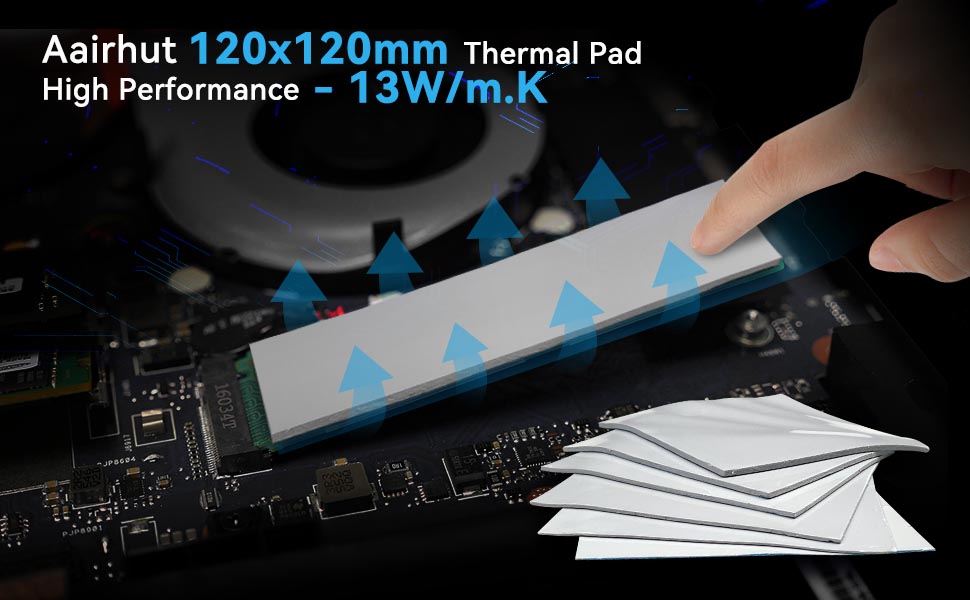
Aairhut True 13W/m·K Thermal Pad – Cool Down Your Device Effectively
- Start with Aairhut! A reliable, high-performance cooling solution for PCs, PS5, MacBooks, laptops, SSDs, and other heat-sensitive electronics.
- Genuine 13W/m·K High Thermal Conductivity Rapidly transfers heat away from electronic components and lowers temperature in seconds. Need better cooling? Higher conductivity is the answer — and 13W/m·K delivers.
- 120 x 120 mm Large Format Provides nearly 6x more coverage than standard 120 x 20 mm pads. One pad covers multiple components — from GPUs to SSD controllers.
- More Than Just Cooling In addition to superior heat dissipation, this pad also provides electrical insulation, shock absorption, and protective sealing for sensitive electronic components.
- Wide Compatibility Ideal for SSDs, GPUs, laptops, MacBooks, hard disk drives, RAM, PS4, PS5, game consoles, and more — anywhere heat management matters.

Product Specifications:
- Density (g/cc): 3.5±0.2
- Hardness (Sc): 30-55
- Thermal Conductivity: 13W/m.K
- Size: 120mm x 120mm
- Breakdown Voltage: 9.8KV(1mm)

Aairhut thermal pads work with virtually any electronic device that generates heat and requires cooling, including:
- Computers & Laptops: PC, MacBook (all models), ultrabooks, gaming laptops
- Game Consoles: PS5, PS4, Xbox Series X/S, Xbox One, Nintendo Switch
- Storage Devices: SSD (NVMe, SATA), HDD, external drives
- Memory & Graphics: RAM modules, GPU, VRAM, VGA cards
- Other Electronics: LED strips, LED drivers, remote controls, power MOSFETs, SMD components, IC chips, and even smartphone motherboards
If your device has a heatsink or generates noticeable heat, a thermal pad can help.

Q: Which thickness should I choose for my device?
A: We recommend using the same thickness as the original pads on your device. The pad should not be too thick (which could lift or bend components) nor too thin (which would fail to make proper contact). When in doubt, 1.0mm or 1.5mm works for most standard RAM modules.
Q: How to cut a thermal pad to the right size?
A: Measure the component surface first. Place the pad on a clean cutting mat, mark the dimensions, then carefully cut along the lines using a sharp knife or scissors. For best results, cut slightly smaller than the component to avoid overhang.
Q: How do I choose the right thermal conductivity for my needs?
A: We offer five thermal conductivity options to match different cooling demands:
- 6W/m·K – Basic cooling for LEDs, drivers, and low-power components
- 9W/m·K – Standard performance for HDDs, RAM, and general electronics
- 13W/m·K – High-performance cooling for gaming PCs, laptops, and SSDs
- 15W/m·K – Enthusiast-grade for overclocked GPUs and high-end laptops
- 20W/m·K – Extreme cooling for high-TDP CPUs, gaming GPUs, and workstations
Q: How long does a thermal pad last? What is its shelf life?
A: Most standard thermal pads last between 6 to 12 months before they dry out or lose performance. Aairhut thermal pads are engineered to last significantly longer — under normal operating conditions, you can expect 2 to 3 years of reliable service life once installed. We design our pads with high-quality, non-oily materials that resist drying and cracking over time. Store unused pads in a cool, dry place (below 30°C) — they will maintain performance for up to 2 years in storage
Q: Can I stack multiple thermal pads on top of each other?
A: Technically yes, but we do not recommend stacking. Each additional layer adds thermal resistance, which reduces overall heat transfer efficiency. This applies to all thermal pads in the market

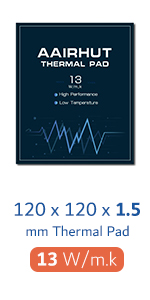 Thermal Pad 1.5mm |  Thermal Pads 4 Pack |  Thermal Pad 20W |  Thermal Pad m.2 |  Thermal Pad 4 Pack |  Thermal Paste | |
|---|---|---|---|---|---|---|
| Customer Reviews | — | — | — | — | — | — |
| Price | — | — | — | — | — | — no data |
| Pack | 1 | 4 | 1 | 3 | 4 | 1 |
| Size (mm) | 120 x 120 x (0.5~3) | 100 x 100 x (0.5~2) | 120 x 120 x (0.5~3) | (70-120) x 20 x (0.5-1.5) | 100 x 100 x (0.5-2) | 2-8g |
Aairhut True 13W/m·K Thermal Pad – Cool Down Your Device Effectively
- Start with Aairhut! A reliable, high-performance cooling solution for PCs, PS5, MacBooks, laptops, SSDs, and other heat-sensitive electronics.
- Genuine 13W/m·K High Thermal Conductivity Rapidly transfers heat away from electronic components and lowers temperature in seconds. Need better cooling? Higher conductivity is the answer — and 13W/m·K delivers.
- 120 x 120 mm Large Format Provides nearly 6x more coverage than standard 120 x 20 mm pads. One pad covers multiple components — from GPUs to SSD controllers.
- More Than Just Cooling In addition to superior heat dissipation, this pad also provides electrical insulation, shock absorption, and protective sealing for sensitive electronic components.
- Wide Compatibility Ideal for SSDs, GPUs, laptops, MacBooks, hard disk drives, RAM, PS4, PS5, game consoles, and more — anywhere heat management matters.
Product Specifications:
- Density (g/cc): 3.5±0.2
- Hardness (Sc): 30-55
- Thermal Conductivity: 13W/m.K
- Size: 120mm x 120mm
- Breakdown Voltage: 9.8KV(1mm)
Aairhut thermal pads work with virtually any electronic device that generates heat and requires cooling, including:
- Computers & Laptops: PC, MacBook (all models), ultrabooks, gaming laptops
- Game Consoles: PS5, PS4, Xbox Series X/S, Xbox One, Nintendo Switch
- Storage Devices: SSD (NVMe, SATA), HDD, external drives
- Memory & Graphics: RAM modules, GPU, VRAM, VGA cards
- Other Electronics: LED strips, LED drivers, remote controls, power MOSFETs, SMD components, IC chips, and even smartphone motherboards
If your device has a heatsink or generates noticeable heat, a thermal pad can help.
Q: Which thickness should I choose for my device?
A: We recommend using the same thickness as the original pads on your device. The pad should not be too thick (which could lift or bend components) nor too thin (which would fail to make proper contact). When in doubt, 1.0mm or 1.5mm works for most standard RAM modules.
Q: How to cut a thermal pad to the right size?
A: Measure the component surface first. Place the pad on a clean cutting mat, mark the dimensions, then carefully cut along the lines using a sharp knife or scissors. For best results, cut slightly smaller than the component to avoid overhang.
Q: How do I choose the right thermal conductivity for my needs?
A: We offer five thermal conductivity options to match different cooling demands:
- 6W/m·K – Basic cooling for LEDs, drivers, and low-power components
- 9W/m·K – Standard performance for HDDs, RAM, and general electronics
- 13W/m·K – High-performance cooling for gaming PCs, laptops, and SSDs
- 15W/m·K – Enthusiast-grade for overclocked GPUs and high-end laptops
- 20W/m·K – Extreme cooling for high-TDP CPUs, gaming GPUs, and workstations
Q: How long does a thermal pad last? What is its shelf life?
A: Most standard thermal pads last between 6 to 12 months before they dry out or lose performance. Aairhut thermal pads are engineered to last significantly longer — under normal operating conditions, you can expect 2 to 3 years of reliable service life once installed. We design our pads with high-quality, non-oily materials that resist drying and cracking over time. Store unused pads in a cool, dry place (below 30°C) — they will maintain performance for up to 2 years in storage
Q: Can I stack multiple thermal pads on top of each other?
A: Technically yes, but we do not recommend stacking. Each additional layer adds thermal resistance, which reduces overall heat transfer efficiency. This applies to all thermal pads in the market
Thermal Pad 1.5mm | Thermal Pads 4 Pack | Thermal Pad 20W | Thermal Pad m.2 | Thermal Pad 4 Pack | Thermal Paste | |
|---|---|---|---|---|---|---|
| Customer Reviews | — | — | — | — | — | — |
| Price | — | — | — | — | — | — no data |
| Pack | 1 | 4 | 1 | 3 | 4 | 1 |
| Size (mm) | 120 x 120 x (0.5~3) | 100 x 100 x (0.5~2) | 120 x 120 x (0.5~3) | (70-120) x 20 x (0.5-1.5) | 100 x 100 x (0.5-2) | 2-8g |