

Your Browsing History



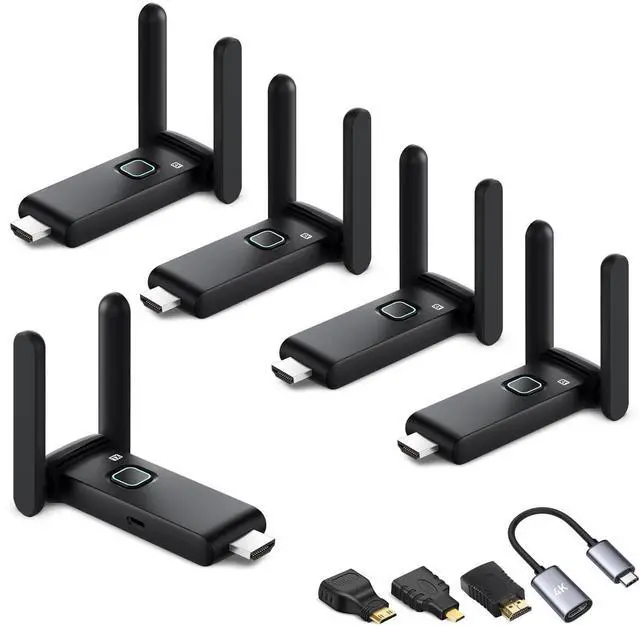

Wireless HDMI transmitter and 4 receiver 4k, USB-C to HDMI Adapter multi TV extender kit, 2.4/5.8G@60Hz 165FT/50M, suitable for expanding from laptops,TV boxes and Camera to multiple TVs/monitors
Limited time offer, ends 09/14 By Eristy shop
- This wireless HDMI kit contains 4 receivers. They can operate simultaneously and send content to four screens from a single transmitter. You can combine them as required. It enables you to stream high-quality video and audio to multiple displays with a transmission range reaching up to 165ft/50m in an open area. This extender is perfect for conference rooms, classrooms, or any environment that requires multiple screens without messy cables. The wireless display adapter kit comes with USB-C to HDMI, Micro HDMI, and Mini HDMI adapters. It supports transmitting video from smartphones with USB-C ports compatible with the PD protocol, along with newer USB-C laptops such as MacBooks. The wireless HDMI transmitter connects to laptops, PCs, cameras, set-top boxes, cable TV boxes, game consoles, and other devices. The receiver connects to HDTVs, projectors, monitors, tablets, and other display devices. No complex setup is needed. Simply plug the transmitter into your playback device and the receiver into your display for immediate, wireless connectivity. Create your customized audio-visual experience in your home theater, conference room, or gaming area. The kit includes 2 mini HDMI adapters and a USB-C to HDMI extension cable, ensuring compatibility with your frequently used output devices and additional products that lack HDMI ports themselves. It is suitable for Sony cameras, Canon cameras, Apple laptops, MacBook, and other USB-C devices. Experience stable transmission across devic
+
+
Overview
Specs
Reviews

Any questions? Our AI mode will help you find out quickly.
Try me now
This wireless HDMI kit contains 4 receivers. They can operate simultaneously and send content to four screens from a single transmitter. You can combine them as required. It enables you to stream high-quality video and audio to multiple displays with a transmission range reaching up to 165ft/50m in an open area. This extender is perfect for conference rooms, classrooms, or any environment that requires multiple screens without messy cables. The wireless display adapter kit comes with USB-C to HDMI, Micro HDMI, and Mini HDMI adapters. It supports transmitting video from smartphones with USB-C ports compatible with the PD protocol, along with newer USB-C laptops such as MacBooks. The wireless HDMI transmitter connects to laptops, PCs, cameras, set-top boxes, cable TV boxes, game consoles, and other devices. The receiver connects to HDTVs, projectors, monitors, tablets, and other display devices. No complex setup is needed. Simply plug the transmitter into your playback device and the receiver into your display for immediate, wireless connectivity. Create your customized audio-visual experience in your home theater, conference room, or gaming area. The kit includes 2 mini HDMI adapters and a USB-C to HDMI extension cable, ensuring compatibility with your frequently used output devices and additional products that lack HDMI ports themselves. It is suitable for Sony cameras, Canon cameras, Apple laptops, MacBook, and other USB-C devices. Experience stable transmission across devices using both 2.4GHz and 5.8GHz dual-band Wi-Fi for continuous connectivity with only ultra-low 0.1s latency. Whether you're streaming live sports, movies, playing games, or giving presentations on big displays, this wireless HDMI transmitter and receiver allows you to enjoy it all without any interruptions, casting all your favorite apps. Say farewell to cable clutter and elevate your audiovisual experience to the next level of wireless freedom. Gather with loved ones on the cozy couch and immerse yourself in a high-definition movie or gaming extravaganza. Supports wireless screen mirroring for multiple TVs on Windows and Mac systems. Activate the expansion mode to extend the workspace to multiple screens, greatly enhancing multitasking efficiency. For Windows systems: use the shortcut key Win+P and choose "Extension" mode. For Mac systems: go to System Preferences, then Display, and choose "Extended Desktop"
Warranty & Returns
Warranty, Returns, And Additional Information
Warranty
- Please contact the Seller directly for warranty information. Warranty information may also be found on the Manufacturer's website.
- CONTACT
Return Policies
- Return for refund within: 30 days
- Return for replacement within: 30 days
- This item is covered by Eristy shop Return Policy
Manufacturer Contact Info
- For a directory of all our manufacturers, please click below.
- Manufacturers Directory
LOADING...