



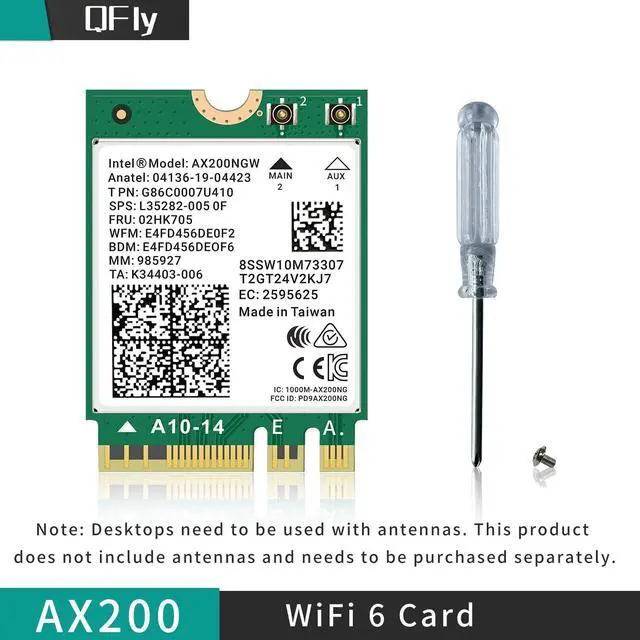


Product Description

Compatibility
This WiFi6E AX200 module full supports the latest Microsoft Windows 10/11 64bit OS.
Support the new 802.11ax standard with its unique features such as OFDMA, 1024QAM, Target Wake Time, 160MHz channels and spatial reuse. Compatible with all the wireless routers and any 11ac or 11n devices.
Compatible with all Intel base CPU, some AMD CPU may have comaptibility issue.

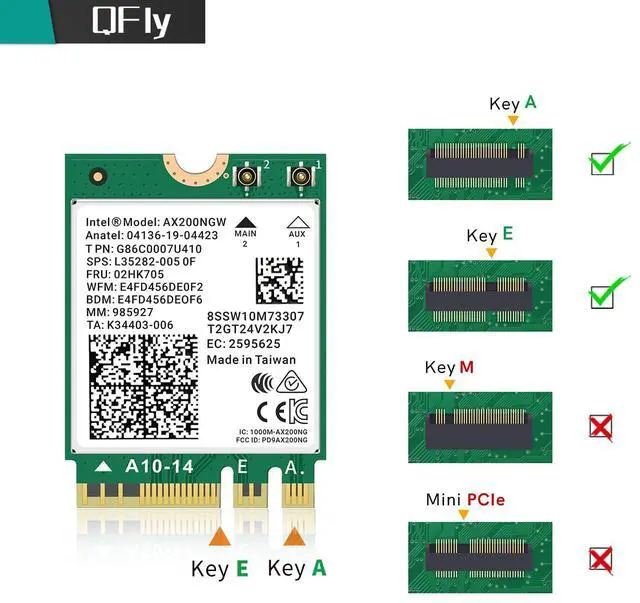
Standard NGFF M.2 Key A or E Slot
Compatible with any Laptop or Desktop with standard NGFF M.2 Key A or Key E slot. All the Laptops with AC9260, AC8265,AC7265 wifi module can be replaced with this AX200 module.
Not Compatible with NGFF cNvIo or cNVIO2 slot. Some laptops use AC9560or AC9642 with NGFFCNVIO, can't be replaced.
Not Compatible with Mini PCIe slot. Some old laptops use AC7260 with Mini PCle connector, can't be replaced.

Easy setup
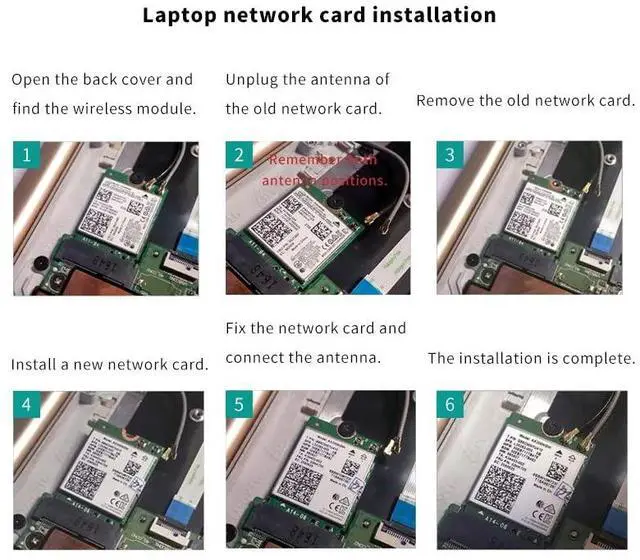
Replacing the wifi module is very simple:
1. Insert the network card corresponding to the M.2 interface and install the network card screws
2. Connect the antenna interface, this antenna interface belongs to the IPEX4 generation interface, the corresponding interface needs to be buckled into the antenna, the antenna belongs to the signal transmission regardless of the left and right
3. Install the driver and enjoy the new speed of light Internet access.

BT 5.2 for TWS Earbuds
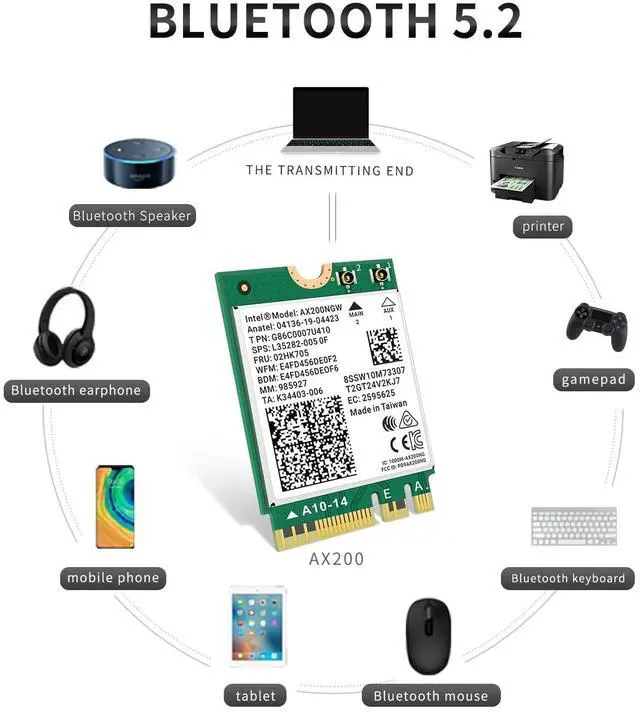
BT 5.2 includes Isochronous Channel feature which lays the foundation for the implementation of next generation of BT Audio – Low Energy Audio. BT 5.2 provides 4x Range over BT 4.2, doubles the transmit speed for faster transmissions thereby reducing the overall power. Idea for BT TWS Earbuds, headset, Keyboard, Mouse and others for more conveniences and demands with this AX200 Module for PC and Desktop.

caution:
This wireless module does not include an antenna.
Network environment, routers, barriers, laptop and PC memory... There are many factors that interfere with wifi speed.
If you have problems installing the network card:
It is recommended that you uninstall and delete the driver related to the original network card (if any), and then restart the computer to properly load the new network card driver. Please use Microsoft's own DriverMax to scan and update the driver.
If your laptop/desktop has built-in WiFi, please turn off the built-in WiFi when using it on your laptop/desktop.
Knowing the following will give you a better product experience:
- Check whether the device wifi is recognized by the computer in the device manager.
- If there is a network controller with a yellow exclamation mark, please install the wifi driver.
- If the driver is already installed, a yellow warning will still be displayed.
- Right-click, click Update, and select the file path to update manually.
Product Description
Compatibility
This WiFi6E AX200 module full supports the latest Microsoft Windows 10/11 64bit OS.
Support the new 802.11ax standard with its unique features such as OFDMA, 1024QAM, Target Wake Time, 160MHz channels and spatial reuse. Compatible with all the wireless routers and any 11ac or 11n devices.
Compatible with all Intel base CPU, some AMD CPU may have comaptibility issue.
| About rate | 2.4Ghz up to 574Mbps 5Ghz up to 2400Mbps |
| Supports Interfaces | M.2 2230 |
| Compatible Systems | Windows 10/11 64bit. |
| About the function: | Support tri-band wireless transmission and Bluetooth 5.2 technology |
| Chipset | AX200NGW |
| Driver | Online Driver (Intel website ) |
Standard NGFF M.2 Key A or E Slot
Compatible with any Laptop or Desktop with standard NGFF M.2 Key A or Key E slot. All the Laptops with AC9260, AC8265,AC7265 wifi module can be replaced with this AX200 module.
Not Compatible with NGFF cNvIo or cNVIO2 slot. Some laptops use AC9560or AC9642 with NGFFCNVIO, can't be replaced.
Not Compatible with Mini PCIe slot. Some old laptops use AC7260 with Mini PCle connector, can't be replaced.
Easy setup
Replacing the wifi module is very simple:
1. Insert the network card corresponding to the M.2 interface and install the network card screws
2. Connect the antenna interface, this antenna interface belongs to the IPEX4 generation interface, the corresponding interface needs to be buckled into the antenna, the antenna belongs to the signal transmission regardless of the left and right
3. Install the driver and enjoy the new speed of light Internet access.
BT 5.2 for TWS Earbuds
BT 5.2 includes Isochronous Channel feature which lays the foundation for the implementation of next generation of BT Audio – Low Energy Audio. BT 5.2 provides 4x Range over BT 4.2, doubles the transmit speed for faster transmissions thereby reducing the overall power. Idea for BT TWS Earbuds, headset, Keyboard, Mouse and others for more conveniences and demands with this AX200 Module for PC and Desktop.
caution:
This wireless module does not include an antenna.
Network environment, routers, barriers, laptop and PC memory... There are many factors that interfere with wifi speed.
If you have problems installing the network card:
It is recommended that you uninstall and delete the driver related to the original network card (if any), and then restart the computer to properly load the new network card driver. Please use Microsoft's own DriverMax to scan and update the driver.
If your laptop/desktop has built-in WiFi, please turn off the built-in WiFi when using it on your laptop/desktop.
Knowing the following will give you a better product experience:
- Check whether the device wifi is recognized by the computer in the device manager.
- If there is a network controller with a yellow exclamation mark, please install the wifi driver.
- If the driver is already installed, a yellow warning will still be displayed.
- Right-click, click Update, and select the file path to update manually.