Your Browsing History
Meet Your Seller
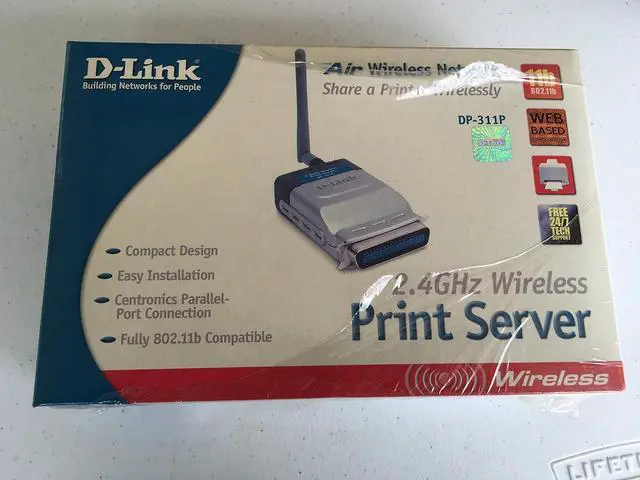
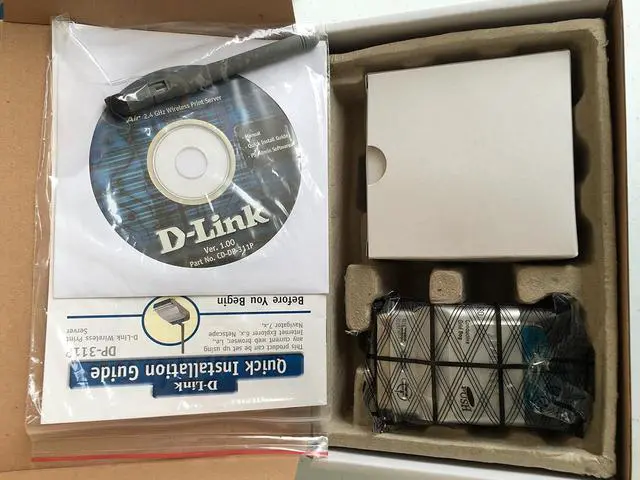
D-Link DP-311P Wireless Print Server, 1-Centronics Port, 802.11b, 11 Mbps
- Easy Web-Based set-up & Configuration
- Compact size for easy placement
- 802.11 standard compliant
- 1 parallel printer port to share a legacy printer on your network
+
+
Overview
Specs
Reviews
Any questions? Our AI beta will help you find out quickly.
Try me now
Product Description The D- Link DP-311P is a compact, 802.11b compatible, wireless print server that allows network users to share a legacy printer. The DP-311P is equipped with one parallel Centronics port for seamless connection to older printers and supports both infrastructure and ad hoc wireless modes. The DP-311P has easy to use configuration tools including a Web Browser and Windows-based configuration program. The DP-311P print server is the ideal network printing solution for small offices, home offices, schools and other businesses that require printer sharing.
From the Manufacturer D-Link, the industry pioneer in networking, continues to offer innovative Ethernet products. The D-Link DP-311P is a wireless print server with one parallel port. With its high-speed IEEE 1284 port, the DP-311P allows those on your network to access and share a printer wirelessly no matter where they reside on the network.
The DP-311P is equipped with one bi-directional parallel port with centronics connector for direct connection to most printers available on the market today. No additional printer cable will be required. The DP-311P also supports all major network operating systems and protocols.
The DP-311P is an 802.11b-compliant wireless Print Server that supports both infrastructure or Adhoc wireless modes. With the DP-311P you have the ability and convenience of sharing a printer beyond the wired network.
The DP-311P is also easily configurable using a Web Browser or Windows based setup wizard. Using Web Browsers on a PC connected to the network, configuration is simple and straightforward with the familiar D-Link interface. PS Admin, a Windows-based configuration program can also be used to configure the DP-311P.
The DP-311P Wireless Print Server is the ideal network printing solution for small offices, home offices, schools and other businesses that require printer sharing.
Product Description From the Manufacturer

From the Manufacturer D-Link, the industry pioneer in networking, continues to offer innovative Ethernet products. The D-Link DP-311P is a wireless print server with one parallel port. With its high-speed IEEE 1284 port, the DP-311P allows those on your network to access and share a printer wirelessly no matter where they reside on the network.
The DP-311P is equipped with one bi-directional parallel port with centronics connector for direct connection to most printers available on the market today. No additional printer cable will be required. The DP-311P also supports all major network operating systems and protocols.
The DP-311P is an 802.11b-compliant wireless Print Server that supports both infrastructure or Adhoc wireless modes. With the DP-311P you have the ability and convenience of sharing a printer beyond the wired network.
The DP-311P is also easily configurable using a Web Browser or Windows based setup wizard. Using Web Browsers on a PC connected to the network, configuration is simple and straightforward with the familiar D-Link interface. PS Admin, a Windows-based configuration program can also be used to configure the DP-311P.
The DP-311P Wireless Print Server is the ideal network printing solution for small offices, home offices, schools and other businesses that require printer sharing.
Product Description From the Manufacturer
Warranty & Returns
Warranty, Returns, And Additional Information
Warranty
- Please contact the Seller directly for warranty information. Warranty information may also be found on the Manufacturer's website.
- Read full details
- CONTACT
Return Policies
- Return for refund within: 30 days
- Return for replacement within: 30 days
- This item is covered by Cloud Sail Return Policy
Manufacturer Contact Info
- For a directory of all our manufacturers, please click below.
- Manufacturers Directory
LOADING...