

Your Browsing History
- Free 30-day Returns
$360.99

Meet Your Seller


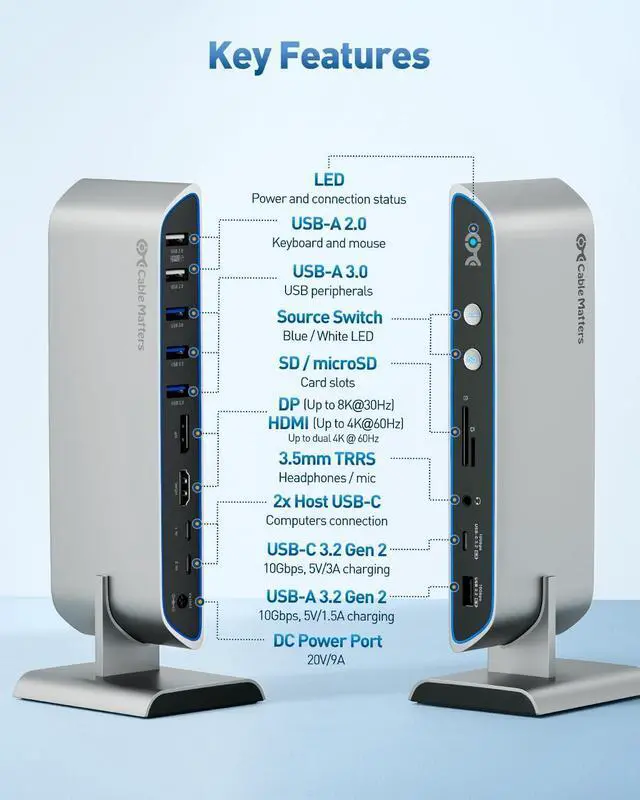

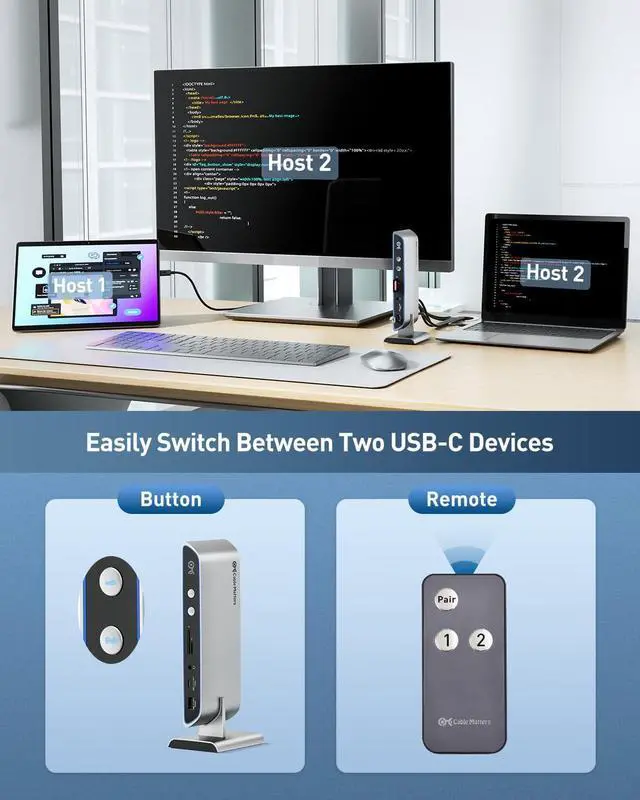


Cable Matters 14-in-1 USB C KVM Switch Dock for 2 Laptops, Supports Dual 4K 60Hz Over DisplayPort & HDMI, Up to 100W Charging, 10Gbps USB-A/USBC Port, Not for Desktop, Thunderbolt 4 Compatible
- Compatibility Note: This USB-C KVM Dock requires a USB-C host device with DisplayPort Alt Mode (DP Alt Mode) support for video output. Not all USB-C ports support video. Not compatible with desktop PCs or USB-C ports without DP Alt Mode. On macOS, only one external display is supported, with resolution limited to 4K@60Hz. VRR (Variable Refresh Rate), G-Sync, FreeSync, and EDID emulation are not supported.
- 14-in-1 USB C KVM: Connect up to 7 USB peripherals, 3.5mm audio, and an SD and MicroSD card to the shared ports of the dual monitor USB C KVM switch; The USB C KVM switch dual monitor features 6x USB-A ports and 1x USB-C port for maximum peripheral support; Share a keyboard, mouse, dual monitors, and a set of peripherals with two computers with this Thunderbolt KVM dock
- KVM Switch For Two Computers Two Monitors: Improve your workflow with the Cable Matters KVM Switch USB C; This Thunderbolt KVM switch lets you share a unified set of peripherals and dual monitors with two computers
+
+
Overview
Reviews

Any questions? Our AI mode will help you find out quickly.
Try me now
Does this dock support dual extended displays on macOS?
No. macOS supports only one extended display (or two mirrored), with resolution limited at 4K@60Hz.
What type of USB-C port do I need on my laptop?
You need a USB-C or Thunderbolt 3/4/5 port with DP Alt Mode video output. Data-only or charge-only ports will not work for video or display switching.
Can this dock output 8K video?
Yes it supports up to 8K@30Hz over DisplayPort on Windows when connected to a host supporting DP 1.4 with DSC over USB-C port and using a certified DP cable. macOS is limited to 4K@60Hz.
How does Power Delivery work?
Provides up to 100W charging for one laptop. When two laptops are connected, each receives up to 65W. Make sure your laptops support USB-C PD input.
Does this dock support VRR, G-Sync, FreeSync, or EDID?
No. These gaming display features and EDID emulation are not supported.
Does this dock support dual extended displays on macOS?
What type of USB-C port do I need on my laptop?
Can this dock output 8K video?
How does Power Delivery work?
Does this dock support VRR, G-Sync, FreeSync, or EDID?
No. macOS supports only one extended display (or two mirrored), with resolution limited at 4K@60Hz.
What type of USB-C port do I need on my laptop?
You need a USB-C or Thunderbolt 3/4/5 port with DP Alt Mode video output. Data-only or charge-only ports will not work for video or display switching.
Can this dock output 8K video?
Yes it supports up to 8K@30Hz over DisplayPort on Windows when connected to a host supporting DP 1.4 with DSC over USB-C port and using a certified DP cable. macOS is limited to 4K@60Hz.
How does Power Delivery work?
Provides up to 100W charging for one laptop. When two laptops are connected, each receives up to 65W. Make sure your laptops support USB-C PD input.
Does this dock support VRR, G-Sync, FreeSync, or EDID?
No. These gaming display features and EDID emulation are not supported.
Does this dock support dual extended displays on macOS?
What type of USB-C port do I need on my laptop?
Can this dock output 8K video?
How does Power Delivery work?
Does this dock support VRR, G-Sync, FreeSync, or EDID?
Warranty & Returns
Warranty, Returns, And Additional Information
Warranty
- Please contact the Seller directly for warranty information. Warranty information may also be found on the Manufacturer's website.
- CONTACT
Return Policies
- Return for refund within: 30 days
- Return for replacement within: 30 days
- This item is covered by Chinathru Trading Co., Limited Return Policy
Manufacturer Contact Info
- For a directory of all our manufacturers, please click below.
- Manufacturers Directory
LOADING...