

Your Browsing History
- Free 30-day Returns
$95.99

Meet Your Seller


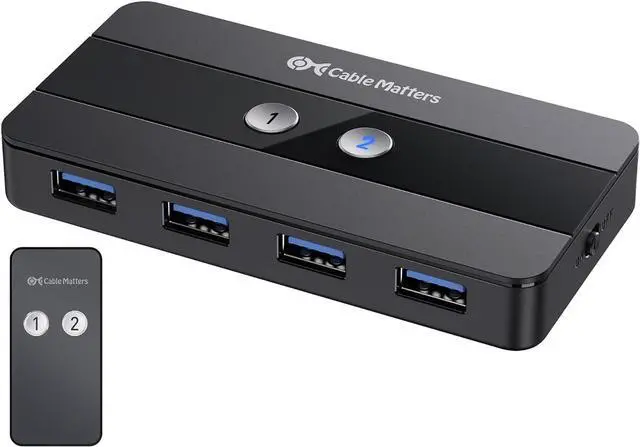


Cable Matters Dual 4K 60Hz USB C KVM Switch for 2 Computers 2 Monitors (Not Work with Desktop PCs or Chromebooks) with RF Remote Control, HDMI, DisplayPort & 4X USB 3.0 Compatible with Thunderbolt 4
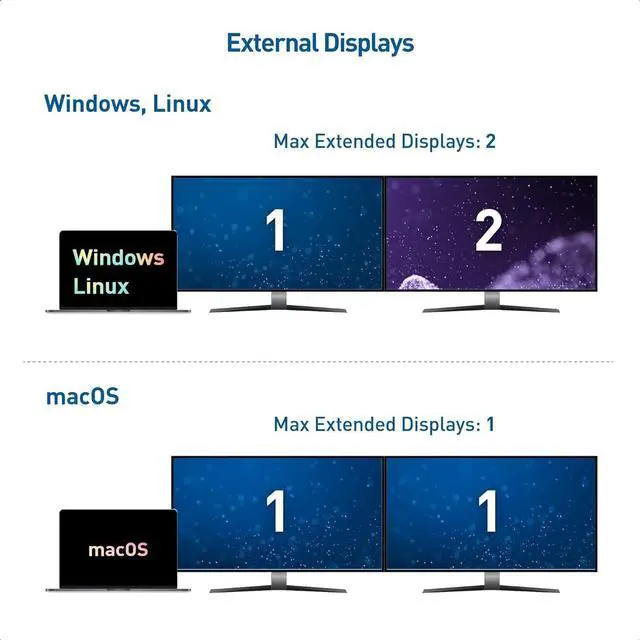
- Dual 4K@60Hz Display Support: Our advanced USB C KVM switch 2 computers is equipped to manage your workstation with ease, offering exceptional dual display capabilities at UHD 4K resolution and 60Hz refresh rate. It's ideal for high-performance tasks on Windows, Linux, and compatible single-display setups for MacBook
- Cutting-Edge Connectivity: The switch is a marvel of USB-C technology, functioning as a Thunderbolt KVM switch that's compatible with the latest Thunderbolt 4 and USB 4 standards. This means you get a high-speed, one-cable KVM solution that supports the fastest data and video transfer
- Effortless Laptop Switching: Save space and boost productivity with this USB C switcher 2 laptops (Not compatible with Desktop PCs). It allows for the sharing of peripherals and displays between two laptops, eliminating the need for duplicate equipment and creating a more streamlined workspace
- Remote Control Switching: A convenient RF remote control complements the USB C switch selector,
+
+
Overview
Reviews

Any questions? Our AI mode will help you find out quickly.
Try me now
The Cable Matters USB-C KVM Switch is the ultimate one-cable KVM that does it all over USB-C. Share dual 4K monitors, plus high-speed USB 3.0 and USB 2.0 peripherals between two computers. Eliminate the need for separate pairs of monitors, keyboards, mice, printers for each computer. Easily swap laptops in and out of your workspace without having to unplug multiple USB and monitor cables.
Important Notes
4K@144Hz video requires a computer with an Nvidia RTX 2060/3060 or an AMD Radeon RX 6000 Series GPU or newer.Dual extended displays are not supported on macOS or ChromeOS. If more than one monitor is connected, the host will mirror the first monitor. Dual monitor capability (DisplayPort MST) is required by the host computer for dual extended display supportAll Macbook, Macbook Pro, and Mac Mini with Apple M1/M2 or Intel chips can only support a maximum resolution of 4K@60HzPlease turn OFF auto-detect on the monitor for better compatibility4K@120Hz support must be manually enabled on some 4K 120Hz TVsVRR/G-Sync/FreeSync is not supportedCannot charge host computersNo EDID Emulation Support.
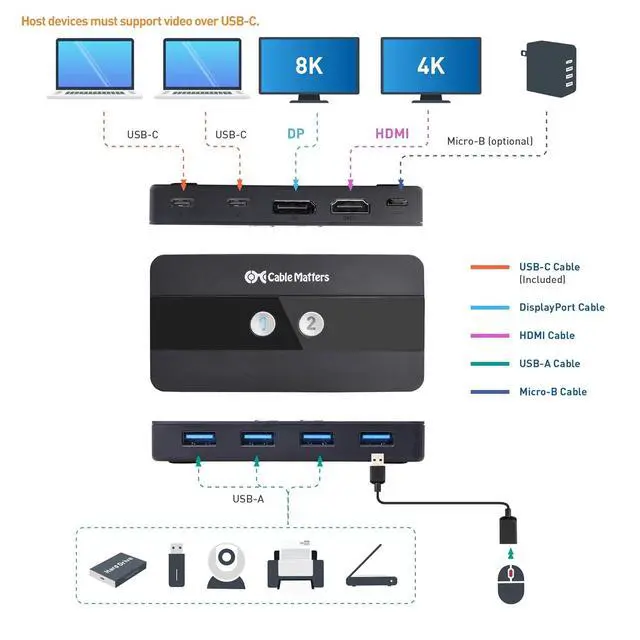
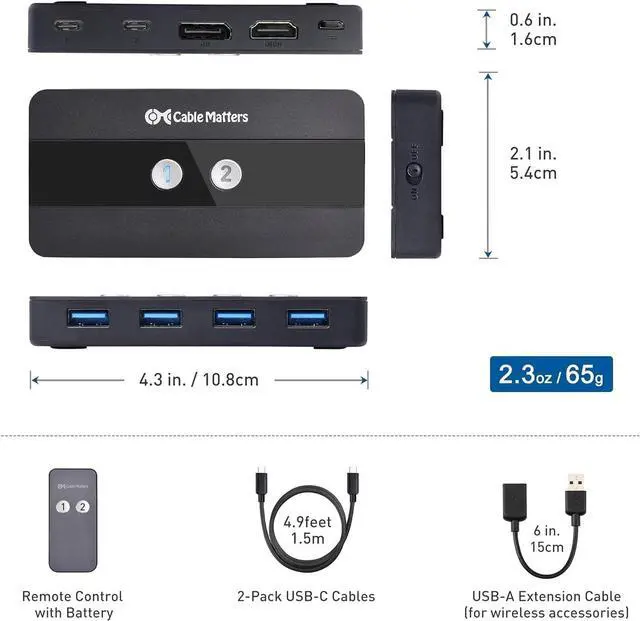
Connect two hosts via USB-C (Host devices must support video over USB-C)Supports up to two monitors and four USB peripherals
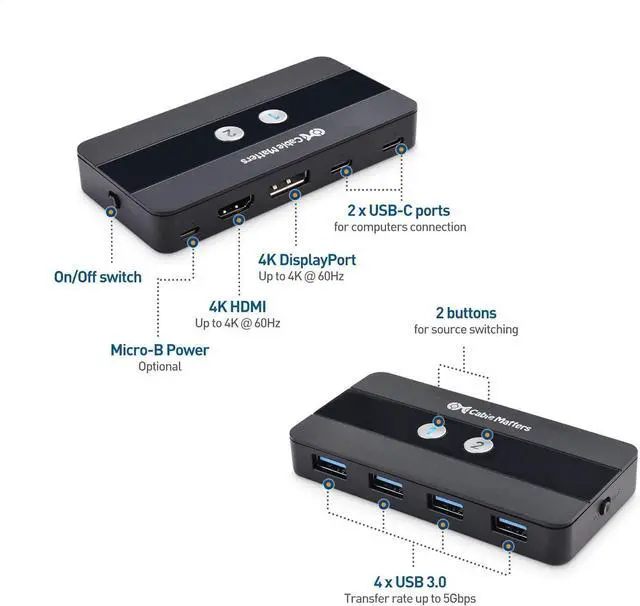
1) 2x USB-C hosts
2) DP Port, 3) HDMI Port, 4) USB 3.0 Ports
5) Source-switching buttons
6) On/Off Switch
7) Micro-B optional power port
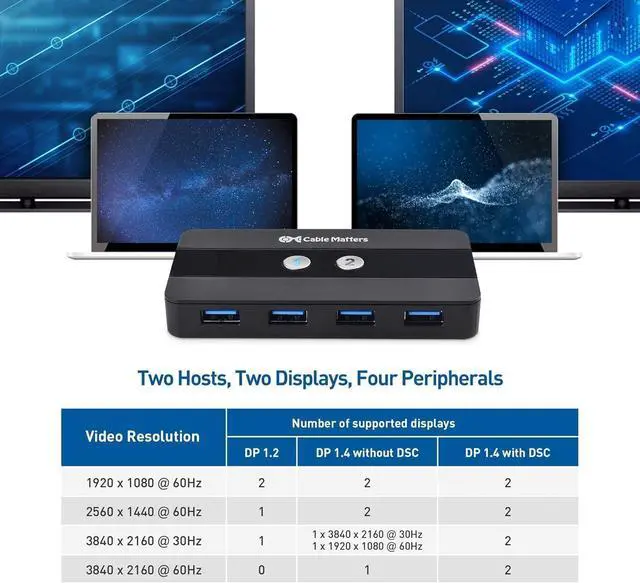
Supports up to dual 4K@60Hz displaysVideo support requires hosts with DP Alt Mode support
Unique design includes LED-lit buttons to effortlessly swap between hosts with the push of a single button.
Remote control allows for quick, easy switching of the host computer with the push of a single button
The switch includes a unique on/off switch to prevent power drain when the switch is not in use
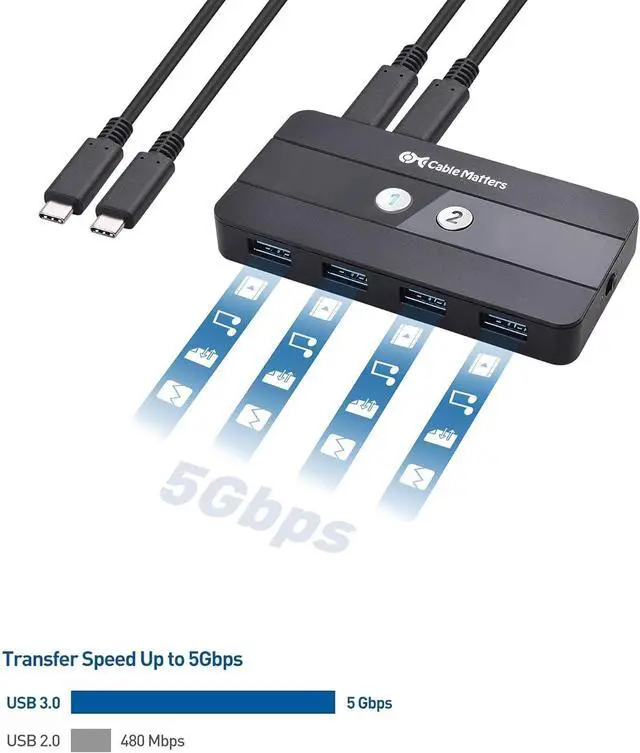
USB 3.0 supports a transfer rate of 5GbpsPlug & play, no driver required
USB-C Sharing Switch2x USB-C cables1x USB 2.0 extension cable1x Remote control
Can I use this KVM switch with dual monitors?
Yes. The Cable Matters USB-C KVM Switch allows you to connect two USB-C hosts to share two monitors on all Operating Systems except Mac OS with resolutions up to 4K@60hz on one monitor.
Does this KVM switch support EDID Emulation?
No
Does this KVM work with any USB-C port? Can I use HDMI/DP as the input?
No. Both laptops must have a USB-C port with DP Alt Mode (or Thunderbolt) for video. The KVM accepts USB-C video input only (no HDMI/DP input). The USB-C Switch only works to switch between two laptops with USB-C video output to HDMI/DP monitors.
Does the Micro-B power port charge my laptops?
No. The power port supplies power to the KVM and connected USB peripherals only. Use each laptops own charger for power/charging.
No video or limited resolutionwhat should I check?
Confirm both laptops support DP Alt Mode, use USB-C cables with video support, avoid feeding HDMI/DP into the KVM, and provide stable power to the KVM for peripherals.
The Ultimate Workstation Accessory Two Hosts, Two Displays Feature-Filled Switch Dual 4K Video One-Touch Switching Remote, Not More Wires Built-in On/Off Switch 5 Gbps Data Transfer Package Contents Can I use this KVM switch with dual monitors?
Does this KVM switch support EDID Emulation?
Does this KVM work with any USB-C port? Can I use HDMI/DP as the input?
Does the Micro-B power port charge my laptops?
No video or limited resolutionwhat should I check?
Important Notes
4K@144Hz video requires a computer with an Nvidia RTX 2060/3060 or an AMD Radeon RX 6000 Series GPU or newer.Dual extended displays are not supported on macOS or ChromeOS. If more than one monitor is connected, the host will mirror the first monitor. Dual monitor capability (DisplayPort MST) is required by the host computer for dual extended display supportAll Macbook, Macbook Pro, and Mac Mini with Apple M1/M2 or Intel chips can only support a maximum resolution of 4K@60HzPlease turn OFF auto-detect on the monitor for better compatibility4K@120Hz support must be manually enabled on some 4K 120Hz TVsVRR/G-Sync/FreeSync is not supportedCannot charge host computersNo EDID Emulation Support.
Connect two hosts via USB-C (Host devices must support video over USB-C)Supports up to two monitors and four USB peripherals
1) 2x USB-C hosts
2) DP Port, 3) HDMI Port, 4) USB 3.0 Ports
5) Source-switching buttons
6) On/Off Switch
7) Micro-B optional power port
Supports up to dual 4K@60Hz displaysVideo support requires hosts with DP Alt Mode support
Unique design includes LED-lit buttons to effortlessly swap between hosts with the push of a single button.
Remote control allows for quick, easy switching of the host computer with the push of a single button
The switch includes a unique on/off switch to prevent power drain when the switch is not in use
USB 3.0 supports a transfer rate of 5GbpsPlug & play, no driver required
USB-C Sharing Switch2x USB-C cables1x USB 2.0 extension cable1x Remote control
Can I use this KVM switch with dual monitors?
Yes. The Cable Matters USB-C KVM Switch allows you to connect two USB-C hosts to share two monitors on all Operating Systems except Mac OS with resolutions up to 4K@60hz on one monitor.
Does this KVM switch support EDID Emulation?
No
Does this KVM work with any USB-C port? Can I use HDMI/DP as the input?
No. Both laptops must have a USB-C port with DP Alt Mode (or Thunderbolt) for video. The KVM accepts USB-C video input only (no HDMI/DP input). The USB-C Switch only works to switch between two laptops with USB-C video output to HDMI/DP monitors.
Does the Micro-B power port charge my laptops?
No. The power port supplies power to the KVM and connected USB peripherals only. Use each laptops own charger for power/charging.
No video or limited resolutionwhat should I check?
Confirm both laptops support DP Alt Mode, use USB-C cables with video support, avoid feeding HDMI/DP into the KVM, and provide stable power to the KVM for peripherals.
The Ultimate Workstation Accessory Two Hosts, Two Displays Feature-Filled Switch Dual 4K Video One-Touch Switching Remote, Not More Wires Built-in On/Off Switch 5 Gbps Data Transfer Package Contents Can I use this KVM switch with dual monitors?
Does this KVM switch support EDID Emulation?
Does this KVM work with any USB-C port? Can I use HDMI/DP as the input?
Does the Micro-B power port charge my laptops?
No video or limited resolutionwhat should I check?
Warranty & Returns
Warranty, Returns, And Additional Information
Warranty
- Please contact the Seller directly for warranty information. Warranty information may also be found on the Manufacturer's website.
- CONTACT
Return Policies
- Return for refund within: 30 days
- Return for replacement within: 30 days
- This item is covered by Chinathru Trading Co., Limited Return Policy
Manufacturer Contact Info
- For a directory of all our manufacturers, please click below.
- Manufacturers Directory
LOADING...