Your Browsing History
Meet Your Seller
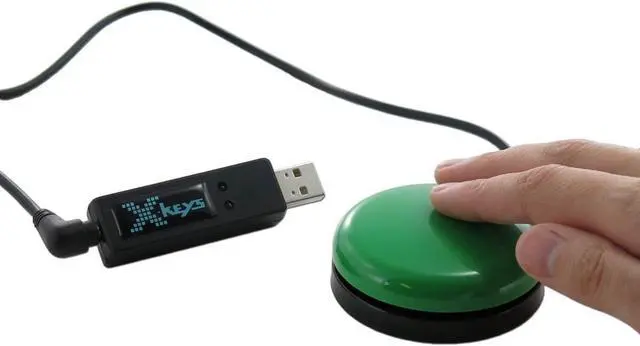
X-keys USB Programmable Switch Interface for 1 to 3 Switches (XK-3) Made in USA
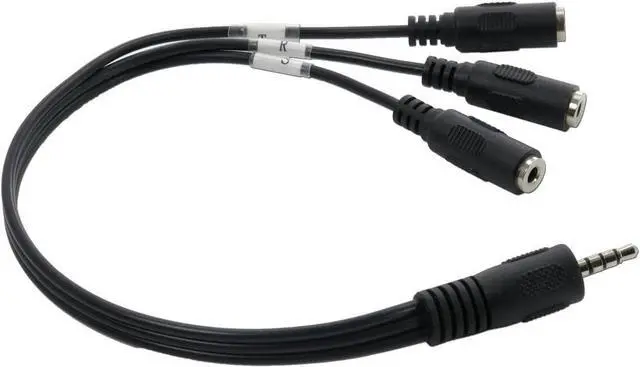
- Up to three switches via 3.5 mm TRRS port with optional adapter
- Connects to any USB port just like a USB keyboard
- Compact - smaller than a pack of chewing gum
- Any contact closure can be converted to a USB HID command
- Accepts 3.5 mm mono, stereo, or TRRS plugs
- X-keys can be programmed with Windows XP-Windows 11 & MacOS 10.14-MacOS 13.
- Linux users should expect to pre-program their X-keys with Hardware Mode prior to bringing their X-keys over to Linux installs
- MADE IN THE USA
+
+
Overview
Specs
Reviews
Any questions? Our AI beta will help you find out quickly.
Try me now
X-keys provide rugged, reliable computer input hardware - programmable keypads, keyboards, and controls. Serving everyone from individual users to multinational corporations and providing mission-critical controls with unparalleled support. Thousands of our devices make the man to machine connection in studios, laboratories, offices, factories, and homes worldwide.
Any Switch Can Trigger Any Action on a Computer or Tablet.
MacroWorks 3.1 for Windows features a wide range of macros including shortcuts to frequently used programs, folders, and files.
Keyboard Mastro for Mac OS includes support for all of X-keys programmable keyboards. The joysticks, T-bar, Jog & Shuttle as well as some KVM models are excluded. Keyboard Maestro cannot control our LEDs either, however, users can change the LEDs on a Windows computer in Hardware mode.
MacroWorks 3.1 is included as a free download with all X-keys USB devices.
Keystrokes and combinations may also be written into the X-keys memory to emulate a USB keyboard or mouse function on any operating system. Use MacroWorks for Windows to take advantage of this feature.
Using MacroWorks for Windows, each application on your system can have its own set of dedicated keys. This allows the same key to trigger different macros in different programs.
For example, the Move tool shortcut in Photoshop is V but in Sketchup, it is M. Using an application specific layer, the same key will send V if Photoshop has focus and M if Sketchup has focus.
An array of special functions including F13-F24 keys, multimedia commands (Play/Pause, Volume Up or Down, Previous or Next Track, etc.), Time and Date insert, and more are selected under the Functions tab in MacroWorks.
Complex macros may be constructed and edited line by line including delays, repeats, and separate macros on press and release of an X-key.
See More Included Software for Windows and OS X Application Specific Layers and Special Functions

Any Switch Can Trigger Any Action on a Computer or Tablet.
MacroWorks 3.1 for Windows features a wide range of macros including shortcuts to frequently used programs, folders, and files.
Keyboard Mastro for Mac OS includes support for all of X-keys programmable keyboards. The joysticks, T-bar, Jog & Shuttle as well as some KVM models are excluded. Keyboard Maestro cannot control our LEDs either, however, users can change the LEDs on a Windows computer in Hardware mode.
MacroWorks 3.1 is included as a free download with all X-keys USB devices.
Keystrokes and combinations may also be written into the X-keys memory to emulate a USB keyboard or mouse function on any operating system. Use MacroWorks for Windows to take advantage of this feature.
Using MacroWorks for Windows, each application on your system can have its own set of dedicated keys. This allows the same key to trigger different macros in different programs.
For example, the Move tool shortcut in Photoshop is V but in Sketchup, it is M. Using an application specific layer, the same key will send V if Photoshop has focus and M if Sketchup has focus.
An array of special functions including F13-F24 keys, multimedia commands (Play/Pause, Volume Up or Down, Previous or Next Track, etc.), Time and Date insert, and more are selected under the Functions tab in MacroWorks.
Complex macros may be constructed and edited line by line including delays, repeats, and separate macros on press and release of an X-key.
See More Included Software for Windows and OS X Application Specific Layers and Special Functions
Warranty & Returns
Warranty, Returns, And Additional Information
Warranty
- Please contact the Seller directly for warranty information. Warranty information may also be found on the Manufacturer's website.
- CONTACT
Return Policies
- Return for refund within: 30 days
- Return for replacement within: 30 days
- This item is covered by Cloud Sail Return Policy
Manufacturer Contact Info
- For a directory of all our manufacturers, please click below.
- Manufacturers Directory
LOADING...