Your Browsing History
- Free 30-day Returns
$279.99
Meet Your Seller
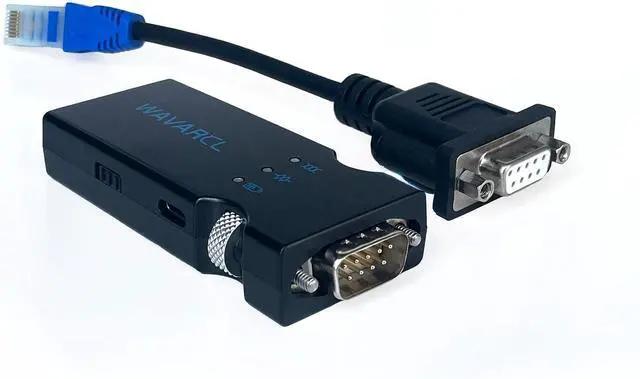
WAVARCL Bluetooth Serial Adapter RS232 to RJ45, Wireless Bluetooth Communication Module, Replace USB RJ45 Cable and 9-pin Adapter (WF610 Pro)
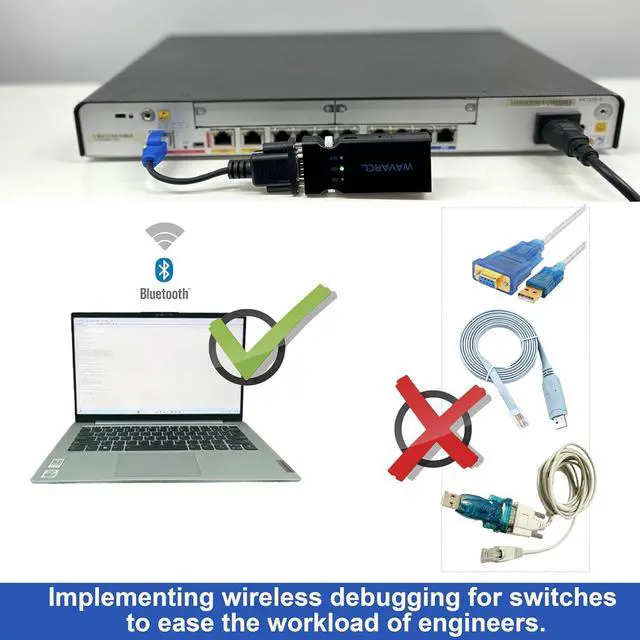
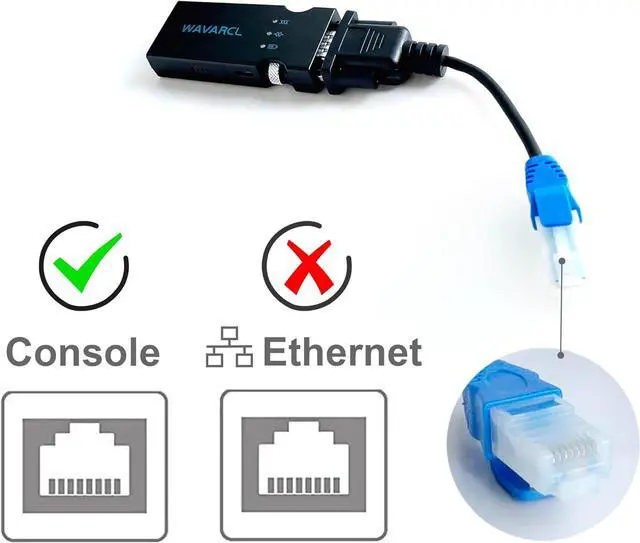
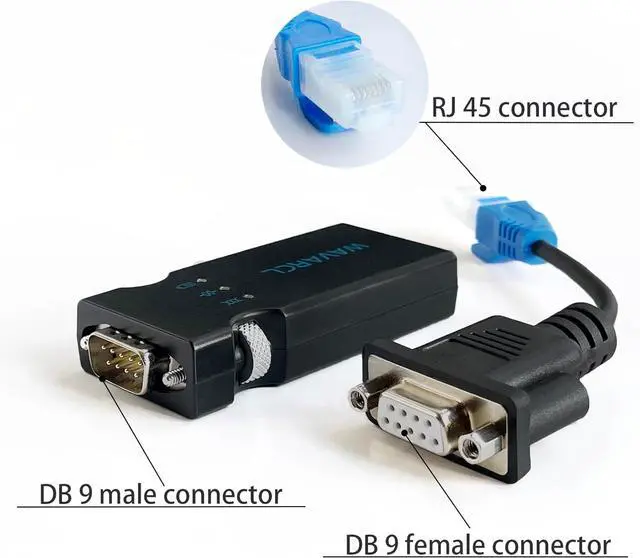
- Supported DevicesThe wireless Bluetooth RS232 DB9 to RJ45 console management cable allows you to connect your Bluetooth-enabled laptops, smartphones, or tablets to routers, switches, firewalls, and wireless devices. It can serve as a substitute for USB console cable, USB-C console cable, or USB to serial RS232/RS-232 adapter.
- Compatible OSFull support for 32-bit and 64-bit Windows, MAC OS. Windows operating systems (such as Windows 7/8.X/10/11). MacOS operating systems (such as Mac OS 10 or higher). Linux/Android operating systems.
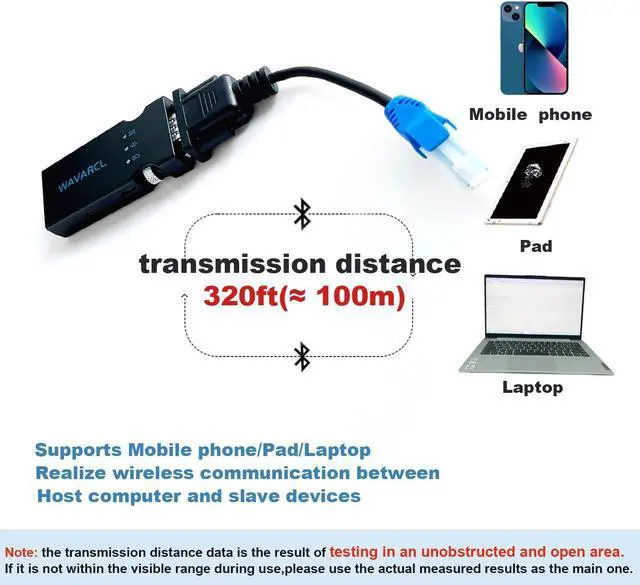
- Default parametersSimilar to USB serial adapter products, the Bluetooth name, baud rate, and PIN code can be configured via software It supports baud rates of 1200,2400, 4800, 9600, 19200, 38400, 57600, and 115200,12800,230400,25600,512000. The communication data is 8 bits and cannot be changed. The default PIN code is 0000, and the default baud rate is 9600, N, 8, 1. Transmission distance is over 320ft(100 meters.
- Two interfaces RJ45 or Ma
+
+
Overview
Reviews
Any questions? Ask CelesteSM will help you find out quickly.
Try me now
WF610PRO Bluetooth Serial Adapter
Advantage:
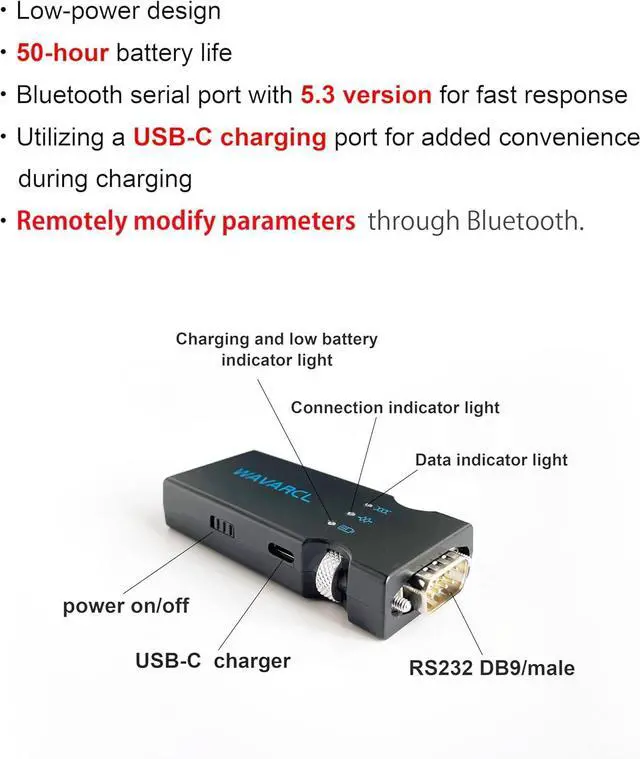
Remotely configue the pamaraters through Bluetooth,without use a USB C cable or RS232 cable
Wireless Bluetooth replacement of RS-232 communication, works with any host computer are support bluetooth.
Supports Bluetooth profiles SPP (Serial Port Profile) or BLE (Bluetooth Low Energy), easy to use Windows/Mac configuration tools.
Help network engineers solve the problem of wirelessly connecting a computer's Bluetooth to console ports and rs232 ports on switches, routers, and other devices.
No more sitting in freezing and noisy server rooms
Our serial DB9 to RJ45 console cable with Bluetooth. It replacement of DB9 to USB serial adapter / USB C console cable.
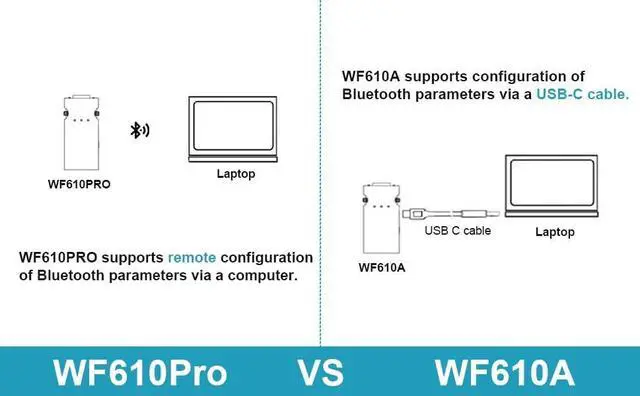
The way to configure Bluetooth parameters is different.
Both of them using Bluetooth and RS232 to RJ45 console cable RJ45 combination debugging network devices.
Replacement of traditional methods such as usb to rs232 serial adapter or usb console cable.It is more convenient.
About WF610PRO,Bluetooth baud rate names, passwords, and other parameters can be remotely configure through computer, tablet, or mobile phone. Convenient for debugging devices with different baud rates and frequent switching of baud rates.
About WF610A,Bluetooth baud rate, name, password and other parameters can be queried and configure through the USB C cable.
The Bluetooth serial adapter is portable and easy to store.
Usb to rj45 console cable or usb to serial cable makes tangled after using.
The serial to usb cables are prone to tripping over other people and dropping laptops or network devices.
The Bluetooth serial will never happen.
As long as your computer supports Bluetooth, it will work!
It supports Bluetooth:
v4.0/v4.1/v4.2/v5.0/v5.1/v5.2/v5.3/v5.4
But the usb console cable requires driver installationold chip may not support the latest OS.
Bluetooth device is compatible with the following operating systems
Full support for 32-bit and 64-bit Windows, MAC OS,Linux,Android,IOS.
Windows operating systems (such as Windows 7/8.X/10/11)
MacOS operating systems (such as Mac OS 10 or higher)
Linux operating systems (such as Ubuntu 18.04 LTS or higher)
Android operating systems (such as Android 9 (Pie) or higher)
IOS operating systems

Advantage:
Remotely configue the pamaraters through Bluetooth,without use a USB C cable or RS232 cable
Wireless Bluetooth replacement of RS-232 communication, works with any host computer are support bluetooth.
Supports Bluetooth profiles SPP (Serial Port Profile) or BLE (Bluetooth Low Energy), easy to use Windows/Mac configuration tools.
Help network engineers solve the problem of wirelessly connecting a computer's Bluetooth to console ports and rs232 ports on switches, routers, and other devices.
No more sitting in freezing and noisy server rooms
Our serial DB9 to RJ45 console cable with Bluetooth. It replacement of DB9 to USB serial adapter / USB C console cable.
The way to configure Bluetooth parameters is different.
Both of them using Bluetooth and RS232 to RJ45 console cable RJ45 combination debugging network devices.
Replacement of traditional methods such as usb to rs232 serial adapter or usb console cable.It is more convenient.
About WF610PRO,Bluetooth baud rate names, passwords, and other parameters can be remotely configure through computer, tablet, or mobile phone. Convenient for debugging devices with different baud rates and frequent switching of baud rates.
About WF610A,Bluetooth baud rate, name, password and other parameters can be queried and configure through the USB C cable.
The Bluetooth serial adapter is portable and easy to store.
Usb to rj45 console cable or usb to serial cable makes tangled after using.
The serial to usb cables are prone to tripping over other people and dropping laptops or network devices.
The Bluetooth serial will never happen.
As long as your computer supports Bluetooth, it will work!
It supports Bluetooth:
v4.0/v4.1/v4.2/v5.0/v5.1/v5.2/v5.3/v5.4
But the usb console cable requires driver installationold chip may not support the latest OS.
Bluetooth device is compatible with the following operating systems
Full support for 32-bit and 64-bit Windows, MAC OS,Linux,Android,IOS.
Windows operating systems (such as Windows 7/8.X/10/11)
MacOS operating systems (such as Mac OS 10 or higher)
Linux operating systems (such as Ubuntu 18.04 LTS or higher)
Android operating systems (such as Android 9 (Pie) or higher)
IOS operating systems
Warranty & Returns
Warranty, Returns, And Additional Information
Warranty
- Please contact the Seller directly for warranty information. Warranty information may also be found on the Manufacturer's website.
- CONTACT
Return Policies
- Return for refund within: 30 days
- Return for replacement within: 30 days
- This item is covered by XinjintongLimited Return Policy
Manufacturer Contact Info
- For a directory of all our manufacturers, please click below.
- Manufacturers Directory
LOADING...