Your Browsing History
- Free 30-day Returns
$162.99
Meet Your Seller
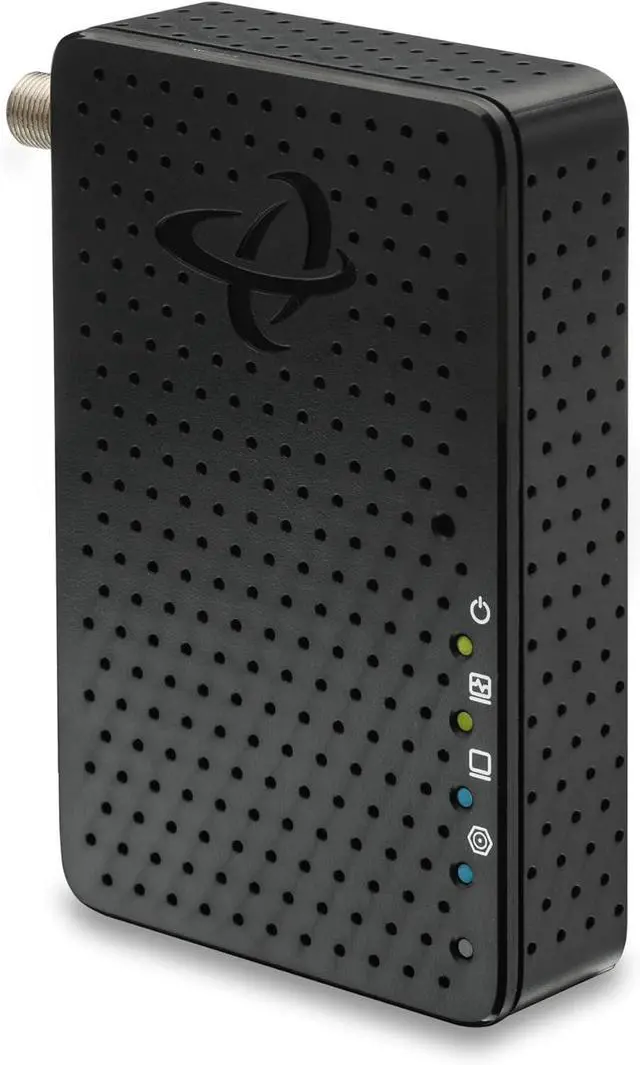
Hitron MoCA 2.5 Adapter (Single Unit Add-On) - Requires Connected Coax Network
- Up to 2.5 Gbps Ethernet Over Existing Coax | Ideal for Cable Internet Homes
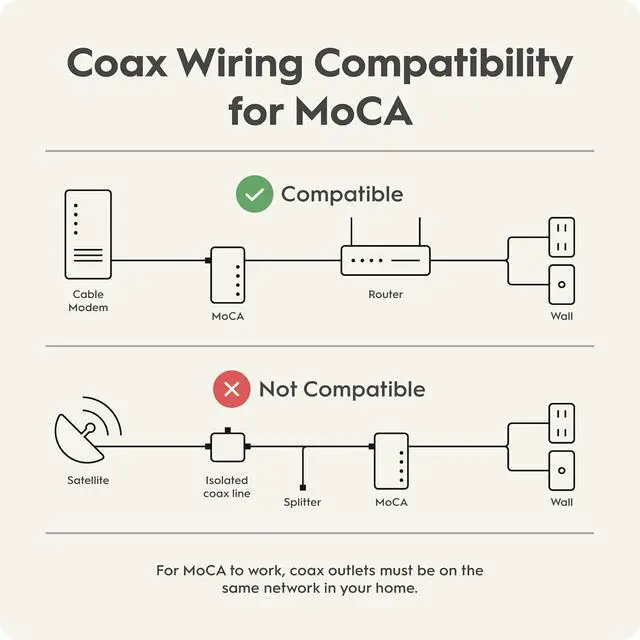
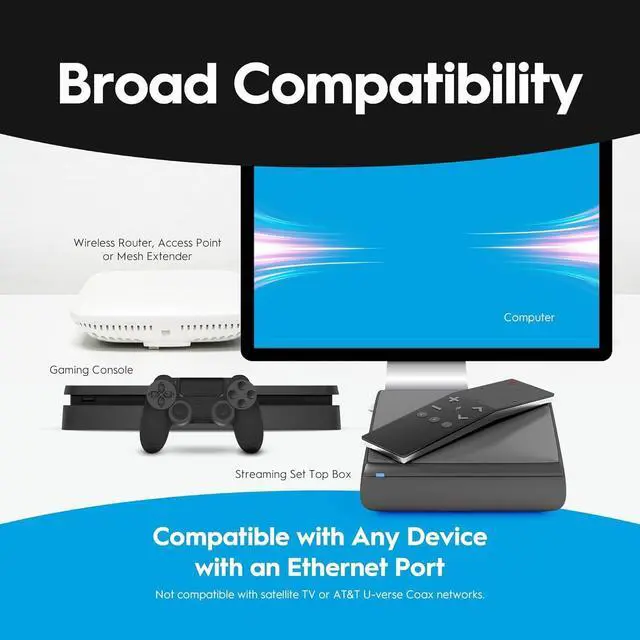
- COMPATIBILITY CHECK REQUIRED BEFORE PURCHASE: Your homes coax outlets MUST be connected through a central splitter/distribution panel for this to work. If coax outlets are isolated, disconnected, or used for satellite TV (DirecTV, Dish, AT&T U-verse), this product will NOT function. Test with a coax tester or contact your cable company to verify connectivity first.
- PERFECT FOR CABLE INTERNET HOMES: Works with cable internet providers (Comcast, Spectrum, Cox, etc.) where coax cables connect to a main splitter. Does NOT work with satellite internet, AT&T fiber, or homes with isolated coax outlets. Transforms connected coax TV outlets into 2.5 Gbps Ethernet ports.
- 2.5 GBPS MAX ETHERNET SPEED: Delivers up to 2.5 Gigabit per second wired connection through your existing coax cables. Perfect for 4K streaming, gaming, and high-bandwidth devices. Actual speeds depend on your internet plan and network conditions.^
+
+
Overview
Specs
Reviews
Any questions? Ask CelesteSM will help you find out quickly.
Try me now
WiFi signals get weaker the farther they travel. When your device is far from the WiFi router, the signal loses strength, leading to slower speeds and sometimes even lost connections. Also, WiFi can be disturbed by things like walls, other electronic devices, and even other WiFi networks.
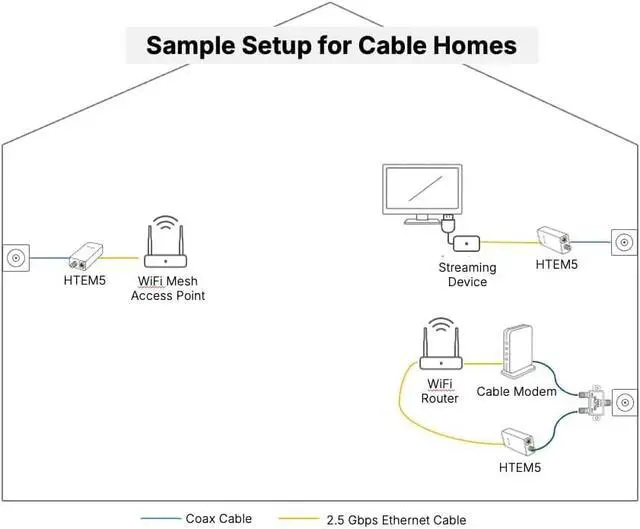
MoCA boosts your WiFi by providing a fast, stable connection between mesh pods. Using existing coaxial cables, MoCA helps the pods communicate quickly and reliably. This high-speed connection means each pod can deliver faster WiFi, giving you better coverage and quicker internet speeds.
Coax Wiring Check: Ensure 1. Cable TV coax wiring (round cables with screw-on F-connectors), 2. Coax network that connects multiple rooms together, and 3. Active coax outlets in rooms where you need to connect a MoCA adapter
High-Split Modem Users: If you have a high-split cable modem, install a Point of Entry (POE) filter to separate MoCA and modem signals
Frequency Compatibility: Splitters must support MoCA frequency band (1125-1675MHz)
Network Requirements: Minimum 2 MoCA devices needed to establish network connection
Compatible Internet Services:Cable Internet: Xfinity, Spectrum, Cox, Optimum, Mediacom, WOW, Suddenlink, all cable ISPs
Fiber Services: Verizon Fios, Google Fiber, Frontier Fiber and most Fiber-to-home providers (Not AT&T Fiber)
Additional Requirements: 1. Standard Cable/Fiber: Works out of the box, 2. High Split DOCSIS Cable: Requires POE filter (sold separately), 3. Router: Any router or gateway with available Ethernet port
Most homes dont need extra parts for MoCA. Low- and mid-split cable modems stay below MoCA frequencies. High-split modems overlap with MoCA and may interfere. A POE (Point of Entry) filter can help keep your MoCA signal strong and stable.
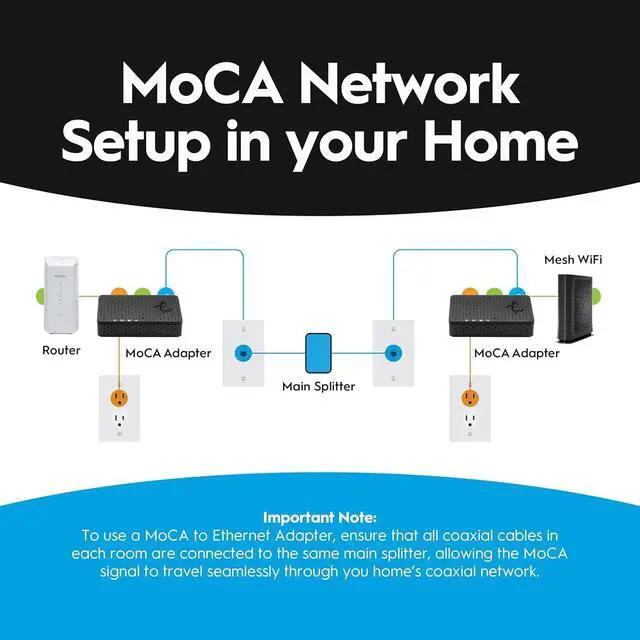
To create a MoCA (Multimedia over Coax Alliance) network, it is essential that all coaxial cables in your home are properly connected to the same coax splitter. If your home was previously wired for satellite TV or another service (other than cable), its possible that not all of your cable outlets are connected to the splitter. Before setting up your MoCA network, ensure that each rooms coaxial cable is connected to the correct splitter. For detailed instructions on how to check if your MoCA adapters are functioning properly, please visit the Hitron's Technical Support website.
Ensure that the RF splitter in your home is MoCA compatible. It must support the MoCA frequency band, which ranges from 1125 to 1675 MHz.
Many cable operators may bypass the main splitter in your home, connecting the external coaxial cable directly to the modem or router. If this happens, not all coax outlets will be connected to the main splitter, making it difficult to create a MoCA network. To build a MoCA network, ensure that all coaxial cablesboth external and internalare connected through the main splitter.
Low-split and mid-split cable modems typically operate up to 1002 MHz, which does not overlap the MoCA frequency band.
High-split cable modems may use upstream frequencies up to 1218 MHz, which can overlap MoCAthis is when a Point of Entry filter may be required.
TROUBLESHOOTING: If MoCA light stays OFF, check that coax cables from different rooms connect to the same splitter. Isolated coax runs will prevent MoCA devices from communicating.
What is MoCA Technology?
MoCA transforms your existing coaxial cable wiring into a high-speed ethernet network backbone. Unlike wireless connections, MoCA uses shielded coaxial cables that provide exceptional signal integrity with ultra-low latency - typically under 5ms.
How does MoCA work?
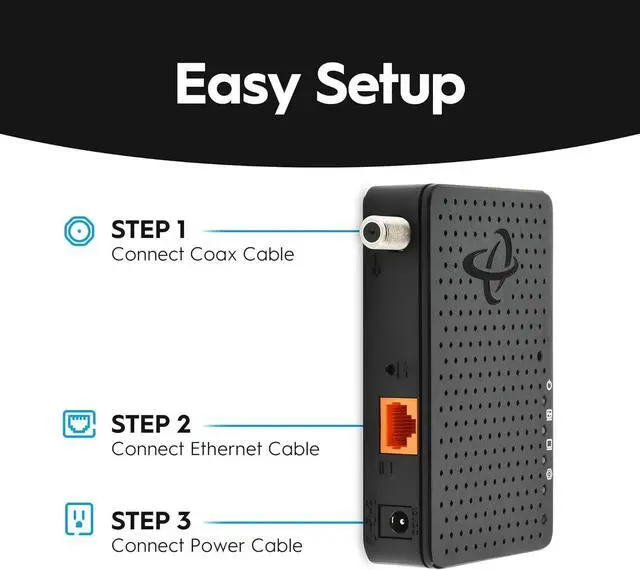
MoCA adapters communicate through your homes coax cables, converting ethernet data into MoCA signals that travel through the coax network, then converts them back to ethernet at the destination.
Is the HTEM5 compatible with satellite services?
No, the HTEM5 is com

MoCA boosts your WiFi by providing a fast, stable connection between mesh pods. Using existing coaxial cables, MoCA helps the pods communicate quickly and reliably. This high-speed connection means each pod can deliver faster WiFi, giving you better coverage and quicker internet speeds.
Coax Wiring Check: Ensure 1. Cable TV coax wiring (round cables with screw-on F-connectors), 2. Coax network that connects multiple rooms together, and 3. Active coax outlets in rooms where you need to connect a MoCA adapter
High-Split Modem Users: If you have a high-split cable modem, install a Point of Entry (POE) filter to separate MoCA and modem signals
Frequency Compatibility: Splitters must support MoCA frequency band (1125-1675MHz)
Network Requirements: Minimum 2 MoCA devices needed to establish network connection
Compatible Internet Services:Cable Internet: Xfinity, Spectrum, Cox, Optimum, Mediacom, WOW, Suddenlink, all cable ISPs
Fiber Services: Verizon Fios, Google Fiber, Frontier Fiber and most Fiber-to-home providers (Not AT&T Fiber)
Additional Requirements: 1. Standard Cable/Fiber: Works out of the box, 2. High Split DOCSIS Cable: Requires POE filter (sold separately), 3. Router: Any router or gateway with available Ethernet port
Most homes dont need extra parts for MoCA. Low- and mid-split cable modems stay below MoCA frequencies. High-split modems overlap with MoCA and may interfere. A POE (Point of Entry) filter can help keep your MoCA signal strong and stable.
To create a MoCA (Multimedia over Coax Alliance) network, it is essential that all coaxial cables in your home are properly connected to the same coax splitter. If your home was previously wired for satellite TV or another service (other than cable), its possible that not all of your cable outlets are connected to the splitter. Before setting up your MoCA network, ensure that each rooms coaxial cable is connected to the correct splitter. For detailed instructions on how to check if your MoCA adapters are functioning properly, please visit the Hitron's Technical Support website.
Ensure that the RF splitter in your home is MoCA compatible. It must support the MoCA frequency band, which ranges from 1125 to 1675 MHz.
Many cable operators may bypass the main splitter in your home, connecting the external coaxial cable directly to the modem or router. If this happens, not all coax outlets will be connected to the main splitter, making it difficult to create a MoCA network. To build a MoCA network, ensure that all coaxial cablesboth external and internalare connected through the main splitter.
Low-split and mid-split cable modems typically operate up to 1002 MHz, which does not overlap the MoCA frequency band.
High-split cable modems may use upstream frequencies up to 1218 MHz, which can overlap MoCAthis is when a Point of Entry filter may be required.
TROUBLESHOOTING: If MoCA light stays OFF, check that coax cables from different rooms connect to the same splitter. Isolated coax runs will prevent MoCA devices from communicating.
What is MoCA Technology?
MoCA transforms your existing coaxial cable wiring into a high-speed ethernet network backbone. Unlike wireless connections, MoCA uses shielded coaxial cables that provide exceptional signal integrity with ultra-low latency - typically under 5ms.
How does MoCA work?
MoCA adapters communicate through your homes coax cables, converting ethernet data into MoCA signals that travel through the coax network, then converts them back to ethernet at the destination.
Is the HTEM5 compatible with satellite services?
No, the HTEM5 is com
Warranty & Returns
Warranty, Returns, And Additional Information
Warranty
- Please contact the Seller directly for warranty information. Warranty information may also be found on the Manufacturer's website.
- CONTACT
Return Policies
- Return for refund within: 30 days
- Return for replacement within: 30 days
- This item is covered by XinjintongLimited Return Policy
Manufacturer Contact Info
- For a directory of all our manufacturers, please click below.
- Manufacturers Directory
LOADING...