• $324.99
  • Free 30-day Returns
  • Shipped by PartsPro Store

    Price alert
    Shop it at NeweggBusiness.

    Meet Your Seller

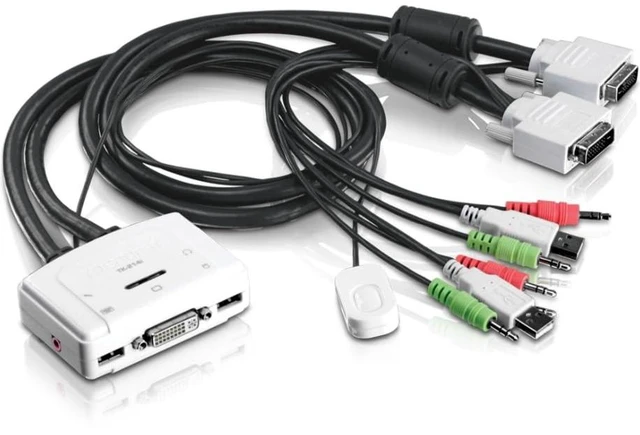
    TK-214i 2-Port DVI Audio KVM Switch

    • 2-Port KVM Switch: Manage two PCs and/or Macs with a single set of controls-USB keyboard, USB mouse, DVI monitor, microphone, and speakers
    • High-Resolution DVI Support: View crystal-clear video at up to 1920 x 1200 resolution
    • Audio Support: Supports both speakers and microphone for full multimedia control
    • No Power Adapter Required: Powered directly through the USB ports of the connected computers
    • Ergonomic Design: Toggle switch with a 1.5-meter (5 ft.) extension cable for convenient placement at your workstation
    • Plug and Play: No driver installation needed-just plug in and start using
    • Hot-Plug Feature: Add or remove computers without powering down the KVM switch
    • Multi-OS Support: Compatible with Windows, Mac, and Linux operating systems
    • LED Display: Easily monitor which computer is active with the LED display indicator
    • Built-in Cables: Includes 80 cm (2.6 ft.) combination cables for USB, DVI, and audio/microphone connections for each computer
    +
    +
    Overview
    Specs
    Reviews

    Any questions? Ask CelesteSM will help you find out quickly.

    The TK-214i 2-Port DVI Audio KVM Switch allows you to control two PCs or Macs using a single set of console controls. This KVM switch offers seamless management of systems with DVI, USB, and audio connections, including speakers and microphones. Easily switch between computers with the convenient push-button toggle switch, which can be placed ergonomically at your workstation using a 1.5-meter (5 ft.) extension cable. No drivers or software installation are requiredjust plug in the devices to start controlling your systems. The KVM switch supports high-quality digital video up to 1920 x 1200 resolution, making it ideal for workstations that need to manage multiple systems without clutter. It is powered by the connected computers, eliminating the need for an external power source.

    Warranty & Returns

    Warranty, Returns, And Additional Information

    Warranty

    • Please contact the Seller directly for warranty information. Warranty information may also be found on the Manufacturer's website.
    • CONTACT

    Return Policies

    Manufacturer Contact Info

    LOADING...