

Your Browsing History
- Free 30-day Returns
$142.99

Meet Your Seller


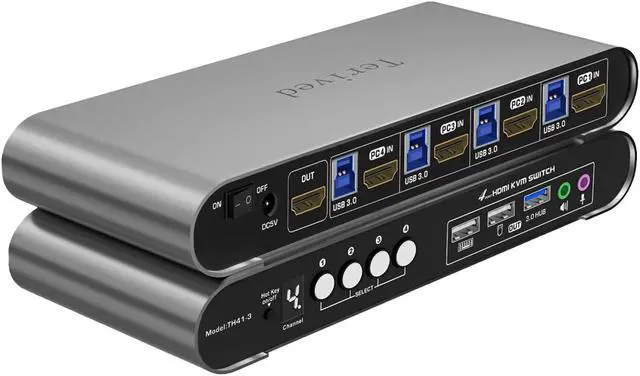
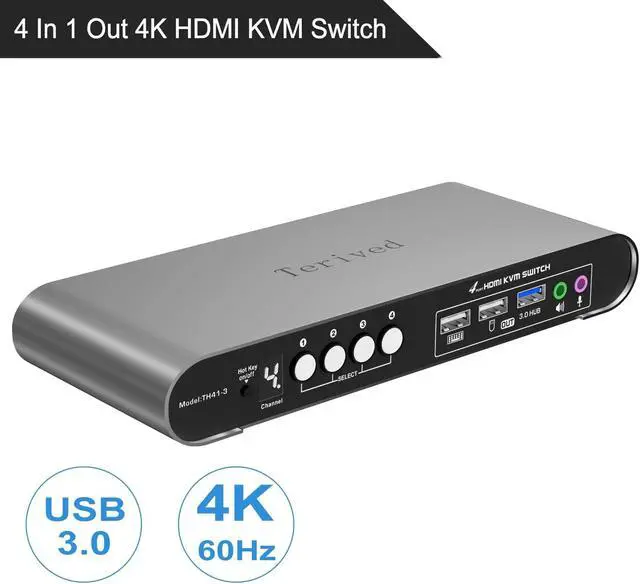


HDMI KVM Switch 4 in 1 Out with Hotkey Mouse Switching, Audio Mic Support, 4K@60Hz, USB 3.0 Hub, Digital Display, Terived Aluminum KVM with Cables Included
- Attention: Please plug in all the cables included in the box; the four USB cables are for the front KVM USB ports. If you don't plug into your computers, your keyboard and mouse will not work. For audio, please select [USB Audio device] as the sound output option and then connect your speakers or headphones to the audio port.
- Aluminum Alloy Shell - We use high-quality aluminum alloy to provide our customers with an excellent premium look, great drop resistance, lightweight design, strong build, and robust corrosion resistance.
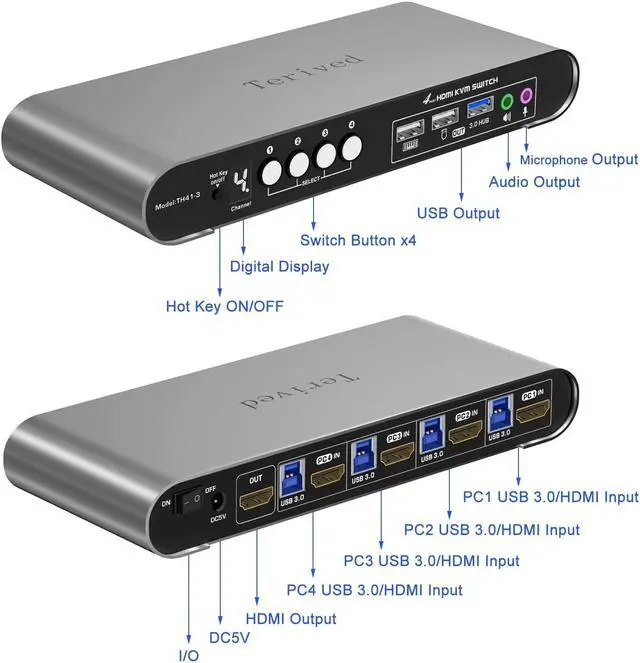
- Digital Display- KVM Switch 4 port with a digital display which lets you easy to see the current channel even in the dark investment
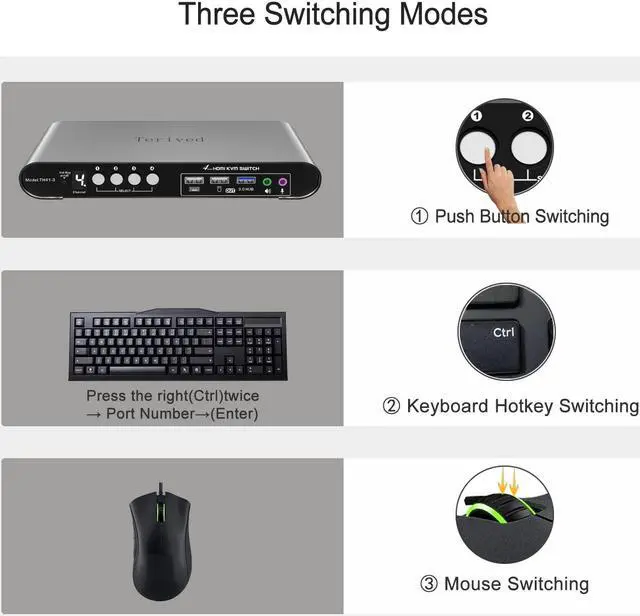
- Hotkey - Tired of a manual button switch? This product gives you a convenient way to switch with Keyboard shortcut: press the right [CTRL] key twice, then press [1, 2, 3, or 4], followed by [Enter] to choose a computer.
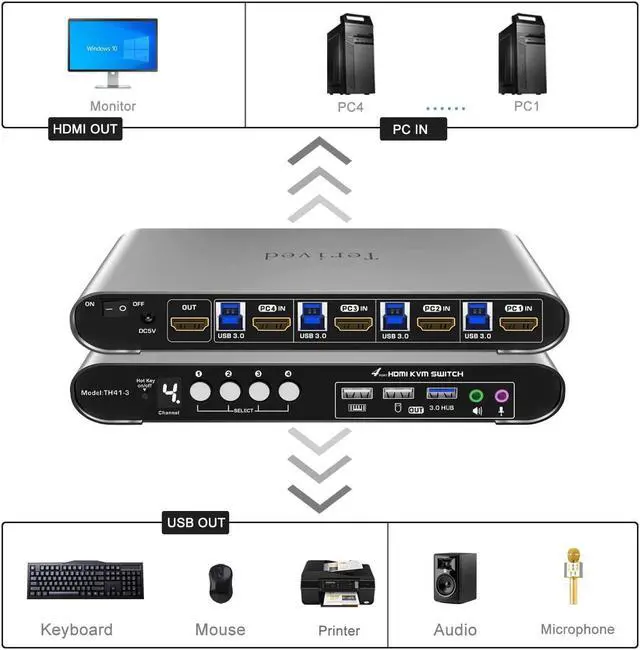
- Four computers one HDMI monitor - Controls 4 HDMI interfaced computers or other applicable devices using one
+
+
Overview
Specs
Reviews

Any questions? Our AI mode will help you find out quickly.
Try me now
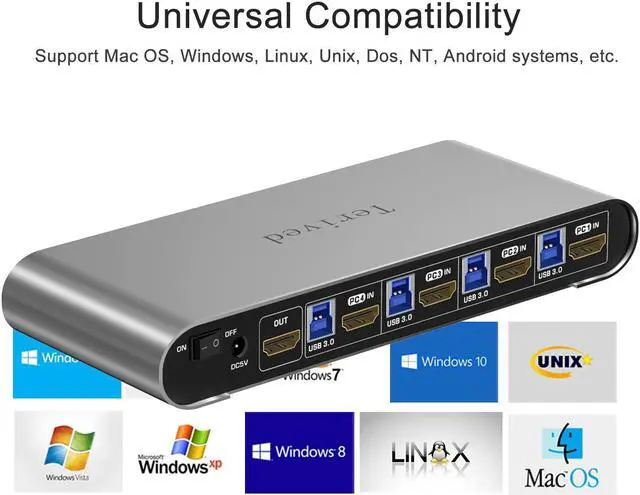
Attention: Please plug in all the cables included in the box; the four USB cables are for the front KVM USB ports. If you don't plug into your computers, your keyboard and mouse will not work.Aluminum Alloy Shell - We use high-quality aluminum alloy to provide our customers with an excellent premium look, great drop resistance, lightweight design, strong build, and robust corrosion resistance.Digital Display- KVM Switch 4 port with a digital display which lets you easy to see the current channel even in the dark investmentHotkey - Tired of a manual button switch? This product gives you a convenient way to switch, including keyboard hotkeys switch, mouse wheel switchFor audio, please select [USB Audio device] as the sound output option and then connect your speakers or headphones to the audio port.Four computers one HDMI monitor - Controls 4 HDMI interfaced computers or other applicable devices using one keyboard, a mouse, one monitor with audio & microphone, and USB 3.0 HUB portHDMI Switch 4K - Supported resolutions: 480i, 480p, 720p, 1080i, 1080p, 2K@144Hz, 4K@60Hz RGB 4:4:4 HDR10, HDMI 2.0 compatible.Auto-Scan, auto-detection, auto EDID. Hot plug & play and HDCP. Multi-platform: support Windows 11/10/7/2000/XP/Vista, Linux, and MacAttention: If the switch's hotkey function conflicts with your keyboard's software which is rare, consider turning off the hotkey by using the front manual hotkey on/off button or switching to another keyboard. To disable the keyboard hotkey alone, press right [CTRL], right [CTRL], [K], [Enter]. You can then switch back to your first keyboard and still use the mouse wheel hotkey.Common Hockey shortcut:
Turn off switch beeping sound: Right [CTRL], Right [CTRL], [B], [Enter] Turn on/off the Mouse hotkey: Right [CTRL], Right [CTRL], [M], [Enter] Turn on/off the Keyboard hotkey: Right [CTRL], Right [CTRL], [K], [Enter] KVM Reset: Right [CTRL], Right [CTRL], [ESC] three times, [Enter]
upported resolutions: 480i, 480p, 720p, 1080i, 1080p, 2K@144Hz, 4K@60Hz RGB 4:4:4 HDR10
This HDMI switcher comes with a 3.5mm audio and microphone slot on the front panel.
For audio, please select [USB Audio device] as the sound output option and then connect your speakers or headphones to the audio port.
It supports Auto-EDID, which prevents the pop-up windows from moving around and changing their size. For example, your software is full-screen. Without EDID, after switching between computers, it might change its size to window mode and move to the place that you don't want it to be.
Power off your computers and monitorsconnect four computers to the KVM switch with HDMI cables and USB (Type A to B) cables.connect your HDMI monitor to the KVM switch with your HDMI cableconnect the 5V power supply to the KVM switchPower on the KVM switch (the on/off switch located on the back of the KVM switch), then computers and monitorsconnect your USB devices to theKVM switchTo set up your audio for a headphone or speaker(windows), open your sound setting and choose [ Speakers(USB Audio Device) ] as the sound outputTo disable the 'beep' sound when switching between computers, right [CTRL] + right [CTRL] + [ b ] + [Enter]You are all set!
Terived 4 Port HDMI KVM Switch with Aluminum Shell and Digital Display, Four Computers One Monitor 4K@60Hz USB 3.0, hotkey, EDID, HDR10 with Cables
Turn off switch beeping sound: Right [CTRL], Right [CTRL], [B], [Enter] Turn on/off the Mouse hotkey: Right [CTRL], Right [CTRL], [M], [Enter] Turn on/off the Keyboard hotkey: Right [CTRL], Right [CTRL], [K], [Enter] KVM Reset: Right [CTRL], Right [CTRL], [ESC] three times, [Enter]
upported resolutions: 480i, 480p, 720p, 1080i, 1080p, 2K@144Hz, 4K@60Hz RGB 4:4:4 HDR10
This HDMI switcher comes with a 3.5mm audio and microphone slot on the front panel.
For audio, please select [USB Audio device] as the sound output option and then connect your speakers or headphones to the audio port.
It supports Auto-EDID, which prevents the pop-up windows from moving around and changing their size. For example, your software is full-screen. Without EDID, after switching between computers, it might change its size to window mode and move to the place that you don't want it to be.
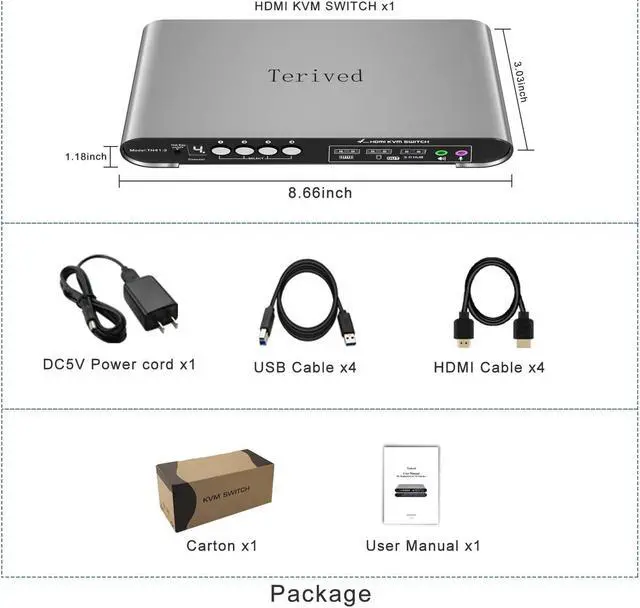
Power off your computers and monitorsconnect four computers to the KVM switch with HDMI cables and USB (Type A to B) cables.connect your HDMI monitor to the KVM switch with your HDMI cableconnect the 5V power supply to the KVM switchPower on the KVM switch (the on/off switch located on the back of the KVM switch), then computers and monitorsconnect your USB devices to theKVM switchTo set up your audio for a headphone or speaker(windows), open your sound setting and choose [ Speakers(USB Audio Device) ] as the sound outputTo disable the 'beep' sound when switching between computers, right [CTRL] + right [CTRL] + [ b ] + [Enter]You are all set!
Terived 4 Port HDMI KVM Switch with Aluminum Shell and Digital Display, Four Computers One Monitor 4K@60Hz USB 3.0, hotkey, EDID, HDR10 with Cables
Warranty & Returns
Warranty, Returns, And Additional Information
Warranty
- Please contact the Seller directly for warranty information. Warranty information may also be found on the Manufacturer's website.
- CONTACT
Return Policies
- Return for refund within: 30 days
- Return for replacement within: 30 days
- This item is covered by Chinathru Trading Co., Limited Return Policy
Manufacturer Contact Info
- For a directory of all our manufacturers, please click below.
- Manufacturers Directory
LOADING...