

Your Browsing History
- Free 30-day Returns
$162.99

Meet Your Seller


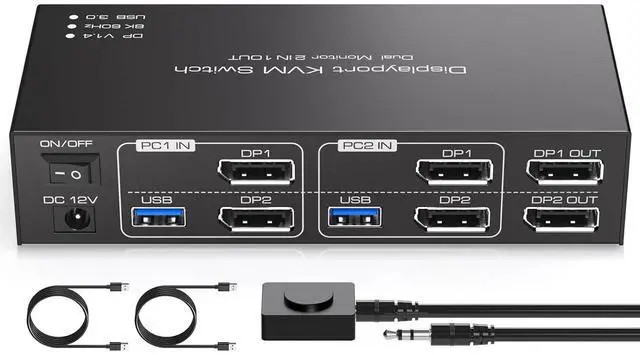


TJCXELE Displayport KVM Switch 2 Monitors 2 Computers 8K@60Hz/4K@120Hz USB 3.0 DP 1.4 KVM Switch for Two Computers Share Dual Displays and 4 USB Devices Support Extended & Copy Mode
- Pre-Purchase Information 1. Please make sure both of your computer or dock station has 2 DP Ports + USB-A Port. 2. Please make sure both of your monitors have an DP Port. 3. HDMI to DP or DP to DVI/VGA cable are not recommended.TroubleshootingDisplay has no image1. Please check whether the connection between the switcher and the monitor is correct. 2. Please check whether the host computer is properly powered on. 3. Please check whether the computer host has the correct output image
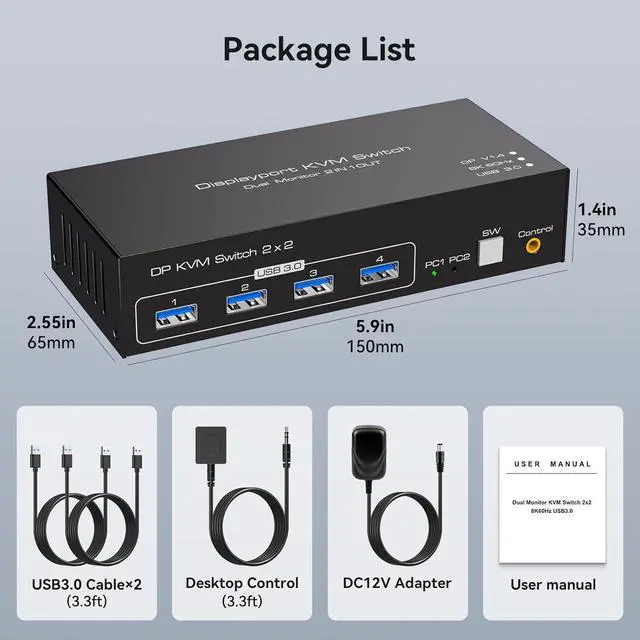
- Displayport KVM Switch 2 ComputersKVM Switch 2 Monitors 2 Computers Display port allow two computers to share two HD monitors and 4 USB 3.0 ports, such as mouse, keyboard, printer U disk, etc.KVM switches includes 12V power adapter.(The current provided by the pc host is small, can't support USB devices such as hard disks). With the external power design, USB devices can obtain a stable working environment through the switch. Note: To output to two monitors, the DP1 and DP2 ports must be connected to
+
+
Overview
Specs
Reviews

Any questions? Our AI mode will help you find out quickly.
Try me now
Pre-Purchase Information 1. Please make sure both of your computer or dock station has 2 DP Ports + USB-A Port. 2. Please make sure both of your monitors have an DP Port. 3. HDMI to DP or DP to DVI/VGA cable are not recommended.TroubleshootingDisplay has no image1. Please check whether the connection between the switcher and the monitor is correct. 2. Please check whether the host computer is properly powered on. 3. Please check whether the computer host has the correct output image
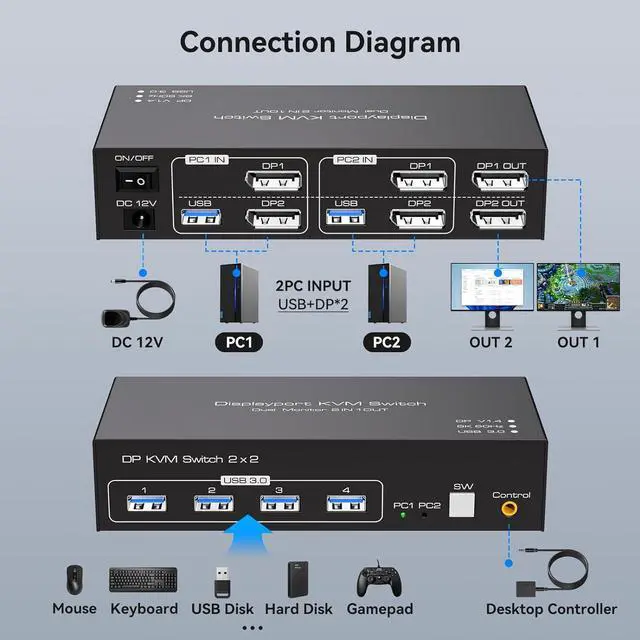
Displayport KVM Switch 2 ComputersKVM Switch 2 Monitors 2 Computers Display port allow two computers to share two HD monitors and 4 USB 3.0 ports, such as mouse, keyboard, printer U disk, etc.KVM switches includes 12V power adapter.(The current provided by the pc host is small, can't support USB devices such as hard disks). With the external power design, USB devices can obtain a stable working environment through the switch. Note: To output to two monitors, the DP1 and DP2 ports must be connected to the same computer
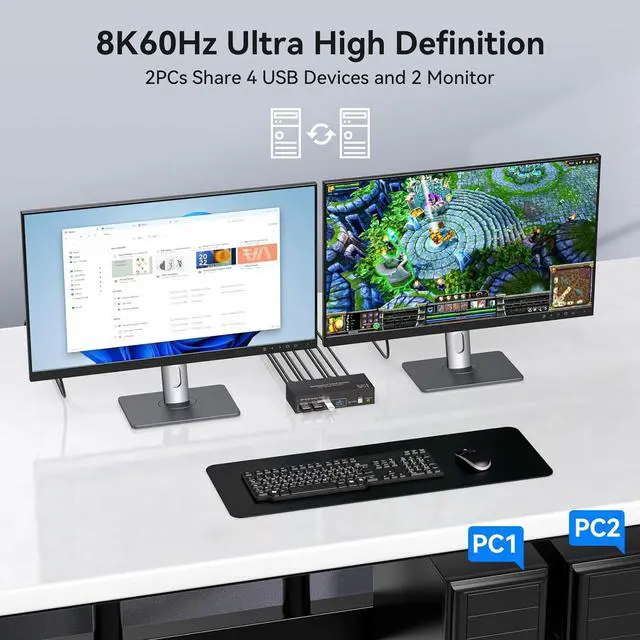
USB KVM Switch Support Extended and Copy Mode DP KVM switches support Extended&Copy Mode.Extended Mode: windows on the main screen can be dragged to the second output screen and display two different screens. Copy Mode: Computer host outputs 2 identical images on 2 monitors. (Note: Please make sure your computer supports multi-display and each connected computer requires 2 DP ports)
Dual Monitor KVM Switch DisplayportThe DP 1.4 KVM switch supports resolutions and refresh rates up to 8K@60Hz 4K@120Hz, and is backward compatible with 1080p 3D 720P,etc. Bringing you a realistic and smooth visual experience. For better experience, please follow the recommended cables: less than 3m for 8K60Hz cables, less than 5m for 4K60Hz cables
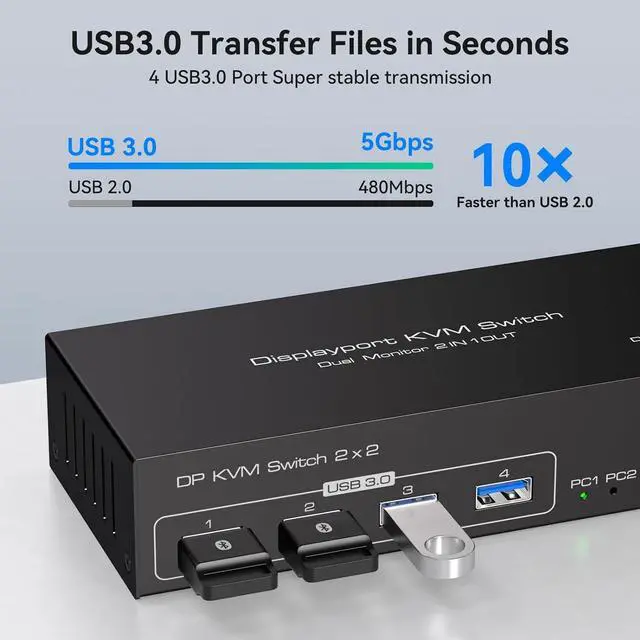
USB 3.0 8K KVM Switch Support 5Gbp/s Transmission RateDisplay port KVM Switches 2 PC 2 Monitor with 4 usb 3.0 ports, two computers can share up to 4 usb devices, such as mouse, keyboard, printer, hard disk, etc. The transmission speed of USB3.0 is as high as 5Gbps, which is far superior to USB2.0 in reading data, and compatible with USB 2.0
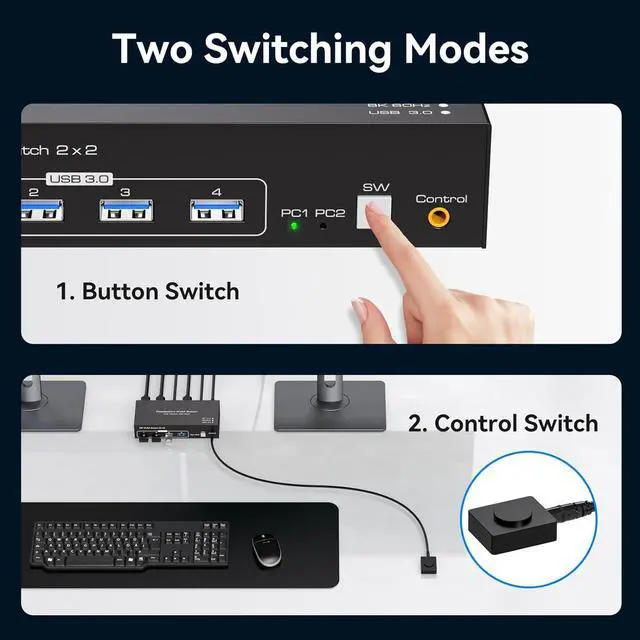
8K DP KVM Switch Easy to UseThe Displayport KVM Switches supports panel button and external wire controller switching.Using the wired extension button, you can place the KVM outside the work area, making your desktop cleaner and tidier.Or just press the panel button next to the indicator light to achieve one-click switching,Simple, quick and easy to use.NOTE: Keyboard shortcuts (hotkeys) toggles are not supported
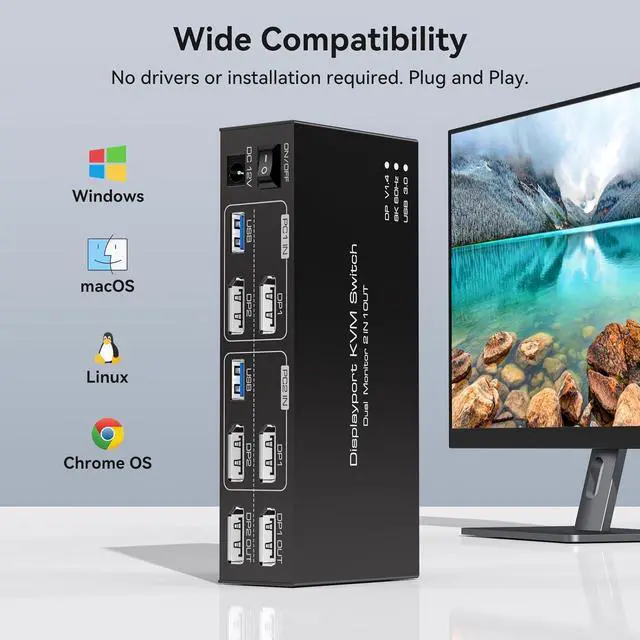
Wide Compatibility The Dual Monitor KVM Switch Display port Plug and play without any software driver, Compatible with Windows/Vista/XP and Mac OS, Linux and Unix.The DP KVM switch supports multiple input devices such as PC, laptop, Apple TV, PS3/PS4, Xbox, and is widely used in offices, multimedia teaching, conference rooms, etc.NOTE:Please use a 12V DC power supply to power it during use
Displayport KVM Switch 2 ComputersKVM Switch 2 Monitors 2 Computers Display port allow two computers to share two HD monitors and 4 USB 3.0 ports, such as mouse, keyboard, printer U disk, etc.KVM switches includes 12V power adapter.(The current provided by the pc host is small, can't support USB devices such as hard disks). With the external power design, USB devices can obtain a stable working environment through the switch. Note: To output to two monitors, the DP1 and DP2 ports must be connected to the same computer
USB KVM Switch Support Extended and Copy Mode DP KVM switches support Extended&Copy Mode.Extended Mode: windows on the main screen can be dragged to the second output screen and display two different screens. Copy Mode: Computer host outputs 2 identical images on 2 monitors. (Note: Please make sure your computer supports multi-display and each connected computer requires 2 DP ports)
Dual Monitor KVM Switch DisplayportThe DP 1.4 KVM switch supports resolutions and refresh rates up to 8K@60Hz 4K@120Hz, and is backward compatible with 1080p 3D 720P,etc. Bringing you a realistic and smooth visual experience. For better experience, please follow the recommended cables: less than 3m for 8K60Hz cables, less than 5m for 4K60Hz cables
USB 3.0 8K KVM Switch Support 5Gbp/s Transmission RateDisplay port KVM Switches 2 PC 2 Monitor with 4 usb 3.0 ports, two computers can share up to 4 usb devices, such as mouse, keyboard, printer, hard disk, etc. The transmission speed of USB3.0 is as high as 5Gbps, which is far superior to USB2.0 in reading data, and compatible with USB 2.0
8K DP KVM Switch Easy to UseThe Displayport KVM Switches supports panel button and external wire controller switching.Using the wired extension button, you can place the KVM outside the work area, making your desktop cleaner and tidier.Or just press the panel button next to the indicator light to achieve one-click switching,Simple, quick and easy to use.NOTE: Keyboard shortcuts (hotkeys) toggles are not supported
Wide Compatibility The Dual Monitor KVM Switch Display port Plug and play without any software driver, Compatible with Windows/Vista/XP and Mac OS, Linux and Unix.The DP KVM switch supports multiple input devices such as PC, laptop, Apple TV, PS3/PS4, Xbox, and is widely used in offices, multimedia teaching, conference rooms, etc.NOTE:Please use a 12V DC power supply to power it during use
Warranty & Returns
Warranty, Returns, And Additional Information
Warranty
- Please contact the Seller directly for warranty information. Warranty information may also be found on the Manufacturer's website.
- CONTACT
Return Policies
- Return for refund within: 30 days
- Return for replacement within: 30 days
- This item is covered by Chinathru Trading Co., Limited Return Policy
Manufacturer Contact Info
- For a directory of all our manufacturers, please click below.
- Manufacturers Directory
LOADING...