

Your Browsing History
- Free 30-day Returns
$155.99

Meet Your Seller

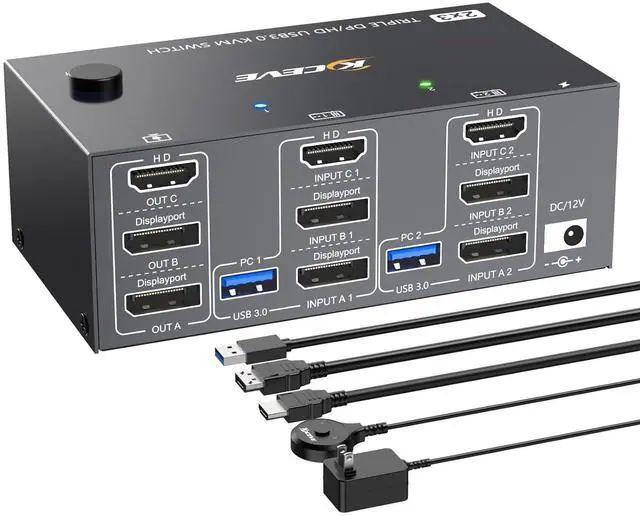



HDMI Displayport KVM Switch 3 Monitors 2 Computers 8K@60Hz 4K@144Hz,3 Monitor KVM Switch 2 Computers for 2 PC Share 3 Monitor and 4 USB3.0 Devices,Triple Monitor KVM Support Extended and Mirror Mode
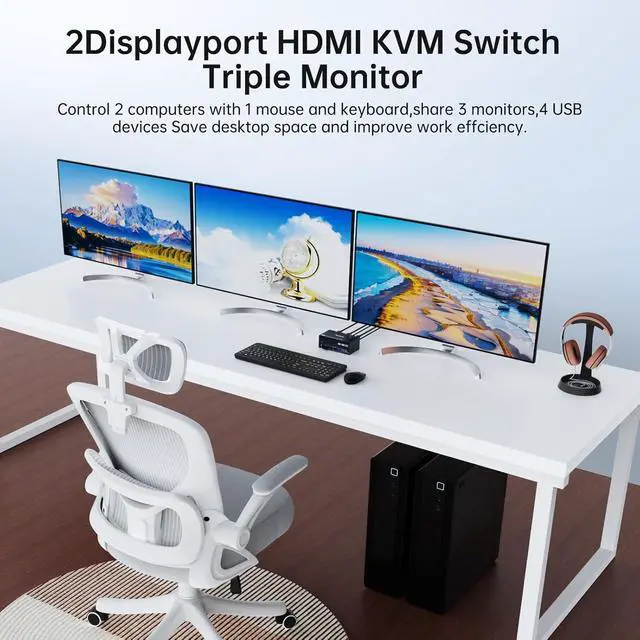
- 3 monitor KVM allows you to control 2 desktops or laptops by only one set of wired or wireless keyboard mouse share 4 USB peripherals devices and 3 monitors.lt supports extended and mirror display modes.(extended mode can output three different screens and mirror mode can output three identical screens):Each connected computer must support multi-screen display and have two DP ports and one HDMI port
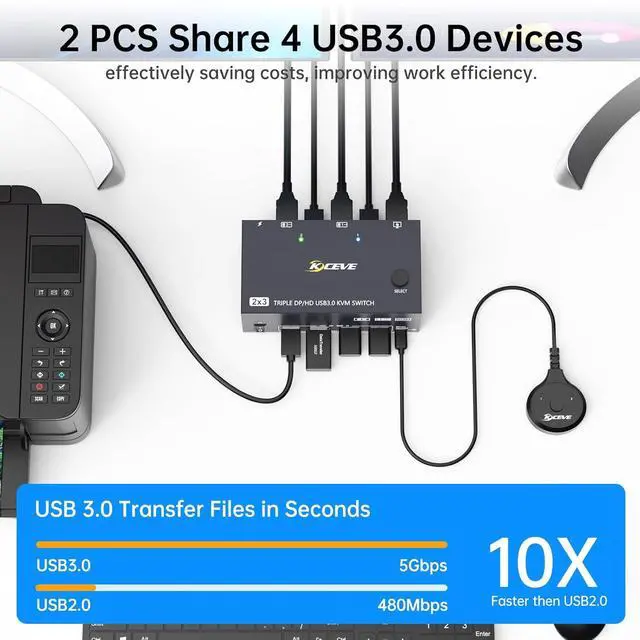
- . KVM switch triple monitor has 4 USB ports,data transfer rate up to 5Gbp/s( .),this 3 monitors KVM switch can recognize USB devices like keyboards, mice,printers,scanners,etc,and is backwards compatible with USB2.0 peripherals...
- [email protected] + DP1.4 KVM switch 3 monitors supports resolution 8K@60Hz/4K@144Hz and backward compatible with lower resolution,KVM switch offers ultra-highdefinition image quality,a feast for your eyes.(:The final resolution d
+
+
Overview
Specs
Reviews

Any questions? Our AI mode will help you find out quickly.
Try me now
8K DP HDMI USB3.0 KVM Switch 2 computers share 3 monitors and 4 USB devices:
Upgrade your workstation to new heights with the 8K three monitor HDMI KVM Switch.With dual computers control,you can effortlessly switch between two hosts using a single keyboard,mouse,and 3 monitors.Increase your efficiency and streamline your workflow with the ability to switch and share across devices quickly.
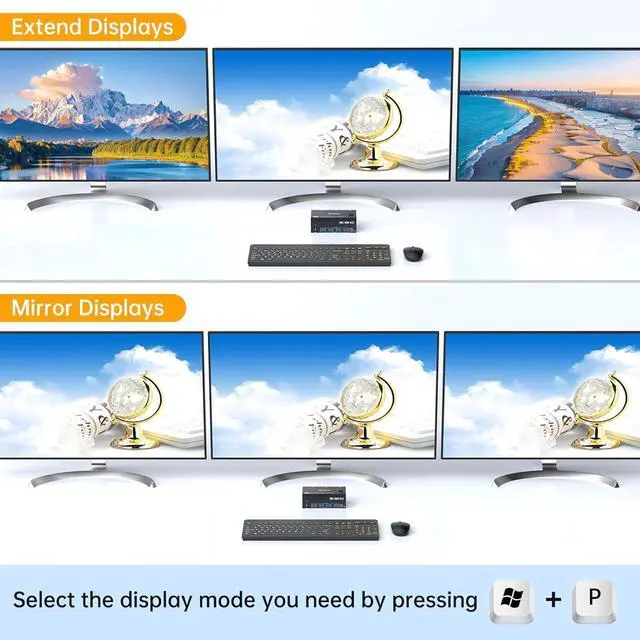
Support Extended/Mirror Mode:
How to choose a mode??
Press "P" and "Window" on the keyboard and mouse at the same time to select the display mode you want.
In Mirror mode,3 output monitors will output same image from PC1 or PC2.In Extended mode,output three different screens,the working window from main screen can be dragged to seond output monitor.You can have the mouse across between 3 monitors.
Universal Compatibility:
Triple monitors KVM switch driver-free and plug and play.It is widely compatible with various systems,such as Windows,Mac OS,Chrome OS,and Linux,Unix,Ubuntu,etc.
Support 8K HD resolution
The resolution and fresh rate of triple monitor KVM switch supports up to 8K@60Hz/4K@144Hz,to achieve 8K high resolution,please use HDMI2.1 and DP1.4 cables,if the set distance allows,the length of cabels more short more better.
With Four USB 3.0 ports
Upgraded USB 3.0 version ensure datatransfer more faster and stable,data transfer speed of 5Gbps,it's a greatsolution to solve many USB deviced is connected issue during use.
2 switch methods
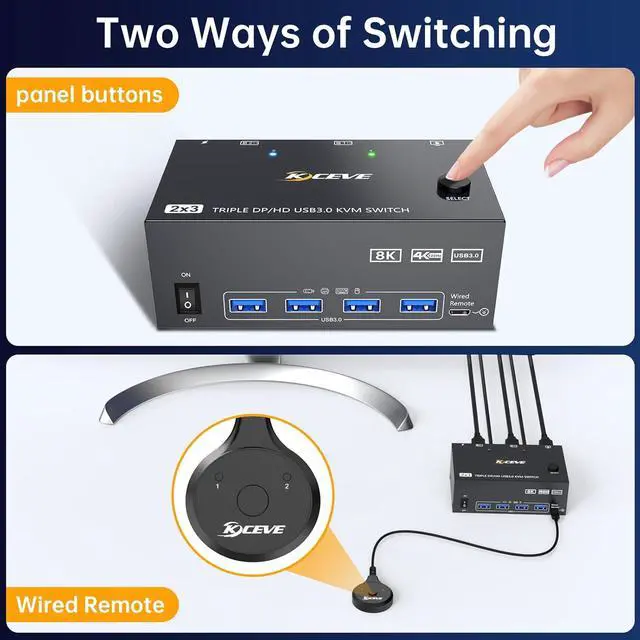
This KVM Switch with 2 switch methods that are pressing the button on the panel and the wired controller(Included).
LED
LED indicate the active computer.
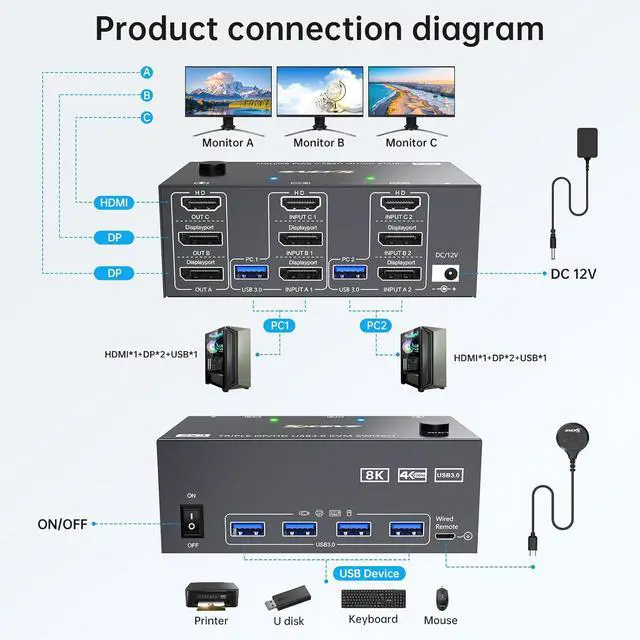
Each PC requires 1*HDMI +2*DP +1*USB cable to connect to the 3 monitors KVM switch
Simply connect your devices,follow the easy-to-use instructions,and start enjoying easy control and switch with our 8K KVM Switch 3 monitors 2 computers.
Note: Package Contents:2 x USB cables,2 x DP cables,1 x HDMI cable,If you need more DP/HDMI cables,please purchase them yourself.
The KVM Switch 2 ports with 4 USB 3.0 ports with a data transfer rate up to 5Gbp/s, which is 10 times faster than USB 2.0 ports.
USB3.0 three monitor HDMI DP KVM switch with two switching methods
Switching Method 1--Panel Button Switching
Switching Method 2--Wired Remote (1.5m)
Experience the stunning clarity of 8K@60Hz resolution with this 8K KVM switch.Enjoy vibrant colors,sharp details,and immersive visuals,bringing vivid world to your life.
DP & HDMI KVM Switch 2 Computers 3 Monitors--2 PCs share1 set of keyboard,mouse,3 monitors and 4 USB 3.0 ports. Product Connection Diagram USB 3.0 HDMI KVM Switch with 4 USB3.0 port
Upgrade your workstation to new heights with the 8K three monitor HDMI KVM Switch.With dual computers control,you can effortlessly switch between two hosts using a single keyboard,mouse,and 3 monitors.Increase your efficiency and streamline your workflow with the ability to switch and share across devices quickly.
Support Extended/Mirror Mode:
How to choose a mode??
Press "P" and "Window" on the keyboard and mouse at the same time to select the display mode you want.
In Mirror mode,3 output monitors will output same image from PC1 or PC2.In Extended mode,output three different screens,the working window from main screen can be dragged to seond output monitor.You can have the mouse across between 3 monitors.
Universal Compatibility:
Triple monitors KVM switch driver-free and plug and play.It is widely compatible with various systems,such as Windows,Mac OS,Chrome OS,and Linux,Unix,Ubuntu,etc.
Support 8K HD resolution
The resolution and fresh rate of triple monitor KVM switch supports up to 8K@60Hz/4K@144Hz,to achieve 8K high resolution,please use HDMI2.1 and DP1.4 cables,if the set distance allows,the length of cabels more short more better.
With Four USB 3.0 ports
Upgraded USB 3.0 version ensure datatransfer more faster and stable,data transfer speed of 5Gbps,it's a greatsolution to solve many USB deviced is connected issue during use.
2 switch methods
This KVM Switch with 2 switch methods that are pressing the button on the panel and the wired controller(Included).
LED
LED indicate the active computer.
Each PC requires 1*HDMI +2*DP +1*USB cable to connect to the 3 monitors KVM switch
Simply connect your devices,follow the easy-to-use instructions,and start enjoying easy control and switch with our 8K KVM Switch 3 monitors 2 computers.
Note: Package Contents:2 x USB cables,2 x DP cables,1 x HDMI cable,If you need more DP/HDMI cables,please purchase them yourself.
The KVM Switch 2 ports with 4 USB 3.0 ports with a data transfer rate up to 5Gbp/s, which is 10 times faster than USB 2.0 ports.
USB3.0 three monitor HDMI DP KVM switch with two switching methods
Switching Method 1--Panel Button Switching
Switching Method 2--Wired Remote (1.5m)
Experience the stunning clarity of 8K@60Hz resolution with this 8K KVM switch.Enjoy vibrant colors,sharp details,and immersive visuals,bringing vivid world to your life.
DP & HDMI KVM Switch 2 Computers 3 Monitors--2 PCs share1 set of keyboard,mouse,3 monitors and 4 USB 3.0 ports. Product Connection Diagram USB 3.0 HDMI KVM Switch with 4 USB3.0 port
Warranty & Returns
Warranty, Returns, And Additional Information
Warranty
- Please contact the Seller directly for warranty information. Warranty information may also be found on the Manufacturer's website.
- CONTACT
Return Policies
- Return for refund within: 30 days
- Return for replacement within: 30 days
- This item is covered by Chinathru Trading Co., Limited Return Policy
Manufacturer Contact Info
- For a directory of all our manufacturers, please click below.
- Manufacturers Directory
LOADING...