

Your Browsing History
- Free 30-day Returns
$760.99

Meet Your Seller




Thunderbolt KVM Switch Docking Station for Macbooks 4 Monitors 2 Computers HDMI 4K60Hz Displaylink USB C Dock for Laptops/Desktop Share 4xHDMI USBA/C Ethernet Audio Support Extended/Copy Mode
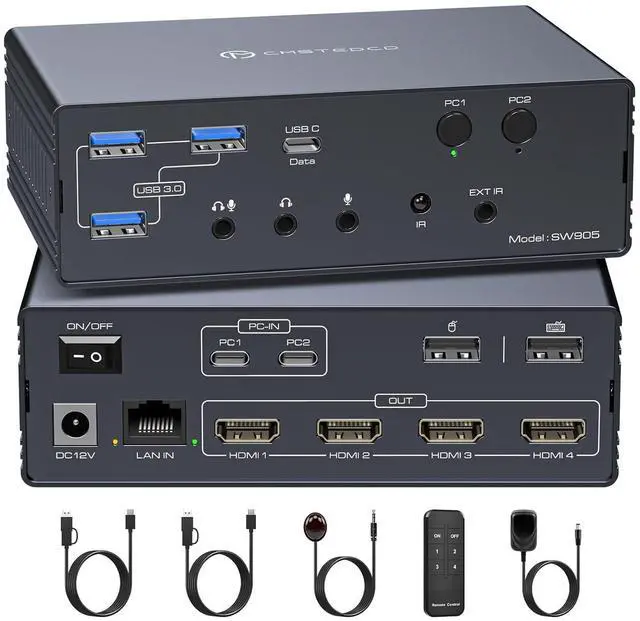
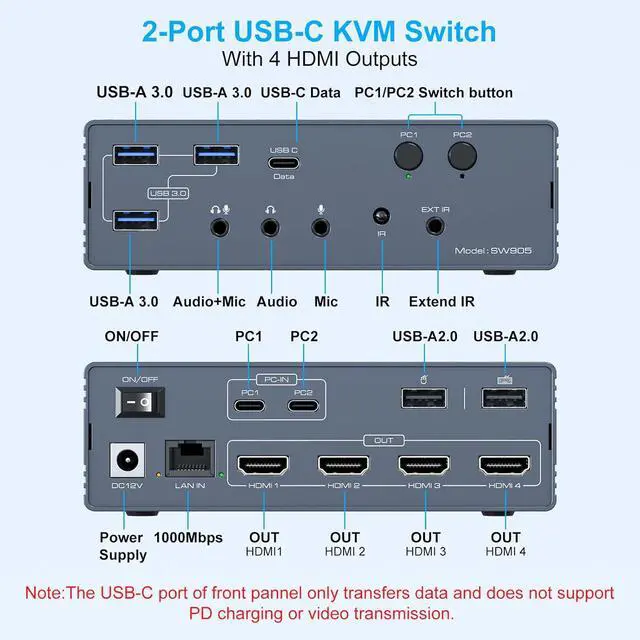
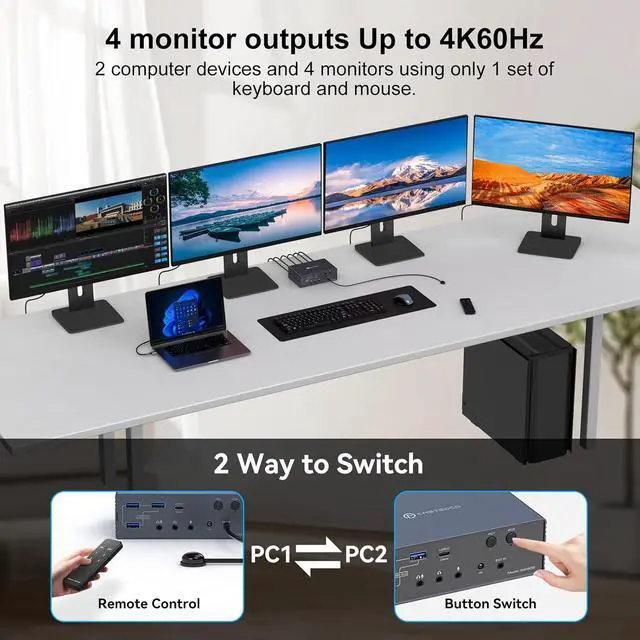
- 2 PC 4 Monitor KVM SwitchThis KVM switch breaks through MacOS limitations. Supports MacBooks/other laptops/desktops (with USB-C or USB-A 3.0+ ports) to expand to 4 displays. Shares full configuration: Connect multiple peripherals via 2 USB-A 2.0 ports, 3 USB-A 3.0 ports, and 1 USB-C port. Features Gigabit Ethernet and audio interfaces. Supports remote control switching to create a complete all-in-one office or entertainment hub.
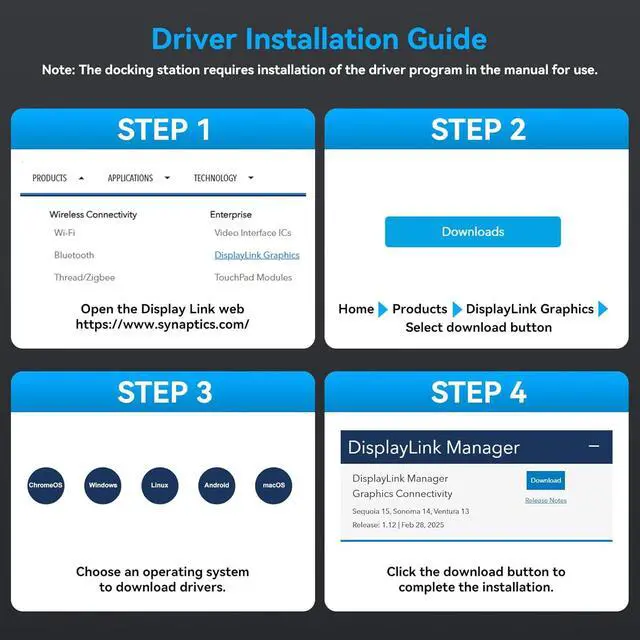
- Important Notice 1. This usb c kvm requires the DisplayLink driver to function. (Refer to the image details page and manual for specific installation steps. Set the driver to run automatically at system startup. Contact technical support if installation issues arise.) 2. The USB input port on your computer must meet the minimum USB 3.0 specification requirements. 3. PD charging functionality is not supported.4. When the device is running, it willoccupy computer system resources. It is recommended to use a CPU of I7 or above and at least 16GB of memory
- W
+
+
Overview
Specs
Reviews

Any questions? Our AI mode will help you find out quickly.
Try me now
2 PC 4 Monitor KVM SwitchThis KVM switch breaks through MacOS limitations. Supports MacBooks/other laptops/desktops (with USB-C or USB-A 3.0+ ports) to expand to 4 displays. Shares full configuration: Connect multiple peripherals via 2 USB-A 2.0 ports, 3 USB-A 3.0 ports, and 1 USB-C port. Features Gigabit Ethernet and audio interfaces. Supports remote control switching to create a complete all-in-one office or entertainment hub.
Important Notice 1. This usb c kvm requires the DisplayLink driver to function. (Refer to the image details page and manual for specific installation steps. Set the driver to run automatically at system startup. Contact technical support if installation issues arise.) 2. The USB input port on your computer must meet the minimum USB 3.0 specification requirements. 3. PD charging functionality is not supported.4. When the device is running, it willoccupy computer system resources. It is recommended to use a CPU of I7 or above and at least 16GB of memory
Wide CompatibilityThis kvm docking station supports USB-C or USB-A 3.0 (or higher) inputs. Achieve one-click switching between desktops and laptops. Seamlessly compatible with macOS, Windows, Chrome OS, Linux, and Android systems. Simply download the DisplayLink driver to unlock the full functionality of this KVM docking station.
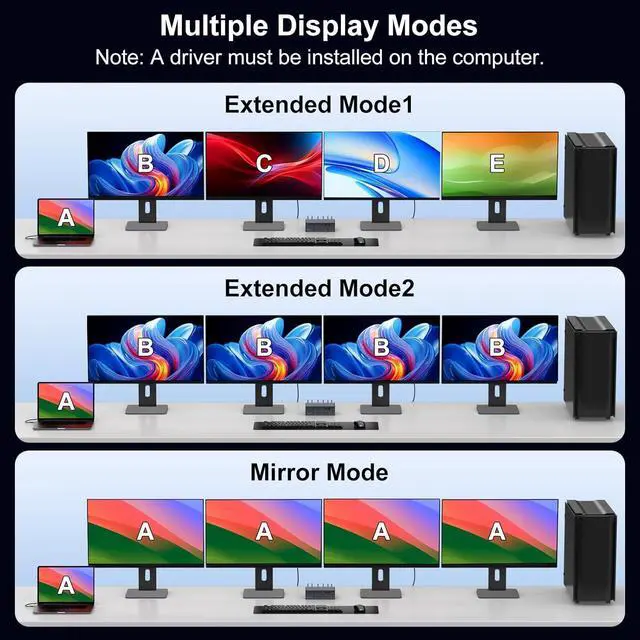
Mirroring and Extended DisplayThis kvm switch hdmi supports mirroring and extended display modes. It overcomes MacOS system limitations. Both Windows and MacOS systems equally support mirroring mode (AAAAA/ABBBB) and extended mode (AAAAA/ABBBB/ABCDE)
4K@60Hz Ultra HD DisplayThis kvm switches supports simultaneous output to four 4K60Hz displays and is backward compatible with lower resolutions. When outputting to only two displays simultaneously, resolutions up to 4K120Hz are achievable. (Note: To achieve the corresponding resolutions, your computer, displays, and cables must all support the respective resolutions. It is recommended that cable length does not exceed 3 feet.)
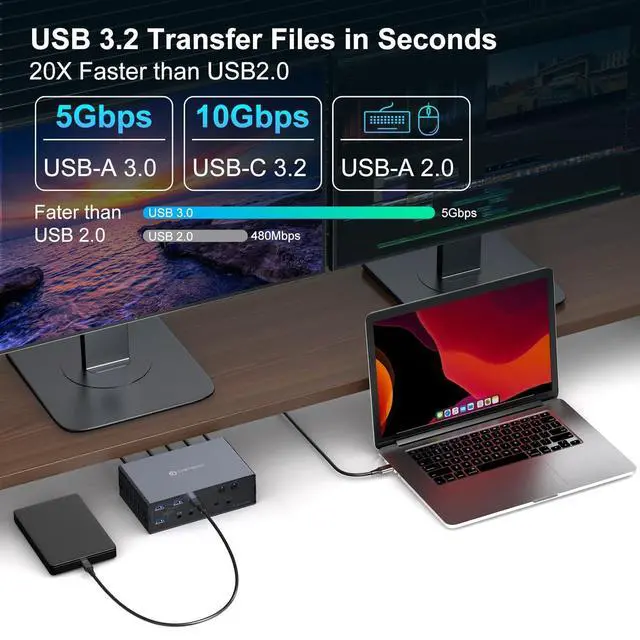
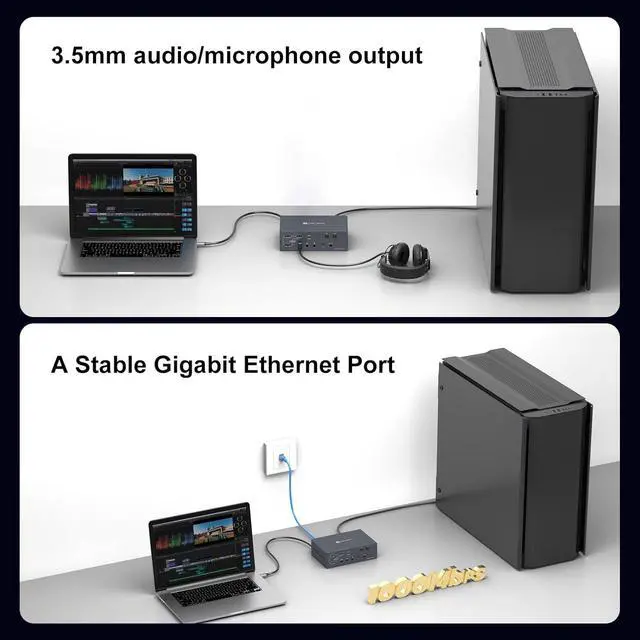
USB High-Speed Transfer and 1000Mbps EthernetThis usb kvm switch features multiple USB high-speed transfer ports, including 1x 10Gbps USB-C; 3x 5Gbps USB-A 3.0; and 2x 480Mbps USB-A 2.0. It supports simultaneous connection of multiple USB external devices. Equipped with a network transfer port, it supports Ethernet speeds up to 1000 Mbps for enhanced work efficiency.
Package Contents and After-Sales ServiceThis package contains: 1x USB KVM Switch; 1x PC 12V Power Adapter; 2x USB A-C to C Cables; 1x External IR Receiver Kit; 1x Remote Control; 1x User Manual. Should you encounter any issues with the product, please contact us. We will do our utmost to provide you with a satisfactory after-sales solution.
Important Notice 1. This usb c kvm requires the DisplayLink driver to function. (Refer to the image details page and manual for specific installation steps. Set the driver to run automatically at system startup. Contact technical support if installation issues arise.) 2. The USB input port on your computer must meet the minimum USB 3.0 specification requirements. 3. PD charging functionality is not supported.4. When the device is running, it willoccupy computer system resources. It is recommended to use a CPU of I7 or above and at least 16GB of memory
Wide CompatibilityThis kvm docking station supports USB-C or USB-A 3.0 (or higher) inputs. Achieve one-click switching between desktops and laptops. Seamlessly compatible with macOS, Windows, Chrome OS, Linux, and Android systems. Simply download the DisplayLink driver to unlock the full functionality of this KVM docking station.
Mirroring and Extended DisplayThis kvm switch hdmi supports mirroring and extended display modes. It overcomes MacOS system limitations. Both Windows and MacOS systems equally support mirroring mode (AAAAA/ABBBB) and extended mode (AAAAA/ABBBB/ABCDE)
4K@60Hz Ultra HD DisplayThis kvm switches supports simultaneous output to four 4K60Hz displays and is backward compatible with lower resolutions. When outputting to only two displays simultaneously, resolutions up to 4K120Hz are achievable. (Note: To achieve the corresponding resolutions, your computer, displays, and cables must all support the respective resolutions. It is recommended that cable length does not exceed 3 feet.)
USB High-Speed Transfer and 1000Mbps EthernetThis usb kvm switch features multiple USB high-speed transfer ports, including 1x 10Gbps USB-C; 3x 5Gbps USB-A 3.0; and 2x 480Mbps USB-A 2.0. It supports simultaneous connection of multiple USB external devices. Equipped with a network transfer port, it supports Ethernet speeds up to 1000 Mbps for enhanced work efficiency.
Package Contents and After-Sales ServiceThis package contains: 1x USB KVM Switch; 1x PC 12V Power Adapter; 2x USB A-C to C Cables; 1x External IR Receiver Kit; 1x Remote Control; 1x User Manual. Should you encounter any issues with the product, please contact us. We will do our utmost to provide you with a satisfactory after-sales solution.
Warranty & Returns
Warranty, Returns, And Additional Information
Warranty
- Please contact the Seller directly for warranty information. Warranty information may also be found on the Manufacturer's website.
- CONTACT
Return Policies
- Return for refund within: 30 days
- Return for replacement within: 30 days
- This item is covered by Chinathru Trading Co., Limited Return Policy
Manufacturer Contact Info
- For a directory of all our manufacturers, please click below.
- Manufacturers Directory
LOADING...