

Your Browsing History
- Free 30-day Returns
$162.99

Meet Your Seller

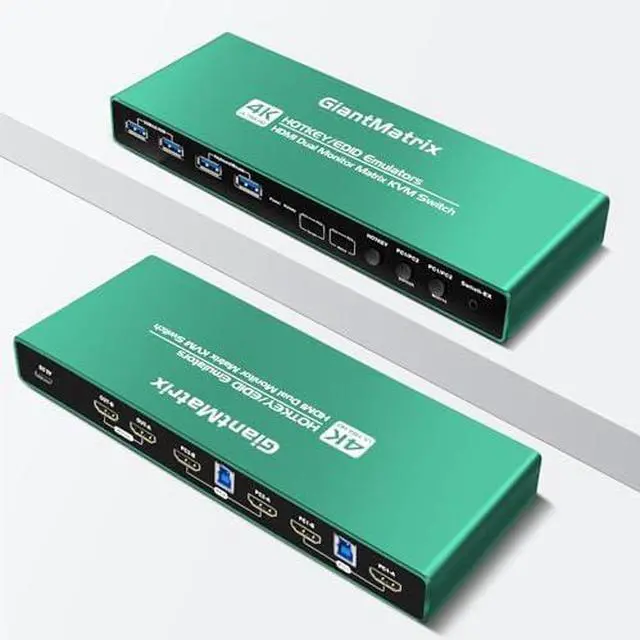


Kvm Switch HDMI 2 Monitors 2 Computers edid Emulator Extended Display 2K 144hz hotkey Switching edid Emulator Matrix hdmi kvm Switch Dual Monitor 2k 144hz
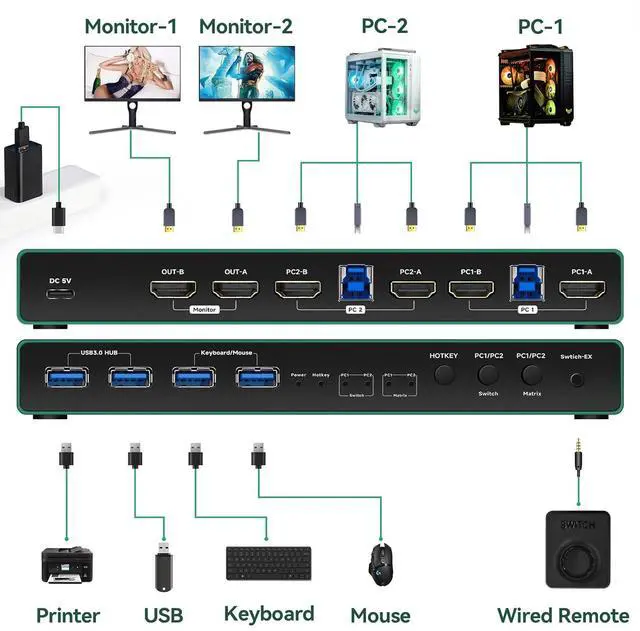
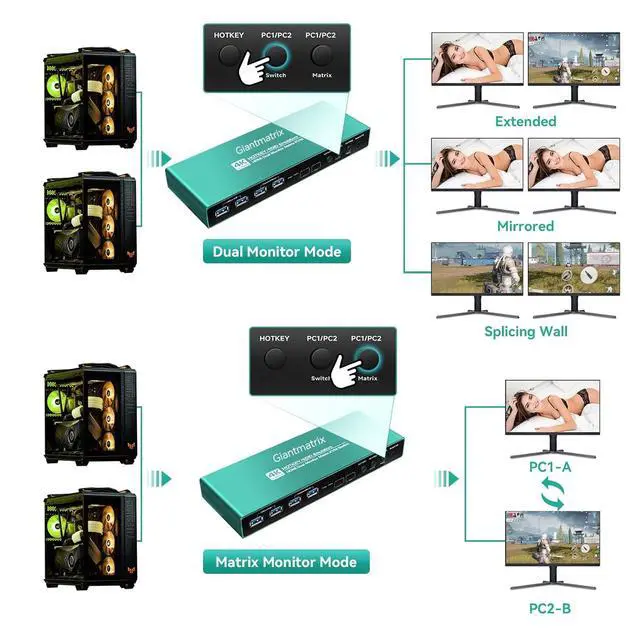
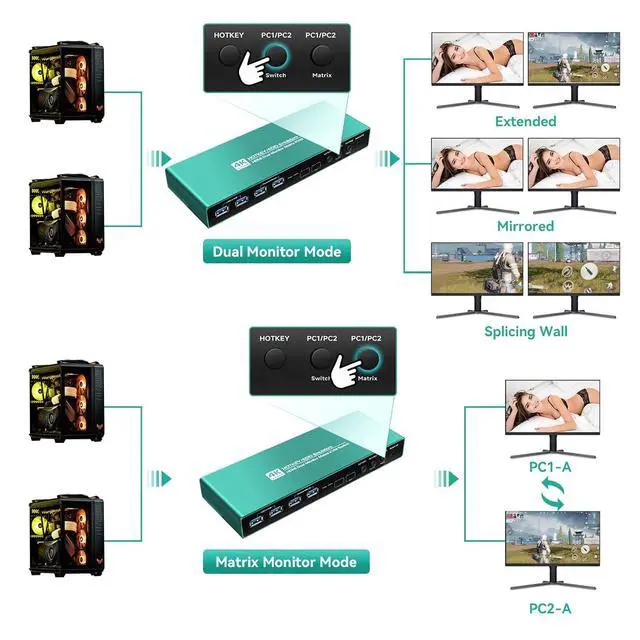
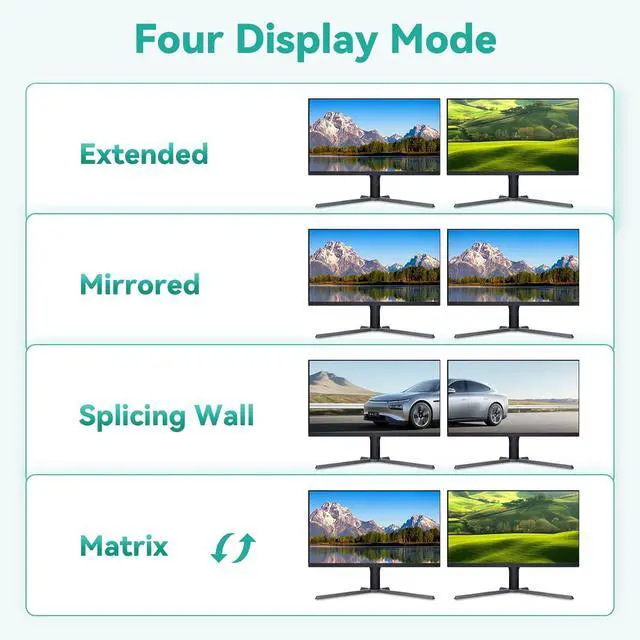
- 8k hdmi kvm switch 2 monitors 2 computersHdmi kvm switch 2 monitors 2 computers hdmi Matrix edid extended display:This is a 4K ultra HD HDMI dual screen matrix KVM switch, through a set of keyboard and mouse can control and manage multi-interface graphics computer and other devices; Each channel supports two 4K HDMI signals and one USB3.0 input, two sets of HDMI signals can freely control and define the main and secondary screens, support expansion mode,replication mode,matrix cross mode;Support intelligent EDID simulation
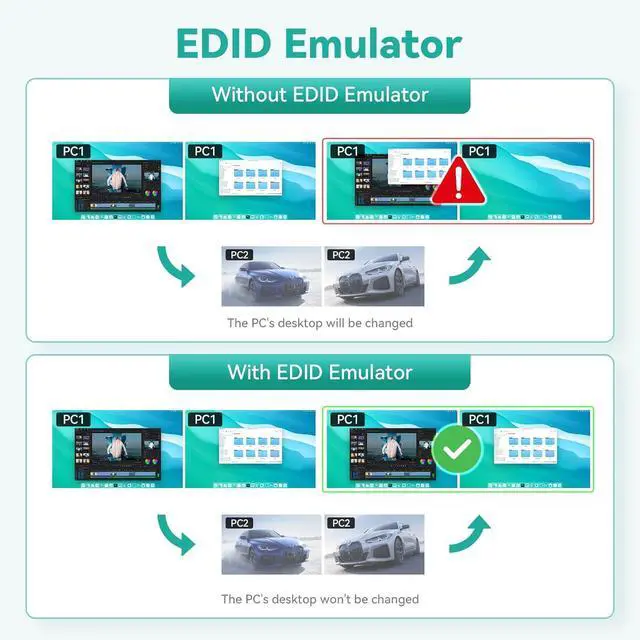
- 2 port hdmi kvm switchDual monitor kvm switch hdmi will take the initiative to communicate with the video card and display data after your first power on normal use, intelligent read the front and rear end of the EDID and stored in the KVM smart chip, when you use the KVM switching process will be very efficient and convenient(Note:Traditional ordinary KVM switcher, each switch requires the video card to read the monitor EDID,which will lead to a relatively long
+
+
Overview
Specs
Reviews

Any questions? Our AI mode will help you find out quickly.
Try me now
8k hdmi kvm switch 2 monitors 2 computersHdmi kvm switch 2 monitors 2 computers hdmi Matrix edid extended display:This is a 4K ultra HD HDMI dual screen matrix KVM switch, through a set of keyboard and mouse can control and manage multi-interface graphics computer and other devices; Each channel supports two 4K HDMI signals and one USB3.0 input, two sets of HDMI signals can freely control and define the main and secondary screens, support expansion mode,replication mode,matrix cross mode;Support intelligent EDID simulation
2 port hdmi kvm switchDual monitor kvm switch hdmi will take the initiative to communicate with the video card and display data after your first power on normal use, intelligent read the front and rear end of the EDID and stored in the KVM smart chip, when you use the KVM switching process will be very efficient and convenient(Note:Traditional ordinary KVM switcher, each switch requires the video card to read the monitor EDID,which will lead to a relatively long switching time,the game will be disconnected or the screen resolution chan
kvm switch 2 monitors 2 computers edidkvm switch 2 monitors 2 computers hdmi 4k 60hz :If you are a laptop+PC,each time the KVM switch, the notebook will appear black screen jumping recognition process. Our smart KVM does not have similar problems during use)This matrix KVM can also support the cross display of different screens of two hosts, while working on one computer can also monitor the other computer, very easy to use. Intelligent KVMis widely used in office,silly, modeling,gaming,entertainment and other places, it is your work and life efficient small helper
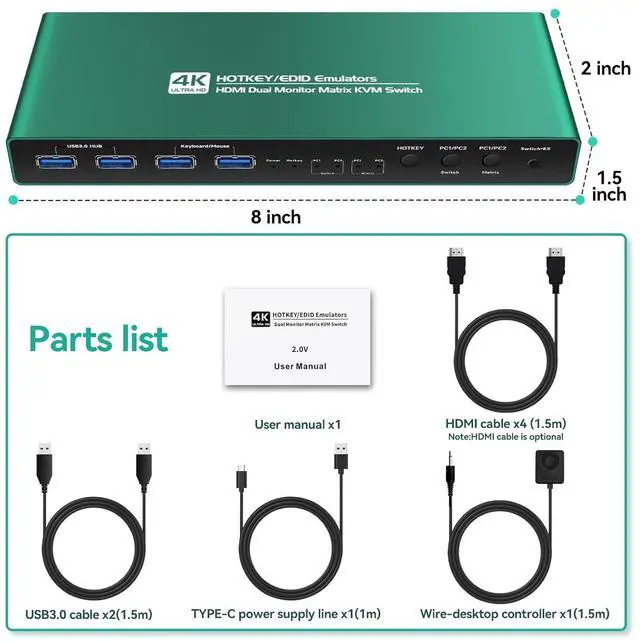
hdmi kvm switch 2 monitors 2 computerskvm switch 2 monitors 2 computers hdmi edid 4k 60hz emulator extended display hotkey 2k 144hz:Ver:HDMI2.0,HDCP2.3 Resolution:4K(4096x2160,3840x2160)60/30/25/24Hz 2K(2560x1440)144/120/100/60Hz 1080P(1920x1080)144/120/100/60Hz Support:HDR,3D,DTS,DOLBY Support:USB3.0/5Gbps Select mode:Keyboard Hotkey switch,Mouse switch,botton switch Wire-desktop controller switch
hdmi kvm switchkvm switch 2 monitors 2 computers hdmi edid Cross display hotkey Support:simultaneous start up of multiple computers Support computer wake up function Support all kinds of USB mechanical/game/wire less keyboard and mouse Support:WINDOWS,MAC,LINUX,UNIX,VISTA,etc
KVM Switch HDMI 2 monitors Attention please:If the keyboard and mouse need to be controlled by hot keys, connect it to the specified interface. If the hot keys cannot be used normally on the keyboard and mouse,disable the hot keys to ensure that other functions can be used normally
2x2 matrix hdmi kvm switch dual monitor: when you computer is type c output ,and you want one type-c kvm switch edid clone ,you can use type c TO HDMI cable +kvm switch hdmi edid+4k hdmi 2.0 cable to monitor,them the type c input will be edid emulator.
hdmi kvm switch 4 port dual monitor extended display:the hdmi kvm switch edid support hotkey switching , you can use hotkey to switch between 2 computers,Right Control two times and number 1 and EnterRight Ctrl+Right ctrl+1+Enteryou will switch to PC-A, and Right Ctrl+Right ctrl+2+Enter you will switch to PC-B. and Right Ctrl+Right Ctrl+[3]+Enter Switch to PC1A+PC2A Matrix mode ,hdmi Cross output and USB follows PC1; Right Ctrl+Right Ctrl+[4]+Enter Switch to PC2A+PC1A Matrix mode ,hdmi Cross output and USB follows PC2 ;You can use Keyboard Hotkey Right Ctrl+Right ctrl+B+Enter to turn off or turn on the Beep for the dual monitor kvm switch.
hdmi matrix kvm:when you computer is dp output ,and you want one Displayport kvm switch edid clone ,you can use DP TO HDMI cable +kvm switch hdmi edid+4k hdmi 2.0 cable to monitor,them the displayport input will be edid emulator.
matrix hdmi kvm switch dual monitor usb 3.0 4k 60hz:the kvm hdmi edid is very suitable for gaming kvm swtich ,the edid emulator make you gaming fluent,make it don't ficker.It will not resize the desktop. when you computer
2 port hdmi kvm switchDual monitor kvm switch hdmi will take the initiative to communicate with the video card and display data after your first power on normal use, intelligent read the front and rear end of the EDID and stored in the KVM smart chip, when you use the KVM switching process will be very efficient and convenient(Note:Traditional ordinary KVM switcher, each switch requires the video card to read the monitor EDID,which will lead to a relatively long switching time,the game will be disconnected or the screen resolution chan
kvm switch 2 monitors 2 computers edidkvm switch 2 monitors 2 computers hdmi 4k 60hz :If you are a laptop+PC,each time the KVM switch, the notebook will appear black screen jumping recognition process. Our smart KVM does not have similar problems during use)This matrix KVM can also support the cross display of different screens of two hosts, while working on one computer can also monitor the other computer, very easy to use. Intelligent KVMis widely used in office,silly, modeling,gaming,entertainment and other places, it is your work and life efficient small helper
hdmi kvm switch 2 monitors 2 computerskvm switch 2 monitors 2 computers hdmi edid 4k 60hz emulator extended display hotkey 2k 144hz:Ver:HDMI2.0,HDCP2.3 Resolution:4K(4096x2160,3840x2160)60/30/25/24Hz 2K(2560x1440)144/120/100/60Hz 1080P(1920x1080)144/120/100/60Hz Support:HDR,3D,DTS,DOLBY Support:USB3.0/5Gbps Select mode:Keyboard Hotkey switch,Mouse switch,botton switch Wire-desktop controller switch
hdmi kvm switchkvm switch 2 monitors 2 computers hdmi edid Cross display hotkey Support:simultaneous start up of multiple computers Support computer wake up function Support all kinds of USB mechanical/game/wire less keyboard and mouse Support:WINDOWS,MAC,LINUX,UNIX,VISTA,etc
KVM Switch HDMI 2 monitors Attention please:If the keyboard and mouse need to be controlled by hot keys, connect it to the specified interface. If the hot keys cannot be used normally on the keyboard and mouse,disable the hot keys to ensure that other functions can be used normally
2x2 matrix hdmi kvm switch dual monitor: when you computer is type c output ,and you want one type-c kvm switch edid clone ,you can use type c TO HDMI cable +kvm switch hdmi edid+4k hdmi 2.0 cable to monitor,them the type c input will be edid emulator.
hdmi kvm switch 4 port dual monitor extended display:the hdmi kvm switch edid support hotkey switching , you can use hotkey to switch between 2 computers,Right Control two times and number 1 and EnterRight Ctrl+Right ctrl+1+Enteryou will switch to PC-A, and Right Ctrl+Right ctrl+2+Enter you will switch to PC-B. and Right Ctrl+Right Ctrl+[3]+Enter Switch to PC1A+PC2A Matrix mode ,hdmi Cross output and USB follows PC1; Right Ctrl+Right Ctrl+[4]+Enter Switch to PC2A+PC1A Matrix mode ,hdmi Cross output and USB follows PC2 ;You can use Keyboard Hotkey Right Ctrl+Right ctrl+B+Enter to turn off or turn on the Beep for the dual monitor kvm switch.
hdmi matrix kvm:when you computer is dp output ,and you want one Displayport kvm switch edid clone ,you can use DP TO HDMI cable +kvm switch hdmi edid+4k hdmi 2.0 cable to monitor,them the displayport input will be edid emulator.
matrix hdmi kvm switch dual monitor usb 3.0 4k 60hz:the kvm hdmi edid is very suitable for gaming kvm swtich ,the edid emulator make you gaming fluent,make it don't ficker.It will not resize the desktop. when you computer
Warranty & Returns
Warranty, Returns, And Additional Information
Warranty
- Please contact the Seller directly for warranty information. Warranty information may also be found on the Manufacturer's website.
- CONTACT
Return Policies
- Return for refund within: 30 days
- Return for replacement within: 30 days
- This item is covered by Chinathru Trading Co., Limited Return Policy
Manufacturer Contact Info
- For a directory of all our manufacturers, please click below.
- Manufacturers Directory
LOADING...