

Your Browsing History
- Free 30-day Returns
$214.99

Meet Your Seller


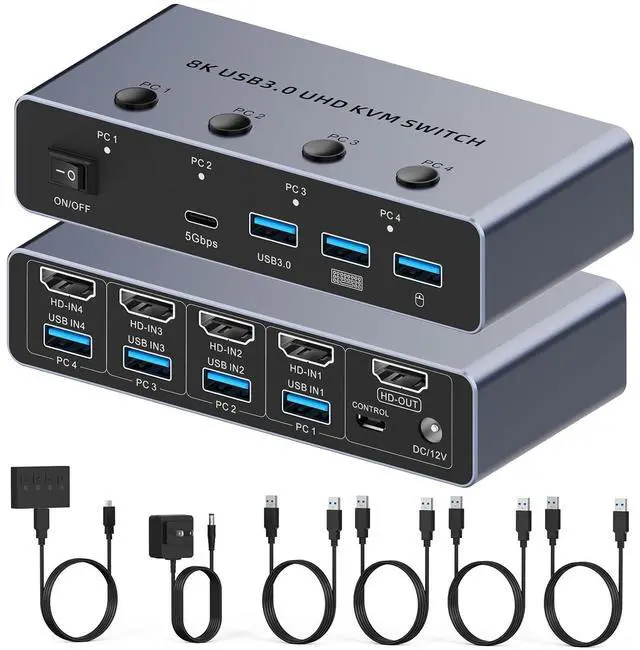


HDMI KVM Switch 4 Computers 1 Monitor, 8K@60Hz HDMI KVM Switcher Share Keyboard,Mouse for Office with 3 USB 3.0+1 USB-C Ports,EDID/HDCP Adaptive,4 USB Cables and Desktop Controller Included
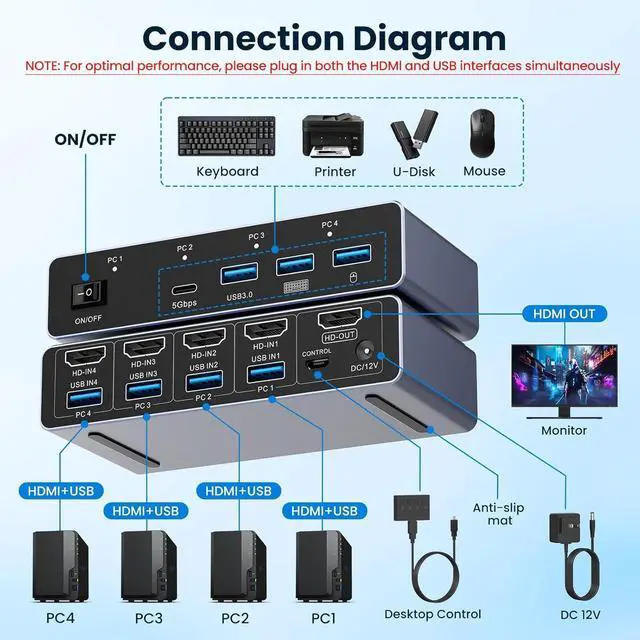
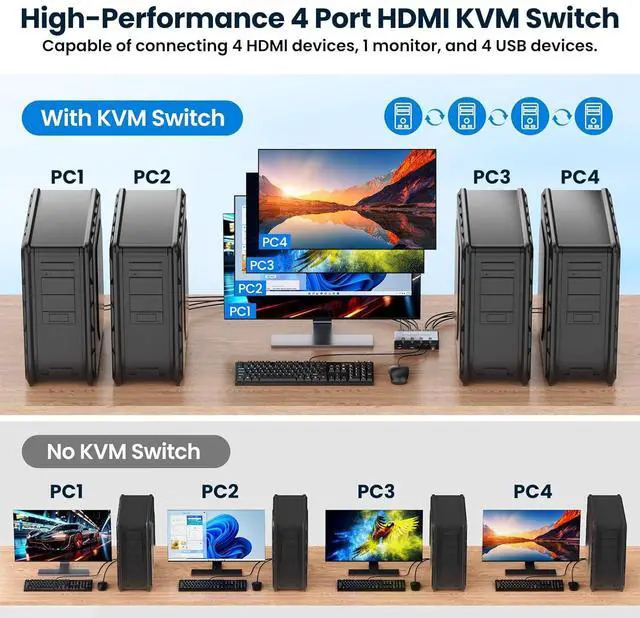
- HDMI KVM Switch: 4 Computers to 1 Monitor This HDMI KVM Switch is designed for 4 computers to share a monitor, keyboard, and mouse. 4 PCs can use one monitor, and via 3 USB-A 3.0 + 1 USB-C (data-only, no video support) ports, it connects peripherals like mice, keyboards, printers, hard drives, etc. One-click seamless switching between the 4 hostsno cable plugging or unplugging needed. Ideal for home offices, design work, and multi-device collaboration, it saves space, boosts efficiency, keeps your desk tidy, and makes work easier and more enjoyable.
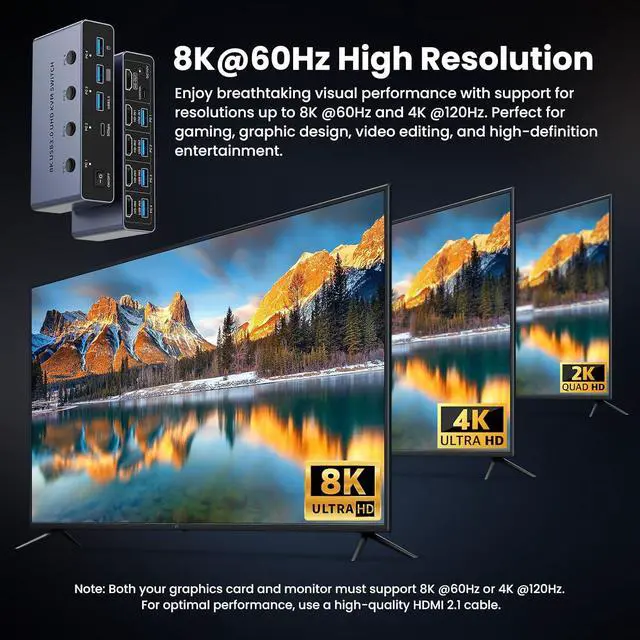
- Up to 8K@60Hz & 4K@120Hz Resolution, HDMI 2.1 Compatible This device supports high-resolution output at 8K@60Hz and 4K@120Hz. In 7680x4320 (8K@60Hz) ultra-clear quality, it delivers stunningly detailed visuals, while also supporting 3D and HDR features for exceptional color and depth performance. It is compatible with HDMI 2.1 and HDCP 2.3 standards, ensuring excellent performance in both video transmission and device switching. Note
+
+
Overview
Specs
Reviews

Any questions? Our AI mode will help you find out quickly.
Try me now
HDMI KVM Switch: 4 Computers to 1 Monitor This HDMI KVM Switch is designed for 4 computers to share a monitor, keyboard, and mouse. 4 PCs can use one monitor, and via 3 USB-A 3.0 + 1 USB-C (data-only, no video support) ports, it connects peripherals like mice, keyboards, printers, hard drives, etc. One-click seamless switching between the 4 hostsno cable plugging or unplugging needed. Ideal for home offices, design work, and multi-device collaboration, it saves space, boosts efficiency, keeps your desk tidy, and makes work easier and more enjoyable.
Up to 8K@60Hz & 4K@120Hz Resolution, HDMI 2.1 Compatible This device supports high-resolution output at 8K@60Hz and 4K@120Hz. In 7680x4320 (8K@60Hz) ultra-clear quality, it delivers stunningly detailed visuals, while also supporting 3D and HDR features for exceptional color and depth performance. It is compatible with HDMI 2.1 and HDCP 2.3 standards, ensuring excellent performance in both video transmission and device switching. Note: To achieve 8K@60Hz resolution, ensure the signal source, monitor, and HDMI cable all support it.
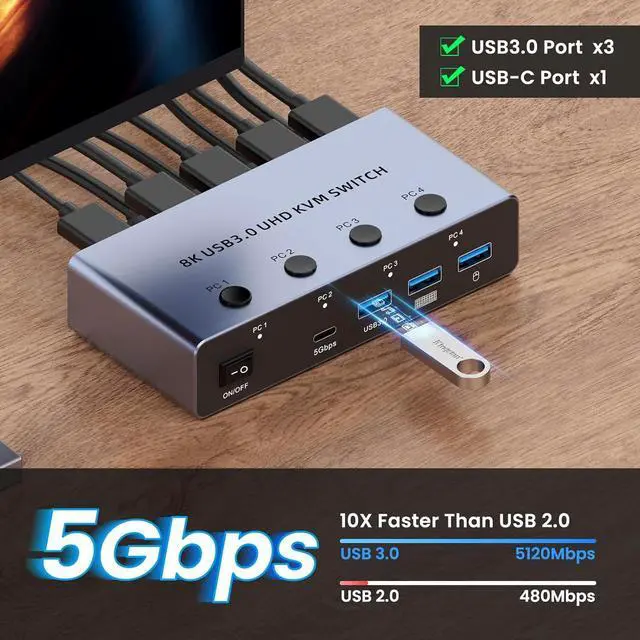
4 USB 3.0 Ports (3 USB-A + 1 USB-C) 5Gbps Designed for multi-device collaboration, this HDMI KVM Switch features 4 USB 3.0 ports (3 USB-A + 1 USB-C) compatible with keyboards, mice, USB flash drives, printers, external hard drives, and other USB peripherals. It lets 4 computers easily share one set of peripherals, cutting down desktop cable clutter. Boasting a 5Gbps transfer speedover 10x faster than USB 2.0 (480Mbps)it speeds up large work files, high-res images, and massive data backups, boosting office or creative productivity. Note: Power via the USB-C port when connecting high-power devices.
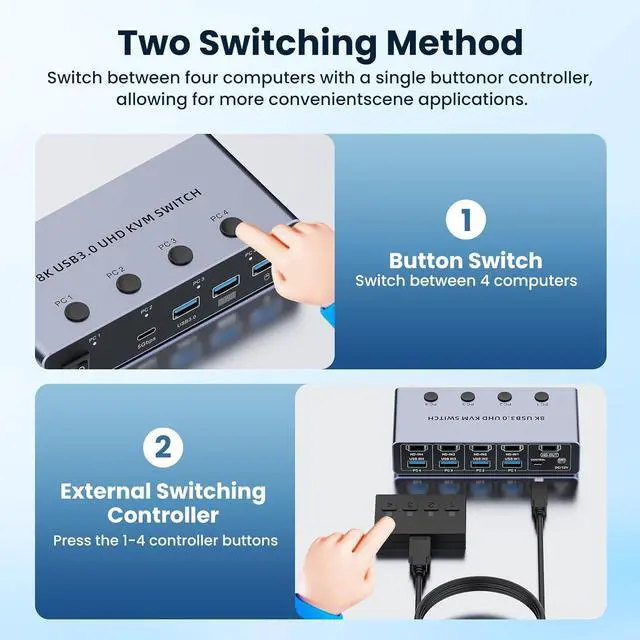
Two Switching Methods Simply press the corresponding number keys (e.g., "PC1", "PC2") on the KVM Switch panel to seamlessly switch between up to 4 computers. It saves desk space, is ideal for placing the device nearby, and enables fast switching. For concealed locations (e.g., cabinets, under desks) or remote operation, use the included button extension cable to extend the control buttons to your fingertips (e.g., desktop, workbench). Press the number keys to switchperfect for complex setups. Note: Hotkey switching is not supported.
NOTE: 1. Connect the product's included 12V/1A power adapter to supply power, ensuring stable operation of the device. 2. Confirm your computer is equipped with HDMI and USB-A ports, then connect the host's HDMI cable and USB cable to the corresponding ports on the Switch respectively. 3. If 8K@60Hz resolution output is required, ensure your graphics card, monitor, and HDMI cable all support this specification. 4. This product does not support hotkey switching; device switching must be completed via the physical button.
What Youll Get: 1×8K HDMI USB 3.0 KVM Switch, 4×USB 3.0 Cables (3.28ft), 1×Power Adapter (12V/1A) with a 3.94ft Power Cable, 1×Desktop Controller (4.92ft), 1×User Manual. If you have any questions before purchase or during use, feel free to reach outwe offer 24-hour dedicated customer support.
Up to 8K@60Hz & 4K@120Hz Resolution, HDMI 2.1 Compatible This device supports high-resolution output at 8K@60Hz and 4K@120Hz. In 7680x4320 (8K@60Hz) ultra-clear quality, it delivers stunningly detailed visuals, while also supporting 3D and HDR features for exceptional color and depth performance. It is compatible with HDMI 2.1 and HDCP 2.3 standards, ensuring excellent performance in both video transmission and device switching. Note: To achieve 8K@60Hz resolution, ensure the signal source, monitor, and HDMI cable all support it.
4 USB 3.0 Ports (3 USB-A + 1 USB-C) 5Gbps Designed for multi-device collaboration, this HDMI KVM Switch features 4 USB 3.0 ports (3 USB-A + 1 USB-C) compatible with keyboards, mice, USB flash drives, printers, external hard drives, and other USB peripherals. It lets 4 computers easily share one set of peripherals, cutting down desktop cable clutter. Boasting a 5Gbps transfer speedover 10x faster than USB 2.0 (480Mbps)it speeds up large work files, high-res images, and massive data backups, boosting office or creative productivity. Note: Power via the USB-C port when connecting high-power devices.
Two Switching Methods Simply press the corresponding number keys (e.g., "PC1", "PC2") on the KVM Switch panel to seamlessly switch between up to 4 computers. It saves desk space, is ideal for placing the device nearby, and enables fast switching. For concealed locations (e.g., cabinets, under desks) or remote operation, use the included button extension cable to extend the control buttons to your fingertips (e.g., desktop, workbench). Press the number keys to switchperfect for complex setups. Note: Hotkey switching is not supported.
NOTE: 1. Connect the product's included 12V/1A power adapter to supply power, ensuring stable operation of the device. 2. Confirm your computer is equipped with HDMI and USB-A ports, then connect the host's HDMI cable and USB cable to the corresponding ports on the Switch respectively. 3. If 8K@60Hz resolution output is required, ensure your graphics card, monitor, and HDMI cable all support this specification. 4. This product does not support hotkey switching; device switching must be completed via the physical button.
What Youll Get: 1×8K HDMI USB 3.0 KVM Switch, 4×USB 3.0 Cables (3.28ft), 1×Power Adapter (12V/1A) with a 3.94ft Power Cable, 1×Desktop Controller (4.92ft), 1×User Manual. If you have any questions before purchase or during use, feel free to reach outwe offer 24-hour dedicated customer support.
Warranty & Returns
Warranty, Returns, And Additional Information
Warranty
- Please contact the Seller directly for warranty information. Warranty information may also be found on the Manufacturer's website.
- CONTACT
Return Policies
- Return for refund within: 30 days
- Return for replacement within: 30 days
- This item is covered by Chinathru Trading Co., Limited Return Policy
Manufacturer Contact Info
- For a directory of all our manufacturers, please click below.
- Manufacturers Directory
LOADING...